
Introduction
Thank you for choosing the KAIWEETS VT500 Non-Contact Voltage Tester. This manual provides essential information for the safe and effective operation, maintenance, and troubleshooting of your device. Please read this manual thoroughly before use and retain it for future reference.

The KAIWEETS VT500 Non-Contact Voltage Tester, a versatile tool for electrical measurements.
Safety Information
Always adhere to basic safety precautions when using electrical testing equipment to reduce the risk of fire, electric shock, and personal injury. This device is designed for professional and DIY use, but proper handling is crucial.
- Do not test voltage with gloves: For accurate readings and to ensure proper contact for certain functions, avoid wearing gloves during contact voltage measurements.
- Ensure the device is in good working condition before each use. Do not use if damaged.
- Do not exceed the maximum rated voltage (300V AC).
- Always assume circuits are live until proven otherwise.
- Keep the device away from water and extreme temperatures.
- Replace batteries promptly when the low battery indicator appears.

For accurate voltage readings and to avoid electric shock risks, always use the tester without gloves when performing contact measurements. The image shows the tester correctly detecting voltage when held by a bare hand, and incorrectly when held with a glove, emphasizing the importance of direct contact for certain functions.
Package Contents
Verify that all items are present and undamaged upon opening the package:
- 1 x KAIWEETS VT500 Non-Contact Voltage Tester
- 1 x AAA Battery
- 1 x User Manual

The KAIWEETS VT500 Voltage Tester as it appears in its retail packaging.
Product Overview
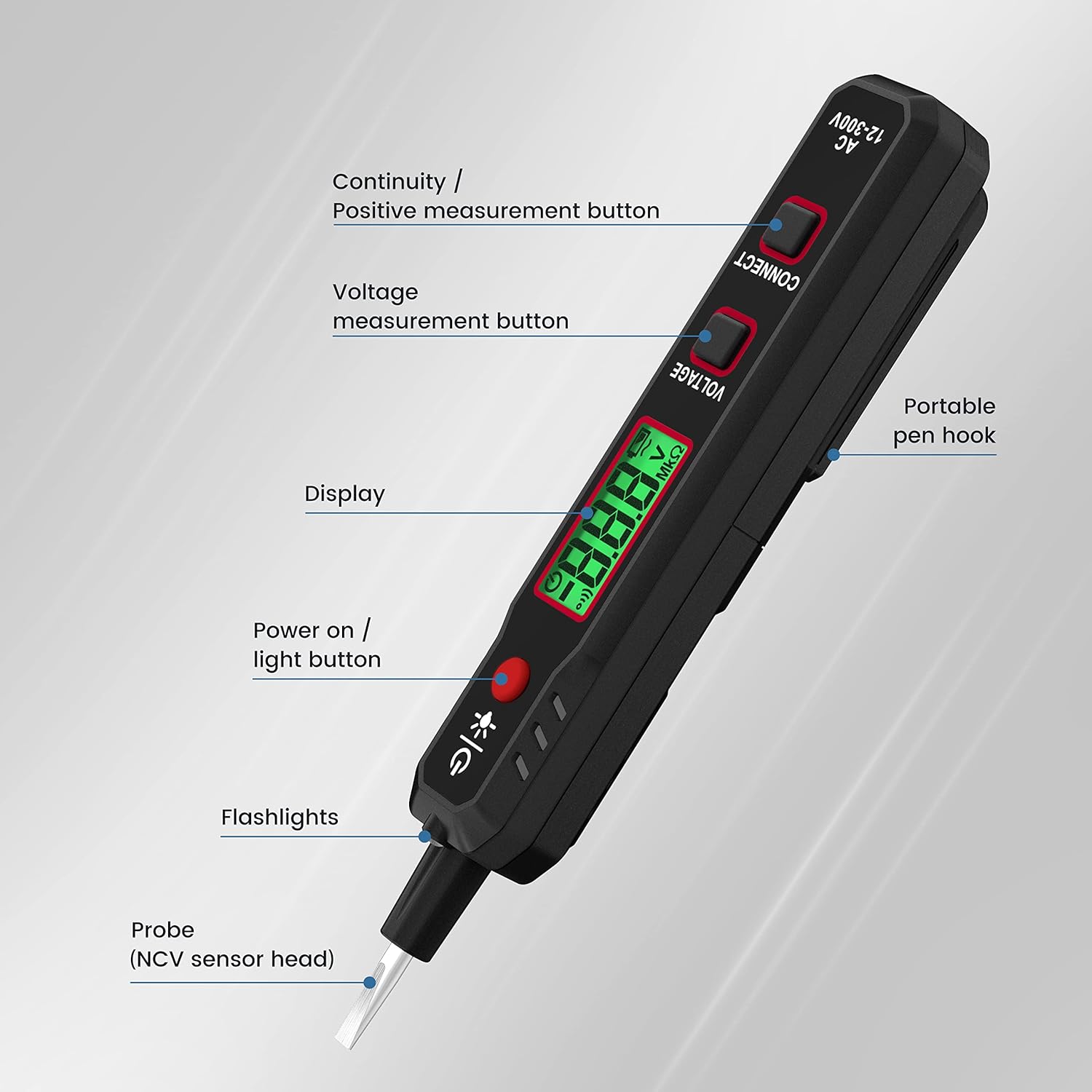
The KAIWEETS VT500 is a versatile electrical testing tool designed for safety and convenience. Key features include:
- Non-Contact Voltage (NCV) Detection: Quickly identifies live/neutral wires and cable breakpoints without direct contact.
- LCD Voltmeter: Provides contact voltage measurement from 12V to 300V AC, displayed on an easy-to-read LCD screen.
- Continuity Test: Detects cable breakpoints and verifies circuit continuity.
- Battery Polarity Test: Determines the polarity of batteries.
- Integrated Flashlight: Illuminates work areas in low-light conditions.
- Screwdriver Function: The probe tip doubles as a flathead screwdriver for added utility.
- Portable Design: Features a pen hook for easy carrying.

The KAIWEETS VT500 features a portable pen hook for easy carrying and accessibility.

The robust probe tip of the KAIWEETS VT500 can also be used as a screwdriver, adding to its utility.
Setup
Battery Installation
- Locate the battery compartment cover on the back of the device.
- Slide or unclip the cover to open.
- Insert one AAA battery, ensuring correct polarity (+/-) as indicated inside the compartment.
- Close the battery compartment cover securely.
Operating Instructions
1. Power On/Off
- Press the Power On/Light button (red button with power symbol) to turn on the device.
- The device will automatically power off after 15 minutes of inactivity to conserve battery life.

The KAIWEETS VT500 automatically powers off after 15 minutes of inactivity to conserve battery life.
2. Non-Contact Voltage (NCV) Detection
- Hold the tester with the NCV sensor head (probe tip) near the wire or outlet you wish to test.
- The device will indicate the presence of AC voltage through visual (LEDs) and audible (buzzer) alerts.
- This mode is ideal for identifying live wires and detecting breakpoints in cables.
3. Live Wire Detection
- Insert the probe tip into the live terminal of an outlet or touch it to a live wire.
- The buzzer will alarm quickly, and the LED display will show 'HI' (High Voltage).

The KAIWEETS VT500 indicating a live wire with 'HI' on its display and an audible alarm.
4. Voltage Measurement (Contact)
- Press and hold the Voltage measurement button.
- Touch the probe tip to the object to be measured (e.g., an outlet terminal).
- The AC voltage value (12-300V) will be displayed on the LCD screen. The buzzer will also alarm quickly.

The KAIWEETS VT500 showing a contact voltage measurement of 228V on its LCD screen.
The KAIWEETS VT500 performing two functions: Live Wire detection (buzzer alarms, LED shows HI) and Contact Voltage Test (accurate readings, safety warning, buzzer alarms quickly).
5. Continuity Test
- Press the Continuity / Positive measurement button.
- Touch the probe tip to one end of the cable or circuit.
- If continuity is detected, the screen will display a continuity symbol and the buzzer will sound. This is useful for finding cable breakpoints.

The KAIWEETS VT500 indicating continuity with a specific symbol on its display and an audible buzzer.

The KAIWEETS VT500 identifying a breakpoint within an electrical cable, indicated by a change in detection.
6. Battery Polarity Test
- Press the Continuity / Positive measurement button.
- While touching the test probe to the positive terminal of the battery, hold the negative terminal with your other hand.
- If the polarity is correct, the screen will display '---P' and the buzzer will sound.

The KAIWEETS VT500 testing battery polarity. Touch the test probe to the positive terminal and hold the negative terminal with your other hand. If polarity is correct, the screen displays '---P' and a buzzer sounds.
7. Flashlight Function
- Press the Power On/Light button briefly to activate the integrated flashlight.
- Press it again to turn off the flashlight.

The integrated flashlight of the KAIWEETS VT500 provides convenient illumination when working in dark environments.
Maintenance
Battery Replacement
When the low battery indicator appears on the display, replace the AAA battery as described in the 'Battery Installation' section. Always use a fresh, high-quality AAA battery.
Cleaning and Storage
- Clean the device with a damp cloth and mild detergent. Do not use abrasive cleaners or solvents.
- Ensure the device is completely dry before storage.
- Store the tester in a cool, dry place, away from direct sunlight and extreme temperatures.
- If storing for extended periods, remove the battery to prevent leakage.
Troubleshooting
| Problem | Possible Cause | Solution |
|---|---|---|
| Device does not power on. | Dead or incorrectly installed battery. | Replace battery with a new AAA battery, ensuring correct polarity. |
| Inaccurate voltage readings. | Poor contact; testing with gloves; low battery. | Ensure firm contact with the conductor. Remove gloves for contact tests. Replace battery. |
| NCV detection is inconsistent. | Weak signal; interference; distance from source. | Move closer to the voltage source. Ensure no strong electromagnetic interference. |
| Buzzer does not sound. | Low battery; device malfunction. | Replace battery. If problem persists, contact support. |
Specifications
| Feature | Specification |
|---|---|
| Model Number | VT500 |
| Brand | KAIWEETS |
| AC Voltage Range (Contact) | 12V - 300V |
| Safety Compliance | CAT.II 300V, CE, RoHS |
| Power Source | 1 x AAA Battery (included) |
| Dimensions (Package) | 16 x 3.7 x 2.4 cm |
| Weight (Package) | 70 grams |
| Color | Black |
| Features | NCV, Voltmeter, Continuity, Battery Polarity, Flashlight, Screwdriver Tip |
Warranty and Support
KAIWEETS products are designed and manufactured to high-quality standards. For warranty information, technical support, or service inquiries, please refer to the contact details provided on the KAIWEETS official website or your purchase documentation. Please have your model number (VT500) and purchase date available when contacting support.


