
DEKCO DC6L
DEKCO Security Camera Outdoor
Model: DC6L - User Manual
1. Product Overview
The DEKCO DC6L is a 100% wireless, battery-operated security camera designed for outdoor use. It provides 1080P Full HD video, smart PIR human motion detection, two-way audio, and multiple night vision modes to ensure comprehensive home security. Its IP66 weather-resistant design allows for reliable operation in various environmental conditions.

Image: The DEKCO DC6L security camera mounted on a wall, with a hand holding a smartphone displaying the camera's live view of a house.
Key Features:
- PIR Human Detection: Advanced smart PIR sensor for accurate human detection, reducing false alarms.
- 100% Wireless & Battery Powered: Operates without power cords or network cables, powered by a 5200mAh rechargeable battery.
- 1080P FHD Video & Color Night Vision: Delivers clear 1080P images and supports full-color night vision with built-in strobe light.
- Sound-light Alarms: Automatically triggers audio and strobe light alarms upon detecting human motion.
- Two-Way Audio: Enables real-time communication through the camera's built-in microphone and speaker.
- 2.4GHz WiFi Connectivity: Stable and fast connection (does not support 5GHz WiFi).
- Secure Local & Cloud Storage: Supports Micro SD card (8-128G, C10, Fat32) and encrypted cloud storage.
- IP66 Weatherproof: Designed to withstand various outdoor weather conditions.
2. Product Components
Familiarize yourself with the different parts of your DEKCO security camera:

Image: Detailed diagram of the DEKCO DC6L camera highlighting its various components including the lens, infrared LEDs, spotlight, PIR motion sensor, microphone, base bracket, power port, micro USB port, SD card slot, and reset button.
Included Components:
- DEKCO DC6L Security Camera
- Mounting Bracket
- Mounting Screws and Wall Plugs
- USB Charging Cable
- User Manual (this document)
- 1 AAA battery (included, pre-installed)
Note: A Micro SD card (8-128G, C10, Fat32) and a 5V&1A power adapter (charger) are not included and must be purchased separately if needed.
3. Setup Guide
3.1 Initial Charging
Before first use, fully charge the camera. It takes approximately 12 hours for the camera to be fully charged using the provided USB cable and a compatible 5V&1A power adapter (not included). A full charge can support the camera for 1-2 months, depending on usage and environmental factors.

Image: The DEKCO camera on a table with text indicating its 5200mAh large battery capacity and instructions for initial charging and battery life.
3.2 App Download and Installation
The DEKCO camera operates with the 'CloudEdge' app. Follow these steps to download and install the app:
- Scan the QR code on the product packaging or search for 'CloudEdge' in your device's app store (App Store for iOS, Google Play for Android).
- Download and install the 'CloudEdge' app.
- Register an account and log in.

Image: A visual guide showing the three steps for easy setup: downloading the CloudEdge app, powering on the camera and connecting to 2.4GHz WiFi, and selecting 'Battery Camera' in the app.
3.3 Wi-Fi Connection
Ensure your Wi-Fi network is 2.4GHz. The camera does not support 5GHz Wi-Fi.
- Power on the camera.
- In the 'CloudEdge' app, tap the '+' icon to add a new device.
- Select 'Battery Camera' from the device list.
- Follow the on-screen prompts to connect the camera to your 2.4GHz Wi-Fi network. This typically involves scanning a QR code displayed on your phone with the camera.

Image: A visual representation showing the DEKCO camera connecting to a 2.4GHz Wi-Fi signal, with a clear indication that 5GHz Wi-Fi is not supported.
3.4 Mounting the Camera
The camera is designed for wall mounting. Choose a location that provides the desired viewing angle and is within range of your 2.4GHz Wi-Fi network.
- Mark the drilling positions using the mounting bracket as a template.
- Drill holes and insert wall plugs if mounting on masonry.
- Secure the mounting bracket to the wall using the provided screws.
- Attach the camera to the mounting bracket and adjust the angle as needed.
4. Operating Instructions
4.1 PIR Human Detection and App Notifications
The camera's upgraded smart PIR sensor focuses on humanoid detection, significantly reducing false alarms from pets or swaying branches. When human motion is detected, the camera will:
- Begin recording video (requires an inserted SD card).
- Send instant alerts to your 'CloudEdge' app.

Image: A scene depicting smart human detection, where the DEKCO camera identifies a person and triggers a sound-light alarm, simultaneously sending an alert message to a smartphone.
4.2 Video Quality and Night Vision Modes
The camera provides 1080P Full HD images and videos. It features three night vision modes:
- Infrared Mode: Standard black and white night vision using infrared LEDs.
- Full Color Mode: Activates the built-in spotlight to provide full-color video even in low light conditions. This can be set in the camera settings within the app.
- Alarm Mode: Triggers the strobe light and siren upon detection to deter intruders.

Image: A comparison of the three night vision modes: Infrared Mode for standard black and white viewing, Full Color Mode for illuminated color viewing, and Alarm Mode which activates a strobe light and siren.
4.3 Two-Way Audio
Communicate directly through the camera using the two-way audio feature. This allows you to speak to visitors or deter unwanted guests from your smartphone via the 'CloudEdge' app.
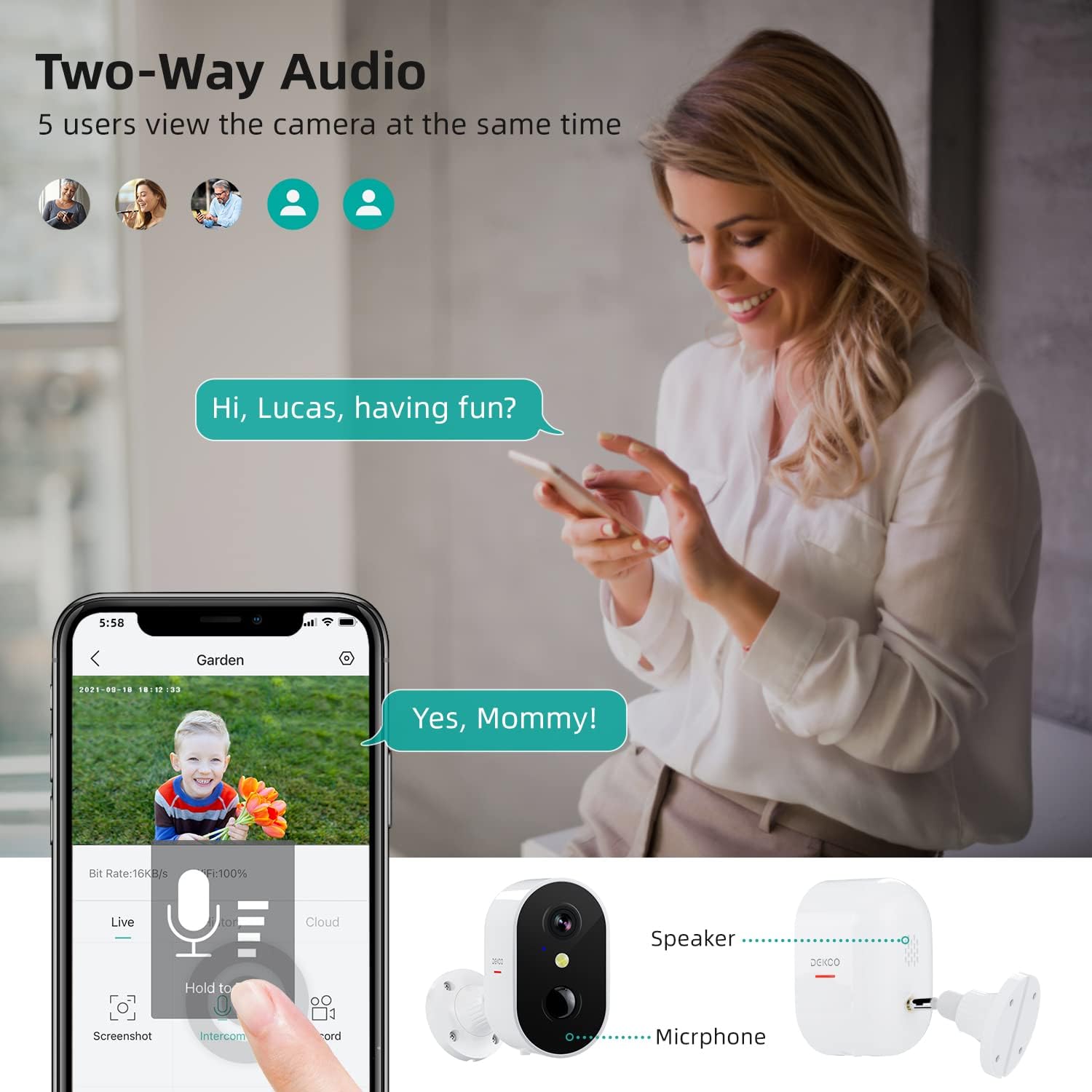
Image: A woman interacting with a child via the DEKCO camera's two-way audio feature, as seen on her smartphone, with icons indicating multiple users can view simultaneously.
4.4 Storage Options
The DEKCO camera offers flexible storage solutions for your recordings:
- Micro SD Card Storage: A built-in slot supports Micro SD cards from 8GB to 128GB (Class 10, Fat32 format). Recordings are stored locally and can be played back at any time.
- Cloud Storage: Encrypted secure cloud storage is also supported for convenient access to your video history from anywhere.

Image: The DEKCO camera mounted on a wall, with an arrow indicating the location of the Micro SD card slot for secure local storage, allowing playback of recorded footage.
5. Maintenance
5.1 Battery Management
To maximize battery life and ensure continuous operation:
- Fully charge the camera before initial use and whenever the battery level is low.
- Consider adding a compatible solar panel (not included) for a non-stop power supply, especially for locations with frequent sunlight.
- Battery life can vary based on the number of motion detections, recording duration, and environmental temperature.
5.2 Weather Resistance
The DEKCO DC6L camera has an IP66 rating, meaning it is protected against dust and powerful water jets. It is designed to withstand outdoor elements, including rain, sun, and temperatures ranging from -20°C to +50°C (-4°F to +122°F).

Image: The DEKCO camera shown in a rainy outdoor environment, highlighting its IP66 waterproof rating and resistance to sun, cold, and dust.
5.3 Cleaning
To maintain optimal performance, periodically clean the camera lens and body. Use a soft, damp cloth. Avoid using harsh chemicals or abrasive cleaners that could damage the camera's surface or lens.
6. Troubleshooting
Common Issues and Solutions:
| Problem | Possible Cause / Solution |
|---|---|
| Camera not connecting to Wi-Fi | Ensure your Wi-Fi is 2.4GHz (5GHz is not supported). Check Wi-Fi signal strength at the camera's location. Restart your router and the camera. Ensure correct Wi-Fi password is entered. |
| Frequent false alarms | Adjust PIR sensitivity settings in the 'CloudEdge' app. Ensure the camera is not pointed at areas with constant motion (e.g., busy roads, swaying trees). The human detection feature helps reduce these. |
| Poor night vision quality | Ensure the camera lens is clean. Check for obstructions blocking the infrared LEDs or spotlight. Ensure there are no strong light sources directly facing the camera at night. |
| Short battery life | High frequency of motion detections and recordings will consume more battery. Reduce detection sensitivity or recording duration if possible. Ensure the camera is fully charged (takes 12 hours). Consider a solar panel. |
| No app notifications | Check app notification settings on your smartphone and within the 'CloudEdge' app. Ensure the app has necessary permissions. Verify internet connection. |
| Cannot view recorded videos | Ensure a compatible Micro SD card is inserted and correctly formatted (Fat32). Check cloud storage subscription status if using cloud. Verify camera is online. |
If you encounter issues not listed here, please refer to the support section for contact information.
7. Specifications
| Feature | Detail |
|---|---|
| Model Number | DC6L |
| Video Capture Resolution | 1080P (1920 x 1080 Pixels) |
| Connectivity Technology | Wireless (Wi-Fi) |
| Wi-Fi Frequency | 2.4GHz (Does not support 5GHz) |
| Power Source | Battery Powered (5200mAh Lithium battery included) |
| Voltage | 5 Volts |
| Wattage | 3 Watt-hours |
| Storage | Micro SD Card (8-128GB, C10, Fat32) & Cloud Storage |
| Weather Resistance | IP66 |
| Operating Temperature | -20°C to +50°C (-4°F to +122°F) |
| Mounting Type | Wall Mount |
| Dimensions (L x W x H) | 9.65 x 15.24 x 10.16 cm (3.8 x 6 x 4 inches) |
| Item Weight | 330 g |
| Compatible Devices | Smartphone (via CloudEdge app) |
8. Warranty and Support
8.1 Limited Warranty
DEKCO provides a 1-Year Limited Warranty for this product. The actual warranty period shall be implemented according to the requirements of local laws and regulations.
8.2 Customer Support
DEKCO offers lifetime support for all DEKCO brand products. If you have any questions, require assistance, or encounter any issues, please do not hesitate to contact our support team:
- Website: www.dekcolife.com
- After Service E-mail: support@dekcolife.com
- United States Support: +1-877-277-5797 (Mon-Fri 9AM-5PM EST)
- United Kingdom Support: +44-20-3885-0802 (Mon-Fri 9AM-5PM GMT)
- Germany Support: +49-69-3109-0128 (Mon-Fri 9AM-5PM CET)
- Facebook: @DEKCOLIFE
Related documentsDC6L

Ask a question about this manual
Ask about setup, troubleshooting, compatibility, parts, safety, or missing instructions. Manuals+ will review the question and use this page’s manual context to help answer it.