
1. Product Overview
The GreenYi HD 720P Vehicle Backup Camera is designed to provide a clear rear view for various Audi and Volkswagen models. This trunk handle replacement camera offers a 1280*720 resolution, a 170-degree viewing angle, and IP68 waterproof rating for reliable performance in diverse conditions. It supports both AHD and CVBS video signals and features adjustable guidelines.

Image 1.1: GreenYi HD 720P Vehicle Backup Camera. This image displays the camera unit integrated into a trunk handle housing, with an RCA video connector visible.
2. Package Contents
Verify that all items are present in the package:
- 1 x GreenYi HD 720P Backup Camera (Trunk Handle Replacement)
- 1 x 19.69FT RCA Video Cable
- 1 x 4.92FT DC Power Cable
- 1 x Female to Female RCA Coupler

Image 2.1: Package Contents. This image shows the backup camera, its retail box, the video cable, and the power cable.
3. Setup and Installation
3.1 Compatibility Check
Before installation, ensure the camera is compatible with your vehicle. This camera is designed for specific Audi and VW models. It is crucial to measure your vehicle's trunk handle dimensions and compare them with the camera's dimensions to confirm fitment. The camera requires a monitor with an RCA connector for video input.
- Compatible Models (Reference Only):
- Volkswagen Jetta MK6 (2010-2018), Jetta/Sagitar (2012-2017), Lavida (2011-2016), Gran Lavida (2013, 2015), Passat (2012-2016), Passat B5 (2009-2010), New Passat (2011, 2013, 2015), Sharan Seat Alhambra 7N (2011-2015), Tiguan (5N facelift) (2008-2015), Touareg (2011-2016), Touran 1T3 1T2 (2011-2015), Caddy 4 (2011-2015), T5 Facelift (2011-2015), Golf Sportwagen 2.5 (2011-2015), Golf VI Variant (from 2010)
- Audi A3 A6L (2012-2017), A4 B8 (Facelift) (2008-2015), A4 B6 A4L A5 A8L S5 S3 (2011-2015), Q3 Q5 (2012-2016), Q7 (2015-2017), RS6 (2009-2015)
- Porsche Cayenne 958 (2011-2015)
- Seat Skoda Fabia Octavia Superb Rapid Spaceback (2015)
Note: The listed car models are for reference only. Always verify the physical dimensions of your trunk handle and the camera to ensure compatibility. This camera only supports RCA connection. If your monitor does not support RCA, it is not compatible.

Image 3.1: Camera Dimensions. This image provides a diagram with measurements of the camera unit (4.33 inches length, 1.93 inches width, 2.76 inches depth) to assist with compatibility checks.

Image 3.2: Installation Position Comparison. This image shows a 'Before' view of a car's trunk handle opening with dimensions (1.89 inch height, 4.41 inch width) and an 'After' view with the GreenYi camera installed, demonstrating the integrated fit.
3.2 Wiring Diagram
Follow the diagram below for proper connection to an Android radio head unit or compatible monitor.
- Connect the RCA video cable from the camera to the video input (usually labeled 'CAM IN' or 'REAR VIEW') on your head unit/monitor.
- Connect the camera's power cable (red and black wires) to the vehicle's reversing light circuit. The red wire connects to the positive (+) terminal of the reversing light, and the black wire connects to the negative (-) terminal (ground).
- Connect the trigger wire (usually a thin red wire integrated with the RCA cable) from the camera side to the reverse trigger input on your head unit/monitor. This signal tells the head unit to switch to the camera view when reverse gear is engaged.
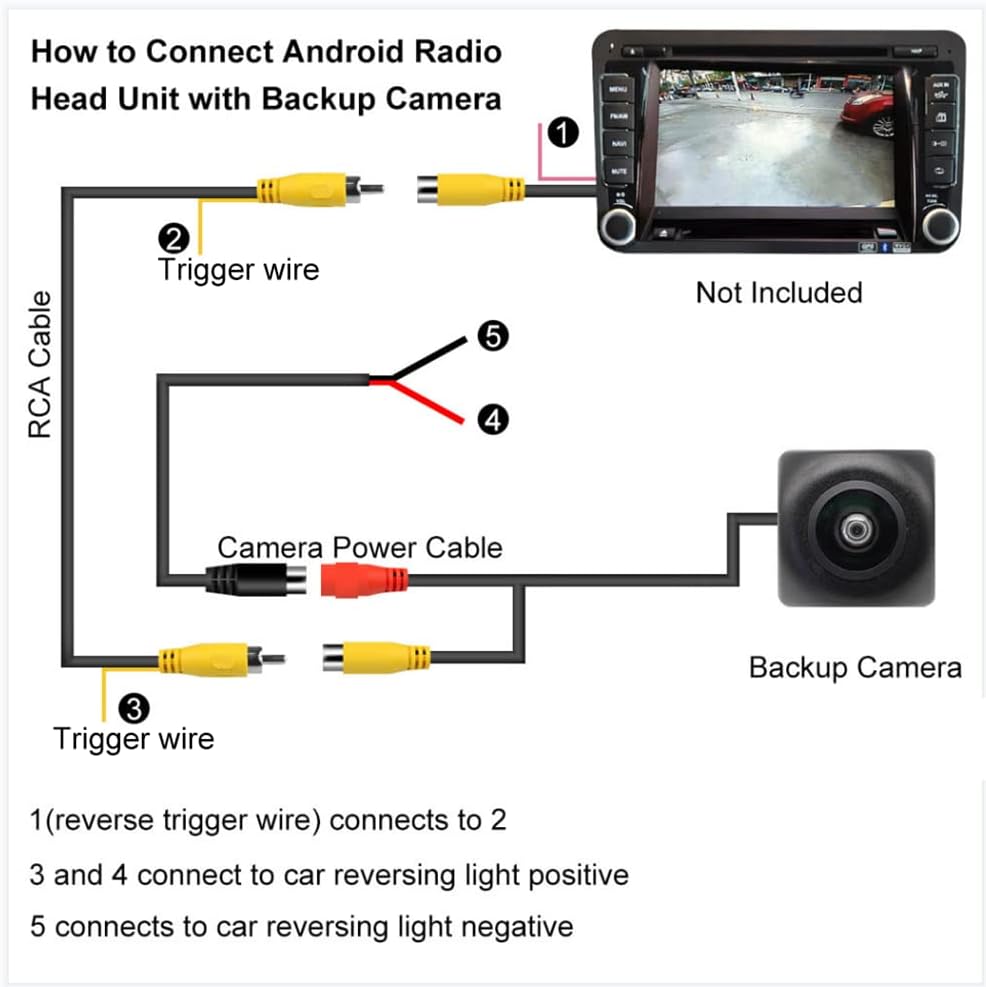
Image 3.3: Wiring Diagram. This diagram illustrates how to connect the backup camera to an Android radio head unit, showing connections for the RCA cable, trigger wires, and camera power to the car's reversing light.
3.3 Video Signal Selection (AHD/CVBS)
The camera supports both AHD (Analog High Definition) and CVBS (Composite Video Broadcast Signal) video formats. By default, the camera outputs a CVBS signal. To switch to AHD 720P 30HZ, cut the white cable loop on the camera's wiring harness and then reconnect the camera to its power supply. AHD provides a clearer image than CVBS.
3.4 Guideline Adjustment
The camera comes with parking guidelines enabled by default. To disable the guidelines, cut the green cable loop on the camera's wiring harness and then reconnect the camera to its power supply.

Image 3.4: Switch Cables. This image shows the white cable loop for switching between CVBS and AHD video signals, and the green cable loop for enabling or disabling parking guidelines.
4. Operation
Once installed and wired correctly, the backup camera will automatically activate and display the rear view on your connected monitor when the vehicle is shifted into reverse gear. The 720P resolution and 170-degree wide-angle lens provide a comprehensive view of the area behind your vehicle.

Image 4.1: Compatible Display Types. This image illustrates various display options for the backup camera, including car stereo MP5 players, Android head units, car mirror monitors, and dedicated car monitors.
5. Maintenance
The GreenYi backup camera is designed for durability with an IP68 waterproof rating. To ensure optimal performance and longevity:
- Cleaning: Periodically clean the camera lens with a soft, damp cloth to remove dirt, dust, or water spots that may obstruct the view. Avoid abrasive cleaners.
- Inspection: Regularly check the wiring connections for any signs of wear, corrosion, or looseness. Ensure the camera is securely mounted in the trunk handle.
- Environmental Factors: While waterproof, extreme temperatures or prolonged exposure to harsh chemicals should be avoided.
6. Troubleshooting
- No Image on Monitor:
- Ensure all power and video connections are secure and correctly wired.
- Verify that your monitor supports RCA video input.
- Check if the reverse trigger wire is correctly connected to your head unit/monitor.
- For some car models, the vehicle's power supply may be too high or too low, requiring an additional relay filter (not included) for stable operation.
- Fuzzy or Poor Image Quality:
- Clean the camera lens.
- If your monitor supports AHD, ensure the white cable loop has been cut to activate AHD mode. AHD provides a clearer image than CVBS.
- Verify that your monitor is set to the correct video input mode.
- Ensure the video cable is double-shielded to prevent interference. The included cable is double-shielded for stable signal transmission.
- No Parking Guidelines or Incorrect Guidelines:
- If guidelines are not present, ensure the green cable loop has not been cut.
- If guidelines are present but undesired, cut the green cable loop to disable them.
- Limited Field of View (e.g., mostly street view on lowered vehicles):
- The camera's mounting position and angle are fixed as a trunk handle replacement. On vehicles with lowered ride height, the camera's perspective may be lower, showing more of the street and less of objects directly behind the vehicle. This is a characteristic of the installation type and not a defect of the camera.
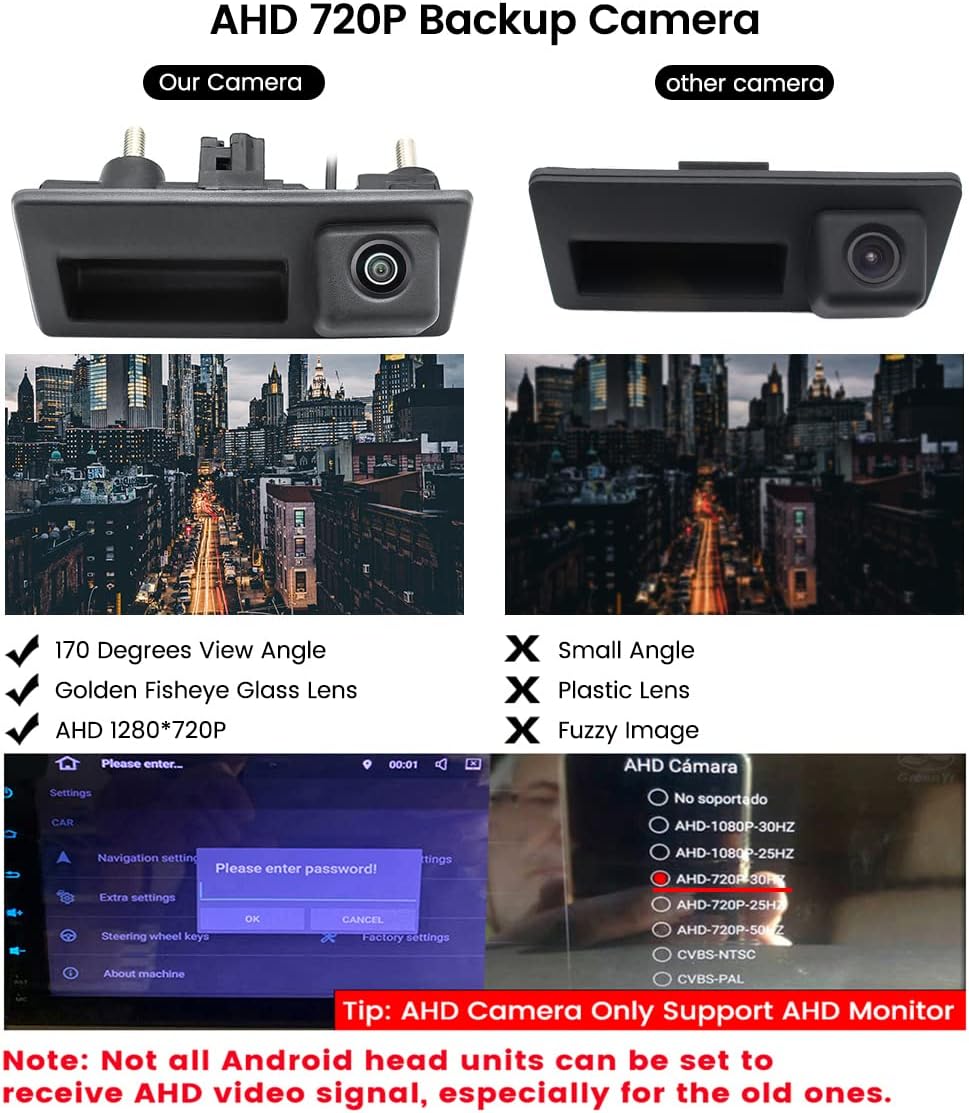
Image 6.1: AHD Camera Features and Settings. This image compares the GreenYi 720P AHD camera with a generic camera, highlighting features like 170-degree view and AHD 1280*720 resolution. It also shows a monitor interface with AHD settings, emphasizing that AHD cameras only support AHD monitors.

Image 6.2: Double-Shielded Video Cable. This image illustrates the difference between a double-shielded video cable, which provides stable signal transmission, and an ordinary cable prone to interference and signal attenuation.
7. Specifications
| Feature | Specification |
|---|---|
| Model Number | GreenYi-140 |
| Resolution | HD 720P (1280*720) |
| Viewing Angle | 170 Degrees (Real Angle of View: 155 Degrees) |
| Video Signal Output | CVBS (default), AHD (selectable) |
| Waterproof Rating | IP68 |
| Installation Type | Trunk Handle Replacement |
| Compatible Devices | Screen Monitors that Support RCA Video Input |
| Voltage | 12 Volts |
| Optical Sensor Technology | CCD |
| Lens Type | Wide Angle |
| Connector Type | RCA |
| Product Dimensions | 4.42 x 1.96 x 1.74 inches |
| Item Weight | 8.8 ounces |
8. Support
For technical assistance or inquiries regarding your GreenYi HD 720P Vehicle Backup Camera, please contact GreenYi customer support. Refer to the product packaging or the GreenYi official website for contact information.
