
LEHMANN LEHMANN_CHOWMEI
LEHMANN Chowmei Immersion Blender Set User Manual
Model: LEHMANN_CHOWMEI
Introduction
Thank you for choosing the LEHMANN Chowmei Immersion Blender Set. This versatile kitchen appliance is designed to simplify your food preparation tasks, offering powerful performance and a range of accessories for various culinary needs. Please read this manual carefully before first use to ensure safe and optimal operation of your appliance.
Important Safety Instructions
Always follow basic safety precautions when using electrical appliances to reduce the risk of fire, electric shock, and/or injury to persons, including the following:
- Read all instructions before use.
- Do not immerse the motor unit in water or other liquids. Clean only with a damp cloth.
- Keep hands, hair, clothing, as well as spatulas and other utensils away from moving blades during operation to prevent injury and/or damage to the appliance.
- Unplug from outlet when not in use, before putting on or taking off parts, and before cleaning.
- Do not operate any appliance with a damaged cord or plug or after the appliance malfunctions, or has been dropped or damaged in any manner.
- This appliance is not intended for use by persons (including children) with reduced physical, sensory or mental capabilities, or lack of experience and knowledge, unless they have been given supervision or instruction concerning use of the appliance by a person responsible for their safety.
- Children should be supervised to ensure that they do not play with the appliance.
- The blades are sharp. Handle with care.
- Do not use outdoors.
- Do not let cord hang over edge of table or counter, or touch hot surfaces.
- Do not place on or near a hot gas or electric burner, or in a heated oven.
- Always ensure the appliance is properly assembled before use.
- Do not use attachments not recommended or sold by the manufacturer.
- This appliance is intended for household use only.
Product Overview and Components
The LEHMANN Chowmei Immersion Blender Set includes the main motor unit and several interchangeable accessories to perform various kitchen tasks.

Figure 1: Complete LEHMANN Chowmei Immersion Blender Set including the main unit, whisk, beaters, dough hooks, chopper, and measuring cup.

Figure 2: Detailed view of the immersion blender's ergonomic grip, seamless connection mechanism, and detachable shaft for easy cleaning.

Figure 3: The control panel featuring 8 variable speed settings and a dedicated Turbo button for maximum power.

Figure 4: Close-up of the durable 304 stainless steel, titanium-plated blade designed for efficient blending.
Included Components:
- Motor Unit: The main body with power and turbo buttons.
- Immersion Blender Shaft: Stainless steel shaft with blade for blending.
- Whisk Attachment: For whipping cream, egg whites, etc.
- Beater Attachments (2x): For mixing batters and doughs.
- Dough Hook Attachments (2x): For kneading light doughs.
- Chopper Bowl with Blade: For chopping vegetables, nuts, etc. (860ml capacity).
- Measuring Cup: For blending and measuring liquids (600ml capacity).
Setup and Assembly
Before first use, wash all parts that will come into contact with food in warm soapy water, rinse thoroughly, and dry. The motor unit should only be wiped clean with a damp cloth.
Assembling the Immersion Blender:
- Align the immersion blender shaft with the motor unit.
- Twist the shaft clockwise until it locks securely into place.
- To detach, twist counter-clockwise and pull apart.
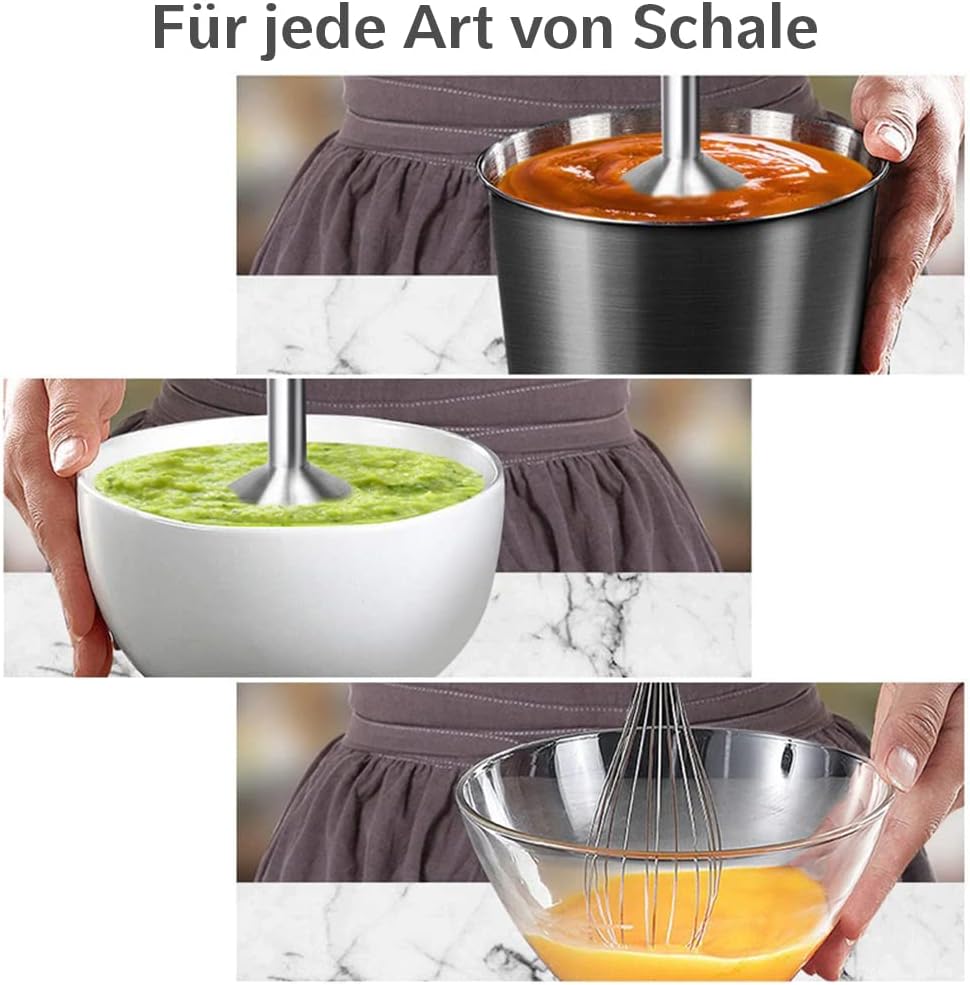
Figure 5: Illustration of how to attach the blending shaft to the main motor unit.
Assembling the Whisk/Beater/Dough Hook Attachments:
- Insert the whisk, beaters, or dough hooks into the gear box attachment until they click into place.
- Align the gear box attachment with the motor unit.
- Twist the gear box clockwise until it locks securely.
- To detach, twist counter-clockwise and pull apart.

Figure 6: Demonstrating the attachment of the whisk accessory to the motor unit.

Figure 7: Demonstrating the attachment of the beater accessory to the motor unit.
Assembling the Chopper:
- Carefully place the chopping blade onto the central pin inside the chopper bowl.
- Add ingredients to the chopper bowl.
- Place the chopper lid onto the bowl, ensuring it is properly seated.
- Align the motor unit with the chopper lid and twist clockwise until it locks.
- To detach, twist counter-clockwise and lift the motor unit.
Operating Instructions
The LEHMANN Chowmei Immersion Blender features a powerful 1200W motor and 8 variable speed settings, plus a Turbo function for maximum power.
General Operation:
- Ensure the desired attachment is securely assembled to the motor unit.
- Plug the appliance into a suitable power outlet.
- Place the attachment into the ingredients. For immersion blending, ensure the blade guard is fully submerged to prevent splashing.
- Press and hold the power button (Schaltfläche 1) to start operation. The speed can be adjusted by rotating the dial on top of the motor unit (8 speeds).
- For maximum power, press and hold the Turbo button (Schaltfläche 2). This will operate the blender at its highest speed (15,000 RPM).
- Release the button to stop operation.
- Always unplug the appliance after use.

Figure 8: The immersion blender in action, demonstrating its use for blending in various containers.

Figure 9: Visual representation of the blender's 1200W maximum power and 15,000 RPM speed.
Usage Tips:
- For best results when blending, use a deep container to prevent splashing.
- When using the whisk, beaters, or dough hooks, ensure the ingredients are in a suitable bowl and the attachments are fully immersed before starting.
- Do not operate the appliance continuously for more than 1 minute. Allow it to cool down for at least 3 minutes before resuming operation.
- For chopping, cut large ingredients into smaller, uniform pieces before placing them in the chopper bowl. Do not overfill.
Care and Maintenance
Proper cleaning and maintenance will ensure the longevity and optimal performance of your LEHMANN Chowmei Immersion Blender Set.
Cleaning:
- Motor Unit: Unplug the unit. Wipe the motor unit with a damp cloth. Do not immerse it in water or any other liquid.
- Immersion Blender Shaft, Whisk, Beaters, Dough Hooks, Chopper Bowl, Measuring Cup: These parts are dishwasher safe. Alternatively, they can be washed by hand in warm soapy water, rinsed thoroughly, and dried immediately.
- Chopping Blade: Handle the blade with extreme care as it is very sharp. Wash it under running water with a brush if necessary, or place it in the dishwasher.
- For stubborn food residue, soak the parts in warm soapy water before cleaning.
Storage:
Store the appliance and its accessories in a dry place, away from direct sunlight and out of reach of children.
Troubleshooting
| Problem | Possible Cause | Solution |
|---|---|---|
| Appliance does not turn on. | Not plugged in; power outlet not working; attachment not securely locked. | Check power cord connection; test outlet with another appliance; ensure attachment is twisted and locked into place. |
| Motor stops during operation. | Overheating protection activated; ingredients too thick/hard; continuous operation too long. | Unplug and let cool for 10-15 minutes; add liquid or cut ingredients smaller; do not operate for more than 1 minute continuously. |
| Poor blending/chopping results. | Insufficient liquid (for blending); ingredients too large (for chopping); overfilling. | Add more liquid; cut ingredients into smaller pieces; reduce quantity of ingredients. |
| Excessive vibration or noise. | Attachment not properly secured; uneven load of ingredients. | Re-attach the accessory ensuring it is locked; distribute ingredients evenly. |
If the problem persists after trying these solutions, please contact customer support.
Product Specifications
| Feature | Specification |
|---|---|
| Brand | LEHMANN |
| Model Number | LEHMANN_CHOWMEI |
| Power | 1200 W (Max) |
| Speed | Up to 15,000 RPM |
| Speed Settings | 8 variable speeds + Turbo function |
| Voltage | 230 V |
| Chopper Bowl Capacity | 860 ml |
| Measuring Cup Capacity | 600 ml |
| Material | Stainless Steel (blade, shaft), BPA-free plastics |
| Dimensions (Product) | 22.8 x 13.2 x 24.3 cm |
| Weight | 1.2 kg |
Warranty and Support
LEHMANN products are manufactured with high-quality materials and undergo strict quality control. For information regarding warranty coverage and customer support, please refer to the warranty card included with your purchase or visit the official LEHMANN website. Please retain your proof of purchase for any warranty claims.
For technical assistance or inquiries, please contact LEHMANN customer service through the contact information provided on the product packaging or the official brand website.
Related documentsLEHMANN_CHOWMEI

Ask a question about this manual
Ask about setup, troubleshooting, compatibility, parts, safety, or missing instructions. Manuals+ will review the question and use this page’s manual context to help answer it.