
1. Introduction
This manual provides detailed instructions for the installation, operation, and maintenance of your CP PLUS 4 MP IP Bullet Camera, model CP-UNC-TB41L5-MDJ. Please read this manual thoroughly before using the product to ensure proper setup and functionality. Keep this manual for future reference.
2. Product Overview
2.1 Key Features
- 1/3’’ 4MP CMOS Image Sensor (0.84667cm)
- 4MP (2560 × 1440)@25/30fps video resolution
- Supports Starlight Technology for enhanced low-light performance
- H.265+/H.264+ Dual Stream Coding for efficient video compression
- Features WDR, 3D-DNR, ROI, HLC, BLC, digital watermarking, and Rotation mode
- 2.8mm fixed lens (3.6 mm optional)
- Built-in IR LED with an IR Range of 50 meters
- IP67 rated for outdoor use
- Micro SD Card slot for local storage
- Power over Ethernet (PoE) support
- Compatible with Mobile Software: iCMOB, gCMOB and CMS Software: KVMS Pro
2.2 What's in the Box
- CP PLUS 4 MP IP Bullet Camera
- Power Adapter
- Mounting accessories (screws, wall plugs)
- Quick Start Guide
2.3 Product Images

Figure 1: Front view of the CP PLUS 4 MP IP Bullet Camera, showing the lens and housing.
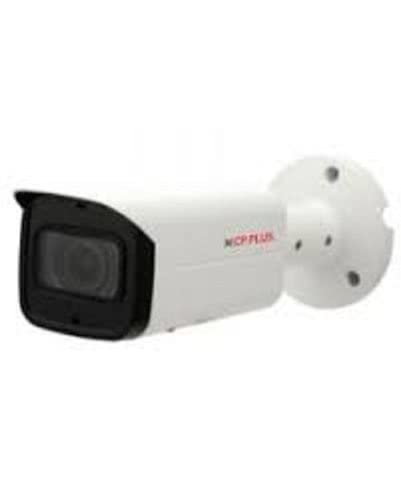
Figure 2: Side view of the CP PLUS 4 MP IP Bullet Camera, highlighting the bullet form factor and mounting base.
3. Safety Information
Please observe the following safety precautions to prevent damage to the product or injury to yourself:
- Ensure the power supply matches the camera's requirements.
- Do not expose the camera to extreme temperatures, humidity, or corrosive environments.
- Avoid pointing the camera directly at strong light sources for extended periods.
- Disconnect power before cleaning or servicing the camera.
- Installation should be performed by qualified personnel if you are unsure.
- Secure all cables to prevent tripping hazards or accidental disconnection.
4. Setup
4.1 Installation
The CP-UNC-TB41L5-MDJ camera is designed for both indoor and outdoor use and supports wall-mounted, surface-mounted, and embedded installation types. Follow these general steps:
- Choose a Location: Select a suitable location that provides the desired viewing angle and is within range of your network and power source. Consider the 50-meter IR range for night vision.
- Mount the Camera: Use the provided mounting accessories to securely attach the camera to the chosen surface. Ensure the mounting is stable and can support the camera's weight.
- Connect Power: Connect the camera to a power source using the provided adapter or via Power over Ethernet (PoE) if your network infrastructure supports it.
- Connect to Network: Connect the camera to your network using an Ethernet cable. The camera also supports wireless connectivity.
4.2 Initial Configuration
After physical installation and power connection, you will need to configure the camera for network access and video streaming. Refer to the specific software manuals for iCMOB, gCMOB, or KVMS Pro for detailed configuration steps, including setting up IP addresses, user accounts, and recording schedules.
5. Operating Instructions
The CP PLUS IP Bullet Camera can be operated and monitored using dedicated software applications.
5.1 Mobile Software (iCMOB, gCMOB)
Download and install the iCMOB or gCMOB application on your Android mobile device. These apps allow you to:
- View live video feeds from your camera.
- Access recorded footage.
- Receive motion alerts.
- Adjust camera settings remotely.
Refer to the respective app's user guide for detailed instructions on adding devices and managing settings.
5.2 CMS Software (KVMS Pro)
For desktop monitoring and management, use the KVMS Pro CMS (Central Management Software). This software provides advanced features for managing multiple cameras, recording, playback, and system configuration. Install KVMS Pro on your computer and follow its instructions to add and manage your CP PLUS camera.
5.3 Night Vision
The camera features Starlight Technology and built-in IR LEDs, providing clear images up to 50 meters in low-light or complete darkness. The camera automatically switches to night vision mode when ambient light levels drop.
5.4 Motion Detection
The camera supports motion-only alert types. Configure motion detection zones and sensitivity settings within the mobile or CMS software to receive notifications when movement is detected in the monitored area.
6. Maintenance
Regular maintenance ensures optimal performance and longevity of your camera.
- Cleaning: Gently clean the camera lens and housing with a soft, dry cloth. For stubborn dirt, use a slightly damp cloth and then dry thoroughly. Do not use harsh chemicals or abrasive cleaners.
- Firmware Updates: Periodically check the CP PLUS official website for firmware updates. Keeping your camera's firmware updated can improve performance, add new features, and enhance security.
- Cable Inspection: Regularly inspect all cables for signs of wear or damage, especially for outdoor installations.
- Mounting Security: Ensure the camera remains securely mounted. Tighten any loose screws if necessary.
7. Troubleshooting
If you encounter issues with your camera, refer to the following common troubleshooting steps:
- No Power: Check the power adapter connection and ensure the power outlet is functional. If using PoE, verify the PoE switch or injector is working correctly.
- No Video/Offline: Verify network cable connections. Ensure the camera has a valid IP address and is connected to the network. Restart the camera and your network router/switch.
- Poor Image Quality: Clean the camera lens. Check for obstructions in the camera's field of view. Ensure sufficient lighting for optimal image quality; verify night vision is activating correctly in low light.
- Motion Detection Not Working: Review motion detection settings in your software (iCMOB, gCMOB, or KVMS Pro). Ensure detection zones are correctly configured and sensitivity is appropriate.
- Cannot Access Camera Remotely: Check your network's internet connection. Ensure port forwarding (if required) is correctly set up on your router, or that cloud access is configured in the software.
For further assistance, contact CP PLUS technical support.
8. Specifications
| Feature | Specification |
|---|---|
| Model Number | CP-UNC-TB41L5-MDJ |
| Image Sensor | 1/3’’ 4MP CMOS (0.84667cm) |
| Effective Still Resolution | 4 MP |
| Video Capture Resolution | 2560 × 1440 (4MP) |
| Frame Rate | 30 frames per second |
| Lens | 2.8mm fixed lens |
| Night Vision Range | 50 meters (IR LED) |
| Night Vision Technology | Starlight |
| Connectivity Technology | Wireless, Ethernet |
| Power Source | Corded Electric, PoE |
| Indoor/Outdoor Usage | Indoor, Outdoor |
| Waterproof Rating | IP67 |
| Storage | Micro SD Card slot |
| Control Method | App (iCMOB, gCMOB), CMS (KVMS Pro) |
| Alert Type | Motion Only |
| Form Factor | Bullet |
| Installation Type | Wall-mounted, Surface-mounted, Embedded |
| Dimensions | 20 x 15 x 15 Centimeters |
| Material | Acrylonitrile Butadiene Styrene (ABS), Plastic |
9. Warranty and Support
For warranty information and technical support, please refer to the warranty card included with your product or visit the official CP PLUS website. You can also contact CP PLUS customer service directly for assistance with product setup, troubleshooting, or any other inquiries.


