
Introduction
Welcome to the user manual for your Lecoo DS152 Boombox RGB Portable Bluetooth Speaker. This speaker combines powerful audio performance with dynamic RGB lighting and versatile connectivity options. This manual provides essential information for setting up, operating, and maintaining your device to ensure optimal performance and longevity.
Package Contents
- 1x Lecoo DS152 Boombox RGB Portable Bluetooth Speaker
- 1x Type-C Cable
- 1x Aux Cable
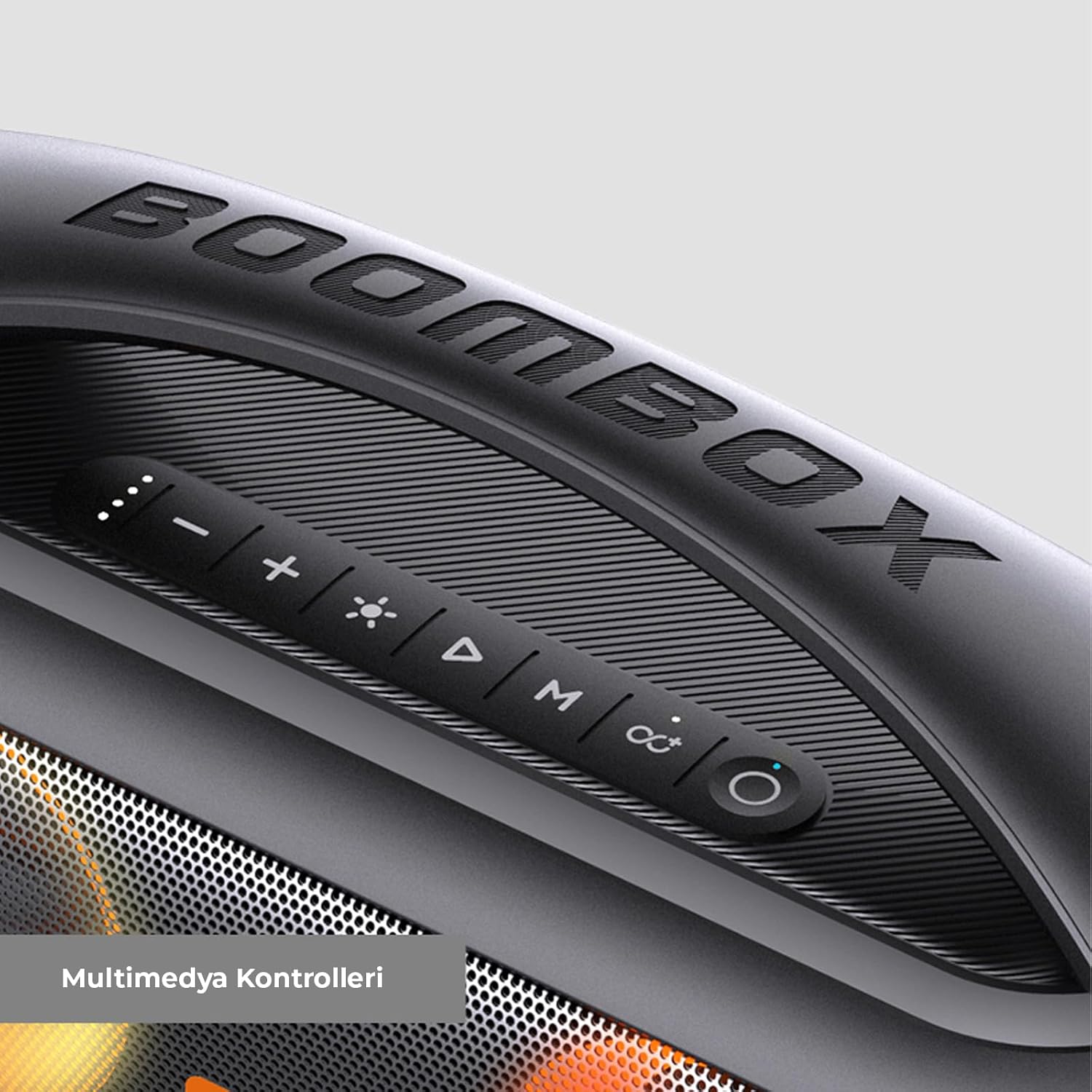
Image: The Lecoo DS152 speaker shown in its retail packaging, indicating the included Type-C charging cable and Aux cable.
Product Overview
The Lecoo DS152 features a robust design with integrated controls and dynamic RGB lighting. It is engineered with dual subwoofers and a tweeter for balanced and powerful sound output.

Image: An exploded view of the Lecoo DS152 speaker, highlighting its internal components including two 3-inch subwoofers and a 2-inch tweeter for comprehensive sound.

Image: A close-up of the multimedia control panel located on the top surface of the Lecoo DS152 speaker, showing buttons for volume, playback, mode, and RGB lighting.
Setup
Charging the Speaker
Before initial use, ensure the speaker is fully charged to maximize battery life and performance.
- Connect the provided Type-C cable to the charging port on the speaker.
- Connect the other end of the Type-C cable to a compatible USB power adapter (5V 1A or 5V 2A, not included).
- The charging indicator light will illuminate, signifying that charging is in progress.
- Charging time is approximately 4.5 hours with a 5V 1A adapter or 4 hours with a 5V 2A adapter.
- The indicator light will change or turn off once the battery is fully charged.
Powering On/Off
To power the speaker on or off, press and hold the power button located on the control panel for a few seconds until you hear an audible prompt or see the indicator light change.
Operating Instructions
Bluetooth Pairing
- Turn on the speaker. It will automatically enter Bluetooth pairing mode, indicated by a flashing light.
- On your device (smartphone, tablet, laptop), enable Bluetooth and search for available devices.
- Select "Lecoo DS152" from the list of detected devices.
- Once successfully paired, the speaker will emit a confirmation sound, and the indicator light will become solid.
- The effective Bluetooth range is approximately 10 meters (33 feet).
AUX Mode
To connect an audio source using the AUX cable:
- Connect one end of the provided 3.5mm AUX cable to the AUX input port on the speaker.
- Connect the other end to the audio output jack of your external device.
- The speaker may automatically switch to AUX mode, or you may need to press the 'M' (Mode) button on the speaker to select AUX input.
TWS (True Wireless Stereo) Function
The TWS function allows you to pair two DS152 speakers together for a synchronized stereo sound experience.
- Ensure both DS152 speakers are powered on and are not currently connected to any Bluetooth device.
- On one of the speakers, press and hold the TWS button (often indicated by an infinity symbol or two interlocking circles) until you hear an audible prompt.
- The speakers will automatically search for and pair with each other. A confirmation sound will indicate successful TWS pairing.
- Once TWS paired, connect your primary device via Bluetooth to the first speaker. Both speakers will now play audio in stereo.
RGB Lighting Control
The speaker features dynamic RGB lighting to enhance your listening experience.
- Press the light button (often indicated by a sun or lightbulb icon) on the control panel to cycle through different RGB lighting modes.
- There are three distinct lighting modes available.

Image: The Lecoo DS152 speaker displaying its vibrant and active RGB lighting effects on the speaker grilles.

Image: A detailed view of the RGB lighting on the Lecoo DS152 speaker's grille, showcasing the color transitions.
Power Bank Function
The Lecoo DS152 can also function as a power bank to charge other devices.
- Connect your smart device's charging cable to the USB output port on the speaker.
- The speaker's internal 3000mAh battery will begin charging your connected device.
- Note that utilizing the power bank function will consume the speaker's battery and may reduce its audio playback time.
Maintenance
Cleaning
To clean the speaker, gently wipe its surfaces with a soft, dry cloth. Avoid using abrasive cleaners, solvents, or harsh chemicals, as these can damage the finish and internal components.
Water Resistance
The Lecoo DS152 speaker is rated IPX5 water-resistant. This means it is protected against splashes and light rain. Do not submerge the speaker in water. For optimal protection against moisture, ensure all port covers are securely closed before exposing the speaker to any wet conditions.

Image: The Lecoo DS152 speaker shown with water splashing on its surface, illustrating its IPX5 water resistance capabilities.
Storage
When not in use for extended periods, store the speaker in a cool, dry place. Keep it away from direct sunlight, extreme temperatures, and high humidity to prevent damage.
Troubleshooting
No Power
- Ensure the speaker's battery is charged. Connect it to a power source using the provided Type-C cable.
- Press and hold the power button for a few seconds to attempt to turn it on.
Cannot Pair via Bluetooth
- Ensure the speaker is in Bluetooth pairing mode (indicated by a flashing light).
- Verify that Bluetooth is enabled on your source device.
- Move the speaker closer to your device, ensuring they are within the 10-meter effective range.
- Try turning off and then restarting both the speaker and your device's Bluetooth function.
- If issues persist, clear the Bluetooth pairing list on your device and attempt to pair again.
No Sound
- Check the volume levels on both the speaker and your connected device.
- Ensure the speaker is correctly paired via Bluetooth or properly connected via the AUX cable.
- If using AUX, confirm the cable is fully inserted into both devices and the correct input mode is selected on the speaker.
Poor Sound Quality
- Move the speaker closer to your Bluetooth device to minimize potential interference.
- Ensure there are no significant physical obstructions between the speaker and your device.
- Try playing a different audio source or file to rule out issues with the content.
TWS Pairing Failure
- Ensure both DS152 speakers are powered on and are not connected to any other Bluetooth device.
- Repeat the TWS pairing steps carefully, ensuring the TWS button is pressed on only one speaker initially.
- Verify that both speakers are the same model (DS152) for TWS compatibility.
Specifications
| Feature | Specification |
|---|---|
| Model | DS152 |
| Bluetooth Version | 5.1 |
| RMS Power Output | 18W |
| Peak Power Output | 36W |
| Battery Capacity | 3.7V, 3000mAh |
| Charging Time | 4.5 hours (5V 1A), 4 hours (5V 2A) |
| Playing Time | 2.5 hours (100% volume), 4.5 hours (50% volume) |
| Frequency Range | 70Hz-16KHz |
| Effective Distance | 10 Meters |
| Water Resistance | IPX5 |
| Product Size | 350 x 138 x 183 mm |
| Weight | 2.27 kg |
| Subwoofer Size | 3 inches * 2 |
| Tweeter Size | 2 inches * 1 |
Warranty Information
This product is covered by a manufacturer's warranty. Please refer to the warranty card included in your product packaging or visit the official Lecoo website for detailed information regarding warranty terms, conditions, and duration. It is recommended to retain your purchase receipt as proof of purchase for any warranty claims.
Customer Support
For further assistance, technical support, or service inquiries regarding your Lecoo DS152 speaker, please contact Lecoo customer support. You can typically find contact information on the official Lecoo website or within the documentation provided with your product.

