
1. Introduction
This manual provides detailed instructions for the installation, operation, and maintenance of your Chieftec BE-10B-300 Small Form Factor (SFF) computer case. Please read this manual thoroughly before beginning assembly to ensure proper setup and safe usage. Keep this manual for future reference.
2. Safety Information
- Always disconnect the power cord from the wall outlet before opening the computer case or performing any installation or maintenance.
- Ensure proper grounding to prevent electrical shock.
- Handle all components with care to avoid damage from electrostatic discharge (ESD). Consider using an anti-static wrist strap.
- Keep the case away from sources of heat, direct sunlight, and moisture.
- Do not block ventilation openings to ensure adequate airflow and prevent overheating.
3. Package Contents
Verify that all components are present in the package. If any items are missing or damaged, contact your retailer.
- Chieftec BE-10B-300 SFF Computer Case
- Power Cord
- Accessory Kit (screws, standoffs, cable ties, small bracket)
- User Manual (this document)

Figure 3.1: Included accessory kit with various screws, a power cable, and a small mounting bracket.
4. Product Overview
The Chieftec BE-10B-300 is a compact Small Form Factor (SFF) computer case designed for Mini ATX and Micro ATX motherboards. It features a sleek black design and includes a 300W power supply. The case supports various storage configurations and offers convenient front panel connectivity.
4.1 External Views

Figure 4.1: Front view of the Chieftec BE-10B-300 case, showcasing the optical drive bay, power button, and front I/O ports in a vertical setup.

Figure 4.2: Angled front view of the case, highlighting the textured front panel and accessible ports.

Figure 4.3: Top view of the case when oriented horizontally, showing the smooth top panel.
4.2 Internal Layout
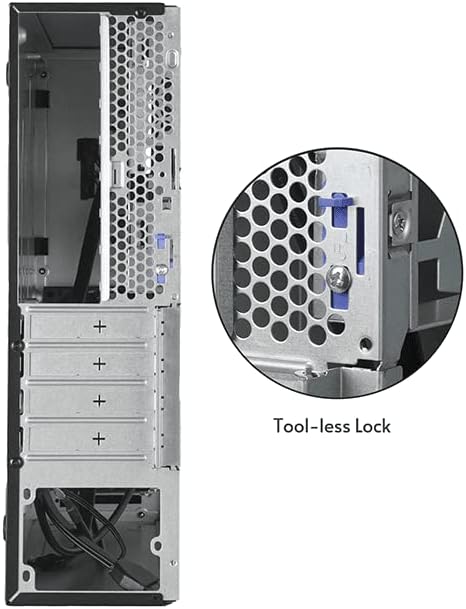
Figure 4.4: Internal view of the case, illustrating the motherboard mounting area and the pre-installed cooling fan.

Figure 4.5: Another internal view, detailing the drive bay structure and internal cabling.
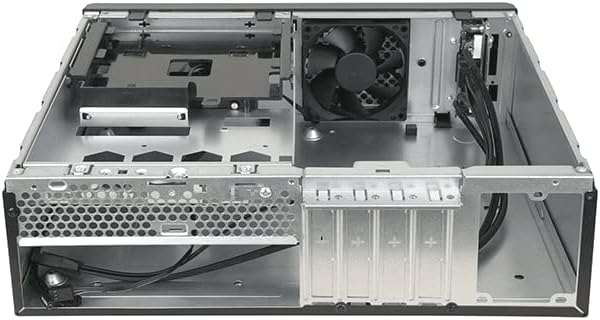
Figure 4.6: Rear view of the case, showing expansion slots and a close-up of the tool-less lock mechanism for easy component installation.
5. Setup Guide
5.1 Preparation
- Unpack the computer case and place it on a stable, flat surface.
- Gather necessary tools: Phillips head screwdriver, anti-static wrist strap (recommended).
5.2 Opening the Case
Locate the thumbscrews or latches on the rear of the case that secure the side panel. Remove them and carefully slide the side panel backward, then lift it off.
5.3 Motherboard Installation
- Install the I/O shield provided with your motherboard into the opening at the rear of the case.
- Align your Mini ATX or Micro ATX motherboard with the pre-installed standoffs inside the case.
- Secure the motherboard using the appropriate screws from the accessory kit. Do not overtighten.
5.4 Power Supply Installation
The Chieftec BE-10B-300 comes with a pre-installed 300W power supply. Ensure all power cables are routed correctly and connected to your components as needed.
5.5 Drive Installation
The case supports 5.25" ultra-slim optical drives, 3.5" HDDs, and 2.5" SSDs. Refer to the diagram below for drive bay locations.
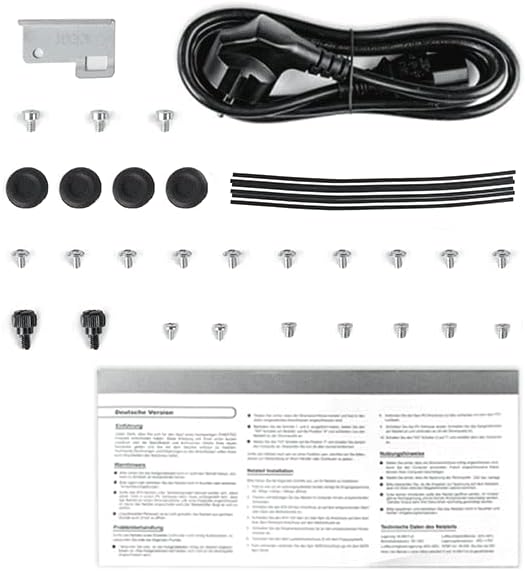
Figure 5.1: Drive bay configuration diagram, indicating mounting points for various storage devices.
- 5.25" Ultra-Slim ODD (9.5 mm): Slide the optical drive into the designated bay from the front and secure it with screws or the tool-less mechanism if available.
- 3.5" HDD / 2.5" SSD: Mount the drives into the appropriate brackets or bays as shown in Figure 5.1. Secure them with screws.
5.6 Expansion Card Installation
Remove the necessary expansion slot covers from the rear of the case. Insert your expansion card (e.g., graphics card, network card) into the motherboard's PCIe slot and secure it using the tool-less lock mechanism or a screw.
5.7 Cable Management
Route all cables (power, data, front panel) neatly to ensure optimal airflow and a clean build. Use cable ties from the accessory kit to bundle cables.
5.8 Closing the Case
Once all components are installed and cables are managed, carefully slide the side panel back into place and secure it with the thumbscrews or latches.
6. Operating Instructions
6.1 Powering On/Off
- Connect the power cord to the power supply unit and a wall outlet.
- Press the power button located on the front panel of the case to turn on your computer.
- To turn off, use the operating system's shutdown function or press and hold the power button for several seconds.
6.2 Connecting Peripherals
Connect your monitor, keyboard, mouse, and other peripherals to the appropriate ports on the rear I/O panel of your motherboard and the front I/O panel of the case.
7. Maintenance
7.1 Cleaning
- Regularly clean the exterior of the case with a soft, damp cloth. Avoid abrasive cleaners.
- Periodically open the case and use compressed air to remove dust buildup from internal components, especially fans and heatsinks, to maintain optimal cooling performance.
8. Troubleshooting
If you encounter issues, refer to the following common troubleshooting steps:
- No Power: Ensure the power cord is securely connected to both the wall outlet and the power supply. Check the power switch on the power supply itself.
- No Display: Verify that your monitor is connected to the correct video output port on your graphics card or motherboard and that the monitor is powered on.
- System Instability: Check all internal cable connections (power, data, motherboard headers) to ensure they are firmly seated. Verify that all components are properly installed.
- Overheating: Ensure all case fans are spinning and not obstructed. Clean any dust buildup from fans and heatsinks.
For more complex issues, consult your component manuals or seek professional assistance.
9. Specifications
| Feature | Specification |
|---|---|
| Model Number | BE-10B-300 |
| Brand | Chieftec |
| Case Type | Small Form Factor (SFF) Desktop |
| Color | Black |
| Material | Alloy Steel |
| Motherboard Compatibility | Mini ATX, Micro ATX |
| Power Supply | 300W (Included) |
| Power Supply Mounting Type | Bottom Mount |
| Cooling Method | Air |
| Fan Size | 80 mm (8E+1 Millimeters) |
| Product Dimensions | 10 x 2 x 2.7 inches |
| Item Weight | 8.84 pounds |
| Recommended Uses | General-purpose |
10. Warranty and Support
10.1 Warranty Information
Chieftec products are manufactured to high-quality standards. For specific warranty terms and conditions, please refer to the warranty card included with your product or visit the official Chieftec website. Keep your proof of purchase for warranty claims.
10.2 Technical Support
If you encounter any issues that cannot be resolved using the troubleshooting guide in this manual, please contact Chieftec customer support or your retailer for assistance. Contact information can typically be found on the Chieftec website or on your product packaging.


