
Jesverty SPS-6005
Jesverty SPS-6005 DC Power Supply User Manual
Model: SPS-6005 | Output: 0-60V, 0-5A
1. Introduction
Thank you for choosing the Jesverty SPS-6005 DC Power Supply. This device is a high-precision, adjustable switching power supply designed for various applications including laboratory experiments, electronic repairs, DIY projects, and educational purposes. It provides stable and accurate voltage and current output, ensuring reliable performance for your tasks.

Figure 1: Front view of the Jesverty SPS-6005 DC Power Supply, showing the LED display and control knobs.
Video 1: An overview of the Jesverty DC Power Supply, demonstrating its features and compact design.
2. Safety Information
Please read all safety instructions carefully before operating the device to prevent injury or damage. Keep this manual for future reference.
- Ensure the power supply is connected to a grounded outlet.
- Do not operate the device in wet or damp conditions.
- Avoid short-circuiting the output terminals.
- Do not open the casing; there are no user-serviceable parts inside. Refer servicing to qualified personnel.
- Disconnect power before making any connections or adjustments.
- Ensure proper ventilation to prevent overheating. The built-in fan will activate as needed.

Figure 2: Diagram illustrating the internal protection mechanisms of the Jesverty power supply, including short circuit, leakage, thermal, voltage overload, and power overload protection.
3. Package Contents
Verify that all items are present in the package:
- 1 x Jesverty SPS-6005 DC Power Supply Unit
- 1 x Power Cord (type may vary by region)
- 1 set of Test Leads (alligator clips)
- 1 x Instruction Manual
4. Product Overview and Component Names
Familiarize yourself with the various parts of your Jesverty SPS-6005 DC Power Supply:
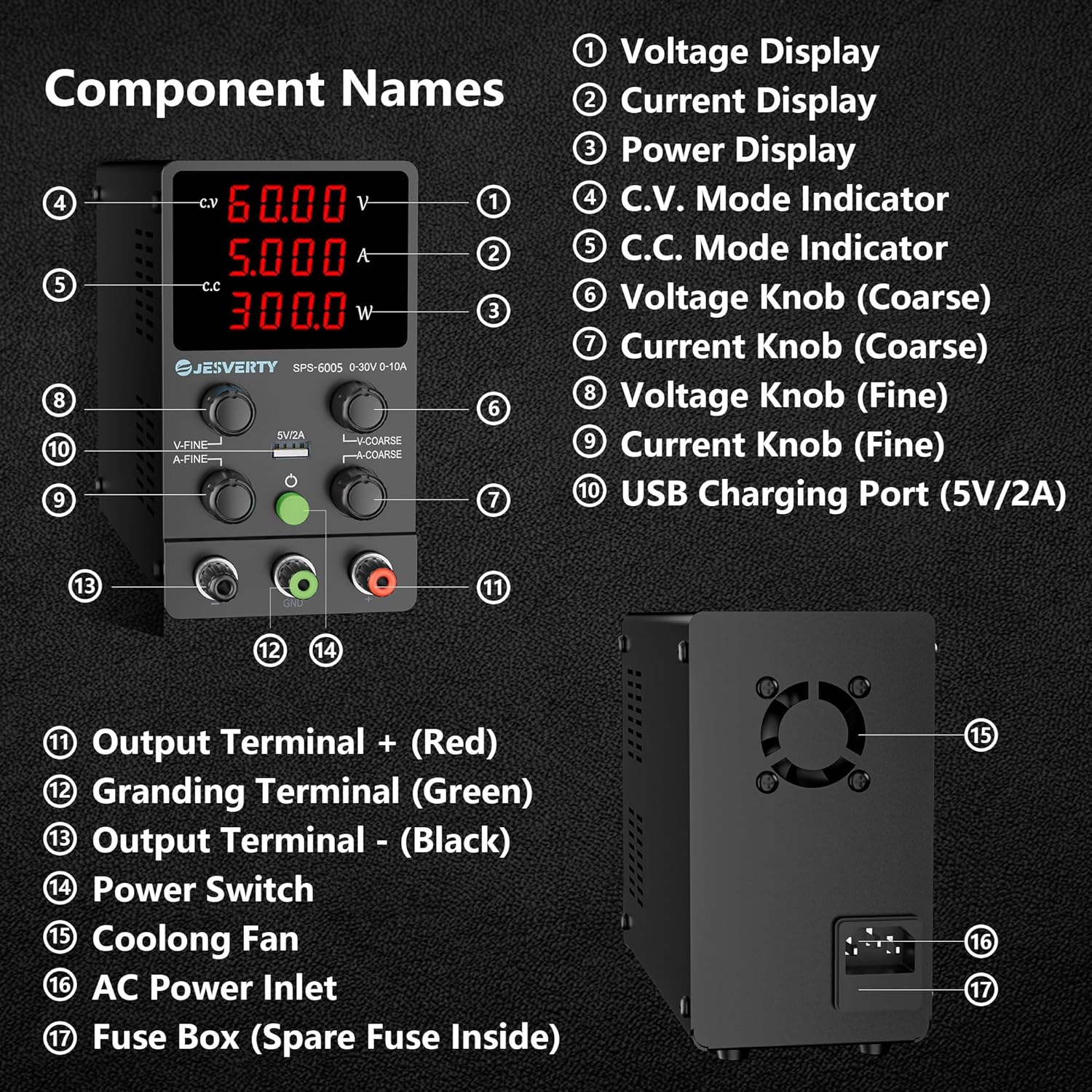
Figure 3: Detailed diagram of the SPS-6005 highlighting its main components and their names.
- Voltage Display: Shows the output voltage in Volts (V).
- Current Display: Shows the output current in Amperes (A).
- Power Display: Shows the output power in Watts (W).
- C.V. Mode Indicator: Illuminates when the unit is operating in Constant Voltage mode.
- C.C. Mode Indicator: Illuminates when the unit is operating in Constant Current mode.
- Voltage Knob (Coarse): For large adjustments of the output voltage.
- Current Knob (Coarse): For large adjustments of the output current.
- Voltage Knob (Fine): For precise, small adjustments of the output voltage.
- Current Knob (Fine): For precise, small adjustments of the output current.
- USB Charging Port (5V/2A): Provides a stable 5V, 2A output for charging compatible USB devices.
- Output Terminal + (Red): Positive output terminal.
- Grounding Terminal (Green): Ground connection terminal.
- Output Terminal - (Black): Negative output terminal.
- Power Switch: Turns the unit ON/OFF.
- Cooling Fan: Automatically activates to dissipate heat and maintain optimal operating temperature.
- AC Power Inlet: Connects the power cord to the AC mains supply.
- Fuse Box: Contains the main fuse (spare fuse inside).
5. Setup
Follow these steps to set up your power supply for first use:
- Placement: Place the power supply on a stable, flat surface with adequate ventilation around it. Ensure the cooling fan at the rear is not obstructed.
- Connect Power: Insert the provided power cord into the AC Power Inlet (16) on the rear of the unit, then plug the other end into a grounded electrical outlet.
- Connect Test Leads: Connect the test leads to the output terminals. The red lead connects to the positive (+) terminal (11), and the black lead connects to the negative (-) terminal (13). The green terminal (12) is for grounding.
- Initial Power On: Turn on the power supply using the Power Switch (14). The LED display will illuminate.
6. Operating Instructions
6.1. 4-Digit Display & Power Calculation
The bright 4-digit LED display provides real-time readings of Voltage (V), Current (A), and Power (W). The display resolution is highly precise, up to 0.01V, 0.001A, and 0.1W, allowing for accurate monitoring of your output.

Figure 4: The power supply displaying voltage, current, and power, connected to an oscilloscope for measurement verification.
6.2. Auto C.V. and C.C. Mode
The Jesverty SPS series automatically switches between Constant Voltage (C.V.) and Constant Current (C.C.) modes based on the load. This ensures stable output even when the load changes. The C.V. and C.C. indicators (4 and 5) will show the active mode.
- Constant Voltage (C.V.) Mode: The output voltage remains constant at the set value, while the current varies according to the load.
- Constant Current (C.C.) Mode: The output current remains constant at the set value, while the voltage varies according to the load.
Note: The voltage and current settings you establish define the crossover point at which the mode automatically switches.
6.3. Voltage and Current Adjustment
Use the coarse and fine adjustment knobs for precise control:
- Coarse Adjustment (6, 7): Use the 'V-COARSE' and 'A-COARSE' knobs for large adjustments of voltage and current.
- Fine Adjustment (8, 9): Use the 'V-FINE' and 'A-FINE' knobs for precise, small adjustments. This allows for setting exact voltage and current limits.
6.4. USB Charging Function
The integrated 5V/2A USB port (10) allows for convenient charging of compatible USB-powered devices. This port features a fast charging protocol recognition chip.

Figure 5: The 5V/2A USB charging port on the front panel, capable of charging various devices.
Video 2: A demonstration of the Jesverty Reliability Test, showcasing the power supply's durability and stable output under various conditions.
7. Maintenance
Proper maintenance ensures the longevity and optimal performance of your power supply.
- Cleaning: Use a soft, dry cloth to clean the exterior of the unit. Do not use abrasive cleaners or solvents.
- Ventilation: Ensure the cooling fan (15) and ventilation openings are free from dust and obstructions. The fan is temperature-regulated and will operate as needed to prevent overheating.
- Fuse Replacement: If the unit does not power on, check the fuse located in the Fuse Box (17) at the rear. Disconnect the power cord before attempting to replace the fuse. A spare fuse is typically located inside the fuse box holder. Replace with a fuse of the same type and rating.
Figure 6: The large cooling fan located at the rear of the unit, essential for maintaining optimal operating temperature.

Figure 7: The fuse box, which typically contains a spare fuse for convenient replacement.
8. Troubleshooting
If you encounter issues with your Jesverty SPS-6005, refer to the following common problems and solutions:
| Problem | Possible Cause | Solution |
|---|---|---|
| No power/Unit does not turn on | Power cord not connected, power outlet issue, blown fuse. | Check power cord connection. Test outlet with another device. Replace fuse if blown (refer to Maintenance section). |
| No output voltage/current | Output terminals not connected correctly, voltage/current set to zero, protection mode activated. | Verify test lead connections. Adjust voltage/current knobs. Check for short-circuit or overload conditions. |
| Inaccurate readings | Poor test lead connection, external interference. | Ensure secure connections. Minimize electromagnetic interference from other devices. |
| Overheating/Fan constantly running loudly | Obstructed ventilation, prolonged high load operation. | Clear any obstructions from the fan and vents. Reduce load or allow unit to cool down. |
Video 3: A detailed look at the SPS 6005 DC Power Supply, highlighting its features and operational stability.
9. Specifications
| Feature | Detail |
|---|---|
| Model Number | SPS-6005 |
| Output Voltage | 0-60V (Adjustable) |
| Output Current | 0-5A (Adjustable) |
| Display | 4-Digit LED (V, A, W) |
| Display Resolution | 0.01V, 0.001A, 0.1W |
| USB Port Output | 5V/2A |
| Product Dimensions | 3.35 x 6.1 x 7.09 inches |
| Item Weight | 3.08 pounds (approx. 1.4 kg) |
| Manufacturer | Jesverty |
| Country of Origin | China |
| Cooling Method | Air (Temperature-regulated fan) |
| Protection Functions | Short-circuit protection, Over-load protection, Grounding terminal |
10. Warranty and Support
Jesverty is committed to providing high-quality products and excellent customer service. Your SPS-6005 DC Power Supply is built with reliable circuit designs and multiple protection functions to ensure performance and extend its lifespan.
Should you have any problems or questions regarding your order or the product, please do not hesitate to contact Jesverty Customer Service via Amazon or email. We provide professional technical support to assist you.
Related documentsSPS-6005

Ask a question about this manual
Ask about setup, troubleshooting, compatibility, parts, safety, or missing instructions. Manuals+ will review the question and use this page’s manual context to help answer it.