
Introduction
This manual provides essential information for the proper setup, operation, maintenance, and troubleshooting of your Asmuse 88-Key Digital Piano. Please read this manual thoroughly before using the instrument to ensure optimal performance and longevity.
1. Setup
1.1 Unpacking and Component Check
Carefully remove all components from the packaging. Verify that all items listed below are present:
- Asmuse 88-Key Digital Piano Unit
- Power Adapter (DC 12V)
- Sustain Pedal
- Headphones
- User Manual (this document)
- Dust Cover
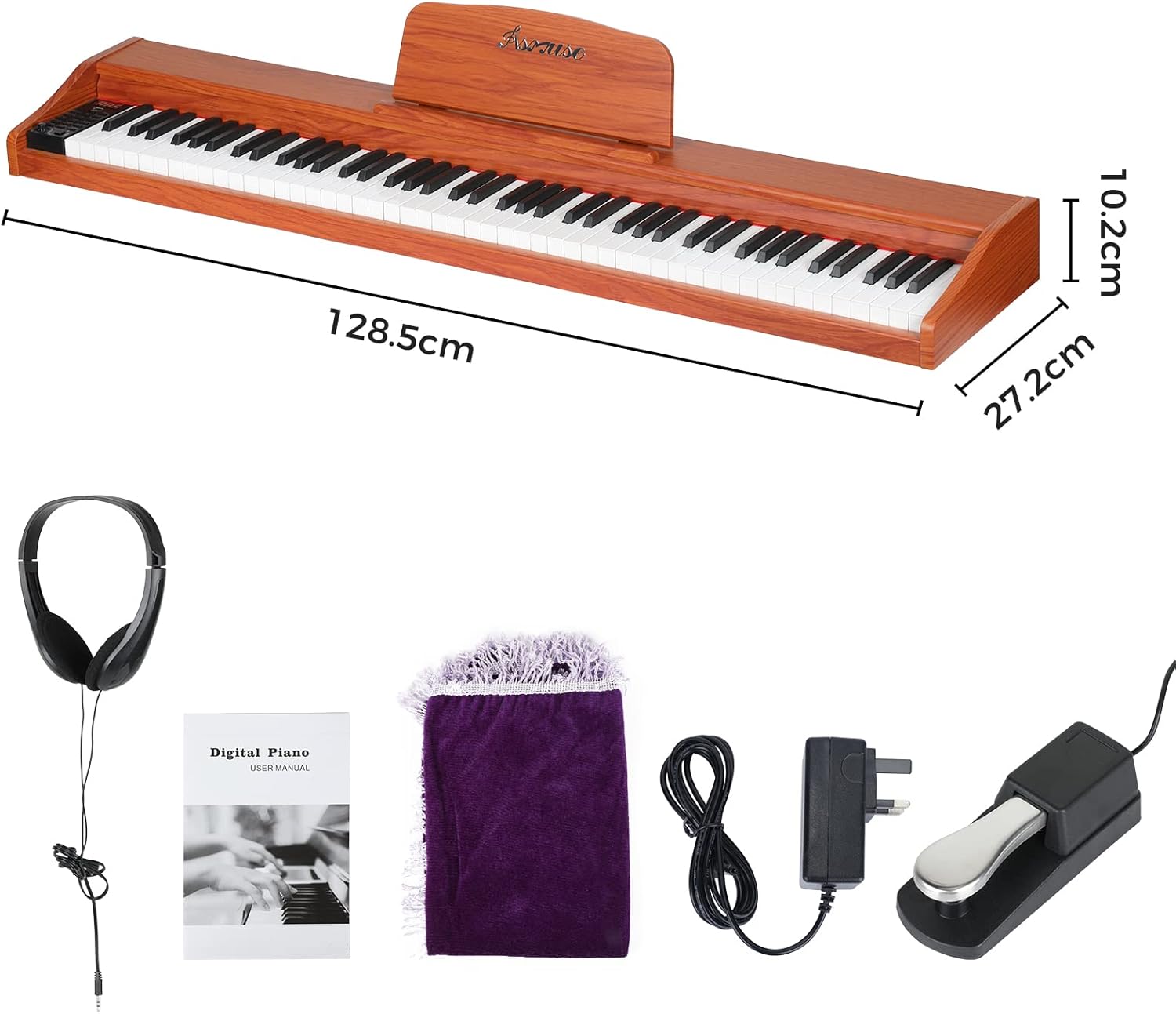
Figure 1: Digital Piano and Accessories
1.2 Power Connection
- Locate the DC 12V input port on the rear panel of the digital piano.
- Connect the power adapter cable to the DC 12V input port.
- Plug the power adapter into a standard electrical outlet.

Figure 2: Power Adapter Connection
1.3 Pedal and Audio Connections
The rear panel of the piano features various ports for external devices:
- SUS (Sustain Pedal): Connect the included sustain pedal here.
- AUDIO IN: For connecting external audio sources.
- AUDIO OUT: For connecting to external amplifiers or speakers.
- MIDI IN/OUT: For connecting to MIDI devices.
- MIDI USB: For connecting to a computer for MIDI software integration.

Figure 3: Rear Panel Connections
2. Operating Instructions
2.1 Power On/Off and Volume Control
- To power on the piano, press the ON/OFF button located on the control panel.
- To power off, press the ON/OFF button again.
- Adjust the master volume using the VOL knob. Turn clockwise to increase volume, counter-clockwise to decrease.
2.2 Control Panel Overview
The control panel provides access to various functions and settings. The LCD screen displays current selections and parameters.

Figure 4: Control Panel and LCD Screen
Key functions include:
- TONE: Select different instrument voices.
- RHYTHM: Choose from various rhythm patterns.
- TEMPO: Adjust the speed of rhythms or metronome.
- DRUMKITS: Access different drum sounds.
- INTEGRATE: (Specific function, refer to full manual for details)
- SPLIT: Divides the keyboard into two sections, each with a different voice.
- DUAL: Layers two voices simultaneously.
- TRANS (Transpose): Shift the pitch of the keyboard up or down.
- SYNC: Synchronize rhythm start with playing.
- BEAT: Adjust beat settings for metronome/rhythm.
- RECORD/REC-PLAY: Record your performance and play it back.
- DEMO: Play built-in demonstration songs.
- PREV/NEXT: Navigate through selections (tones, rhythms, songs).
- PLAY/PAUSE: Start or pause playback of rhythms, demos, or recorded tracks.
- ENBBLE/STOP: Enable or stop certain functions.
The piano features 88 semi-weighted keys, providing a realistic playing feel.

Figure 5: Key Features Overview
3. Maintenance
3.1 Cleaning
- Use a soft, dry cloth to wipe the surface of the piano.
- For stubborn dirt, slightly dampen the cloth with water and a mild soap solution, then wipe dry immediately.
- Avoid using abrasive cleaners, solvents, or chemical sprays, as these can damage the finish.
3.2 Storage and Care
- Store the piano in a cool, dry place away from direct sunlight and extreme temperatures.
- Protect the instrument from dust using the provided dust cover when not in use.
- Avoid placing heavy objects on the keyboard.
4. Troubleshooting
| Problem | Possible Cause | Solution |
|---|---|---|
| No power | Power adapter not connected or faulty; power outlet not working. | Ensure the power adapter is securely connected to the piano and a working electrical outlet. Try a different outlet. |
| No sound | Volume is too low; headphones connected; external speakers not connected or off. | Increase the VOL knob. Disconnect headphones if sound is desired from built-in speakers. Ensure external speakers are powered on and connected correctly to AUDIO OUT. |
| Distorted or unclear sound | Volume too high; faulty audio connection; internal issue. | Reduce the volume. Check all audio cables for secure connection. If the issue persists, contact customer support. |
| Keys not responding | Debris under keys; internal malfunction. | Gently inspect keys for any obstructions. If the problem continues, contact customer support. |
5. Specifications
| Feature | Detail |
|---|---|
| Brand | Asmuse |
| Model Number | 7690eed8-dca7-4869-aaf1-8f847d3101ee |
| Instrument Type | Digital Piano |
| Number of Keys | 88 |
| Key Type | Semi-weighted |
| Body Material | Plastic |
| Color | Brown |
| Dimensions (Product) | 128.5 cm (L) x 27.2 cm (W) x 10.2 cm (H) |
| Package Dimensions | 134 x 34.29 x 18.54 cm |
| Item Weight | 12.4 Kilograms |
| Supported Software | MIDI Software |
| Special Feature | Modern Asmuse functionalities (e.g., Metronome, Synchrony Chord, Recording) |
| Skill Level | Intermediate |
Figure 6: Product Dimensions
6. Warranty and Support
6.1 Product Warranty
For information regarding the product warranty, please refer to the warranty card included with your purchase or contact your retailer. Warranty terms and conditions may vary by region and retailer.
6.2 Customer Support
If you encounter any issues or have questions not covered in this manual, please contact Asmuse customer support for assistance. Contact details can typically be found on the manufacturer's official website or through your purchase documentation.