
SanBouSi EBC-A40L
EBC-A40L Battery Capacity Tester User Manual
Model: EBC-A40L | Brand: SanBouSi
Introduction
The SanBouSi EBC-A40L is a high-current battery charge and discharge capacity tester designed for 0-5V batteries. It provides precise measurements for voltage and current, making it suitable for performance testing and analysis of various battery types. This manual provides essential information for the safe and effective operation, setup, and maintenance of your EBC-A40L tester.
Package Contents
Upon unpacking, please verify that all items listed below are present and in good condition:
- 1 x EBC-A40L Battery Tester
- 1 x Online Cable (USB-TTL cable for PC connection)
- 1 x Testing Cable (for connecting to batteries)
- 1 x Power Supply Cable
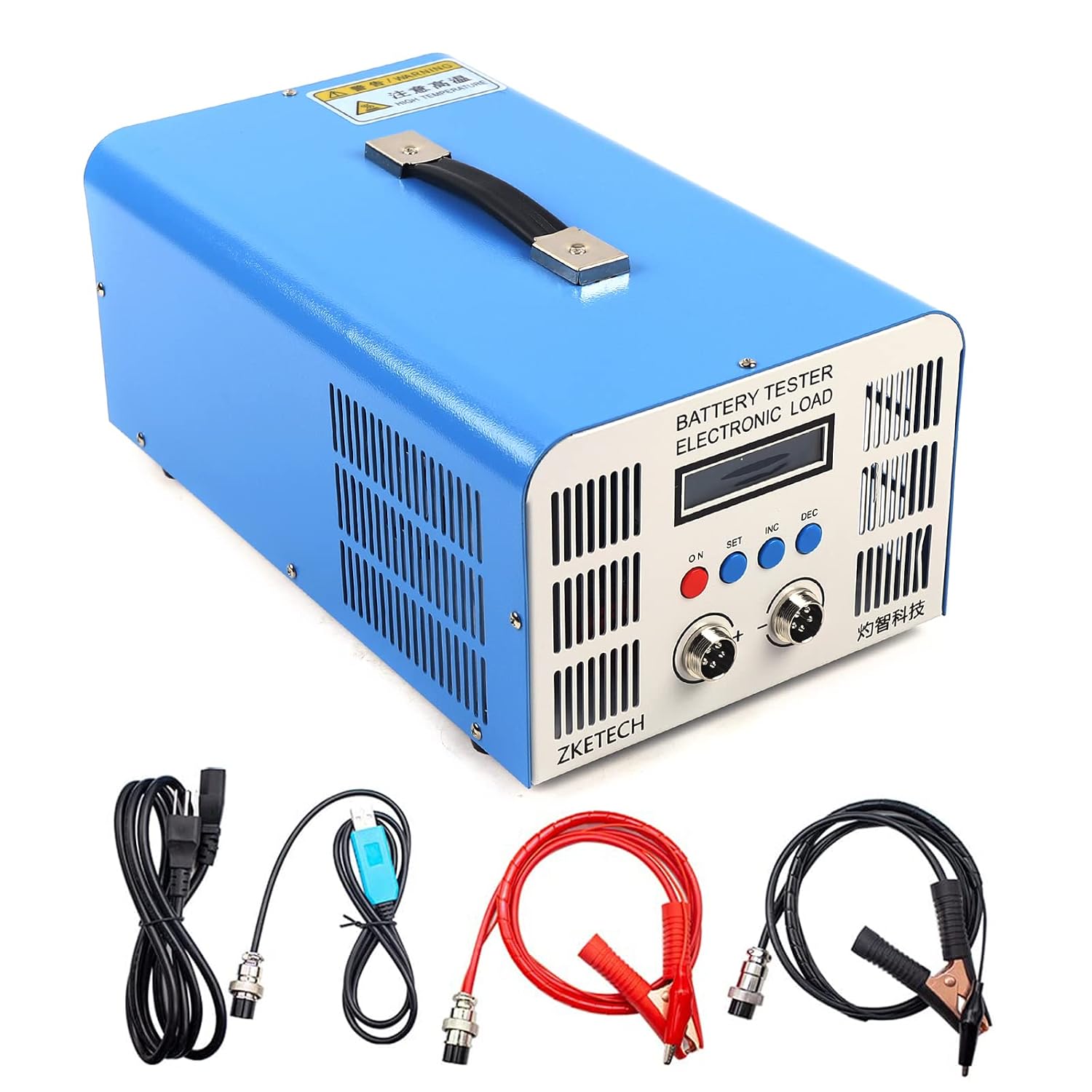
Image: The EBC-A40L Battery Capacity Tester shown with its included online cable, testing cable, and power supply cable.
Product Overview
Familiarize yourself with the main components and interfaces of the EBC-A40L tester.

Image: Front panel of the EBC-A40L tester, showing the display, control buttons (ON, SET, INC, DEC), and battery connection ports (+ and -).
- Display Screen: Shows real-time testing data and menu options.
- Control Buttons:
- ON: Power button.
- SET: Enters settings or confirms selections.
- INC: Increases values or navigates up.
- DEC: Decreases values or navigates down.
- Battery Connection Ports (+/-): For connecting the testing cables to the battery.

Image: Rear panel of the EBC-A40L tester, showing the power input socket and cooling fan.
- Power Input: Connects the supplied power supply cable.
- Cooling Fan: Ensures proper heat dissipation during operation.
Setup
- Placement: Place the EBC-A40L tester on a stable, flat surface with adequate ventilation. Ensure the cooling fan vents are not obstructed.
- Power Connection: Connect the supplied power supply cable to the power input socket on the rear of the tester and then plug it into a standard AC110V power outlet.
- Battery Connection:
- Connect the testing cable to the battery connection ports (+ and -) on the front of the tester.
- Connect the other end of the testing cable to the battery terminals, ensuring correct polarity (positive to positive, negative to negative).
- PC Connection (Optional): For advanced functions and data logging, connect the online cable (USB-TTL cable) from the tester to your computer's USB port. Install the necessary software drivers and application as per the instructions provided with the software.
Operating Instructions
Powering On/Off
- To power on, press the ON button.
- To power off, press and hold the ON button until the display turns off.
Basic Operation Modes
The EBC-A40L supports both charging and discharging modes for battery testing.
Discharging Mode (CC/CP)
This mode is used to discharge a battery to measure its capacity.
- Select the desired discharge mode:
- CC (Constant Current): Discharges the battery at a constant current.
- CP (Constant Power): Discharges the battery at a constant power.
- Set the discharge parameters using the SET, INC, and DEC buttons:
- For CC mode: Set the target discharge current (0.1-40A).
- For CP mode: Set the target discharge power (up to 200W).
- Set the termination voltage (cut-off voltage) at which the discharge will stop.
- Start the discharge process. The display will show real-time voltage, current, and accumulated capacity.
- The discharge will automatically terminate when the battery voltage reaches the set cut-off voltage, or manually if stopped.
Charging Mode (CV)
This mode is used to charge a battery at a constant voltage.
- Select CV (Constant Voltage) charging mode.
- Set the target charging voltage (0-5V).
- Set the termination current (cut-off current) at which the charging will stop (Max charging current is 20A).
- Start the charging process. The display will show real-time voltage, current, and accumulated charge.
- The charging will automatically terminate when the current drops below the set cut-off current, or manually if stopped.
Maintenance
- Cleaning: Regularly wipe the exterior of the tester with a soft, dry cloth. Do not use abrasive cleaners or solvents.
- Ventilation: Ensure the cooling fan and vents are free from dust and debris. Use compressed air to clear any blockages if necessary.
- Storage: When not in use, store the tester in a cool, dry place, away from direct sunlight and extreme temperatures.
- Cable Inspection: Periodically inspect all cables for signs of wear, damage, or corrosion. Replace damaged cables immediately.
Troubleshooting
| Problem | Possible Cause | Solution |
|---|---|---|
| Tester does not power on. | No power supply; Power cable not connected properly; Faulty power outlet. | Check power cable connection; Try a different power outlet; Ensure AC110V supply. |
| No reading on display. | Battery not connected; Incorrect battery polarity; Faulty testing cable. | Ensure battery is connected; Verify correct polarity (+ to +, - to -); Check testing cable for damage. |
| Discharge/Charge stops prematurely. | Termination voltage/current reached; Over-temperature protection; Loose connection. | Check set termination parameters; Allow unit to cool down if hot; Secure all cable connections. |
| Inaccurate readings. | Poor cable connection; Calibration required (advanced). | Ensure all connections are secure and clean; Refer to advanced user guide or contact support for calibration. |
Specifications
| Parameter | Value |
|---|---|
| Model | EBC-A40L |
| Voltage Range | 0-5V |
| Voltage Accuracy | 0.2% ± 0.003V |
| Current Range (Discharge) | 0.1-40A |
| Current Range (Charge) | 0.1-20A (Max) |
| Current Accuracy | 0.2% ± 0.01A |
| Discharging Mode | CC (Constant Current) / CP (Constant Power) |
| Discharging Termination | Time / Cut-off Voltage / Manual |
| Discharging Power | 200W Max |
| Charging Mode | CV (Constant Voltage) |
| Charging Termination | Cut-off Current / Manual |
| Heat Dissipation | Fan |
| Power Supply | AC110V |
| Packed Weight | 6 Kg |
| Capacity Measurement Resolution (<10Ah) | 0.001 Ah |
| Capacity Measurement Resolution (10-100Ah) | 0.01Ah |
| Capacity Measurement Resolution (>100Ah) | 0.1Ah |
Warranty and Support
For warranty information and technical support, please refer to the documentation provided with your purchase or contact SanBouSi customer service. Keep your purchase receipt as proof of purchase for warranty claims.
Manufacturer: ANINZE
Date First Available: July 21, 2022
For further assistance, you may also refer to the official product page or contact your retailer.
Ask a question about this manual
Ask about setup, troubleshooting, compatibility, parts, safety, or missing instructions. Manuals+ will review the question and use this page’s manual context to help answer it.