
1. Product Overview
The JJC 16 Slots Portable Micro SD Memory Card Case is designed to provide secure and organized storage for up to 16 Micro SD, Micro SDHC, or Micro SDXC cards. Its robust construction offers protection against environmental factors and physical impact, making it suitable for various usage scenarios.
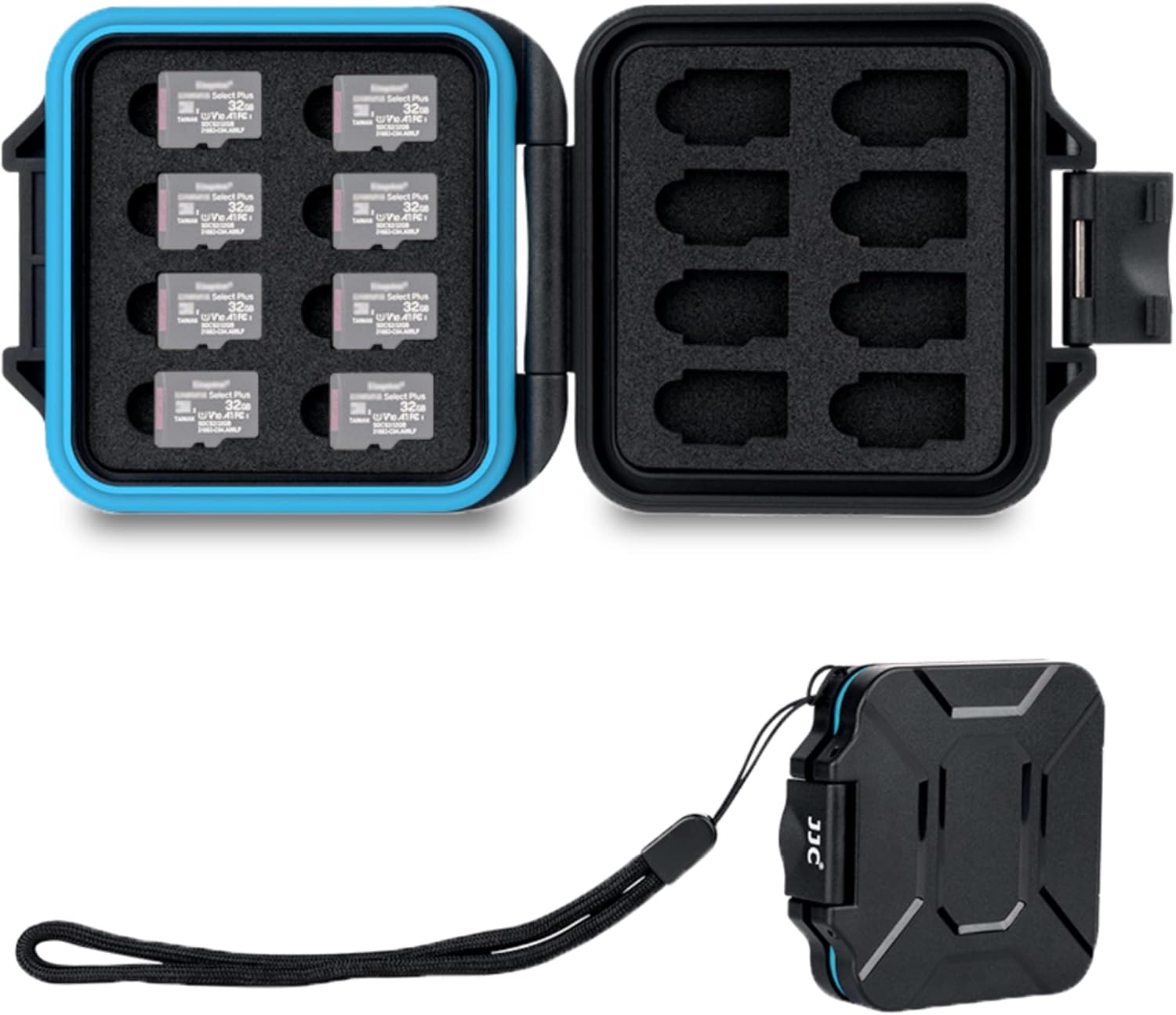
Image 1.1: The JJC 16 Slots Micro SD Memory Card Case shown both open, revealing the card slots, and closed with an attached lanyard.
2. Key Features
- Capacity: Holds up to 16 Micro SD/Micro SDHC/Micro SDXC/TF cards securely.
- External Protection: Constructed from high-strength ABS material to protect cards from dust, moisture, and water splashes.
- Internal Protection: Features a molded EVA foam interior with specific compartments to safely hold memory cards and reduce shock.
- Weatherproof Seal: Equipped with a snap closure and silicone O-ring seal for enhanced protection against dust and water.
- Portability: Includes a molded eyelet for attaching a strap or lanyard, and a compact, lightweight design for easy transport.

Image 2.1: Visual representation of the case's construction, highlighting the hard ABS exterior, snap closure with silicone seal, and soft EVA foam interior.
3. Setup and Card Insertion
- Opening the Case: Locate the snap closure on the side of the case. Gently lift the latch to open the case.
- Inserting Micro SD Cards: Identify the individual slots within the EVA foam interior. Each slot is precisely cut to fit a Micro SD card. Carefully align your Micro SD card with a slot and gently push it down until it is seated securely within the foam. Ensure the card is fully inserted and flush with the foam surface.
- Closing the Case: Once all cards are inserted, align the top and bottom halves of the case. Press firmly on the snap closure until it clicks into place, indicating a secure seal.

Image 3.1: A Micro SD card being inserted into one of the snug-fitting slots in the EVA foam interior.
4. Operation and Card Removal
- Accessing Cards: To retrieve a card, open the snap closure as described in the setup section.
- Removing Micro SD Cards: Gently press down on one edge of the Micro SD card within its slot. The card should slightly tilt, allowing you to grasp the opposite edge and pull it out. Avoid forcing the card to prevent damage to the card or the foam.
- Using the Lanyard: If desired, attach a lanyard to the molded eyelet on the case for convenient carrying. This helps prevent accidental drops and keeps the case accessible.

Image 4.1: Demonstrates the case's portability with an attached lanyard and its open state for card access.
5. Maintenance and Care
- Cleaning the Exterior: Wipe the exterior of the case with a soft, damp cloth. Avoid abrasive cleaners or solvents that could damage the ABS material.
- Cleaning the Interior: If the EVA foam interior requires cleaning, use a dry, soft brush or a can of compressed air to remove dust or debris. Do not use liquids on the foam.
- Maintaining the Seal: Periodically inspect the silicone O-ring seal for any signs of wear or damage. Ensure it is free from dirt or debris to maintain its weatherproof properties.
- Storage: Store the case in a cool, dry place away from direct sunlight and extreme temperatures when not in use.

Image 5.1: The case positioned on a wet surface, illustrating its water-resistant design.
6. Troubleshooting
- Cards not fitting: Ensure you are using Micro SD cards (including Micro SDHC/Micro SDXC/TF). The case is specifically designed for these card types and may not accommodate other formats.
- Case not closing securely: Check for any obstructions around the edges of the case or on the silicone O-ring seal. Ensure all cards are fully seated in their slots and not protruding.
- Difficulty removing cards: Micro SD cards are designed to fit snugly. Apply gentle pressure to one edge of the card to tilt it, then carefully pull it out. Avoid excessive force.
7. Specifications
| Brand | JJC |
| Model | 16 Micro SD |
| Capacity | 16 Micro SD/Micro SDHC/Micro SDXC/TF cards |
| Material | High-strength ABS exterior, EVA foam interior |
| Protection Features | Water-resistant, dust-proof, anti-shock |
| Dimensions | Approximately 3.1 x 2.7 x 0.6 inches (7.9 x 6.9 x 1.5 cm) |
| Weight | Approximately 1.4 ounces (40 grams) |
8. Warranty and Support
JJC products are manufactured to high-quality standards. For information regarding warranty coverage, technical support, or service inquiries, please refer to the official JJC website or contact your authorized retailer. Please retain your proof of purchase for warranty claims.