
Introduction
This manual provides comprehensive instructions for the installation, operation, maintenance, and troubleshooting of the FTVOGUE SF-HC30A3 Torch Height Controller. This device is designed for use with CNC plasma and flame cutting systems, offering precise arc voltage regulation for optimal cutting performance.
The SF-HC30A3 controller features an integrated design for high reliability and ease of use, utilizing full digital control technology and a robust aluminum alloy housing suitable for demanding industrial environments.
Safety Information
Always observe standard safety precautions when working with electrical equipment and cutting machinery. Ensure proper grounding and disconnect power before performing any installation, maintenance, or inspection. Refer to your CNC system and cutting machine manuals for additional safety guidelines.
- Ensure all connections are secure and correctly wired.
- Operate the device within its specified voltage and current limits.
- Avoid exposing the controller to excessive moisture or extreme temperatures.
- Do not attempt to modify the internal components of the controller.
Product Overview and Components
The FTVOGUE SF-HC30A3 Torch Height Controller is an integrated unit comprising a detector, controller, and driver. It uses stepper motor control for precise height adjustment.
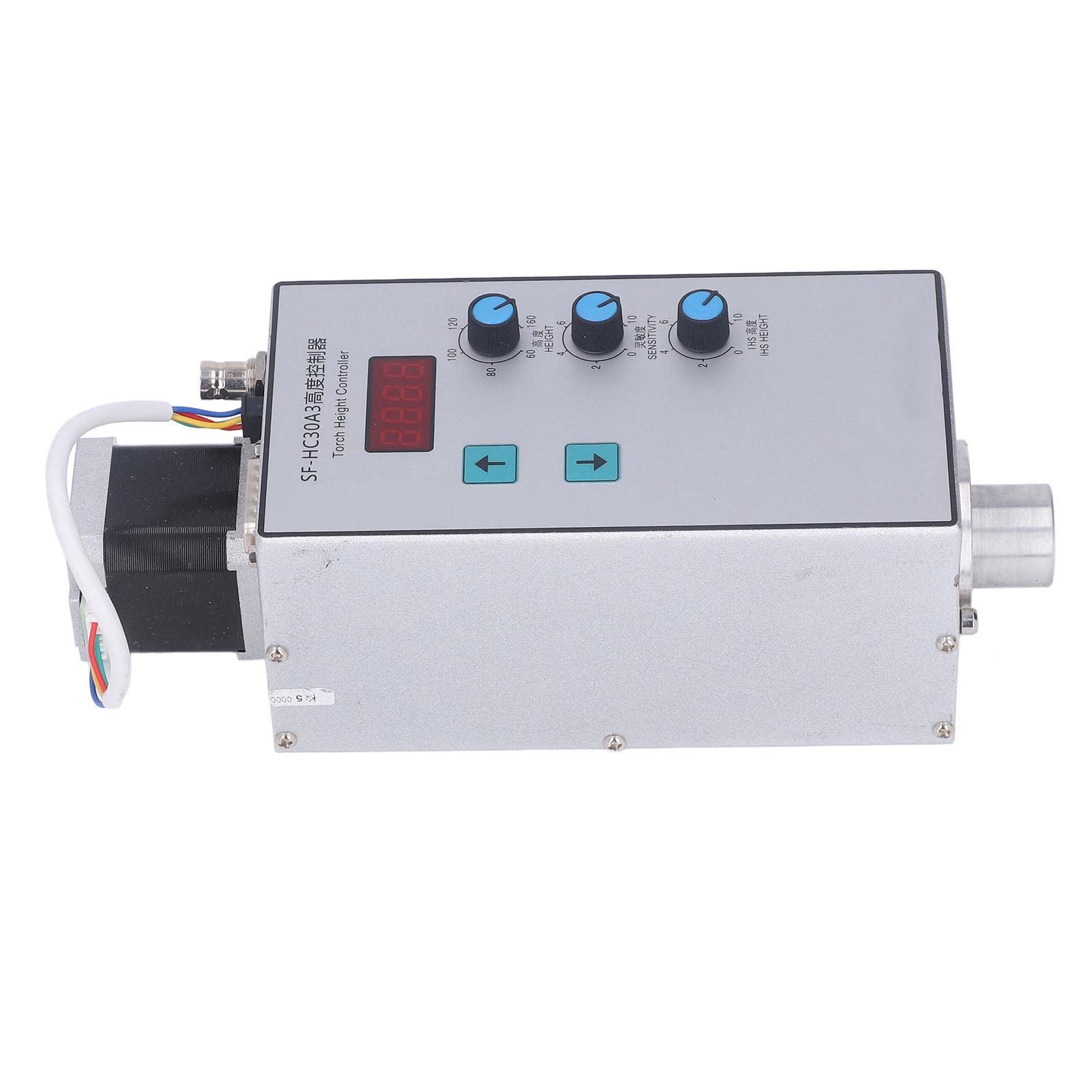
Image: The FTVOGUE SF-HC30A3 Torch Height Controller with its various components, including the main control unit, mounting brackets, and connection cables.
Key features include:
- Integrated Design: Detector, controller, and driver are combined into a single unit.
- Stepper Motor Control: Replaces traditional DC motors for fast and stable height adjustment.
- Full Digital Control: SMD technology ensures high reliability without adjustable components.
- Robust Housing: Sealed, anti-interference aluminum alloy shell suitable for harsh environments.
- Multiple Interfaces: Compatible with various CNC systems for plasma and flame cutting.
Setup and Installation
The SF-HC30A3 controller is designed for straightforward integration into existing CNC plasma or flame cutting systems. Follow these general steps for installation:
- Mounting the Controller: Securely attach the main control unit to your CNC machine frame using the provided mounting brackets. Ensure it is in a location that allows for easy access to controls and clear visibility of the display.
- Connecting the Stepper Motor: Connect the stepper motor cable from the controller to the torch lifting mechanism. The integrated design means the motor is typically part of the main unit.
- Power and Signal Connections: Connect the power supply and signal cables from your CNC system to the appropriate interfaces on the SF-HC30A3 controller. Refer to your CNC system's manual for specific wiring diagrams. The controller offers multiple interfaces for compatibility.
- Torch Arc Voltage Connection: Connect the arc voltage sensing cable from your plasma or flame torch to the controller. This connection is crucial for the arc voltage regulation function.
- Initial Power-Up: After all connections are secure, power on your CNC system and the SF-HC30A3 controller. Observe the digital display for initial status.

Image: Detail of the stepper motor connection point on the SF-HC30A3 controller.

Image: Side view of the SF-HC30A3 controller, highlighting the various input/output ports for system integration.
Operating Instructions
The SF-HC30A3 controller provides intuitive controls for adjusting torch height and sensitivity. The digital display shows current settings or status.

Image: Front panel of the SF-HC30A3 controller, showing the digital display, up/down buttons, and three adjustment knobs for IHS Height, Sensitivity, and Arc Voltage Height.
- Digital Display: Shows the current torch height, sensitivity, or other operational parameters.
- Up/Down Buttons: Used for manual torch height adjustment during setup or specific operations.
- IHS Height Knob: Adjusts the Initial Height Sensing (IHS) distance. This sets the initial standoff height before arc ignition.
- Sensitivity Knob: Controls the responsiveness of the arc voltage regulation. Higher sensitivity means quicker adjustments to changes in arc voltage.
- Height Knob: Sets the target arc voltage height during cutting. This is the primary control for maintaining a consistent cutting distance.
- Saving Settings: The controller allows for real-time saving of height and sensitivity settings, improving operational convenience.
For detailed calibration and specific operational modes, refer to the comprehensive programming guide for your CNC system in conjunction with this controller.
Maintenance
The SF-HC30A3 controller is designed for high reliability and requires minimal maintenance. However, regular checks can ensure optimal performance and longevity.
- Cleaning: Periodically clean the exterior of the controller with a dry, soft cloth. Avoid using harsh chemicals or abrasive materials.
- Connection Checks: Regularly inspect all electrical connections for tightness and signs of wear or corrosion. Re-secure any loose connections.
- Environmental Protection: Ensure the controller's sealed aluminum housing remains intact to protect against dust, moisture, and electromagnetic interference.
- Software Updates: If applicable, check with the manufacturer for any available firmware updates for improved performance or new features.
Troubleshooting
This section addresses common issues you might encounter with the SF-HC30A3 Torch Height Controller. For problems not listed here, contact technical support.
| Problem | Possible Cause | Solution |
|---|---|---|
| Controller does not power on. | No power supply or faulty connection. | Check power cable and connections. Ensure power source is active. |
| Torch height not adjusting. | Stepper motor connection issue, incorrect settings, or mechanical obstruction. | Verify stepper motor cable. Check Height and Sensitivity knob settings. Inspect torch lifting mechanism for obstructions. |
| Inconsistent cutting height. | Incorrect Sensitivity setting, poor arc voltage signal, or worn consumables. | Adjust Sensitivity knob. Check arc voltage sensing cable. Replace torch consumables as needed. |
| Digital display shows error code. | Internal fault or specific system error. | Note the error code and consult the manufacturer's technical support. |
Specifications
The following are the technical specifications for the FTVOGUE SF-HC30A3 Torch Height Controller:
| Model Number | SF-HC30A3 |
| Manufacturer | FTVOGUE |
| Item Weight | 5.87 pounds |
| Package Dimensions | 11.38 x 8.03 x 6.97 inches |
| Power Source | (Not specified in detail, assumed external) |
| Control Type | Full Digital, Stepper Motor |
| Adjustment Stroke | 100mm |
| Shell Material | Aluminum Alloy |
Warranty and Support
FTVOGUE is committed to providing high-quality products and customer satisfaction. If you have any questions or require assistance with your SF-HC30A3 Torch Height Controller, please contact our customer support team.
For after-sales inquiries, please reach out to the seller or manufacturer directly. We are dedicated to addressing your concerns seriously and providing high-quality after-sales service.