
HANLIM HL-A-P10
HANLIM Home Stereo System User Manual
Model: HL-A-P10
1. Introduction
This user manual provides detailed instructions for the operation and maintenance of your HANLIM Home Stereo System. Please read this manual thoroughly before using the product to ensure proper and safe operation. Keep this manual for future reference.

Figure 1: Front view of the HANLIM Home Stereo System.
2. Package Contents
Verify that all items are included in the package:
- 1 x Home Stereo System (DVD/CD Player integrated)
- 1 x Remote Control (AAA batteries not included)
- 1 x US Adapter (1.5m)
- 1 x HDMI Cable (1.5m)
- 1 x RCA Cable (1m)
- 1 x FM Antenna
- 1 x User Manual/Warranty
3. Setup Guide
3.1 Connecting to Power
- Ensure the power switch on the rear panel of the stereo system is in the OFF position.
- Connect the US Adapter to the AC IN port on the rear of the system.
- Plug the other end of the US Adapter into a standard wall outlet (AC 110-240V, 50/60Hz).
3.2 Connecting to a TV or Projector (Optional)
To enjoy DVD movies on a larger screen, connect the stereo system to your TV or projector using either the HDMI or RCA cables provided.
- HDMI Connection: Connect one end of the HDMI cable to the HDMI OUT port on the stereo system and the other end to an HDMI input on your TV or projector.
- RCA Connection: Connect the RCA cable (red, white, yellow) to the VIDEO OUT and AUDIO OUT (L/R) ports on the stereo system, matching the colors to the corresponding input ports on your TV or projector.
3.3 Connecting the FM Antenna
For optimal FM radio reception, connect the FM antenna to the FM ANT port on the rear of the system. Extend the antenna fully and position it for the best signal.

Figure 2: Rear panel connections and setup with a TV.
3.4 Initial Power On
After all connections are made, switch the power switch on the rear panel to the ON position. Then, press the Power button on the top control panel or the remote control to turn on the system.
Video 1: Demonstrates the initial setup, including connecting power and cables, and powering on the system.
4. Operating Instructions
The HANLIM Home Stereo System offers multiple playback modes and functions. Use the SOURCE button on the control panel or remote to switch between modes (DVD/USB, Bluetooth, AUX, FM Radio).

Figure 3: Overview of the system's multi-function capabilities.
4.1 DVD/CD Playback
- Press the OPEN/CLOSE button to open the disc tray.
- Carefully place a DVD or CD (CD / CD-R / CD-RW / MP3 / DVD-R / RW / DVD+R / RW / DVD-Video / VCD / SVCD) onto the disc tray with the label side facing up.
- Press the OPEN/CLOSE button again to close the tray. The system will automatically detect the disc and begin playback.
- Use the PLAY/PAUSE, NEXT/PREVIOUS, and STOP buttons for playback control.
Note: Blu-ray discs are not supported.

Figure 4: Enjoying movies with the built-in DVD player.
4.2 FM Radio Operation
- Switch the source to FM Radio mode.
- Press the SCAN button to automatically scan and save available FM stations (87.5~108MHz).
- Use the NEXT/PREVIOUS buttons to navigate through saved stations.
4.3 Bluetooth Connectivity
- Switch the source to Bluetooth (BT) mode. The system will enter pairing mode, indicated by a flashing "BT" on the LED screen.
- On your mobile device (phone, tablet, computer), enable Bluetooth and search for available devices.
- Select "HANLIM" or "HL-A-P10" from the list of devices to pair. Once connected, "BT" will stop flashing.
- You can now play audio from your device through the stereo system.
Note: Bluetooth earphones are not supported.
4.4 USB Playback
- Insert a USB flash drive (up to 32GB) containing MP3 or WMA audio files into the USB IN port.
- Switch the source to USB mode. The system will automatically begin playing audio files from the USB drive.
- Use the playback control buttons (PLAY/PAUSE, NEXT/PREVIOUS) to manage your music.
4.5 AUX In Connection
- Connect an external audio device (e.g., phone, computer, MP3 player) to the AUX IN port using a 3.5mm audio cable (not included).
- Switch the source to AUX IN mode.
- Play audio from your connected device.
4.6 Karaoke Function
- Connect up to two microphones (not included) to the MIC 1 and MIC 2 (6.5mm) input jacks.
- Adjust the microphone volume using the MIC VOL knob.
- Adjust the echo effect using the ECHO knob for enhanced vocal performance.
- The system supports karaoke discs (CDG) for on-screen lyrics when connected to a TV.
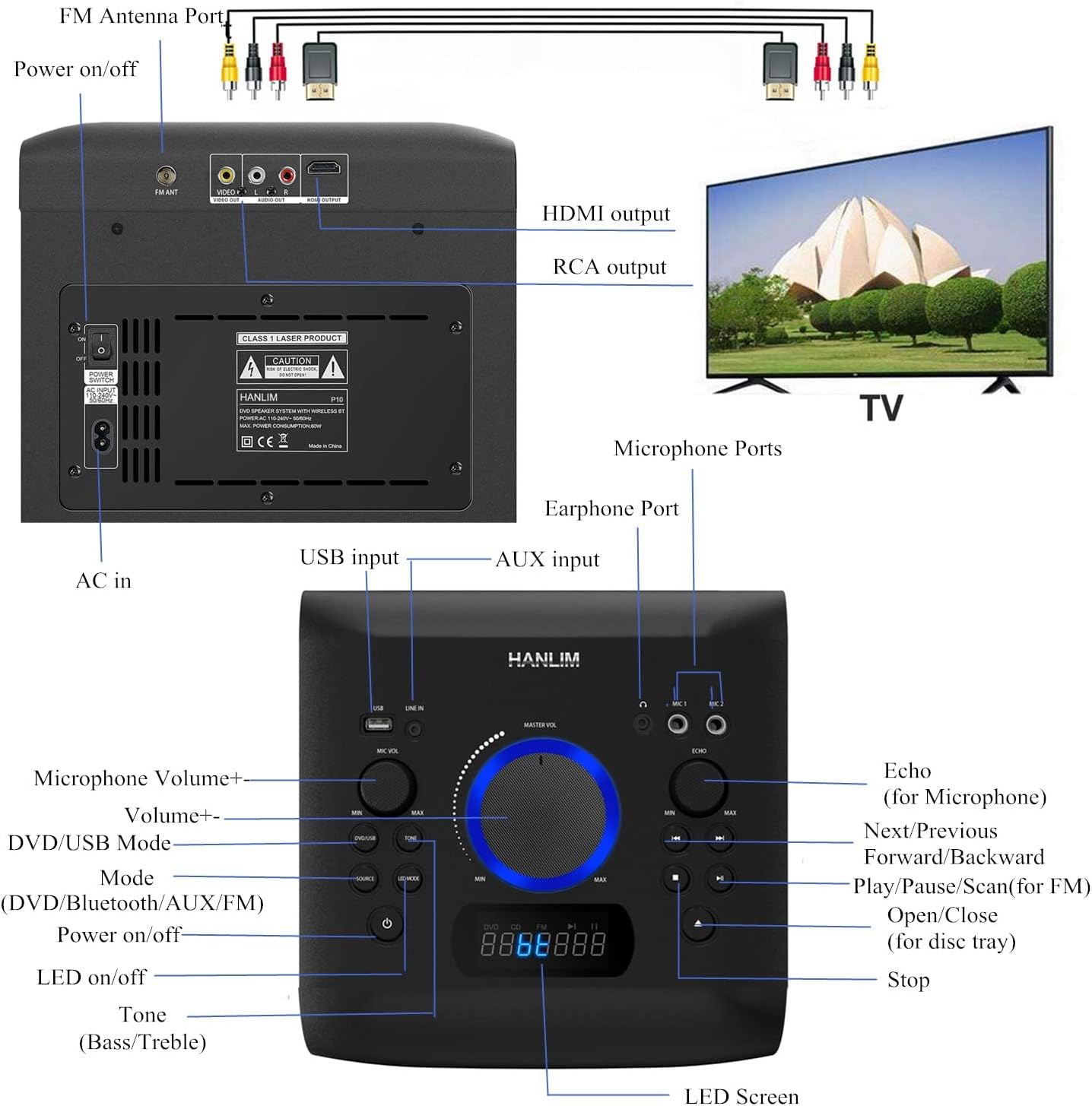
Figure 5: Enjoying karaoke with dual microphone inputs.
4.7 Earphone Jack
Connect 3.5mm earphones to the EARPHONE JACK for private listening.
4.8 Control Panel Overview
Familiarize yourself with the main controls on the top panel:
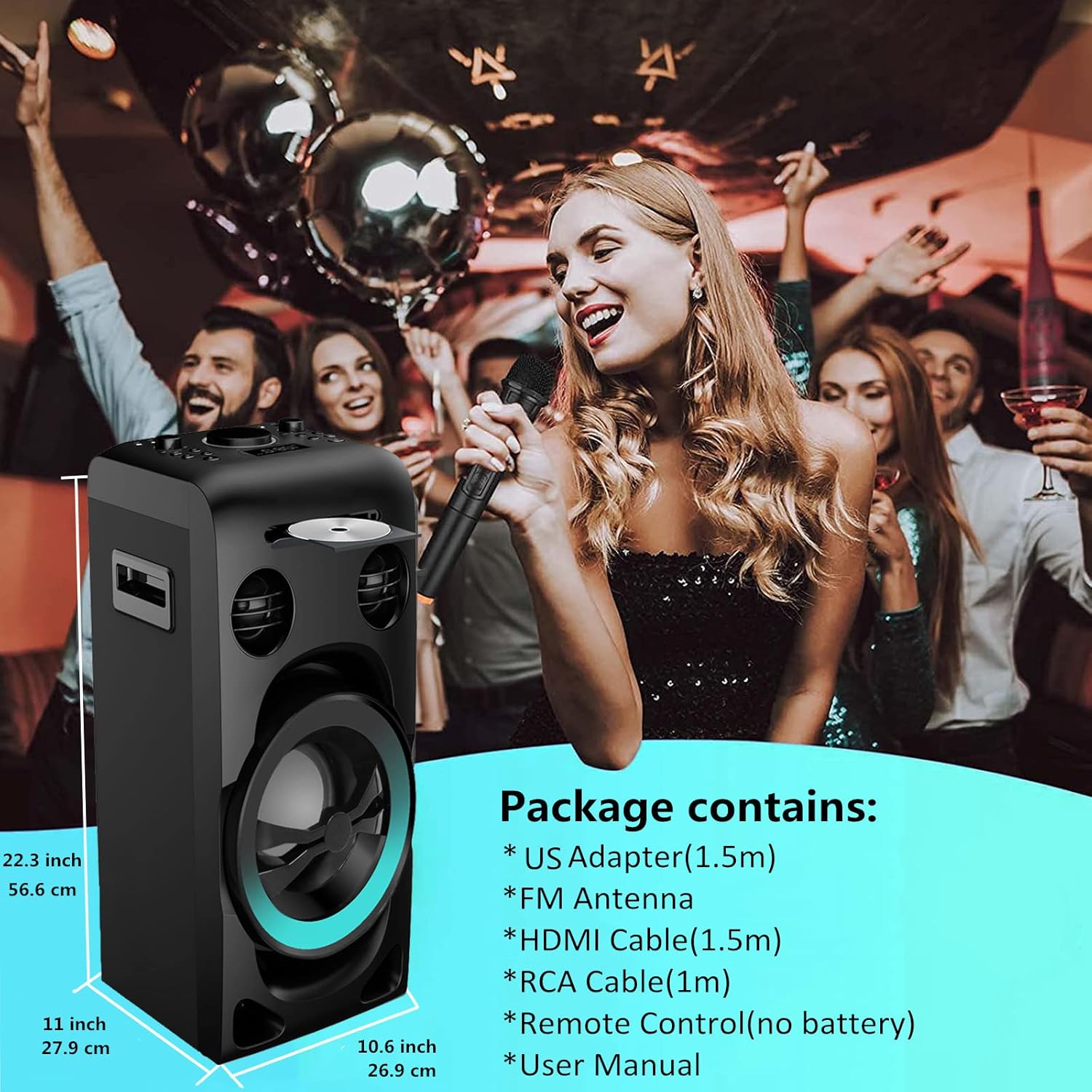
Figure 6: Detailed control panel layout.
- MASTER VOL: Adjusts the overall system volume.
- MIC VOL: Adjusts microphone volume.
- ECHO: Adjusts the microphone echo effect.
- TONE (Bass/Treble): Adjusts bass and treble levels.
- SOURCE: Switches between DVD/USB, Bluetooth, AUX, and FM Radio modes.
- LED MODE: Changes the lighting effects around the woofer.
- PLAY/PAUSE/SCAN: Controls playback and initiates FM scan.
- NEXT/PREVIOUS: Skips tracks/stations.
- OPEN/CLOSE: Opens and closes the disc tray.
- STOP: Stops playback.
Video 2: Demonstrates various operating functions including DVD playback, volume adjustment, tone control, LED light modes, source switching, microphone connection, USB playback, and Bluetooth pairing.
5. Maintenance
5.1 Cleaning the Unit
To maintain the appearance of your stereo system, wipe the exterior surfaces with a soft, dry cloth. Do not use abrasive cleaners, waxes, or solvents as they may damage the finish. Ensure the unit is powered off and unplugged before cleaning.
5.2 Disc Care
Handle discs by their edges to avoid fingerprints. Keep discs clean and free of scratches. Store discs in their cases when not in use to prevent dust and damage.
5.3 Speaker Care
Avoid placing heavy objects on the speakers. Keep speakers away from direct sunlight, heat sources, and excessive moisture to prevent damage to the components.
6. Troubleshooting
If you encounter issues with your HANLIM Home Stereo System, refer to the following common problems and solutions:
| Problem | Possible Cause | Solution |
|---|---|---|
| No power | Power cable not connected; Power switch off; Outlet malfunction. | Ensure power cable is securely connected. Turn the rear power switch to ON. Try a different power outlet. |
| No sound | Volume too low; Incorrect source selected; Audio cables loose. | Increase MASTER VOL. Press SOURCE to select the correct input. Check all audio cable connections. |
| Disc not playing | Disc inserted incorrectly; Disc is dirty or scratched; Unsupported disc format. | Re-insert disc correctly. Clean the disc. Ensure it is a supported format (not Blu-ray). |
| Bluetooth not pairing | System not in BT mode; Device too far; Bluetooth on device is off. | Switch system to BT mode. Ensure device is within 10 meters. Turn Bluetooth on your device ON. |
| Remote control not working | Batteries are dead or inserted incorrectly; Obstruction between remote and system. | Replace AAA batteries, ensuring correct polarity. Remove any obstructions. |
7. Specifications
Key technical specifications of the HANLIM Home Stereo System:

Figure 7: Product dimensions.
| Feature | Detail |
|---|---|
| Model Name | HL-A-P10 |
| Speaker Type | Component |
| Speaker Configuration | 2.5 inch Tweeter*2, 6.5 inch Woofer |
| Max RMS Output | 80W |
| Speaker Maximum Output Power | 300 Watts |
| Product Dimensions (D x W x H) | 11"D x 10.6"W x 22.3"H (56.6 x 27.9 x 26.9 cm) |
| Item Weight | 19.8 pounds (9 Kilograms) |
| Connectivity Technology | RCA, Bluetooth, Auxiliary, USB, HDMI |
| Wireless Communication | Bluetooth |
| Bluetooth Range | 10 Meters |
| USB Support | USB 2.0, up to 32GB (MP3/WMA) |
| FM Radio Frequency | 87.5~108MHz |
| Power Source | Corded Electric (AC 110-240V, 50/60Hz) |
| Material | Plastic |
| Control Method | Buttons Control, Remote Control |
8. Warranty and Support
Your HANLIM Home Stereo System comes with a one-year warranty from the date of purchase. This warranty covers manufacturing defects and workmanship under normal use.
For warranty claims, technical support, or any inquiries, please contact HANLIM customer service. Refer to the contact information provided on the warranty card included in your package or visit the official HANLIM website.
Please retain your proof of purchase for warranty validation.
Related documentsHL-A-P10


Ask a question about this manual
Ask about setup, troubleshooting, compatibility, parts, safety, or missing instructions. Manuals+ will review the question and use this page’s manual context to help answer it.