
1. Introduction
This manual provides detailed instructions for the installation, operation, and maintenance of your Blindsmart Plantation Shutters Motor, Model JM36. This smart electric motor is designed to automate the opening and closing of interior window plantation shutters, offering convenience and enhanced control. Please read this manual thoroughly before installation and use to ensure proper function and safety.
2. Safety Information
- Ensure all power sources are disconnected before installation or maintenance.
- Keep the device away from water and high humidity environments.
- Do not attempt to disassemble or repair the motor yourself. Contact qualified personnel for service.
- Keep children and pets away from moving parts during operation.
- Use only the specified charging methods (USB or solar panel) to prevent damage or fire hazards.
3. Package Contents
Verify that all items are present in your package:
- 1 x Blindsmart Plantation Shutters Motor
- 1 x 64mm Bracket
- 1 x 89mm Bracket
- 1 x USB Zigbee Dongle
- 1 x Solar Panel
- USB Charging Cable
- Adhesive Pads for installation
4. Product Features
- Smart Automation: Automates existing plantation shutters for interior windows.
- Rechargeable Battery: Built-in 3200 mAh large capacity lithium battery for long-lasting operation.
- Dual Charging Options: Can be charged via the included solar panel or USB interface. (Note: Solar panel is an auxiliary charging accessory; for consistent power, use the USB power plug.)
- Zigbee Connectivity: This version supports Zigbee for smart home integration and app control. (Note: Remote version supports remote control only. For app control, ensure you have the Bluetooth or Zigbee version.)
- App Control: Control the motor directly from your smartphone to open or close shutters.
- Easy Installation: Supports two installation methods: adhesive or screw-based.
5. Setup and Installation
Follow these steps to install your Blindsmart Plantation Shutters Motor:
- Choose the Correct Bracket: Use the provided measuring tool to determine whether the 64mm or 89mm louver bracket is suitable for your shutters.
- Prepare the Shutter Rod: Remove the existing tilt rod from your plantation shutter.
- Attach the Coupling: Secure the appropriate coupling (small, medium, or large, determined by the measuring tool) to the shutter's tilt mechanism. Ensure it is firmly attached.
- Mount the Motor: Attach the motor housing to the left side of the shutter frame using either the adhesive pads or screws. Ensure it is positioned correctly to align with the coupling.
- Connect Motor to Coupling: Carefully slide the motor onto the coupling, ensuring a secure connection.
- Install Solar Panel (Optional): If using the solar panel, attach it to the window glass in an area that receives ample sunlight using the suction cups. Plug the solar panel cable into the motor's USB charging port.
- Connect to App (Zigbee Version):
- Plug the USB Zigbee dongle into a powered USB port.
- Press the button on the Zigbee Dongle 5 times until the indicator flashes.
- Open the TUYA Smart App and add devices through your TUYA Zigbee Hub.
- Follow the in-app instructions to pair the motor.
- Connect to App (Bluetooth Version):
- Turn on your phone's Bluetooth.
- Open the TUYA Smart App.
- Wait for the device to be found automatically and follow the in-app instructions to pair.
- Calibrate the Motor: After successful pairing, calibrate the motor through the app to set the full open and full closed positions of your shutters. This ensures accurate operation.

Figure 5.1: Product Parameters and Components. Shows dimensions of the motor, optional solar panels, and louver brackets.

Figure 5.2: Version Selection. Illustrates Zigbee, Bluetooth, and Remote control versions and their components.

Figure 5.3: Remote Control Connection Steps. Shows pressing setup button, channel button, and up button for pairing.
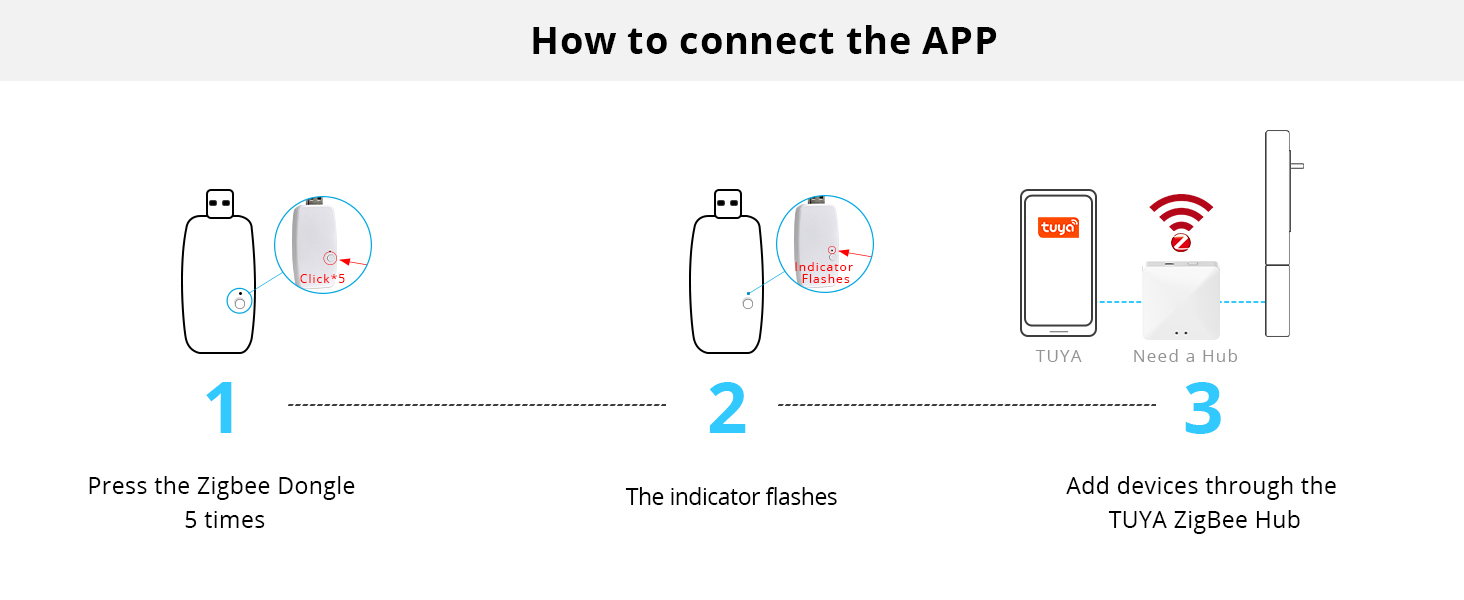
Figure 5.4: App Connection Steps for Zigbee Version. Illustrates pressing dongle button, indicator flashing, and adding device via TUYA Zigbee Hub.

Figure 5.5: App Connection Steps for Bluetooth Version. Shows turning on Bluetooth, opening TUYA App, and automatic device discovery.
6. Operating Instructions
The Blindsmart Plantation Shutters Motor offers multiple control options:
- App Control: Use the dedicated smartphone application (TUYA Smart App) to open, close, or adjust the tilt of your shutters. The app allows for precise control and scheduling.
- Remote Control: If you have the Remote version or a compatible remote, you can control the motor wirelessly. Refer to the remote's specific instructions for pairing and operation.
- Voice Control: Integrate your Zigbee or Bluetooth version motor with compatible smart home assistants (e.g., Google Assistant, Amazon Alexa) via a smart hub for convenient voice commands.
- Manual Adjustment: The motor allows for manual adjustment of the shutter slats if needed.

Figure 6.1: App Control Interface. Demonstrates controlling shutter movement via a smartphone application.

Figure 6.2: RF Remote Control. Shows a remote being used to control the shutter motor.
7. Setting Limits
You can set specific upper, lower, and middle limits for your shutters through the control application. This allows for customized light control and privacy settings.
- Upper Limit: Defines the fully open position of the shutters.
- Lower Limit: Defines the fully closed position of the shutters.
- Middle Limits: Allows for intermediate positions, providing partial light entry or privacy.
Refer to the app's settings for detailed instructions on how to program these limits.

Figure 7.1: Shutter Limit Settings. Visual representation of upper, middle, and lower limit positions for the shutters.
8. Maintenance
- Charging: The motor's built-in 3200 mAh lithium battery can be charged via the solar panel or a USB cable. While the solar panel provides auxiliary charging, it is recommended to use the USB interface with a power plug for more consistent and reliable charging, especially in low-light conditions.
- Cleaning: Gently wipe the motor and solar panel with a soft, dry cloth. Avoid using harsh chemicals or abrasive materials.
- Firmware Updates: Periodically check the companion app for any available firmware updates to ensure optimal performance and access to new features.

Figure 8.1: Rechargeable Battery. Highlights the built-in large-capacity lithium battery and USB charging port.
9. Troubleshooting
| Problem | Possible Cause | Solution |
|---|---|---|
| Motor not responding to app/remote. | Low battery; Not paired; Out of range; Hub connection issue (Zigbee). | Charge the motor; Re-pair the device; Ensure device is within range of phone/hub; Check hub's internet connection. |
| Shutters not opening/closing fully. | Calibration issue; Obstruction. | Re-calibrate the motor's limits via the app; Check for any physical obstructions. |
| Solar panel not charging effectively. | Insufficient sunlight; Panel dirty; Panel not connected. | Ensure panel receives direct sunlight; Clean the solar panel; Verify cable connection. |
| Motor makes unusual noise. | Misalignment; Internal issue. | Check motor and coupling alignment; If noise persists, contact customer support. |
10. Specifications
- Model Number: JM36
- Brand: Blindsmart
- Connectivity: Zigbee Version
- Battery: 1 Product Specific rechargeable lithium battery (3200 mAh), included
- Charging: USB interface, Solar Panel (auxiliary)
- Item Weight: 1.21 pounds
- Package Dimensions: 16.06 x 6.93 x 1.3 inches
- Included Components: Motor, 64mm Bracket, 89mm Bracket, USB Zigbee dongle, Solar panel
11. Product Videos
Smart Motor for Plantation Shutters
This video demonstrates the Blindsmart Smart Motor in action, showcasing its functionality with plantation shutters.
Automatic Opener Smart Motor for Shutters Window Shutters
A demonstration video highlighting the automatic opening and closing capabilities of the Blindsmart Smart Motor for window shutters.
12. Warranty and Support
For warranty information, technical support, or service inquiries, please refer to the contact details provided with your product packaging or visit the official Blindsmart website. Keep your purchase receipt for warranty claims.