
MeLE Quieter 3C
MeLE Quieter3C Fanless Mini PC User Manual
Model: Quieter 3C (3C-N5105-8GB-256GB)
Introduction
This manual provides detailed instructions for the setup, operation, and maintenance of your MeLE Quieter3C Fanless Mini PC. Please read this manual thoroughly before using the device to ensure proper functionality and to maximize its lifespan. The MeLE Quieter3C is a compact, fanless mini PC designed for quiet and stable performance in various applications, from home office to industrial use.
What's in the Box
Verify that all items are present in the package:
- 1x Mini PC Quieter 3C 82E
- 1x Power Adapter 12V/2A
- 1x VESA Mount
- 1x User Manual (this document)
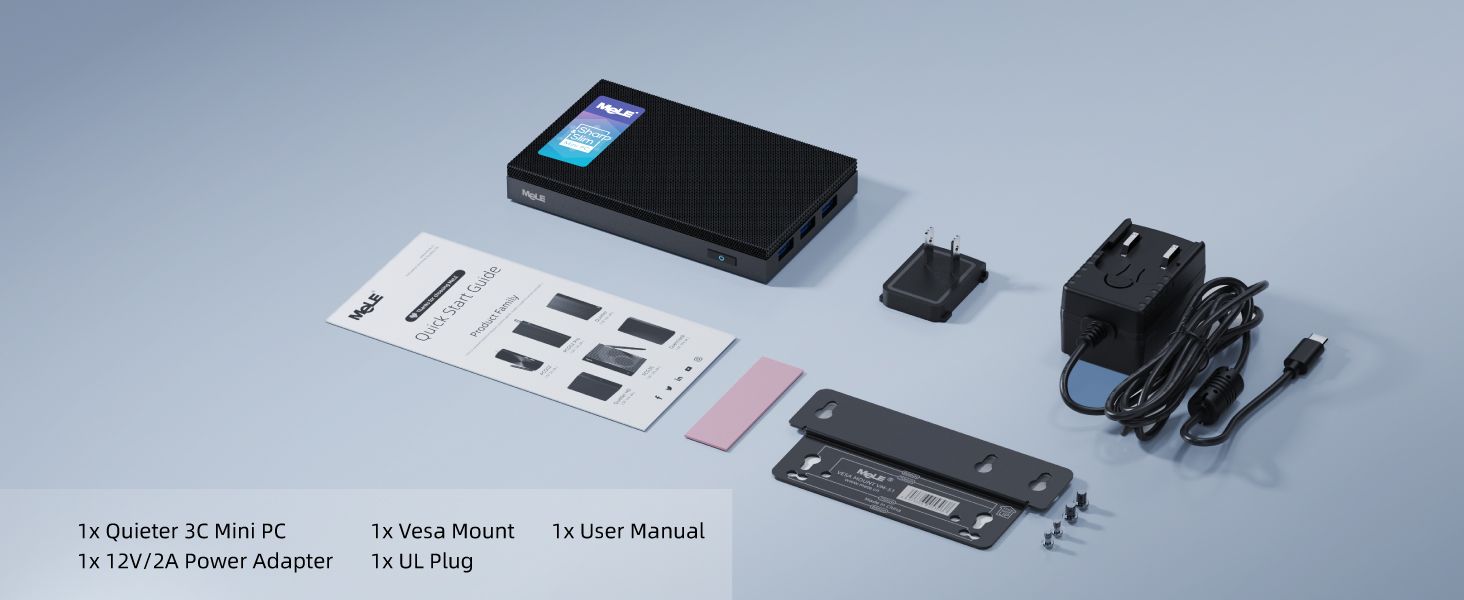
Image: Contents of the MeLE Quieter3C package, showing the mini PC, power adapter, VESA mount, and user manual.
Product Overview
The MeLE Quieter3C is a compact and efficient fanless mini PC. Key features include:
- Processor: Intel Celeron N5105 (2.9 GHz, 4 Cores, 4 Threads)
- Memory: 8GB LPDDR4 RAM (2933 MHz)
- Storage: 256GB eMMC, expandable via Micro SD (up to 1TB) and M.2 NVMe 2280 SSD (up to 4TB)
- Graphics: Intel UHD Graphics, supporting triple 4K display output
- Connectivity: WiFi 5 (802.11ac) with AC9560 module, Bluetooth 5.1, Gigabit Ethernet
- Ports: Full-function USB Type-C (data, charging, video), multiple USB 3.2 ports, HDMI 2.0, 3.5mm audio jack
- Cooling: Fanless design for silent operation and dust resistance

Image: Top-down view of the MeLE Quieter3C Mini PC, highlighting its compact form factor and port layout.
Setup Instructions
- Connect to Display: Connect your monitor(s) to the Mini PC using the HDMI ports or the full-function USB Type-C port. The device supports up to three 4K displays simultaneously.
- Connect Peripherals: Plug in your keyboard, mouse, and other USB devices into the available USB 3.2 ports.
- Power Connection:
- Use the provided 12V/2A power adapter and connect it to the DC-in port.
- Alternatively, you can power the device via the PD-enabled USB Type-C port (ensure your power supply is over 24W). This port also supports data transfer and video output.
- Network Connection: Connect an Ethernet cable to the Gigabit Ethernet port for a wired network connection, or use the built-in WiFi 5 for wireless connectivity.
- Power On: Press the power button located on the device. The system will boot up.

Image: Detailed diagram illustrating the rich I/O ports of the MeLE Quieter3C, including USB-C, HDMI, USB 3.2, Micro-SD, audio jack, Ethernet, and power button.
Operating Instructions
Initial Boot and Operating System
Upon first power-on, the Mini PC will typically guide you through the initial setup of the pre-installed operating system (e.g., Windows 11 Pro). Follow the on-screen prompts to configure language, region, network, and user accounts.
Connecting to Networks
- Wired Connection: Plug an Ethernet cable into the RJ45 port. The system should automatically detect and connect to the network.
- Wireless Connection: Access the network settings in your operating system, select your desired Wi-Fi network, and enter the password if required. The device supports WiFi 5 (802.11ac) for stable wireless connectivity.
Display Configuration
The MeLE Quieter3C supports triple display output. You can connect monitors via the two HDMI 2.0 ports and one full-function USB Type-C port. To configure multiple displays, access your operating system's display settings (e.g., right-click on the desktop in Windows and select "Display settings").

Image: The MeLE Quieter3C Mini PC connected to three external monitors, illustrating its capability for triple 4K display output.
Storage Expansion
The device comes with 256GB eMMC storage. For additional storage, you can:
- Micro SD Card: Insert a Micro SD card into the dedicated slot. It supports up to 1TB.
- M.2 NVMe SSD: The Mini PC includes an internal M key PCIe 3.0 x2 M.2 SSD NVMe 2280 slot, supporting up to 4TB. This requires opening the device and installing an M.2 SSD (not compatible with SATA interface). Refer to the detailed installation guide for this procedure if available, or seek professional assistance.

Image: An exploded view of the MeLE Quieter3C showing the internal M.2 NVMe 2280 SSD slot for storage upgrades.
Thermal Management
The MeLE Quieter3C features an elegant fanless cooling design, ensuring silent operation and dust resistance. This passive cooling system prevents overheating and supports 24/7 operation. Due to the fanless nature, the surface temperature of the device may reach between 55°C to 70°C during operation. This is normal for fanless mini PCs and meets the safety standards of International Electrotechnical IEC62368-1:2018. Ensure adequate airflow around the device and avoid placing it in enclosed spaces to optimize heat dissipation.

Image: A diagram demonstrating the fanless thermal dissipation of the MeLE Quieter3C, with arrows indicating heat flow and a graph showing stable performance across various ambient temperatures.

Image: An exploded view of the MeLE Quieter3C, highlighting its internal components and the absence of a fan, ensuring silent operation.
Specifications
| Feature | Detail |
|---|---|
| Brand | MeLE |
| Series | Quieter 3C |
| Model Number | Quieter 3C |
| Processor | Intel Celeron N5105 (2.9 GHz) |
| RAM | 8 GB LPDDR4 (2933 MHz) |
| Storage | 256 GB eMMC |
| Expandable Storage | Micro SD (up to 1TB), M.2 NVMe 2280 SSD (up to 4TB) |
| Graphics Coprocessor | Intel UHD Graphics |
| Max Screen Resolution | 3840 x 2160 pixels (4K) |
| Wireless Type | 802.11ax (WiFi 5), Bluetooth 5.1 |
| Operating System | OS (e.g., Windows 11 Pro) |
| Ports | Full-function USB Type-C (PD3.0, DP1.4), 2x USB 3.2 (10Gbps), 2x USB 3.2 (5Gbps), 2x HDMI 2.0, Gigabit Ethernet, 3.5mm Audio Jack, Micro SD Slot, Kensington Lock Slot |
| Item Weight | 1.08 pounds |
| Product Dimensions | 5.12 x 3.15 x 0.79 inches |
| Power Input | 12V/2A DC or USB-C PD (over 24W) |
Troubleshooting
- No Power:
- Ensure the power adapter is securely connected to both the Mini PC and a working power outlet.
- If using USB-C PD, verify the power supply provides over 24W and the cable is fully functional.
- Try a different power outlet.
- No Display Output:
- Check all HDMI and USB-C display cables are securely connected to both the Mini PC and the monitor.
- Ensure the monitor is powered on and set to the correct input source.
- Test with a single monitor and cable to isolate the issue.
- No Internet Connection:
- For wired connections, ensure the Ethernet cable is properly connected and your router is functioning.
- For Wi-Fi, check your network settings, ensure Wi-Fi is enabled, and re-enter the password if necessary. Restart your router if other devices are also experiencing issues.
- System Slowdown/Overheating:
- While the device is fanless, ensure it is placed in a well-ventilated area and not in an enclosed space.
- Close unnecessary applications to reduce CPU load.
- Monitor ambient temperature; extreme heat can affect performance.
Maintenance
- Cleaning: Use a soft, dry cloth to clean the exterior of the Mini PC. Avoid liquid cleaners directly on the device. The fanless design reduces dust accumulation internally, but external vents should be kept clear.
- Software Updates: Regularly update your operating system and drivers to ensure optimal performance and security.
- Storage Management: Periodically check your storage usage and remove unnecessary files to maintain system responsiveness.
- Environmental Conditions: Operate the Mini PC within recommended temperature and humidity ranges. Avoid direct sunlight and extreme temperatures.
Warranty and Support
MeLE offers a One Year Warranty for the Quieter3C Mini PC. For customer service and technical support, please refer to the following:
- Warranty Period: 12 Months
- Email Support: service@mele.cn
- Phone Support: +86-0755-8636 3200
- Response Time: Customer service replies typically within 24 hours.
- Legal Compliance: MeLE products are manufactured in accordance with FCC, CE, UKCA, IC, and TELEC standards.
For maintenance or repair during the warranty period, please contact MeLE support.

Image: MeLE customer support details, including email address, phone number, and warranty information.
Related documentsQuieter 3C


Ask a question about this manual
Ask about setup, troubleshooting, compatibility, parts, safety, or missing instructions. Manuals+ will review the question and use this page’s manual context to help answer it.