
1. Introduction
Thank you for choosing the Jafända JF999 Air Purifier. This manual provides essential information for the safe and efficient use of your device. Please read it thoroughly before operation and retain it for future reference.
The Jafända JF999 is designed to improve indoor air quality by removing various airborne particles and odors, covering large areas up to 4575 sq ft. It features a True HEPA 13 filter, activated carbon filter, smart app control, and Amazon Alexa compatibility.
2. Important Safety Instructions
- Read all instructions before using the appliance.
- Do not operate any fan with a damaged cord or plug. Discard fan or return to an authorized service facility for examination and/or repair.
- Do not run cord under carpeting. Do not cover cord with throw rugs, runners, or similar coverings. Arrange cord away from traffic area and where it will not be tripped over.
- Use this appliance only for its intended use as described in this manual. Any other use not recommended by the manufacturer may cause fire, electric shock, or injury to persons.
- Always unplug the air purifier before moving it, opening the grille, changing filters, cleaning, or whenever it is not in use.
- Do not use outdoors.
- Do not use in bathrooms or other humid environments.
- Do not block air openings or place on a soft surface, such as a bed or sofa, where openings may become blocked.
- Keep the cord away from heated surfaces.
- Do not operate where aerosol (spray) products are being used or where oxygen is being administered.
- Do not use this appliance near water, such as in a wet basement or near a swimming pool.
- This appliance has a polarized plug (one blade is wider than the other). To reduce the risk of electric shock, this plug is intended to fit in a polarized outlet only one way. If the plug does not fit fully in the outlet, reverse the plug. If it still does not fit, contact a qualified electrician. Do not attempt to defeat this safety feature.
3. Package Contents
- Jafända JF999 Air Purifier Unit
- True HEPA 13 & Activated Carbon Filter Set (pre-installed or separate)
- User Manual
- Power Cord
4. Product Overview
Familiarize yourself with the components of your Jafända JF999 Air Purifier.

Figure 4.1: Front view of the Jafända JF999 Air Purifier, showing the digital display and a smartphone with the control app.

Figure 4.2: Detailed view of the control panel and display, indicating features like Auto Mode, PM2.5 Sensor, 5 Speed Options, 0-12h Timer, Sleep, Temperature, WiFi, PM2.5 numerical value, Lock, Humidity, Dimmer, and Filter Life indicator.
Key Components:
- Control Panel & Digital Display: Shows air quality (PM2.5), temperature, humidity, fan speed, and mode.
- Air Inlet Grilles: Located on the sides (Dual-in design).
- Air Outlet: Located at the top (Dual-out design).
- Filter Compartments: Accessible from the sides for filter installation and replacement.
- Wheels: For easy movement of the unit.
- PM2.5 Laser Sensor: Monitors real-time air quality.
5. Setup
5.1 Unpacking and Filter Installation
- Carefully remove the air purifier from its packaging.
- Open the filter compartment covers on both sides of the unit.
- Remove the plastic packaging from the True HEPA 13 and Activated Carbon filters.
- Insert the filters into their respective compartments, ensuring they are correctly oriented.
- Close the filter compartment covers securely.

Figure 5.1: Illustration of opening the filter compartment for filter access.

Figure 5.2: Illustration of inserting the filters into the unit.
5.2 Placement
- Place the air purifier on a firm, level surface.
- Ensure there is at least 12 inches (30 cm) of clear space around all sides for optimal airflow.
- Avoid placing the unit directly against walls or furniture that could obstruct air intake or output.
- The unit is equipped with wheels for easy relocation.
5.3 Power Connection
- Plug the power cord into a standard electrical outlet.
- The unit will enter standby mode.
5.4 Smart App & Voice Control Setup
- Download the Jafända Smart App from the Google Play Store or Apple App Store.
- Follow the in-app instructions to connect your air purifier to your home Wi-Fi network. Ensure Bluetooth is enabled on your device during setup.
- To enable Alexa voice control, link the Jafända skill in your Amazon Alexa app and discover devices.

Figure 5.3: The Jafända JF999 Air Purifier demonstrating smart app and Alexa voice control capabilities.
6. Operating Instructions
6.1 Power On/Off
- Press the Power button on the control panel or use the app to turn the unit on or off.
6.2 Modes and Fan Speed
- Auto Mode: Press the 'A' button. The purifier will automatically adjust fan speed based on real-time air quality detected by the PM2.5 sensor.
- Manual Fan Speed: Use the fan speed button to cycle through 5 available speeds.
- Sleep Mode: Activates the lowest fan speed (22 dB) and dims the display for quiet operation during sleep.

Figure 6.1: The air purifier operating in Auto Mode, indicated by the 'A' symbol.

Figure 6.2: The air purifier operating in Sleep Mode, designed for quiet operation.
6.3 Timer Function
- Use the Timer button to set the operating duration from 0 to 12 hours.
6.4 Display and Air Quality Indicator
- The digital display shows real-time PM2.5 levels, temperature, and humidity.
- The LED light ring changes color to indicate air quality:
- Green: Excellent
- Blue: Moderate
- Orange: Poor
- Red: Unhealthy
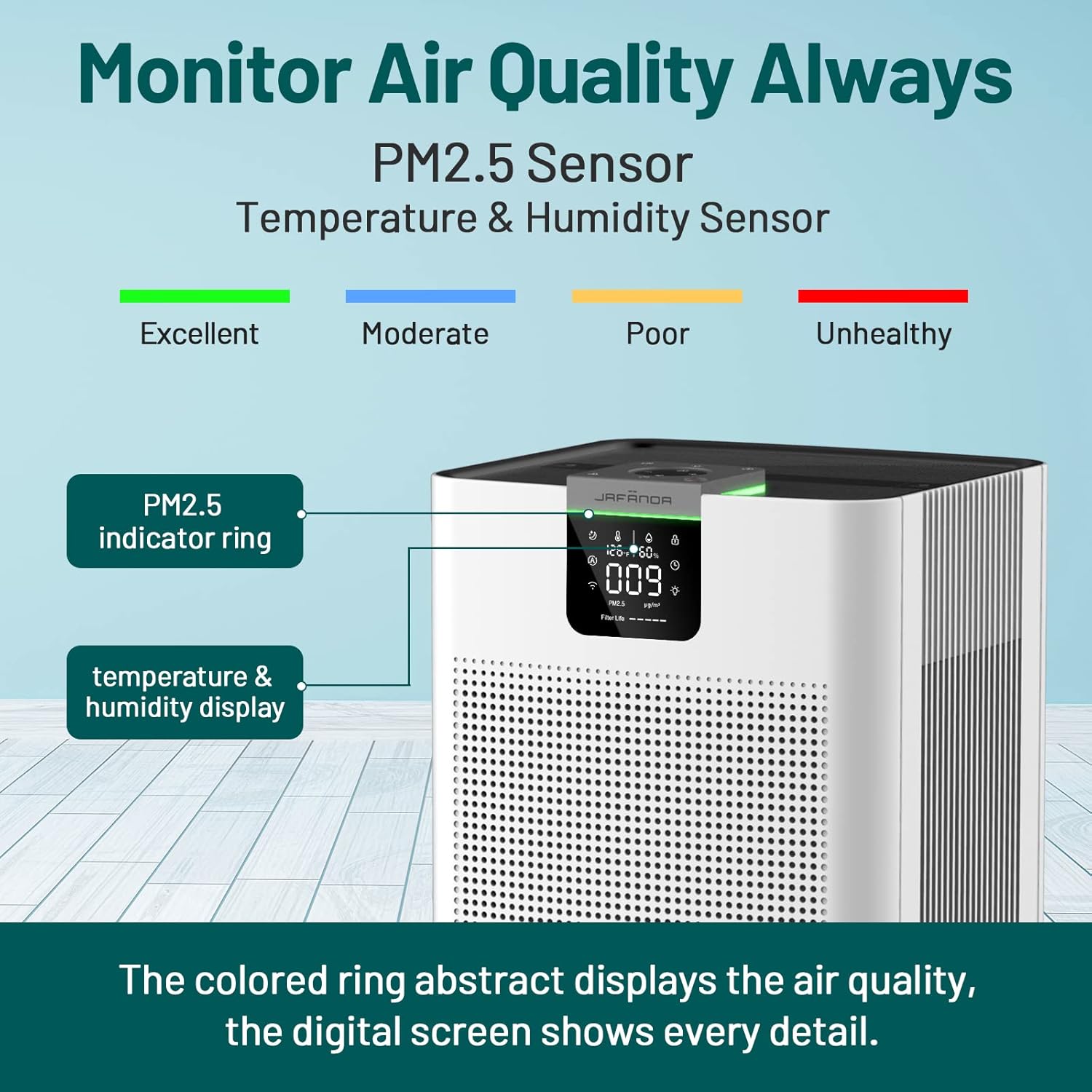
Figure 6.3: The air purifier's display showing PM2.5 levels, temperature, humidity, and the corresponding air quality indicator ring.
6.5 App Control and Voice Commands
- Control all functions (power, mode, fan speed, timer, child lock, dimmer) remotely via the Jafända Smart App.
- Use Amazon Alexa for basic voice commands like "Alexa, turn on the air purifier."

Figure 6.4: The Jafända Smart App interface for controlling the air purifier, compatible with Alexa and Google Assistant.
7. Maintenance
Regular maintenance ensures optimal performance and extends the lifespan of your air purifier.
7.1 Filter Replacement
- The filter life indicator on the display will notify you when filters need attention.
- The pre-filter can be vacuumed periodically to remove large particles and extend the life of the HEPA and carbon filters.
- Replace the True HEPA 13 and Activated Carbon filters every 6-8 months, or as indicated by the unit, depending on usage and air quality.
- Use genuine Jafända replacement filters for optimal performance. Search for:
- Original Filter: B0B74KYX8H
- Odor Air Filter: B0C2Y9TPZ1
- VOCs Air Filter: B0BTGGVV36

Figure 7.1: Illustration of the filter replacement process.
7.2 Cleaning the Unit
- Always unplug the unit before cleaning.
- Wipe the exterior with a soft, dry cloth.
- Do not use abrasive cleaners or solvents.
- Gently vacuum the air intake and outlet grilles to remove dust buildup.
7.3 Sensor Cleaning
- Periodically clean the PM2.5 sensor opening with a soft brush or cotton swab to ensure accurate readings.
8. Troubleshooting
| Problem | Possible Cause | Solution |
|---|---|---|
| Unit does not turn on. | Not plugged in; power outlet malfunction; power button not pressed. | Ensure power cord is securely plugged in. Test outlet with another device. Press the power button firmly. |
| Poor air purification performance. | Filters are dirty or clogged; filter packaging not removed; air inlets/outlets blocked. | Check and replace filters if necessary. Ensure all plastic packaging is removed from filters. Clear any obstructions around the unit. |
| Unusual noise during operation. | Foreign object inside; unit not on a level surface; filter not installed correctly. | Turn off and unplug the unit, check for foreign objects. Place on a stable, level surface. Reinstall filters. |
| App/Alexa control not working. | Wi-Fi connection issue; incorrect app setup; Alexa skill not linked. | Check Wi-Fi connection. Re-pair the device in the app. Ensure Jafända skill is enabled in Alexa app. |
| PM2.5 reading seems inaccurate. | Sensor is dirty. | Clean the PM2.5 sensor opening as described in the Maintenance section. |
9. Specifications
| Feature | Detail |
|---|---|
| Model Number | JF999 |
| Brand | Jafända |
| Coverage Area | Up to 4575 ft² (60 mins), 915 ft² (12 mins) |
| CADR | 588 CFM (1000 m³/h) |
| Filter Type | True HEPA 13, Activated Carbon, Pre-filter |
| Particle Retention Size | 0.03 microns (99.99% H1N1 virus) |
| Noise Level | 22 dB (Sleep Mode) |
| Control Type | APP Control, Amazon Alexa, Manual Touch Panel |
| Product Dimensions | 13"D x 15.08"W x 31.92"H (33 cm D x 38.3 cm W x 81.1 cm H) |
| Item Weight | 19.95 pounds (9.05 kg) |
| Wattage | 120W |
| Certifications | EPA Certified, ECARF Certified, Energy Star, CARB Certified, FCC Certified, ETL Certified, CA65 Certified |

Figure 9.1: Dimensions of the Jafända JF999 Air Purifier.

Figure 9.2: Jafända JF999 Air Purifier certifications.

Figure 9.3: SGS Test Report indicating high removal efficiency for various pollutants. For detailed report, scan the QR code or visit SGS Online Report.
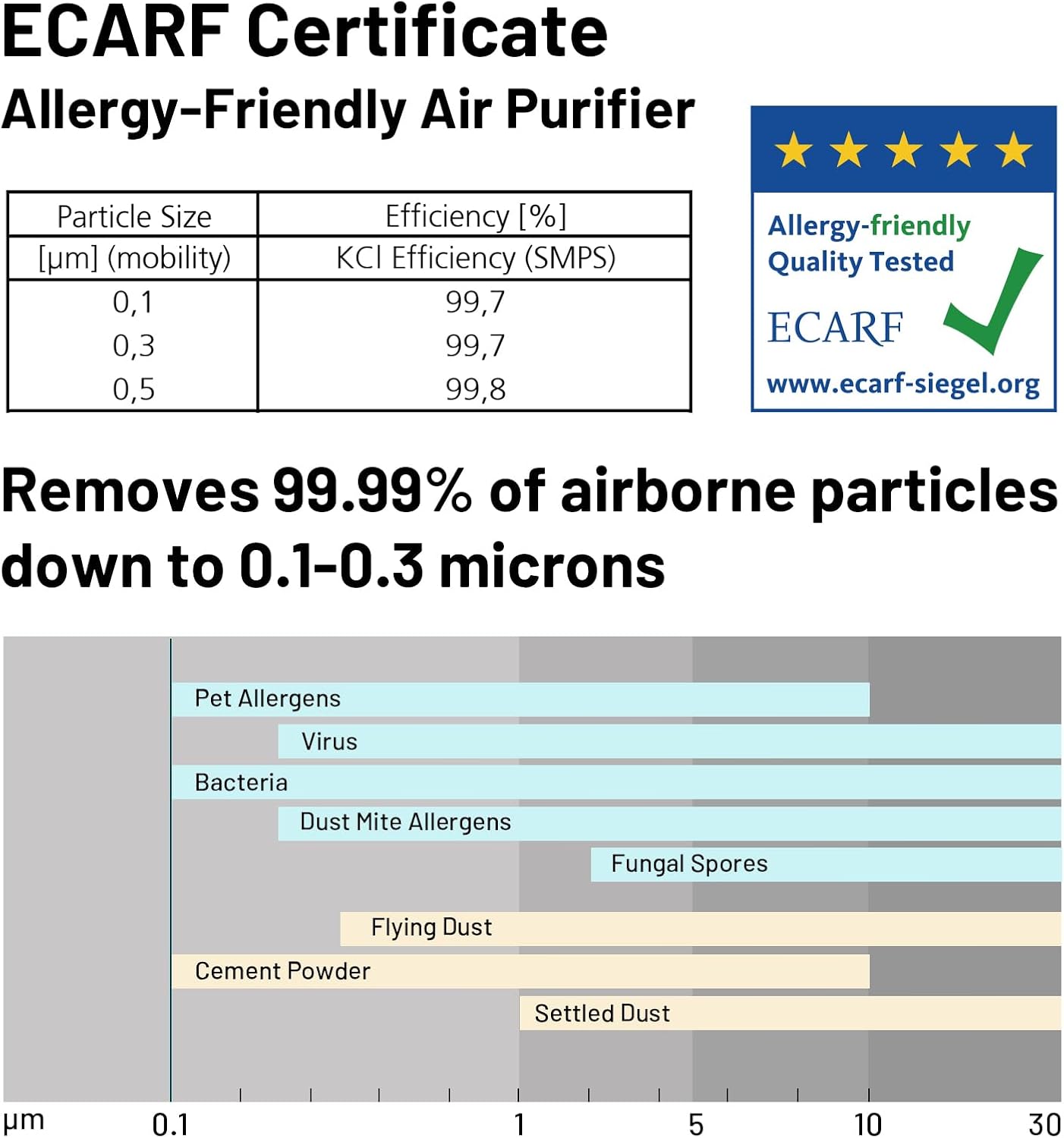
Figure 9.4: ECARF Certificate for Allergy-Friendly Air Purifier, demonstrating high efficiency in removing airborne particles.
10. Warranty
The Jafända JF999 Air Purifier comes with a 1-Year Limited Warranty. Register your product with Jafända to receive an additional year of warranty coverage, extending it to a 2-Year Warranty.
This warranty covers defects in materials and workmanship under normal use. It does not cover damage resulting from misuse, accident, unauthorized modifications, or failure to follow the instructions in this manual.
For warranty claims or further details, please contact Jafända Customer Support.
11. Customer Support
If you have any questions, concerns, or require assistance with your Jafända JF999 Air Purifier, please contact our customer support team.
- Online Support: Visit the official Jafända website for FAQs and support resources.
- Email Support: Refer to your product registration card or the Jafända website for contact email.
- Phone Support: Refer to your product registration card or the Jafända website for contact number.
Please have your model number (JF999) and purchase information ready when contacting support.


