
Fujitsu LIFEBOOK U9311/F (FMVU34013)
Fujitsu LIFEBOOK U9311/F Notebook User Manual
Model: FMVU34013
1. Introduction
This manual provides essential information for the safe and efficient use of your Fujitsu LIFEBOOK U9311/F notebook. Please read this manual thoroughly before using the product and keep it for future reference.
The Fujitsu LIFEBOOK U9311/F is a high-performance notebook designed for productivity and portability. It features a 13.3-inch Full HD display, an Intel Core i5-1145G7 processor, 16GB of RAM, and a 256GB SSD. This particular unit is an Amazon Renewed product, meaning it has been professionally inspected and tested to work and look like new. While it may have been opened and powered on for verification, it is not a previously used item and functions identically to a new product.
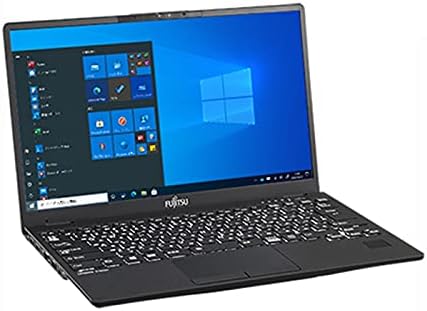
Figure 1: Fujitsu LIFEBOOK U9311/F Notebook. This image shows the closed laptop from a slight angle, highlighting its sleek design and black finish.
2. Setup
2.1 Unpacking
Carefully remove the notebook and all accessories from the packaging. Ensure all components listed below are present:
- Fujitsu LIFEBOOK U9311/F Notebook
- AC Adapter and Power Cord
- Documentation (this manual, warranty information)
2.2 Connecting the Power Adapter
Connect the AC adapter to the power input port on the side of the notebook. Plug the power cord into a wall outlet. The notebook can be used while charging, or it can be fully charged before first use.
2.3 Initial Boot-up
Press the power button to turn on the notebook. Follow the on-screen instructions to complete the initial Windows 10 Pro setup, including language selection, network connection, and user account creation.
3. Operating the Notebook
3.1 Overview of Ports and Connectors
Familiarize yourself with the various ports and connectors on your LIFEBOOK U9311/F for connecting peripherals and external devices.

Figure 2: Side view diagrams of the Fujitsu LIFEBOOK U9311/F, illustrating the location and type of various ports. The top diagram shows the left side with a Kensington lock slot, USB 3.2 (Gen2) Type-C / Thunderbolt 4 port, HDMI port, and USB 3.2 (Gen1) Type-A port. The bottom diagram shows the right side with a smart card slot (custom-made), microphone/headphone combo jack, direct memory card slot, LAN (foldable) port, and another USB 3.2 (Gen1) Type-A port.
- USB 3.2 (Gen2) Type-C / Thunderbolt™ 4: For high-speed data transfer, display output, and power delivery.
- HDMI: Connect to external displays or projectors.
- USB 3.2 (Gen1) Type-A: Standard USB ports for connecting peripherals like mice, keyboards, and external drives.
- Mic/Line-in/Headphone/Line-out/Headset Combo Jack: For audio input and output.
- Direct Memory Card Slot: For inserting memory cards.
- LAN (Foldable): For wired network connection.
- Kensington Lock Slot: For securing the notebook with a compatible lock.
- Smart Card Slot (Custom-made): For smart card authentication (if applicable).
3.2 Using the Keyboard and Touchpad
The notebook features a full-sized keyboard and a precision touchpad. Refer to the Windows 10 Pro operating system's help documentation for detailed instructions on customizing touchpad gestures and keyboard shortcuts.
3.3 Connecting to Wi-Fi
To connect to a wireless network, click the Wi-Fi icon in the system tray, select your desired network, and enter the password if prompted.
3.4 Using WPS Office2
Your notebook comes pre-installed with WPS Office2. This suite includes word processing, spreadsheet, and presentation applications. Launch the applications from the Start Menu to begin creating and editing documents.
4. Maintenance
4.1 Cleaning the Notebook
Use a soft, lint-free cloth slightly dampened with water or a screen cleaner to clean the display and exterior surfaces. Avoid using harsh chemicals or abrasive materials.
4.2 Battery Care
To prolong battery life, avoid fully discharging the battery frequently. Store the notebook in a cool, dry place when not in use for extended periods.
4.3 Software Updates
Regularly check for and install Windows updates and driver updates to ensure optimal performance and security. Go to Settings > Update & Security > Windows Update to check for updates.
5. Troubleshooting
5.1 Power Issues
- Notebook does not turn on: Ensure the AC adapter is securely connected and the power outlet is functional. Try pressing and holding the power button for 10-15 seconds.
- Battery not charging: Verify the AC adapter connection. Check if the power indicator light is on.
5.2 Display Issues
- No image on screen: Connect an external monitor to check if the issue is with the notebook's display. Press Fn + F7 (or the appropriate function key with a display icon) to cycle through display modes.
5.3 Performance Issues
- Notebook is slow: Close unnecessary applications. Check Task Manager for high CPU/memory usage. Ensure sufficient free space on the SSD.
- Applications crashing: Ensure all software and drivers are up to date. Reinstall problematic applications.
5.4 Network Connectivity Issues
- Cannot connect to Wi-Fi: Ensure Wi-Fi is enabled. Restart your router and the notebook. Verify Wi-Fi password.
- Wired network not working: Check the LAN cable connection. Ensure network drivers are installed and up to date.
6. Specifications
| Brand | Fujitsu |
| Model Name | LIFEBOOK U9311/F |
| Product Model Number | FMVU34013 |
| Screen Size | 13.3 Inches |
| Resolution | 1920x1080 Pixels |
| Color | Black |
| CPU Brand | Intel |
| CPU Type | Core i5-1145G7 |
| CPU Speed | 2.6 GHz |
| RAM Size | 16 GB |
| Memory Type | DDR3 SDRAM |
| Hard Disk Size | 256 GB |
| Hard Disk Type | SSD (Solid State Drive) |
| Operating System | Windows 10 Pro |
| Graphics Coprocessor | Intel |
| Connectivity | 802.11 ABGN (Wi-Fi) |
| Product Dimensions (W x D x H) | 30.7 x 19.7 x 1.6 cm |
| Item Weight | 2 Kilograms |
| Battery Type | Lithium Ion (1 included) |
| Battery Energy Content | 45 Watt Hours |
7. Warranty and Support
This Fujitsu LIFEBOOK U9311/F notebook, as an Amazon Renewed product, is backed by a 180-day return guarantee based on Amazon Renewed product terms. For any issues or support inquiries, please contact Amazon customer service or refer to the Amazon Renewed program details.
For technical support related to the Windows operating system or pre-installed software, please refer to the respective software documentation or online support resources.
Related documentsLIFEBOOK U9311/F (FMVU34013)

Ask a question about this manual
Ask about setup, troubleshooting, compatibility, parts, safety, or missing instructions. Manuals+ will review the question and use this page’s manual context to help answer it.