
VTech VM919-2HD
VTech VM919-2HD Baby Monitor Instruction Manual
Model: VM919-2HD
Introduction
This manual provides detailed instructions for the safe and effective use of your VTech VM919-2HD Video Baby Monitor. This system allows you to monitor your child with a 7-inch 720p HD parent unit and two cameras, offering features like panoramic viewing, night vision, and secure transmission without Wi-Fi.

Image: The VTech VM919-2HD Baby Monitor system, showing the parent unit and two baby units (cameras).
What's Included
Verify that your package contains the following items:
- Parent unit (1)
- Baby units (cameras) (2)
- AC adaptors (3)
Setup Instructions
1. Powering the Baby Units (Cameras)
- Place each baby unit in your child's room, ensuring a clear view of the crib or play area.
- Connect one end of an AC adaptor to the power jack on each baby unit.
- Plug the other end of the AC adaptor into a wall outlet. The baby unit will power on automatically.
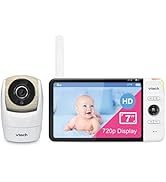
Image: A VTech baby unit (camera) connected to its power adapter.
2. Powering the Parent Unit
- Connect one end of an AC adaptor to the power jack on the parent unit.
- Plug the other end of the AC adaptor into a wall outlet.
- Press and hold the POWER button on the parent unit to turn it on.
- The parent unit and baby units are pre-paired for direct use. No additional pairing is required for initial setup.

Image: Front view of the VTech VM919-2HD parent unit, showing the screen and control buttons.
3. Positioning the Baby Units
- Place the baby units at least 3 feet (1 meter) away from your child to avoid potential hazards.
- Ensure the camera lens is not obstructed.
- The baby units can be placed on a flat surface or wall-mounted.
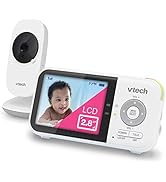
Image: A VTech baby unit placed on a shelf in a nursery, monitoring a crib.
Operating Instructions
Parent Unit Display and Controls
The 7-inch HD parent unit provides a clear view of your child. Use the control buttons to navigate menus and adjust settings.

Image: The parent unit screen showing a baby, illustrating the 7-inch HD display and wide-angle viewing capability.
Camera Control (Pan, Tilt, Zoom)
- From the parent unit, you can remotely pan the camera up to 270 degrees side-to-side for 360-degree panoramic viewing.
- Tilt the camera up to 100 degrees up and down.
- Zoom in up to 4 times for a closer view of your child.

Image: The parent unit displaying controls for pan, tilt, and zoom functions of the baby unit camera.
Night Vision
The baby units are equipped with automatic infrared night vision, allowing for clear monitoring in low-light conditions or complete darkness.

Image: A visual comparison demonstrating the clarity of enhanced night vision compared to standard night vision in a nursery setting.
Sound Activation Mode (VOX)
- The parent unit screen can be set to turn off to conserve battery.
- When sound activation mode (VOX) is enabled, the screen will automatically turn on when the baby unit detects sound above a preset level.
- Adjust the VOX sensitivity to suit your environment.
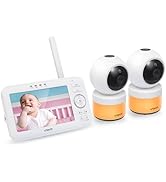
Image: The parent unit displaying the settings for sound activation mode (VOX), including sensitivity levels.
Two-Way Talk and Lullabies
- Use the two-way talk feature to communicate with your child through the baby unit.
- The baby unit can play 5 lullabies and 4 soothing sounds (including white noise and a trickling stream) to help your child sleep.
Temperature Monitoring
The baby unit includes a built-in temperature sensor. The parent unit will display the nursery temperature and can alert you if it goes outside a set range.
Battery Life and Range
- The parent unit features a 5000mAh rechargeable battery, providing up to 15 hours of video streaming on a single charge.
- The system offers a range of up to 1,000 feet, allowing you to stay connected throughout your home.

Image: The parent unit displaying battery life information, indicating up to 15 hours of screen-on time.
Maintenance
Cleaning
- Clean the surfaces of the parent unit and baby units with a soft, damp cloth.
- Do not use cleaning sprays or liquid cleaners.
- Ensure the devices are unplugged before cleaning.
Battery Care
- To prolong battery life, avoid fully discharging the parent unit battery frequently.
- Store the unit in a cool, dry place when not in use for extended periods.
Troubleshooting
| Problem | Solution |
|---|---|
| No power on parent unit/baby unit. | Ensure AC adaptors are securely plugged into both the unit and a working electrical outlet. Check if the parent unit's power button is pressed. |
| No image or sound on parent unit. | Verify both baby units and the parent unit are powered on. Ensure they are within range. Adjust the volume on the parent unit. |
| Poor image quality. | Check for obstructions in front of the camera lens. Ensure the camera lens is clean. Adjust the camera's position for optimal viewing. |
| Parent unit beeps or shows "Out of Range". | Move the parent unit closer to the baby unit. Ensure there are no large metal objects or other electronic devices interfering with the signal. |
| Short battery life on parent unit. | Ensure the parent unit is fully charged before use. Reduce screen brightness or enable VOX mode to conserve power. Battery performance may decrease over time. |
Specifications
| Feature | Detail |
|---|---|
| Model Number | VM919-2HD |
| Parent Unit Display Size | 7 Inches |
| Video Capture Resolution | 720p HD |
| Viewing Angle | 110 Degrees (Wide-Angle) |
| Pan/Tilt Range | Pan 270 degrees, Tilt 100 degrees (360-degree panoramic viewing) |
| Zoom | 4x Digital Zoom |
| Connectivity Technology | 2.4G FHSS (Secure, No Wi-Fi required) |
| Operating Range | Up to 1,000 feet |
| Parent Unit Battery | 5000 mAh Lithium Polymer (Up to 15 hours video streaming) |
| Special Features | 2-Way Audio, Cry Detection, HD Resolution, Night Vision, PTZ Technology, Temperature Alerts, Lullabies, Soothing Sounds, VOX Mode |
| Power Source | Battery Powered (Parent Unit), AC Adaptor (Baby Units) |
| Indoor/Outdoor Usage | Indoor |
| Dimensions (Parent Unit) | 7.87 x 4.28 x 0.76 inches |
| Item Weight | 2.88 pounds |
Warranty and Support
Warranty Information
For warranty details, please refer to the warranty card included with your product or visit the official VTech website. Keep your purchase receipt as proof of purchase.
Customer Support
If you encounter any issues or have questions regarding your VTech VM919-2HD Baby Monitor, please contact VTech customer support. Contact information can typically be found on the VTech website or in the product packaging.
You may also visit the VTech Store on Amazon for additional resources.
Related documentsVM919-2HD


Ask a question about this manual
Ask about setup, troubleshooting, compatibility, parts, safety, or missing instructions. Manuals+ will review the question and use this page’s manual context to help answer it.