
1. Product Overview
This manual provides instructions for the installation, operation, and maintenance of your dolria PC0018 20-Light LED Dimmable Crystal Chandelier. Please read these instructions carefully before installation and retain them for future reference.

Image 1.1: The dolria PC0018 20-Light LED Dimmable Crystal Chandelier, showcasing its multi-tier design with individual crystal pendants.
2. Setup and Installation
The dolria PC0018 chandelier is designed for hard-wired installation. Professional installation is recommended. Ensure power is disconnected at the circuit breaker before beginning installation.
2.1 Package Contents
Verify all components are present before installation. The package includes the chandelier unit, mounting hardware, LED bulbs, and a remote control.
2.2 Mounting the Chandelier
- Turn off power at the main circuit breaker.
- Attach the mounting bracket to the ceiling junction box using the provided hardware.
- Connect the electrical wires (live, neutral, ground) from the chandelier to the corresponding wires in the junction box. Secure connections with wire nuts.
- Carefully lift the chandelier and secure it to the mounting bracket.

Image 2.1: Diagram showing chandelier dimensions (Canopy diameter 23.6", Max length 157") and control options (Remote control, Phone APP, Switch). Note: Dimmer switch is not used with this chandelier.
2.3 Adjusting Wire Lengths
The hanging wires are adjustable to customize the chandelier's height and arrangement. The minimum length is 3.9 inches, and the maximum height is 156 inches. Adjustments can be made even after initial installation to achieve the desired aesthetic.
The chandelier is compatible with sloping or slanted ceilings without requiring an additional adapter, provided the ceiling angle is less than 30 degrees. For ceiling angles greater than 30 degrees, a ceiling adapter may be required. Contact customer support if you need a ceiling adapter.

Image 2.2: Illustration demonstrating compatibility with sloped ceilings (angle less than 30 degrees) and the need for an adapter for steeper angles.
3. Operating Instructions
This chandelier offers advanced lighting control features, including adjustable color temperature and dimmable brightness, controllable via remote control or a mobile application.
3.1 Powering On/Off
Once installed and wired, turn on the power at the circuit breaker. The chandelier can be turned on or off using the wall switch, the provided remote control, or the mobile application.
3.2 Adjusting Color Temperature
The chandelier supports three color temperature settings:
- Warm Light (3000K): Provides a cozy, inviting ambiance.
- Natural Light (4000K): Offers a balanced, soft illumination.
- Cool Light (6000K): Delivers bright, clear daylight-like illumination.
Switch between these settings using the remote control or the mobile application.
3.3 Dimming Brightness
The brightness of the chandelier can be adjusted from 5% to 100%. Use the dimming controls on the remote or the mobile application to set the desired light intensity. Note that a traditional dimmer switch is not compatible with this chandelier's integrated dimming system.
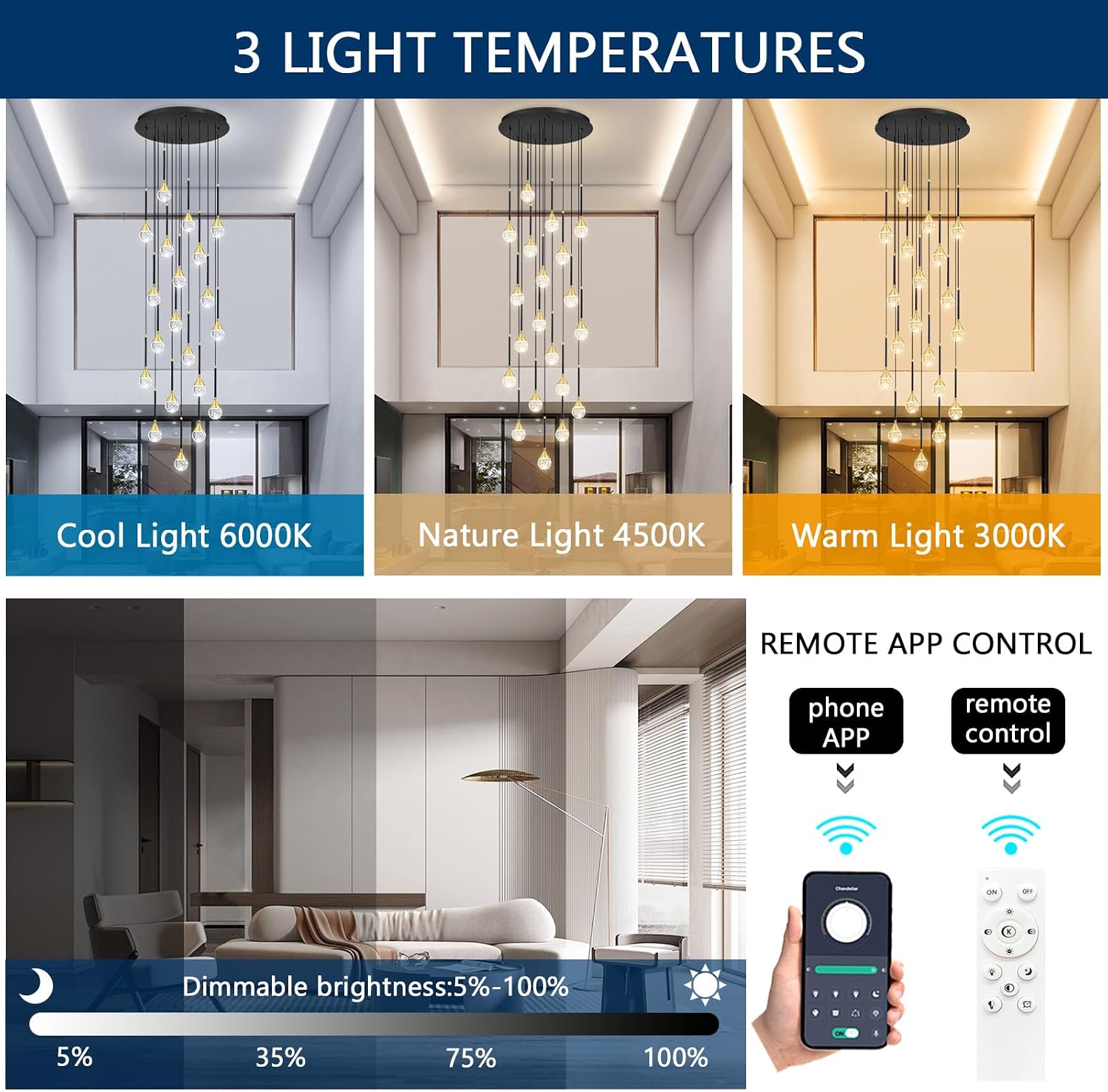
Image 3.1: Visual representation of the three light temperatures (Cool, Nature, Warm) and the dimmable brightness range (5% to 100%) controlled by remote or app.
3.4 Mobile Application Control
Download the dedicated mobile application (refer to the packaging or included quick start guide for QR code/app store links) to control the chandelier from your smartphone. The app allows for full control over color temperature, brightness, and other potential smart features.
4. Maintenance
Regular maintenance ensures the longevity and optimal performance of your chandelier.
4.1 Cleaning
- Before cleaning, ensure the power to the chandelier is turned off at the circuit breaker.
- Use a soft, dry, lint-free cloth to gently wipe the metal and crystal components.
- For stubborn marks on crystal, a slightly damp cloth with mild glass cleaner can be used, but avoid spraying directly onto the fixture.
- Do not use abrasive cleaners, solvents, or polishes as they may damage the finish.
4.2 Bulb Replacement
The chandelier uses integrated LED light sources designed for long life (up to 6000 hours). If a bulb requires replacement, contact customer support for assistance and compatible replacement parts.
5. Troubleshooting
If you encounter issues with your chandelier, refer to the following common problems and solutions:
| Problem | Possible Cause | Solution |
|---|---|---|
| Chandelier does not light up. | No power supply; loose wiring; faulty bulb. | Check circuit breaker. Ensure all wire connections are secure. Contact support if bulbs are suspected to be faulty. |
| Remote control or app not working. | Remote battery low; app not paired; signal interference. | Replace remote battery. Re-pair the app with the chandelier (refer to app instructions). Ensure no obstructions between remote/phone and chandelier. |
| Light flickers or dims unexpectedly. | Incompatible dimmer switch; unstable power supply; loose connection. | Ensure no external dimmer switch is used. Check power supply stability. Verify wiring connections. |
If the problem persists after attempting these solutions, please contact customer support.
6. Product Specifications
| Brand | dolria |
| Model Number | PC0018 |
| Material | Crystal, Metal |
| Color | Black (frame), Clear (crystal) |
| Light Source | Integrated LED |
| Number of Lights | 20 |
| Wattage | 100W (total LED) |
| Lumen Output | 8500 lumens |
| Color Temperature | 3000K (Warm), 4000K (Natural), 6000K (Cool) |
| Dimmability | 5% to 100% (via remote/app) |
| Voltage | AC110-240V |
| Canopy Diameter | 23.5 inches |
| Max Hanging Height | 156 inches |
| Min Hanging Length | 3.9 inches |
| Control Method | Remote Control, Mobile App |
| Lifespan | Up to 6000 hours |
| Mounting Type | Flush Mount |
| Assembly Required | Yes |
| Indoor/Outdoor Use | Indoor |
7. Warranty and Support
7.1 Warranty Information
The dolria PC0018 Chandelier comes with a 36-month warranty from the date of purchase. This warranty covers manufacturing defects and material faults under normal use.
7.2 Customer Support
Should you encounter any problems, require replacement parts, or have questions regarding your chandelier, please contact dolria customer support. We provide 1:1 replacement parts for any damaged or missing accessories during the warranty period.
Please have your model number (PC0018) and proof of purchase ready when contacting support.
Contact information for dolria customer support can typically be found on the product packaging or the official dolria website.