
1. Introduction
This manual provides comprehensive instructions for the OLEVS YPF-S-G9925ZP-JH Square Chronograph Watch. Please read this manual carefully to ensure proper use and maintenance of your timepiece. This watch features a square case, a brown leather strap, a multi-function chronograph, luminous hands, and 3ATM water resistance.

Image 1.1: OLEVS Square Chronograph Watch (Model YPF-S-G9925ZP-JH)
2. Setup
2.1 Initial Setup
Upon receiving your watch, ensure all protective films are removed. The watch is powered by an original quartz movement and should be running. If not, gently pull out the crown to position 2 and push it back in to activate the movement.
2.2 Setting the Time
- Pull the crown (A) out to position 2.
- Rotate the crown to set the hour and minute hands to the desired time. Ensure the AM/PM is correctly set, especially when setting the date.
- Push the crown back to position 0 to start the watch.
2.3 Setting the Date
- Pull the crown (A) out to position 1.
- Rotate the crown clockwise or counter-clockwise (depending on the movement) to adjust the date.
- Once the correct date is displayed, push the crown back to position 0.

Image 2.1: Watch Crown and Chronograph Buttons (A: Crown, B: Start/Stop, C: Reset)
3. Operating Instructions
3.1 Chronograph Function
The watch features a multi-function chronograph with three sub-dials:
- 1/10 Second Sub-dial: Located at the 12 o'clock position.
- Minute Sub-dial: Located at the 9 o'clock position (up to 60 minutes).
- Second Sub-dial: Located at the 6 o'clock position (up to 60 seconds).
- To start the chronograph, press button B (top right button). The chronograph second hand and 1/10 second hand will begin to move.
- To stop the chronograph, press button B again. The elapsed time will be displayed.
- To reset the chronograph, press button C (bottom right button) while the chronograph is stopped. All chronograph hands will return to their zero positions.
Video 3.1: Demonstration of the OLEVS Square Chronograph Watch's functions, including time setting and chronograph operation.
3.2 Luminous Display
The watch hands feature a luminous coating, allowing for time readability in low-light conditions. Exposure to light will charge the luminous material.
3.3 Water Resistance
This watch is 3ATM water resistant, meaning it can withstand splashes, rain, or brief immersion in water. It is not suitable for swimming, diving, or hot water activities (e.g., showering, sauna) as steam can penetrate the seals.
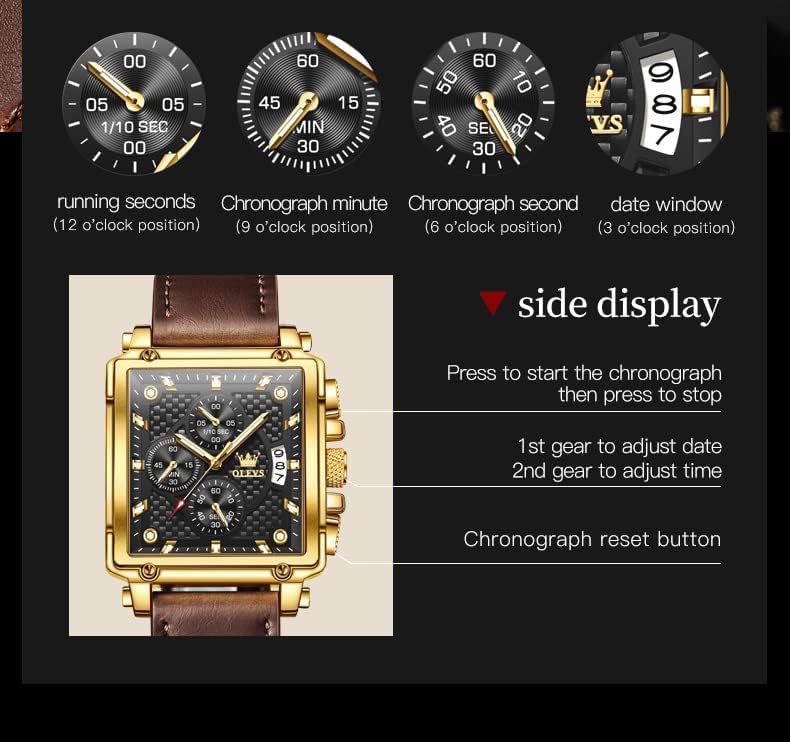
Image 3.1: Key features of the OLEVS watch, including water resistance and luminous display.
4. Maintenance
- Cleaning: Wipe the watch case and strap regularly with a soft, dry cloth to remove dust and dirt. For the leather strap, avoid excessive moisture.
- Water Exposure: While water resistant, avoid prolonged exposure to water. If the watch gets wet, dry it thoroughly with a soft cloth. Do not operate buttons or the crown while the watch is wet.
- Temperature: Avoid exposing the watch to extreme temperatures (hot or cold) or sudden temperature changes, as this can affect the movement and seals.
- Chemicals: Keep the watch away from chemicals, solvents, and detergents, which can damage the case, strap, or seals.
- Battery Replacement: The quartz movement is powered by a battery. When the watch stops or the time becomes inaccurate, the battery may need replacement. It is recommended to have the battery replaced by a professional watchmaker to ensure proper sealing and water resistance.
5. Troubleshooting
| Issue | Possible Cause | Solution |
|---|---|---|
| Watch not running | Battery depleted; Crown not pushed in. | Push crown to position 0. If still not running, replace battery (professional service recommended). |
| Time/Date incorrect | Time/Date not set correctly; Crown accidentally pulled out. | Refer to Section 2.2 and 2.3 to reset time and date. Ensure crown is fully pushed in. |
| Chronograph hands not resetting to zero | Chronograph not reset properly. | Ensure chronograph is stopped, then press button C to reset. If issue persists, consult professional service. |
| Moisture inside watch | Exposure to steam or prolonged water immersion beyond 3ATM rating. | Immediately take the watch to a professional watchmaker for inspection and drying to prevent damage. |
6. Specifications
| Feature | Detail |
|---|---|
| Brand | OLEVS |
| Model Number | YPF-S-G9925ZP-JH |
| Movement | Original Quartz Movement |
| Water Resistance | 3ATM (30 meters) |
| Case Material | Not specified (typically alloy or stainless steel) |
| Strap Material | Brown Leather |
| Display Type | Analog with Chronograph and Date Window |
| Luminous Function | Yes, on hands |
| Package Dimensions | 4.37 x 3.54 x 2.83 inches |
| Item Weight | 3.17 ounces |
| Date First Available | July 19, 2022 |
7. Warranty and Support
7.1 Warranty Information
This OLEVS watch comes with a 2-year warranty period from the date of purchase. This warranty covers manufacturing defects under normal use. It does not cover damage resulting from accidents, improper use, unauthorized repairs, or normal wear and tear.
7.2 Customer Support
For any issues or inquiries regarding your OLEVS watch, please contact customer support through the Amazon platform where the purchase was made. Our team is available to assist you with troubleshooting, warranty claims, or general product questions.