
1. Introduction
Thank you for choosing the HiQuick 8-Bay Smart Battery Charger with included AA and AAA rechargeable batteries. This manual provides essential information for the safe and efficient use of your new charger and batteries. Please read it thoroughly before operation and retain it for future reference.
2. Important Safety Instructions
- Use only Ni-MH or Ni-CD rechargeable batteries with this charger. Do not attempt to charge alkaline, carbon-zinc, or any other non-rechargeable battery types, as this may lead to leakage, rupture, or explosion.
- Ensure correct polarity (+/-) when inserting batteries into the charger slots. Incorrect insertion can damage the charger and batteries.
- Do not disassemble, modify, or short-circuit the charger or batteries.
- Avoid exposing the charger and batteries to water, moisture, direct sunlight, or extreme temperatures.
- Keep out of reach of children.
- The charger features multiple protection mechanisms including over-charge, over-current, over-voltage, over-heat, and short-circuit protection to ensure safe charging.
- The included HiQuick batteries are designed for safety and environmental protection, containing no harmful heavy metals like Mercury (Hg), Cadmium (Cd), or Lead (Pb).
3. Package Contents
- 1 x HiQuick 8-Bay Smart Battery Charger
- 8 x HiQuick AA Ni-MH Rechargeable Batteries (2800mAh)
- 8 x HiQuick AAA Ni-MH Rechargeable Batteries (1100mAh)
- 1 x USB Charging Cable (Power adapter not included)
4. Setup
- Connect the provided USB charging cable to the Micro USB input port on the HiQuick 8-Bay Smart Battery Charger.
- Plug the other end of the USB cable into a compatible USB power source (e.g., a USB wall adapter, power bank, or computer USB port). A 5V USB power adapter is required (not included).
- The charger's LED indicators will briefly illuminate upon connection, indicating it is ready for use.
5. Operating Instructions
5.1 Inserting Batteries
The HiQuick charger features 8 independent charging bays, allowing you to charge any combination of 1 to 8 AA or AAA Ni-MH/Ni-CD rechargeable batteries simultaneously. Insert batteries into the slots, ensuring the positive (+) and negative (-) terminals align correctly with the markings in the charger.

Image: The HiQuick 8-Bay Smart Battery Charger can charge 1 to 8 Ni-Mh/Ni-Cd AA and AAA rechargeable batteries simultaneously, thanks to its convenient hybrid charging technology.
5.2 LED Indicators
Each charging bay has a dedicated LED indicator to show the charging status:
- RED Light: Indicates the battery is currently charging.
- GREEN Light: Indicates the battery is fully charged.

Image: The intelligent LED screen charger clearly indicates charging status with red lights for charging and green lights for fully charged batteries.
5.3 Charging Times
The charger utilizes 600mA pulse current charging for efficient and safe charging. Approximate charging times are as follows:
- AAA 1100mAh batteries: Approximately 2 hours.
- AA 2800mAh batteries: Approximately 4.5 hours.
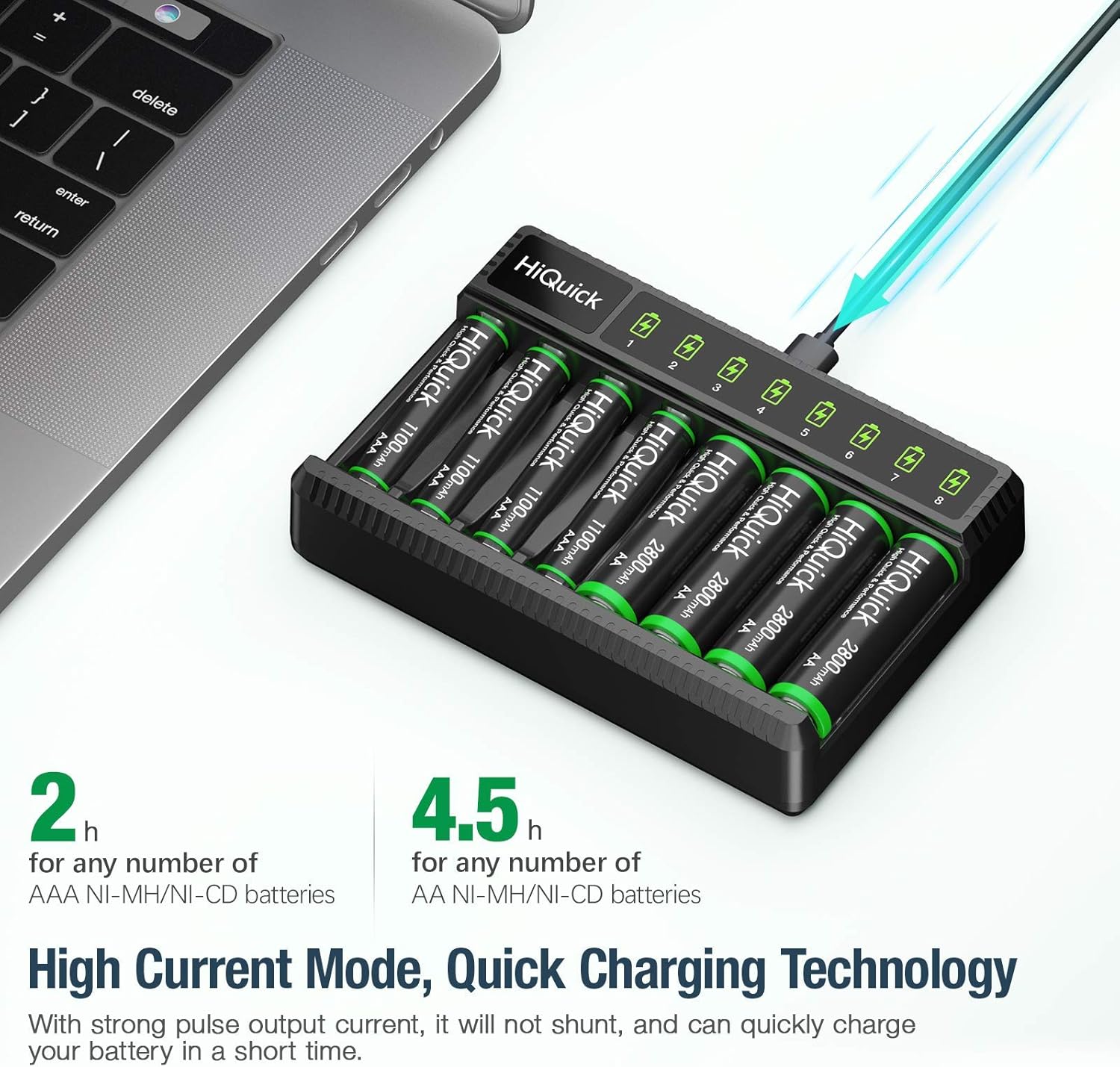
Image: The charger features high current mode and quick charging technology, allowing for fast charging of both AA and AAA batteries.
6. Battery Information
The included HiQuick Ni-MH rechargeable batteries offer high capacity and long-lasting performance:
- High Capacity: AA batteries are 2800mAh, and AAA batteries are 1100mAh.
- Long Cycle Life: Designed for up to 1200 recharge cycles, extending battery life significantly.
- Low Self-Discharge: These batteries maintain approximately 80% of their capacity even after 36 months of non-use. For optimal performance, it is suggested to charge them once every 3 months if not in use.

Image: HiQuick rechargeable batteries are designed with special protective technology and materials to extend their life up to 1200 times.

Image: HiQuick batteries feature low self-discharge, retaining 80% of their power after 3 years of non-use. It is recommended to charge them once every 3 months when not in use.
6.1 Operating Conditions
HiQuick AA batteries are suitable for 1.2V products and can operate effectively in temperatures ranging from -20°C to 60°C.

Image: HiQuick AA batteries are capable of operating under a wide temperature range, from -20°C to 60°C, making them suitable for various conditions.
7. Maintenance
- Clean the charger and battery contacts regularly with a dry, soft cloth to ensure optimal connection.
- Store the charger and batteries in a cool, dry place away from direct sunlight and extreme temperatures.
- If the charger is not in use for an extended period, unplug it from the power source.
- Dispose of old or damaged batteries according to local regulations. Do not dispose of them in household waste.
8. Troubleshooting
8.1 Batteries Not Charging
- Ensure the charger is properly connected to a working USB power source.
- Verify that the batteries are inserted with correct polarity (+/-).
- Check if the batteries are Ni-MH or Ni-CD rechargeable types. Non-rechargeable batteries will not charge.
- Clean the battery and charger contacts to remove any dirt or debris.
- If an LED indicator remains off or flashes erratically, the battery might be faulty or incorrectly inserted. Try re-inserting or replacing the battery.
8.2 Charger Not Powering On
- Confirm the USB cable is securely connected to both the charger and the power source.
- Try a different USB power source or USB cable to rule out issues with those components.
9. Specifications
| Feature | Specification |
|---|---|
| Brand | HiQuick |
| Model | B0B6W6HDTV |
| Charger Type | 8-Bay Smart Battery Charger |
| Compatible Battery Types | Ni-MH, Ni-CD (AA, AAA) |
| Input Voltage | 5 Volts (via Micro USB) |
| Output Voltage | 5 Volts |
| Charging Current | 600mA (Pulse Current) |
| AA Battery Capacity | 2800mAh |
| AAA Battery Capacity | 1100mAh |
| AA Charging Time | Approx. 4.5 Hours |
| AAA Charging Time | Approx. 2 Hours |
| Battery Cycle Life | Up to 1200 cycles |
| Operating Temperature | -20°C to 60°C |
| Safety Certification | UL |
10. Warranty and Support
For warranty information, technical support, or any product-related inquiries, please refer to the contact information provided with your purchase or visit the official HiQuick website. Keep your purchase receipt as proof of purchase for warranty claims.
