
1. Introduction
Thank you for purchasing the Veho MZ-S Bluetooth Wireless Speaker. This manual provides important information regarding the setup, operation, and maintenance of your device. Please read it carefully before use and retain it for future reference.
2. Package Contents
- Veho MZ-S Bluetooth Wireless Speaker
- USB Charging Cable
- User Manual
3. Product Overview
The Veho MZ-S is a compact and powerful portable Bluetooth speaker designed for high-quality audio on the go. It features Bluetooth 5.0 connectivity, a 5-watt output, and up to 12 hours of playback time. The speaker also supports microSD card playback and twin pairing for an enhanced stereo experience.

Image: Angled view of the Veho MZ-S Bluetooth Wireless Speaker, showcasing its compact design and speaker grille.
4. Controls and Ports
Familiarize yourself with the speaker's controls and connection ports for optimal use.
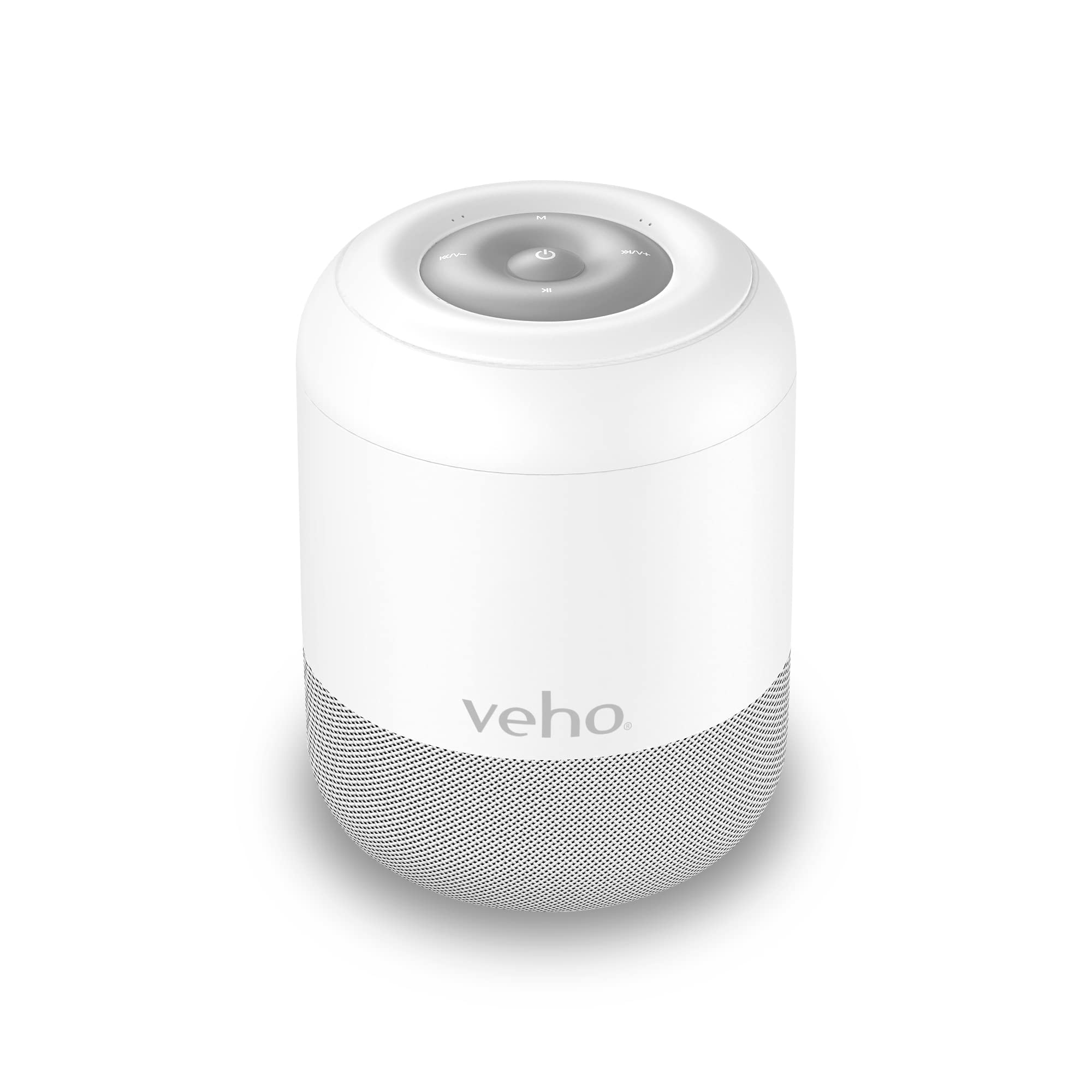
Image: Top view of the Veho MZ-S speaker, highlighting the control buttons: Power, Mode, Volume Up/Next Track, Volume Down/Previous Track, and Play/Pause.
Top Panel Controls:
- Power Button (⏻): Press and hold to power on/off. Short press to Play/Pause.
- Mode Button (M): Short press to switch between Bluetooth and MicroSD modes.
- Volume Up / Next Track (⏭⏭/V+): Short press for next track. Press and hold to increase volume.
- Volume Down / Previous Track (⏮⏮/V-): Short press for previous track. Press and hold to decrease volume.

Image: Back view of the Veho MZ-S speaker, showing the MicroSD card slot and the Micro USB charging port.
Rear Ports:
- MicroSD Card Slot: Insert a MicroSD card for direct music playback.
- Micro USB Charging Port: Connect the provided USB cable for charging.
5. Charging the Speaker
Before first use, fully charge the Veho MZ-S speaker. A full charge provides up to 12 hours of playback time.
- Connect the supplied USB charging cable to the Micro USB port on the back of the speaker.
- Connect the other end of the USB cable to a USB power adapter (not included) or a computer's USB port.
- The charging indicator light will illuminate during charging and turn off once fully charged.

Image: The Veho MZ-S speaker with an overlay indicating '12H', representing its 12-hour battery life.
6. Setup
6.1 Bluetooth Pairing
To connect your Veho MZ-S speaker to a Bluetooth-enabled device:
- Power on the speaker by pressing and holding the Power button. The speaker will enter Bluetooth pairing mode automatically, indicated by a flashing LED light.
- On your smartphone, tablet, or other Bluetooth device, enable Bluetooth and search for available devices.
- Select 'Veho MZ-S' from the list of devices.
- Once paired, the LED indicator will stop flashing and remain solid, and you will hear a confirmation tone.
- The speaker has a wireless range of up to 10 meters (32 feet).
6.2 Twin Pairing (TWS)
For an enhanced stereo sound experience, you can pair two Veho MZ-S speakers together:
- Ensure both MZ-S speakers are powered off.
- Power on both speakers simultaneously. They will automatically attempt to connect to each other.
- Once successfully paired, one speaker will act as the master (left channel) and the other as the slave (right channel). A confirmation tone will sound.
- Now, connect your Bluetooth device to the master speaker as described in the 'Bluetooth Pairing' section.
7. Operating the Speaker
7.1 Bluetooth Playback
After successful Bluetooth pairing, you can play audio from your connected device. Use the speaker's controls or your device's controls to manage playback:
- Play/Pause: Short press the Power button.
- Next Track: Short press the Volume Up / Next Track button.
- Previous Track: Short press the Volume Down / Previous Track button.
- Volume Control: Press and hold the Volume Up / Next Track button to increase volume, or the Volume Down / Previous Track button to decrease volume.
7.2 MicroSD Card Playback
The MZ-S speaker supports audio playback directly from a MicroSD card.
- Insert a MicroSD card (with supported audio files) into the MicroSD card slot on the back of the speaker.
- If the speaker is in Bluetooth mode, short press the Mode (M) button to switch to MicroSD mode.
- Playback will begin automatically. Use the same controls as Bluetooth playback for managing tracks and volume.
8. Maintenance
- Clean the speaker with a soft, dry cloth. Do not use abrasive cleaners or solvents.
- Keep the speaker away from water, moisture, and extreme temperatures.
- Store the speaker in a cool, dry place when not in use for extended periods.
- Do not attempt to disassemble or repair the speaker yourself. This will void the warranty.
9. Troubleshooting
- Speaker does not power on:
- Ensure the speaker is fully charged. Connect it to a power source using the USB charging cable.
- Cannot pair with Bluetooth device:
- Ensure the speaker is in Bluetooth pairing mode (flashing LED). Make sure Bluetooth is enabled on your device and it is within 10 meters of the speaker. Try restarting both the speaker and your device.
- No sound:
- Check the volume levels on both the speaker and your connected device. Ensure the speaker is correctly paired and playing audio from the correct source (Bluetooth or MicroSD).
- Twin Pairing not working:
- Ensure both speakers are MZ-S models and are powered on simultaneously from an off state. Make sure they are close to each other during the pairing process.
10. Specifications
| Model Name | MZ-S |
| Model Number | VSS-703-MZS-W |
| Speaker Type | Portable |
| Connectivity Technology | Bluetooth |
| Bluetooth Version | 5.0 |
| Wireless Range | Up to 10 meters (32 feet) |
| Power Output | 5 Watts |
| Battery Life | Up to 12 hours |
| Power Source | Battery Powered |
| Special Features | Twin Pairing, MicroSD Slot |
| Compatible Devices | Smartphone, Tablet |
| Included Components | USB Charging Cable |
| Product Dimensions | 7.5D x 7.5W x 7.5H Centimetres |
| Weight | 380 g |
| Manufacturer | Veho |
11. Safety Information
- Do not expose the speaker to extreme temperatures, direct sunlight, or open flames.
- Avoid dropping or subjecting the speaker to strong impacts.
- Keep out of reach of children.
- Dispose of the speaker and its battery responsibly according to local regulations.
- Use only the provided charging cable or a certified equivalent.
12. Warranty and Support
The Veho MZ-S Bluetooth Wireless Speaker comes with a standard manufacturer's warranty. For detailed warranty information, technical support, or service inquiries, please visit the official Veho website or contact their customer support team. Please retain your proof of purchase for warranty claims.
Veho Global Group
PO Box 436, Southampton, SO30 9DH, UK
For further assistance, please visit: www.veho-world.com


