
HiQuick 8 Bay Smart Battery Charger
HiQuick 8 Bay Smart Battery Charger User Manual
Model: 8 Bay Smart Battery Charger
1. Introduction
Thank you for choosing the HiQuick 8 Bay Smart Battery Charger. This intelligent charger is designed to efficiently and safely charge Ni-MH/Ni-Cd AA and AAA rechargeable batteries. With its advanced features and multiple protection mechanisms, it ensures optimal performance and longevity for your batteries. This manual provides detailed instructions for setup, operation, maintenance, and troubleshooting to help you get the most out of your product.

Figure 1: HiQuick 8 Bay Smart Battery Charger with included AA and AAA rechargeable batteries.
2. Safety Instructions
Please read these safety instructions carefully before using the charger to prevent injury and damage to the product or connected devices. Keep this manual for future reference.
- Use only with compatible Ni-MH/Ni-Cd AA and AAA rechargeable batteries. Do not attempt to charge alkaline, carbon-zinc, or other non-rechargeable battery types, as this may lead to leakage, rupture, or explosion.
- Do not disassemble, modify, or repair the charger. Refer all servicing to qualified personnel.
- Avoid exposing the charger to water, moisture, high temperatures, or direct sunlight.
- Do not operate the charger if it has been damaged in any way.
- Ensure proper ventilation during charging. Do not cover the charger.
- Keep out of reach of children and pets.
- Unplug the charger from the power source when not in use or before cleaning.
- Dispose of batteries and the charger according to local regulations. Do not dispose of batteries in fire.
3. Package Contents
Verify that all items are present in the package:
- 1 x HiQuick 8 Bay Smart Battery Charger
- 4 x HiQuick AA Ni-MH Rechargeable Batteries (2800mAh)
- 20 x HiQuick AAA Ni-MH Rechargeable Batteries (1100mAh)
- 1 x USB Charging Cable (Power adapter not included)
- 1 x User Manual
4. Product Features
- 8 Independent Charging Slots: Allows simultaneous charging of 1 to 8 AA or AAA Ni-MH/Ni-Cd batteries.
- Smart LED Display: Individual LED indicators for each slot show charging status (Red for Charging, Green for Fully Charged).
- Fast Charging Technology: Utilizes pulse current charging for efficient and rapid charging. Charges 1-8 AAA 1100mAh batteries in approximately 2 hours and 1-8 AA 2800mAh batteries in approximately 4.5 hours.
- Multiple Protection Features: Built-in microcomputer control technology provides protection against overcharge, overcurrent, overvoltage, overheat, and short circuit conditions.
- Universal Compatibility: Supports various devices requiring AA/AAA batteries.
- Low Self-Discharge Batteries: Included HiQuick Ni-MH batteries retain 80% capacity after 36 months of non-use.
- Long-Life Rechargeable Batteries: Batteries can be cycled up to 1200 times.

Figure 2: The charger features multiple protection mechanisms including overcharge, overcurrent, overvoltage, overheat, and short circuit protection.

Figure 3: HiQuick rechargeable batteries are designed for long life, supporting up to 1200 charge cycles.
5. Setup
- Unpack the Charger: Carefully remove the charger and all accessories from the packaging.
- Connect Power: Connect the provided USB charging cable to the charger's 5V2A input port. Plug the other end of the USB cable into a compatible USB power adapter (not included) or a USB port on a computer. Ensure the power source provides 5V/2A for optimal charging speed.
- Insert Batteries: Insert 1 to 8 AA or AAA Ni-MH/Ni-Cd rechargeable batteries into the charging slots. Ensure the positive (+) and negative (-) ends of the batteries align correctly with the markings on the charger. Incorrect insertion can prevent charging or damage the batteries/charger.

Figure 4: The charger supports hybrid charging of both AA and AAA Ni-MH/Ni-Cd rechargeable batteries.
6. Operating Instructions
- Initiate Charging: Once batteries are correctly inserted and the charger is connected to a power source, the LED indicator for each slot will illuminate RED, indicating that charging has begun.
- Monitor Charging Status: The intelligent LED screen will show the charging process.
- RED Light: Battery is charging.
- GREEN Light: Battery is fully charged.
- Charging Time:
- AAA 1100mAh batteries: Approximately 2 hours for 1-8 batteries.
- AA 2800mAh batteries: Approximately 4.5 hours for 1-8 batteries.
- Remove Batteries: Once the LED indicator turns GREEN, the battery is fully charged. You can safely remove the batteries from the charger. Unplug the charger from the power source when all batteries are removed or charging is complete.

Figure 5: The intelligent LED screen indicates charging status: Red for charging, Green for fully charged.
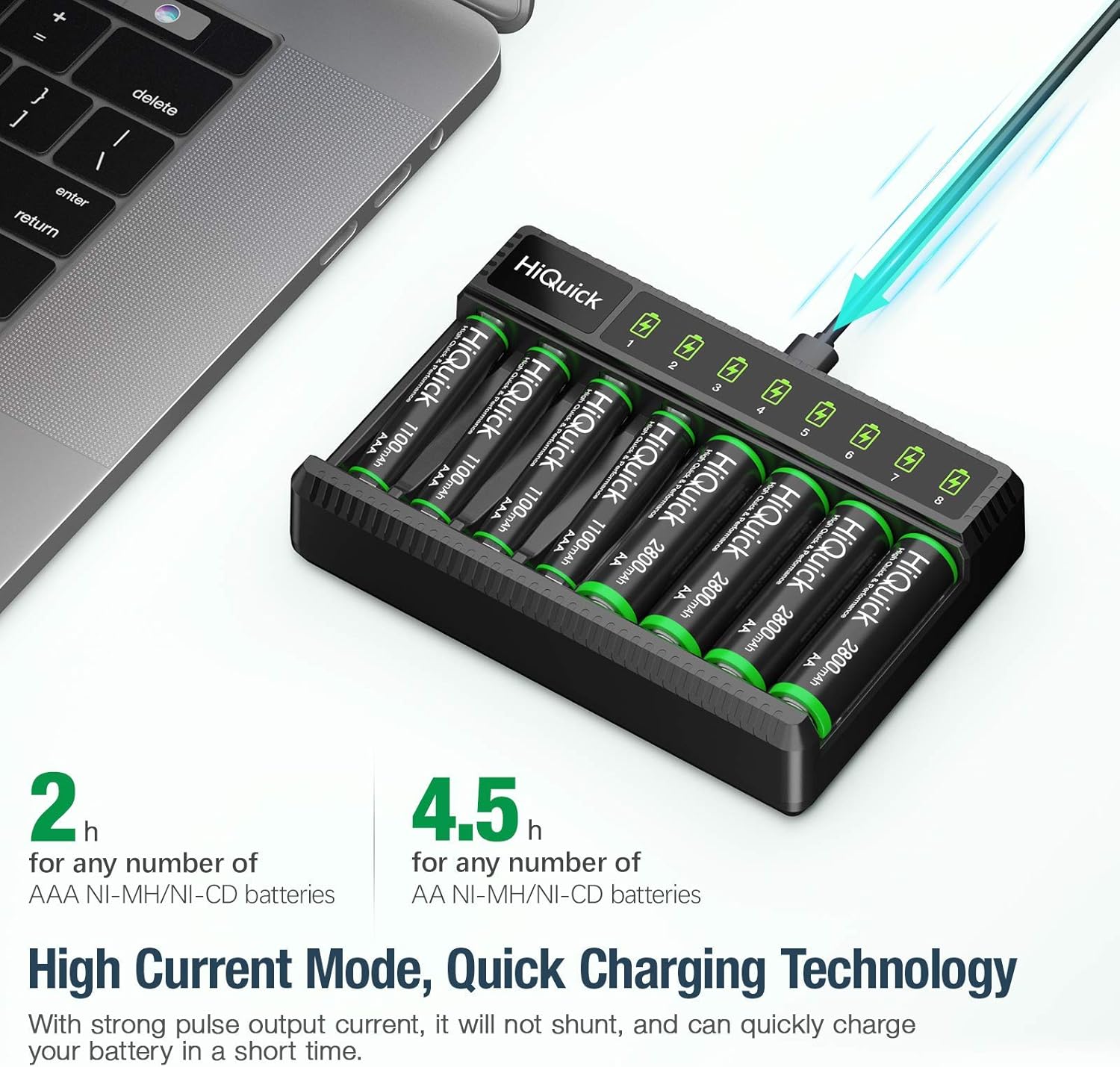
Figure 6: The charger utilizes high current mode and quick charging technology for efficient power restoration.
7. Maintenance
- Cleaning: Disconnect the charger from the power source before cleaning. Use a soft, dry cloth to wipe the surface of the charger. Do not use abrasive cleaners or solvents.
- Storage: Store the charger and batteries in a cool, dry place away from direct sunlight and extreme temperatures.
- Battery Care: For optimal battery life, it is recommended to charge HiQuick Ni-MH batteries at least once every 3 months if they are not in use, to maintain their low self-discharge properties.

Figure 7: HiQuick batteries maintain 80% of their capacity after 3 years of non-use, demonstrating low self-discharge.
8. Troubleshooting
| Problem | Possible Cause | Solution |
|---|---|---|
| LED light does not turn on when battery is inserted. |
|
|
| Battery does not fully charge or charges slowly. |
|
|
| Charger or batteries become hot during charging. |
|
|
9. Specifications
- Model: HiQuick 8 Bay Smart Battery Charger
- Input: 5V / 2A
- Output: 1.4V (Individual slot output current not specified, but implied by 2A input)
- Compatible Battery Types: Ni-MH / Ni-Cd AA, AAA rechargeable batteries
- Charging Slots: 8 independent slots
- Charging Time (Approx.):
- AAA 1100mAh: 2 hours
- AA 2800mAh: 4.5 hours
- Protection: Overcharge, Overcurrent, Overvoltage, Overheat, Short Circuit
- Included Batteries: 4 x AA 2800mAh, 20 x AAA 1100mAh
10. Warranty and Support
HiQuick products are designed and manufactured to the highest quality standards. For information regarding warranty coverage, technical support, or customer service, please refer to the contact information provided on the product packaging or visit the official HiQuick website. Please retain your proof of purchase for warranty claims.
For further assistance, you may also contact the seller directly through the platform where the product was purchased.
Related documents8 Bay Smart Battery Charger

Ask a question about this manual
Ask about setup, troubleshooting, compatibility, parts, safety, or missing instructions. Manuals+ will review the question and use this page’s manual context to help answer it.