
EARISE R18
EARISE R18 Portable PA System Speaker User Manual
Model: R18 | Brand: EARISE
1. Introduction
Thank you for choosing the EARISE R18 Portable PA System Speaker. This versatile audio system is designed for various applications, including party entertainment, karaoke, public speaking, and outdoor events. It features an 8-inch subwoofer, 1-inch tweeter, RGB lights, and supports multiple audio inputs including Bluetooth, USB, AUX, TF card, and FM radio. This manual provides detailed instructions to help you set up, operate, and maintain your speaker for optimal performance.
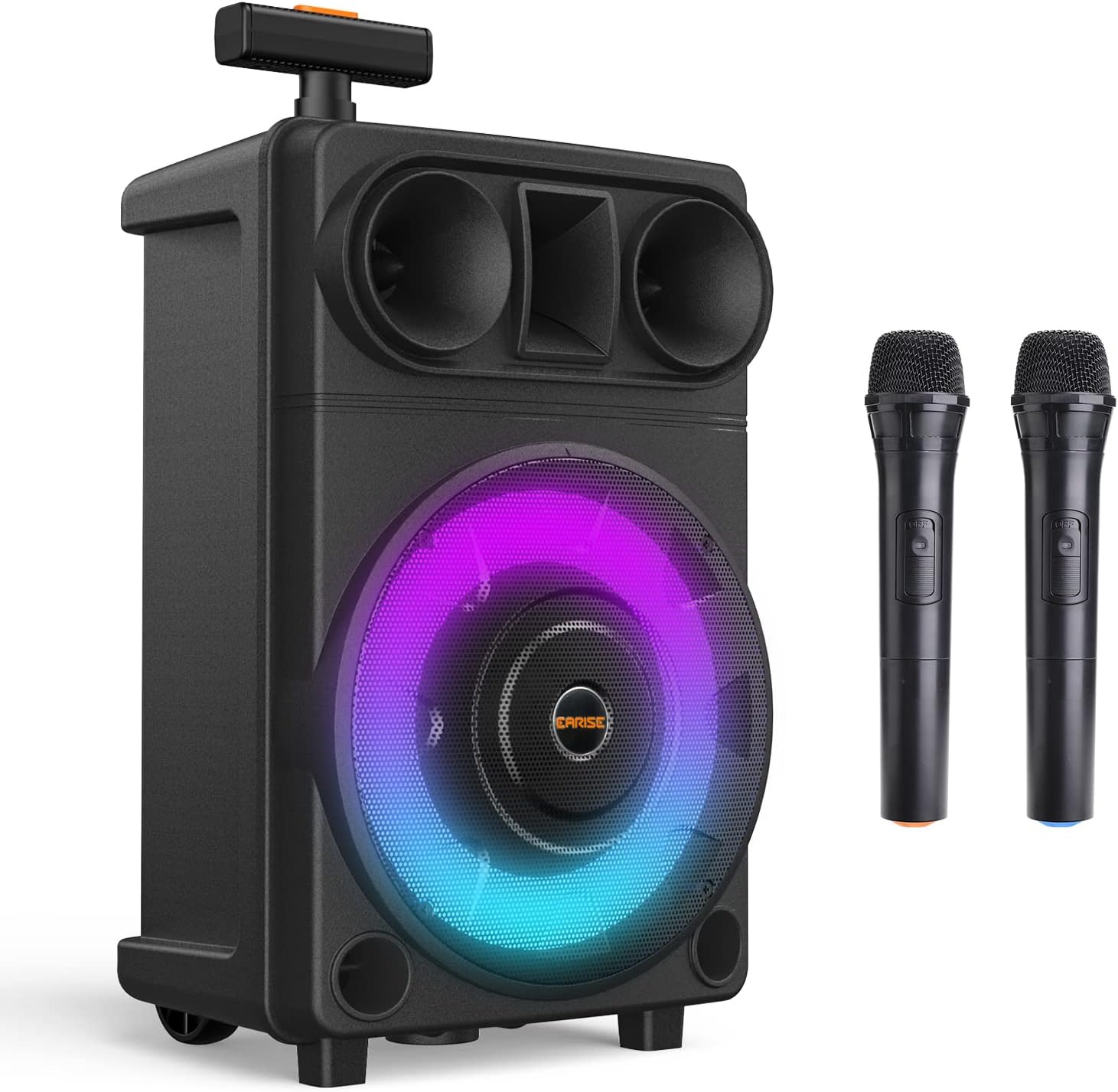
Image: The EARISE R18 Portable PA System Speaker, showcasing its main unit with RGB lighting and two wireless microphones.
2. Package Contents
Please check the package contents to ensure all items are present:
- EARISE R18 Portable PA System Speaker
- 2 x Low-Noise Wireless Microphones
- 1 x AUX Cable
- 1 x USB Charging Cable
- User Manual (this document)

Image: The EARISE R18 speaker with its dimensions (9.8" x 8.3" x 16.5") and the included accessories: two wireless microphones, an AUX cable, and a USB charging cable.
3. Setup Guide
3.1 Charging the Speaker
Before first use, fully charge the speaker. Connect the provided USB charging cable to the USB 5V Charging Port (8) on the control panel and plug the other end into a compatible USB power adapter (not included). The charging indicator will show the charging status.

Image: Detailed views of the speaker's features, including the charging port, control knobs, telescoping handle, and display indicating supported input modes.
3.2 Microphone Setup
The EARISE R18 comes with two low-noise wireless microphones. Simply power on the microphones; they should automatically connect to the speaker. Ensure the microphone volume knob (13) on the speaker is adjusted to an audible level.

Image: Two individuals using the wireless microphones with the EARISE R18 speaker, illustrating its low-noise capability.
4. Operating Instructions
4.1 Control Panel Overview
Familiarize yourself with the control panel located on the top of the speaker:
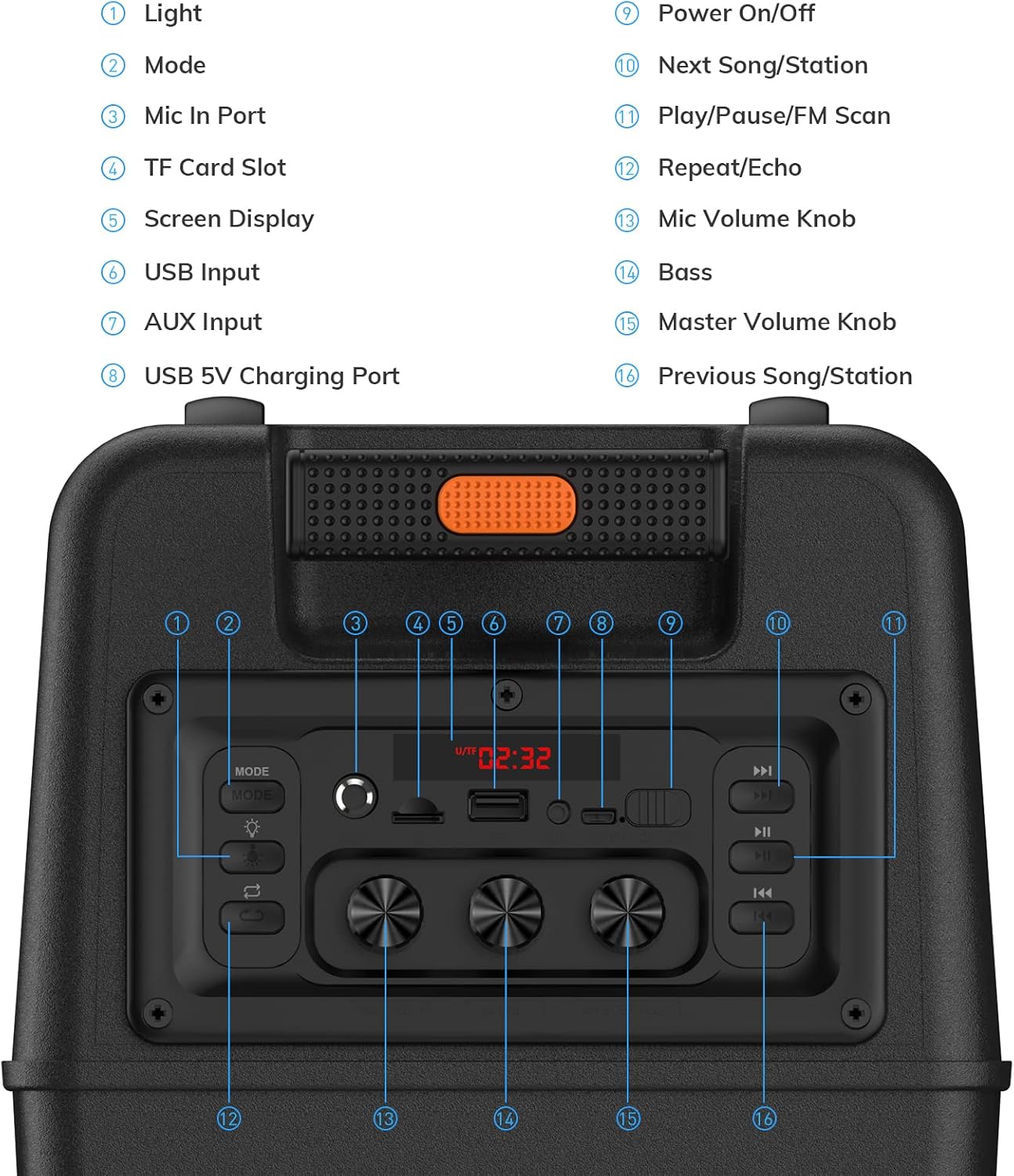
Image: A detailed view of the speaker's control panel, with numbered labels indicating the function of each button and knob.
| No. | Function |
|---|---|
| 1 | Light Button |
| 2 | Mode Button |
| 3 | Mic In Port |
| 4 | TF Card Slot |
| 5 | Screen Display |
| 6 | USB Input |
| 7 | AUX Input |
| 8 | USB 5V Charging Port |
| 9 | Power On/Off Button |
| 10 | Next Song/Station Button |
| 11 | Play/Pause/FM Scan Button |
| 12 | Repeat/Echo Button |
| 13 | Mic Volume Knob |
| 14 | Bass Knob |
| 15 | Master Volume Knob |
| 16 | Previous Song/Station Button |
4.2 Power On/Off
Press the Power On/Off Button (9) to turn the speaker on or off.
4.3 Mode Selection
Press the Mode Button (2) repeatedly to cycle through available input modes: Bluetooth, USB, TF Card, AUX, and FM Radio. The selected mode will be displayed on the Screen Display (5).
4.4 Bluetooth Mode
- Turn on the speaker and select Bluetooth mode using the Mode Button (2). The display will show "BLUE" or a similar indicator.
- Enable Bluetooth on your device (smartphone, tablet, etc.) and search for "EARISE R18".
- Select "EARISE R18" to pair. A confirmation sound will indicate successful pairing.
- You can now play audio from your device through the speaker.
4.5 USB/TF Card Mode
- Insert a USB flash drive into the USB Input (6) or a TF card into the TF Card Slot (4).
- The speaker will automatically switch to USB/TF mode and begin playing audio files. If not, select the mode using the Mode Button (2).
- Use the Previous Song/Station Button (16) and Next Song/Station Button (10) to navigate tracks.
- Press the Play/Pause/FM Scan Button (11) to play or pause.
4.6 AUX Mode
- Connect one end of the provided AUX cable to the AUX Input (7) on the speaker.
- Connect the other end to the audio output jack of your external device (e.g., MP3 player, computer).
- The speaker will automatically switch to AUX mode. If not, select the mode using the Mode Button (2).
4.7 FM Radio Mode
- Select FM Radio mode using the Mode Button (2).
- Press and hold the Play/Pause/FM Scan Button (11) to automatically scan and save available FM radio stations.
- Use the Previous Song/Station Button (16) and Next Song/Station Button (10) to switch between saved stations.
4.8 Microphone and Echo Control
- Adjust the volume of the wireless microphones using the Mic Volume Knob (13).
- To add an echo effect to the microphone sound, press the Repeat/Echo Button (12). Press again to cycle through echo levels or turn off.
- A wired microphone can also be connected to the Mic In Port (3).
4.9 Adjusting Sound and Volume
- Use the Master Volume Knob (15) to control the overall output volume of the speaker.
- Adjust the bass level using the Bass Knob (14) to enhance low-frequency sounds.
4.10 RGB Light Control
The speaker features dynamic RGB lights. Press the Light Button (1) to cycle through different light show modes or to turn the lights off.

Image: The EARISE R18 speaker highlighting its internal audio components and demonstrating various RGB light patterns.
5. Maintenance
- Cleaning: Use a soft, dry cloth to clean the speaker's exterior. Do not use abrasive cleaners or solvents.
- Storage: Store the speaker in a cool, dry place away from direct sunlight and extreme temperatures.
- Battery Care: To prolong battery life, avoid fully discharging the battery frequently. Recharge the speaker regularly, even if not in use for extended periods.
- Water Exposure: This speaker is not waterproof. Avoid exposing it to water or excessive moisture.
6. Troubleshooting
| Problem | Possible Cause | Solution |
|---|---|---|
| No sound from speaker | Volume too low; Incorrect mode selected; Device not connected properly. | Increase Master Volume Knob (15); Press Mode Button (2) to select correct input; Reconnect Bluetooth/AUX cable/USB/TF card. |
| Microphone not working | Microphone not powered on; Mic volume too low; Microphone not paired (wireless). | Ensure microphone is powered on; Increase Mic Volume Knob (13); Re-pair wireless microphones or check wired connection. |
| Short battery life | Battery not fully charged; Battery degradation over time. | Fully charge the speaker before use; Reduce volume or turn off RGB lights to conserve power. |
| Bluetooth connection unstable | Device too far from speaker; Interference. | Move device closer to the speaker (within 33 feet); Avoid obstacles between device and speaker; Turn off other Bluetooth devices. |
| Distorted sound | Volume too high; Audio source quality is poor. | Lower the Master Volume Knob (15); Try a different audio source or file. |
7. Specifications
- Model: R18
- Brand: EARISE
- Output Wattage: 400 Watts (Peak)
- Subwoofer Size: 8 inches
- Tweeter Size: 1 inch
- Connectivity: Bluetooth, USB, AUX, TF Card, FM Radio
- Microphones: 2 Wireless Microphones included, 1 Mic In Port
- Lighting: RGB Lights (6 Disco Light Show Modes)
- Battery: Built-in 3600mAh Rechargeable Battery
- Dimensions (L x W x H): 9.8 x 8.3 x 16.5 inches
- Item Weight: 8.28 pounds
- Recommended Uses: Party entertainment, karaoke, public speaking, outdoor events
8. Warranty and Support
EARISE products are manufactured to high quality standards. For warranty information, technical support, or service inquiries, please refer to the warranty card included with your purchase or visit the official EARISE website. Please retain your proof of purchase for any warranty claims.
Related documentsR18


Ask a question about this manual
Ask about setup, troubleshooting, compatibility, parts, safety, or missing instructions. Manuals+ will review the question and use this page’s manual context to help answer it.