Introduction
Thank you for choosing the Bietrun WXM19 Wireless Microphone System. This system provides high-quality audio transmission for various applications, including karaoke, public address systems, mixers, and more. Featuring UHF wireless technology, rechargeable batteries, and Bluetooth connectivity, this manual will guide you through the setup, operation, and maintenance of your new microphone system to ensure optimal performance.
What's in the Box
Please verify that all items are present in your package:
- 2 x Bietrun WXM19 Wireless Microphones
- 1 x Wireless Receiver (6.35mm jack)
- 1 x USB Charging Cable (Type-C for receiver, Micro USB for microphones)
- 1 x 3.5mm to 6.35mm Audio Converter
- 2 x Microphone Foam Covers

Product Overview
The Bietrun WXM19 system consists of two handheld wireless microphones and a compact receiver. Each microphone features a dynamic unidirectional core for clear vocal pickup and an alloy casing for durability. The receiver supports UHF wireless transmission and Bluetooth connectivity.
Key Features:
- UHF Wireless Technology: Provides stable signal transmission up to 240 feet (75 meters) in open areas.
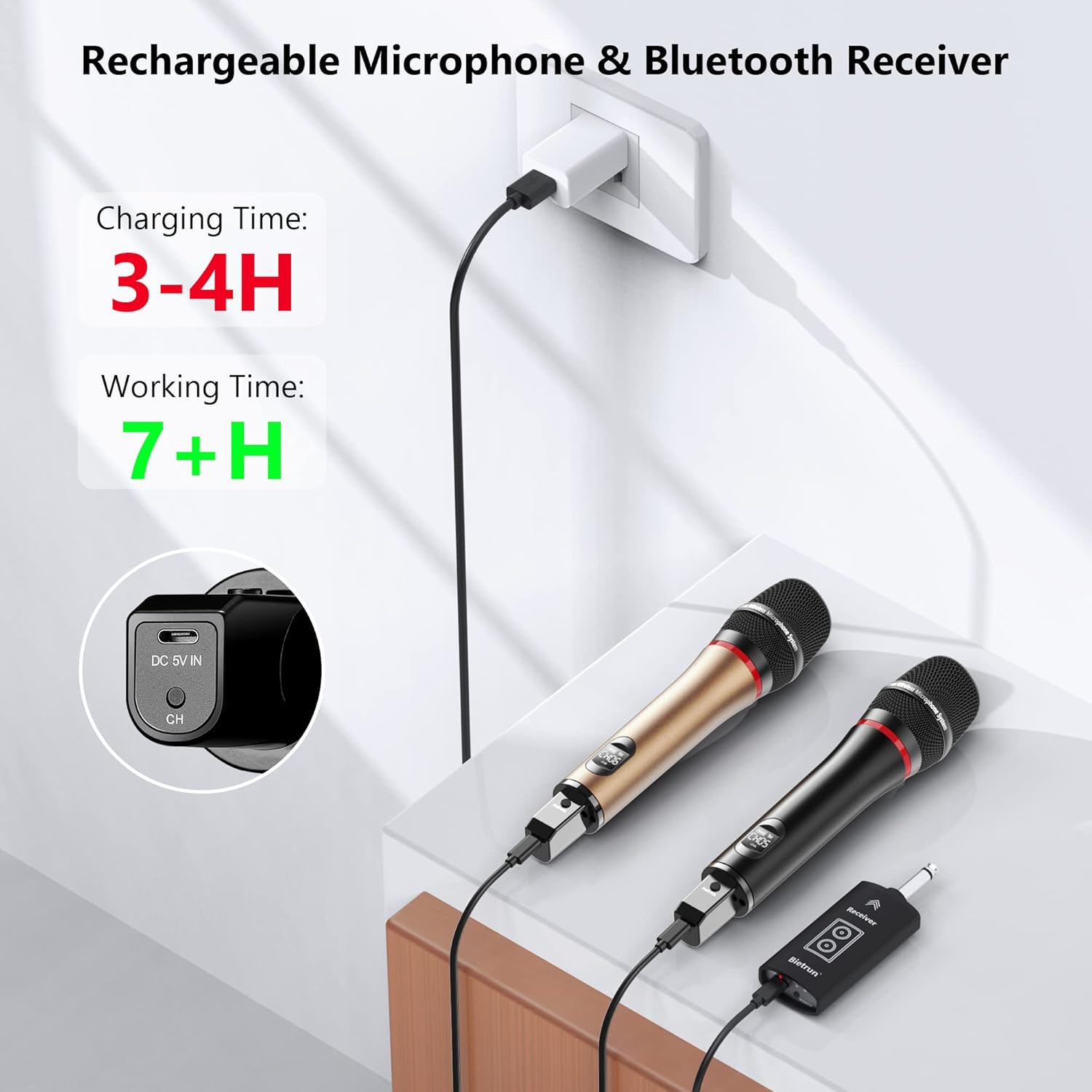
- Rechargeable Batteries: Microphones and receiver feature built-in 1200mAh lithium-ion batteries, offering up to 7 hours of working time after 3-4 hours of charging.
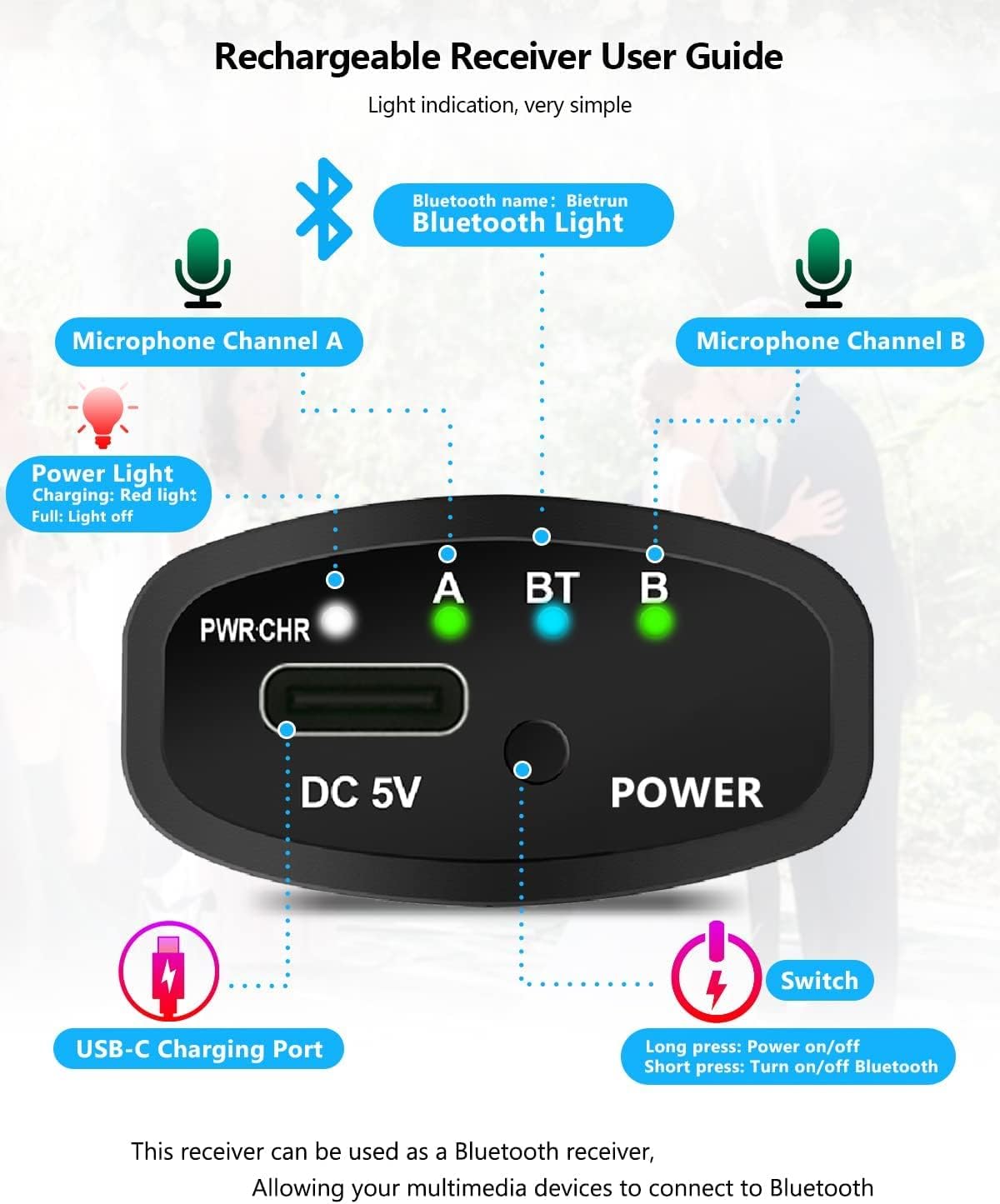
- Bluetooth Connectivity: The receiver can act as a Bluetooth receiver to stream music from your devices.
- Adjustable Channels: 15 selectable frequency channels per microphone to avoid interference.
- Wide Compatibility: Connects to devices with 6.35mm (1/4") or 3.5mm (1/8") microphone inputs, such as PA systems, karaoke machines, mixers, and amplifiers.

Setup Instructions
1. Charging the Devices
Before first use, fully charge both microphones and the receiver. Use the included USB charging cable.
- Connect the USB-C end of the charging cable to the receiver's DC 5V port.
- Connect the Micro USB ends to the charging ports on the bottom of each microphone.
- Plug the USB-A end into a standard USB power adapter (not included).
- The LED ring light on the microphone will glow red during charging and turn green when fully charged. The receiver's power light will be red while charging and turn off when full.
- Charging time is approximately 3-4 hours for a full charge, providing up to 7 hours of working time.
2. Initial Pairing and Connection
The microphones and receiver are designed for automatic connection. Follow these steps:
- Turn on the Receiver: Press and hold the POWER button on the receiver until its indicator lights up.
- Turn on the Microphones: Press the power switch located at the tail of each microphone. The microphone display will show the channel number.
- Plug into Audio Device: Insert the receiver's 6.35mm jack into the microphone input port of your audio device (e.g., PA system, karaoke machine, mixer). If your device has a 3.5mm input, use the included 3.5mm to 6.35mm converter.
- The microphones and receiver should automatically connect. The 'A' and 'B' lights on the receiver will indicate successful connection for each microphone.

3. Compatibility Notes
This system is compatible only with input devices that have a 6.35mm (1/4") or 3.5mm (1/8") microphone interface. Ensure your device has a dedicated microphone input. It is not compatible with 'LINE IN' or 'AUX IN' ports.

Operating Instructions
1. Adjusting Microphone Channels
Each microphone has 15 adjustable frequency channels. If you experience interference or wish to use multiple microphone systems simultaneously, you can change the channel:
- With the microphone powered on, briefly press the power switch at the tail of the microphone.
- The channel number on the microphone's display will change.
- Ensure that each microphone operates on a different channel to prevent interference.
2. Using Bluetooth Connectivity
The receiver can function as a Bluetooth receiver to stream audio from your smartphone, tablet, or laptop to your connected audio system.
- Ensure the receiver is powered on and connected to your audio device's microphone input.
- Briefly press the POWER button on the receiver to activate Bluetooth mode. The Bluetooth light (BT) will illuminate.
- On your smart device, search for Bluetooth devices and select "Bietrun".
- Once connected, you can play music or karaoke tracks from your device through your audio system.

Maintenance
Proper maintenance ensures the longevity and optimal performance of your Bietrun WXM19 Wireless Microphone System.
- Cleaning: Use a soft, dry cloth to clean the microphones and receiver. Avoid using liquid cleaners or solvents.
- Storage: Store the system in a cool, dry place away from direct sunlight and extreme temperatures when not in use.
- Battery Care: For extended storage, charge the batteries to approximately 50% every few months to maintain battery health. Avoid fully discharging the batteries for prolonged periods.
- Handling: Handle the microphones and receiver with care to prevent physical damage. Avoid dropping them.
Troubleshooting
If you encounter issues with your Bietrun WXM19 Wireless Microphone System, refer to the following common problems and solutions:
| Problem | Possible Cause | Solution |
|---|---|---|
| No sound from microphone | Microphone or receiver not powered on; low battery; incorrect input on audio device; receiver not connected to MIC IN. | Ensure both microphone and receiver are charged and powered on. Verify the receiver is plugged into a 'MIC IN' port, not 'LINE IN' or 'AUX IN'. Check the volume on your audio device. |
| Interference or static noise | Other wireless devices operating on the same frequency; distance too far; obstacles blocking signal. | Change the channel on the microphone (briefly press the power switch). Ensure microphones are not too far from the receiver (max 240ft/75m). Reduce obstacles between receiver and microphones. |
| Bluetooth not connecting | Bluetooth mode not activated on receiver; receiver too far from smart device; incorrect device selected. | Briefly press the POWER button on the receiver to activate Bluetooth (BT light should be on). Ensure your smart device's Bluetooth is on and search for "Bietrun". Keep devices within 10m for Bluetooth. |
| Short battery life | Incomplete charging; aging battery. | Ensure devices are fully charged (3-4 hours). If battery life significantly degrades over time, contact customer support. |
Specifications
| Feature | Specification |
|---|---|
| Model | WXM19 |
| Connectivity Technology | UHF Wireless, Bluetooth |
| Wireless Range (UHF) | Up to 240 feet (75 meters) in open areas |
| Bluetooth Range | Up to 33 feet (10 meters) |
| Microphone Type | Dynamic, Unidirectional |
| Audio Sensitivity | 95 dB |
| Frequency Response | 50Hz - 16KHz |
| Number of Channels | 15 per microphone |
| Battery Type | Lithium Polymer (1200mAh built-in) |
| Charging Time | 3-4 hours |
| Working Time | Up to 7 hours |
| Material | Metal (microphone casing) |
| Connector Type | 6.35mm Jack (receiver) |
| Item Weight | 1.92 pounds (total package) |
| Package Dimensions | 11.97 x 6.61 x 2.6 inches |

Warranty and Support
Bietrun products are designed for reliability and performance. For warranty information or technical support, please refer to the contact details provided with your purchase or visit the official Bietrun website. Keep your purchase receipt as proof of purchase for any warranty claims.


