
Introduction
This manual provides detailed instructions for the proper installation, operation, and maintenance of your Yokomo BL-RS4 Drift Spec Sensored Brushless Electronic Speed Controller (ESC) and Zero S Drift Spec Motor combo set. This system is designed for high-performance RC drift applications, offering precise control and robust power delivery.
The BL-RS4 ESC comes pre-programmed with a drift-specific setup, providing an expert-level starting point for enthusiasts. Its powerful basic performance can be further optimized using a dedicated programmer (BL-YBP4) or a Wi-Fi module (sold separately). When paired with the color-anodized ZERO-S motor, this combo is fully compatible with the Yokomo YD-2 series chassis, ensuring a coordinated and high-performing setup.
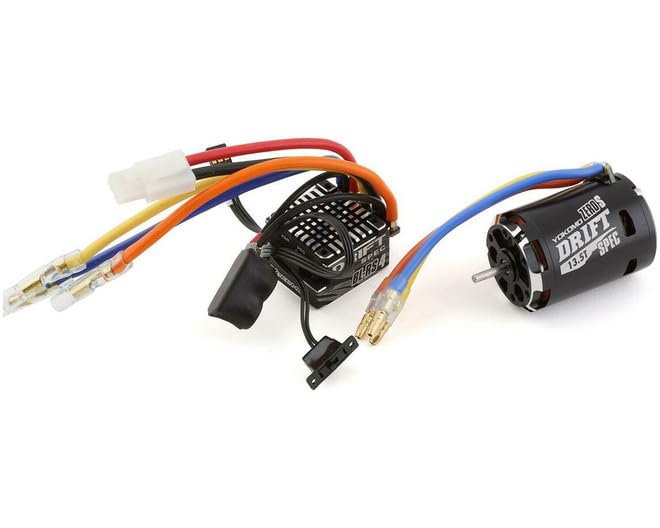
Image: The Yokomo BL-RS4 Drift Spec Sensored Brushless ESC and Zero S Drift Spec Motor combo set. This image displays the compact design of the ESC and the sleek appearance of the motor, highlighting their intended use in RC drift vehicles.
Safety Precautions
- Always disconnect the battery from the ESC when not in use to prevent accidental operation and potential damage.
- Ensure all connections are secure and properly insulated to avoid short circuits.
- Operate your RC vehicle in a safe environment, away from people, pets, and obstacles.
- Do not expose the ESC or motor to water or excessive moisture unless specifically designed for waterproof operation.
- Keep hands and loose clothing away from rotating parts of the motor and drivetrain.
- Use only recommended battery types and chargers. Incorrect charging or battery usage can lead to fire or explosion.
- This product is recommended for users 16 years and older. Adult supervision is advised for younger users.
Setup and Installation
1. ESC Mounting
- Choose a location on your chassis that allows for good airflow to the ESC for cooling.
- Secure the ESC using double-sided tape or mounting screws, ensuring it is firmly attached and protected from impacts.
- Avoid mounting the ESC near sources of extreme heat or vibration.
2. Motor Connection
- Connect the three motor wires from the ESC to the corresponding terminals on the Zero S motor. Ensure correct phase matching (A-A, B-B, C-C). Incorrect connection can damage the ESC or motor.
- Connect the sensor cable from the motor to the sensor port on the ESC. Ensure the connector is fully seated and oriented correctly.
3. Battery Connection
- Connect the battery connector from the ESC to your compatible RC battery pack. Observe correct polarity: red wire to positive (+), black wire to negative (-). Reverse polarity will cause severe damage.
- Ensure the battery is fully charged before operation.
4. Receiver Connection
- Plug the ESC's receiver cable into the throttle channel (usually Channel 2) of your RC receiver.
- Ensure the receiver is properly bound to your transmitter.
5. ESC Calibration
Before first use, the ESC must be calibrated to your radio system's throttle range.
- Turn on your transmitter and ensure the throttle trim is at neutral.
- With the ESC turned off, hold down the ESC's setup button.
- Turn on the ESC while continuing to hold the setup button. Release the button when the LED starts flashing.
- Set the throttle to full forward and press the setup button once.
- Set the throttle to full reverse and press the setup button once.
- Set the throttle to neutral and press the setup button once.
- The ESC will emit a confirmation tone, indicating successful calibration.
Operating Instructions
Basic Operation
- Ensure all connections are secure and the battery is fully charged.
- Turn on your RC transmitter first.
- Turn on the ESC by pressing its power button.
- The ESC will initialize, and you should hear a series of tones.
- Test throttle response gently to ensure proper function before full operation.
- To stop operation, turn off the ESC first, then turn off your transmitter.
Advanced Settings (with optional programmer/Wi-Fi module)
The BL-RS4 ESC allows for advanced parameter adjustments using the optional Yokomo BL-YBP4 programmer or a compatible Wi-Fi module. These tools enable fine-tuning of settings such as:
- Throttle Response: Adjust punch and acceleration curves.
- Brake Force: Modify braking strength and drag brake settings.
- Timing/Boost: Optimize motor timing for increased power or efficiency (use with caution to avoid overheating).
- Low Voltage Cutoff: Set the voltage at which the ESC reduces power to protect your battery.
- Reverse Speed: Adjust the maximum speed in reverse.
Refer to the specific manual for the BL-YBP4 programmer or Wi-Fi module for detailed instructions on accessing and modifying these settings.
Maintenance
- Cleaning: Regularly clean the ESC and motor to remove dirt, dust, and debris. Use a soft brush or compressed air. Avoid using solvents or harsh chemicals.
- Inspections: Periodically inspect all wires and connectors for signs of wear, fraying, or damage. Replace damaged components immediately.
- Motor Bearings: Check motor bearings for smooth operation. If they feel rough or noisy, they may need lubrication or replacement.
- Temperature Monitoring: Monitor the operating temperature of the ESC and motor during use. Excessive heat can indicate an issue (e.g., incorrect gearing, aggressive timing, or insufficient cooling). Allow components to cool down between runs.
- Storage: Store the ESC and motor in a dry, cool place away from direct sunlight and extreme temperatures. Disconnect batteries during storage.
Troubleshooting
| Problem | Possible Cause | Solution |
|---|---|---|
| ESC does not power on. | Battery not connected, battery discharged, reverse polarity, faulty power switch. | Check battery connection and charge. Verify polarity. Inspect power switch. |
| Motor does not respond to throttle. | ESC not calibrated, receiver not connected, transmitter off, motor wires loose, sensor cable disconnected. | Perform ESC calibration. Check receiver connection. Ensure transmitter is on. Secure motor and sensor wires. |
| Motor runs rough or cogging. | Incorrect motor phase connection, damaged sensor cable, motor timing issues, gearing too high. | Verify motor wire connections. Check sensor cable. Adjust motor timing. Reduce gearing. |
| ESC or motor overheats. | Gearing too high, aggressive timing settings, insufficient airflow, faulty component. | Reduce gearing. Lower timing settings. Improve cooling. Inspect components for damage. |
| Loss of control or erratic behavior. | Radio interference, low battery in transmitter/receiver, loose connections, damaged receiver. | Check radio environment. Charge/replace batteries. Secure all connections. Inspect receiver. |
Specifications
| Component | Specification |
|---|---|
| Model Name | BL-RS4 Drift Spec Sensored Brushless ESC / Zero S Drift Spec Motor |
| Product Code | YOKBL-R4135DBA |
| ESC Type | Sensored Brushless |
| Motor Type | Sensored Brushless (Zero S Drift Spec) |
| Compatibility | Yokomo YD-2 series chassis (recommended) |
| Recommended Age | 16 years and up |
| Optional Accessories | BL-YBP4 Programmer, Wi-Fi Module |
Warranty and Support
Yokomo products are manufactured to high standards of quality and performance. This product is covered by a limited warranty against manufacturing defects from the date of purchase. Please retain your proof of purchase for warranty claims.
The warranty does not cover damage caused by:
- Improper installation or setup.
- Misuse, abuse, or negligence.
- Unauthorized modifications or repairs.
- Operating outside of specified parameters.
- Normal wear and tear.
For technical support, spare parts, or warranty inquiries, please contact your local Yokomo dealer or visit the official Yokomo website. Provide your product model number (YOKBL-R4135DBA) and a detailed description of the issue when seeking support.
Official Yokomo Website: www.teamyokomo.com

