1. Introduction
This manual provides detailed instructions for the installation, operation, and maintenance of your SounDigital 800.4 EVO X 4-channel car amplifier. This amplifier is designed for high power output from a compact chassis, suitable for various audio installations including automotive, motorcycle, UTV, and marine applications. Please read this manual thoroughly before installation and use to ensure proper function and safety.
2. Safety Information
Professional Installation Recommended: Due to the complexity of car audio systems and high power electrical connections, professional installation is strongly recommended. Incorrect installation can lead to serious injury, damage to the amplifier, or damage to your vehicle's electrical system.
- Always disconnect the vehicle's battery before performing any electrical work.
- Ensure all wiring is properly insulated and secured to prevent short circuits.
- Use appropriate gauge wiring for power and ground connections as specified in this manual.
- Avoid mounting the amplifier in areas exposed to excessive heat, moisture, or direct sunlight.
- Do not operate the amplifier if it has been exposed to water or shows signs of damage.
- Keep the amplifier away from flammable materials.
3. Package Contents
Verify that all items are present in the package:
- SounDigital 800.4 EVO X Amplifier
- Instruction Manual (this document)
- Mounting Hardware (screws, etc. - assumed, not explicitly listed but typical)
4. Setup and Installation
4.1 Mounting the Amplifier
The SounDigital 800.4 EVO X amplifier features a compact design for versatile mounting. Choose a location that is dry, well-ventilated, and protected from direct heat sources or moisture. Ensure there is sufficient space around the amplifier for proper airflow and cable routing. The amplifier is designed for surface mounting.

Figure 1: Top view of the SounDigital 800.4 EVO X amplifier, showing its compact design and branding.
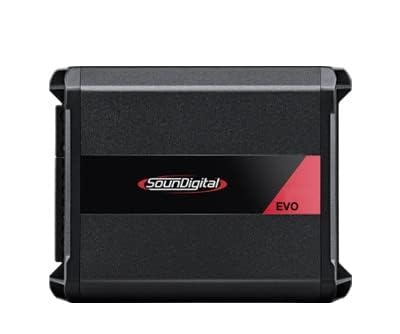
Figure 2: Front/side view of the SounDigital 800.4 EVO X amplifier, highlighting its input/output terminals.
4.2 Power Connections
Proper power and ground connections are critical for amplifier performance and safety. Use heavy-gauge wiring suitable for the amplifier's power requirements.
- Battery (BATT+): Connect a fused power cable directly from the positive terminal of the vehicle's battery to the BATT+ terminal on the amplifier. The fuse should be located within 18 inches (45 cm) of the battery.
- Ground (GND): Connect a cable of the same gauge as the power cable from the GND terminal on the amplifier to a clean, unpainted metal surface on the vehicle's chassis. Ensure a solid, low-resistance connection.
- Remote Turn-On (REM): Connect a remote turn-on wire from your head unit or other switched 12V source to the REM terminal. This wire turns the amplifier on and off with your audio system.
The amplifier operates within a voltage range of 12.6V to 14.4V DC and requires a supply current of 35 Amps.
5. Wiring Diagram and Audio Connections
The SounDigital 800.4 EVO X is a 4-channel amplifier, offering flexibility for various speaker configurations. It can power four speakers or be bridged to power two speakers at higher output.
5.1 4-Channel Stereo Configuration
For a standard 4-channel setup, connect each speaker to its respective channel output (CH1, CH2, CH3, CH4). Ensure the speaker impedance matches the amplifier's capabilities (e.g., 4 Ohms or 2 Ohms per channel).
- Power @ 12.6V @ 4Ω: 4 x 132 WRMS
- Power @ 12.6V @ 2Ω: 4 x 200 WRMS
- Power @ 14.4V @ 4Ω: 4 x 147 WRMS
- Power @ 14.4V @ 2Ω: 4 x 223 WRMS
5.2 Bridged Configuration
The amplifier can be bridged to provide higher power to two speakers (e.g., subwoofers or high-power component sets). When bridging, connect the speakers across the designated positive and negative terminals for bridged operation. Ensure the minimum bridged impedance is met (typically 4 Ohms).
- Bridge Power @ 12.6V @ 4Ω: 2 x 400 WRMS
- Bridge Power @ 14.4V @ 4Ω: 2 x 446 WRMS
Note: Refer to the amplifier's terminal markings for specific bridged connection points.
5.3 Audio Input Connections
Connect the RCA output cables from your head unit or audio source to the RCA input jacks on the amplifier.
6. Operating Instructions
6.1 Initial Power-Up
After all connections are made and verified, reconnect the vehicle's battery. Turn on your head unit. The amplifier should power on, indicated by an LED status light (refer to amplifier for specific LED indicators).
6.2 Gain Adjustment
The gain control matches the amplifier's input sensitivity to the output level of your head unit. Start with the gain set to minimum. Play a familiar track at about 75% of your head unit's maximum volume. Slowly increase the amplifier's gain until you hear distortion, then back off slightly. This ensures maximum clean output.
6.3 Crossover Settings
The amplifier features adjustable crossovers to optimize sound for your speakers:
- High-Pass Filter (HPF): 45Hz – 850Hz. Use HPF for full-range speakers to prevent low frequencies from reaching them, improving clarity and protecting the speakers.
- Low-Pass Filter (LPF): 45Hz – 850Hz. Use LPF for subwoofers to allow only low frequencies to pass, ensuring deep bass reproduction.
Adjust these settings based on your speaker types and desired sound characteristics. The amplifier's frequency response is 5Hz – 22kHz (-3dB) with a Signal-to-Noise Ratio (SNR) of 91dB.
7. Maintenance
The SounDigital 800.4 EVO X amplifier requires minimal maintenance. Periodically inspect all wiring connections to ensure they are secure and free from corrosion. Keep the amplifier clean and free of dust and debris. Use a soft, dry cloth for cleaning. Do not use harsh chemicals or abrasive cleaners.
8. Troubleshooting
| Problem | Possible Cause | Solution |
|---|---|---|
| Amplifier does not turn on. | No power, ground, or remote signal. Blown fuse. | Check all power, ground, and remote connections. Verify fuse at battery and on amplifier. Ensure remote wire receives 12V when head unit is on. |
| No sound output. | RCA cables disconnected. Speaker wires disconnected. Amplifier in protect mode. Gain too low. | Check RCA input connections. Verify speaker wire connections. Check amplifier status LED for protect mode (often red). Adjust gain. |
| Distorted sound. | Gain set too high. Improper crossover settings. Speaker impedance mismatch. Damaged speakers. | Reduce gain. Adjust HPF/LPF settings. Verify speaker impedance is compatible. Inspect speakers for damage. |
| Amplifier overheats. | Insufficient ventilation. Speaker impedance too low. | Ensure adequate airflow around the amplifier. Verify speaker impedance is within specifications. |
9. Specifications
| Feature | Detail |
|---|---|
| Model Number | 800.4 EVOX2 |
| Brand | SounDigital |
| Number of Channels | 4 |
| Output Power (Max) | 800 Watts |
| Power @ 12.6V @ 4Ω | 4 x 132 WRMS |
| Power @ 12.6V @ 2Ω | 4 x 200 WRMS |
| Bridge Power @ 12.6V @ 4Ω | 2 x 400 WRMS |
| Power @ 14.4V @ 4Ω | 4 x 147 WRMS |
| Power @ 14.4V @ 2Ω | 4 x 223 WRMS |
| Bridge Power @ 14.4V @ 4Ω | 2 x 446 WRMS |
| Crossover HPF | 45Hz – 850Hz |
| Crossover LPF | 45Hz – 850Hz |
| SNR | 91dB |
| Frequency Response (-3dB) | 5Hz – 22kHz |
| Minimum Supply Voltage | 12.6 Volts (DC) |
| Maximum Supply Voltage | 14.4 Volts (DC) |
| Supply Current | 35 Amps |
| Product Dimensions | 5.8 x 4.4 x 2.0 inches (14.8 x 11.3 x 5.1 cm) |
| Item Weight | 1.9 pounds |
| Material | Metal |
| Mounting Type | Surface Mount |
| Certification | FCC |
10. Warranty and Support
10.1 Warranty Information
SounDigital products are manufactured to high quality standards. For specific warranty terms and conditions, please refer to the warranty card included with your product or visit the official SounDigital website. Keep your proof of purchase for warranty claims.
10.2 Customer Support
If you encounter any issues not covered in this manual or require further assistance, please contact SounDigital customer support. Contact information can typically be found on the official SounDigital website or on your product packaging.