
1. Introduction
Thank you for purchasing the Lenco SCD-341 Portable CD-Radio. This device combines a CD player, DAB+ and FM radio, and Bluetooth connectivity in a compact design. This manual provides essential information for safe and efficient use of your new audio system. Please read it thoroughly before operation and retain it for future reference.
2. Safety Information
- Do not expose the unit to rain or moisture to prevent fire or electric shock.
- Ensure proper ventilation. Do not block ventilation openings.
- Use only the power adapter supplied with the unit.
- Do not open the casing. Refer all servicing to qualified personnel.
- Avoid placing the unit near heat sources or in direct sunlight.
- Keep the unit away from strong magnetic fields.
3. Package Contents
Please check that all items are present and in good condition:
- Lenco SCD-341 Portable CD-Radio Unit
- Power Adapter
- User Manual (this document)
- Quick Start Guide
4. Product Overview
The Lenco SCD-341 features a user-friendly interface with clearly labeled buttons and an LCD display.

Figure 1: Front view of the Lenco SCD-341, showing the main controls, LCD display, and stereo speakers.

Figure 2: Lenco SCD-341 with its integrated handle and telescopic antenna extended for radio reception.
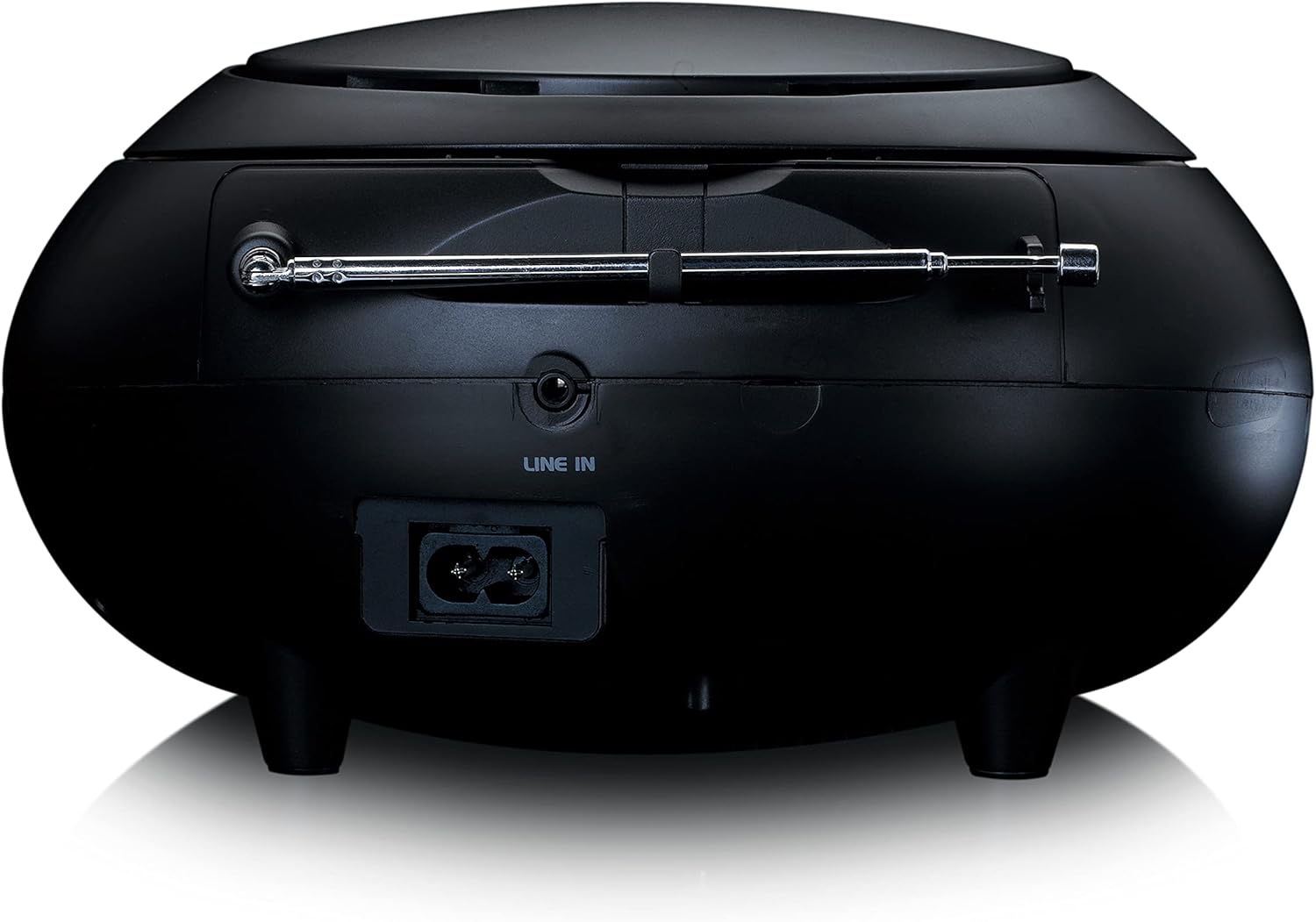
Figure 3: Rear view of the Lenco SCD-341, highlighting the power input and LINE IN audio port.
5. Setup
5.1 Power Connection
The Lenco SCD-341 can be powered by the included AC adapter or by batteries.
- AC Power: Connect the supplied power adapter to the AC IN socket on the rear of the unit (refer to Figure 3) and plug the other end into a standard wall outlet.
- Battery Power: Open the battery compartment on the bottom of the unit. Insert the required number of C-type batteries (not included), ensuring correct polarity. Close the compartment securely.
5.2 Antenna Setup
For optimal DAB+ and FM radio reception, fully extend the telescopic antenna located on the rear of the unit. Adjust its position for the best signal.
6. Operating Instructions
6.1 Power On/Off
Press the POWER button to turn the unit on or off.
6.2 CD Playback
- Press the SOURCE button repeatedly until "CD" is displayed on the LCD screen.
- Open the CD compartment lid by gently lifting it.
- Place a CD with the label side facing up onto the spindle.
- Close the CD compartment lid. The unit will begin reading the CD.
- Use the PLAY/PAUSE, STOP, SKIP FORWARD, and SKIP BACKWARD buttons to control playback.

Figure 4: Top view of the Lenco SCD-341 with the CD compartment open, showing a CD being inserted.
6.3 DAB+ Radio Operation
- Press the SOURCE button repeatedly until "DAB" is displayed.
- The unit will automatically scan for available DAB+ stations. This may take a few moments.
- Once scanning is complete, use the TUNE +/- buttons to navigate through the available stations.
- To save a station as a preset, press and hold the PRESET button, then use TUNE +/- to select a preset number and press PRESET again to confirm.
6.4 FM Radio Operation
- Press the SOURCE button repeatedly until "FM" is displayed.
- Press and hold the TUNE +/- buttons to automatically scan for the next available station. Briefly press to manually tune.
- To save a station as a preset, press and hold the PRESET button, then use TUNE +/- to select a preset number and press PRESET again to confirm.
6.5 Bluetooth Pairing
- Press the SOURCE button repeatedly until "Bluetooth" is displayed. The unit will enter pairing mode, indicated by a flashing Bluetooth icon on the display.
- On your external device (smartphone, tablet), enable Bluetooth and search for available devices.
- Select "Lenco SCD-341" from the list of found devices.
- Once paired, the Bluetooth icon on the unit's display will stop flashing and remain solid. You can now play audio from your device through the Lenco SCD-341.
6.6 Volume Control
Use the VOLUME +/- buttons to adjust the audio output level.
7. Maintenance
- Cleaning: Use a soft, dry cloth to clean the exterior of the unit. Do not use abrasive cleaners or solvents.
- CD Lens Care: If CD playback issues occur, use a commercially available CD lens cleaner disc.
- Storage: When not in use for extended periods, disconnect the power adapter and remove batteries. Store the unit in a cool, dry place.
8. Troubleshooting
| Problem | Possible Cause | Solution |
|---|---|---|
| No power | Power adapter not connected; batteries depleted or incorrectly inserted. | Check power adapter connection; replace batteries or ensure correct polarity. |
| No sound | Volume too low; incorrect source selected; headphones connected. | Increase volume; select correct source (CD, DAB, FM, Bluetooth); disconnect headphones. |
| CD not playing | CD inserted incorrectly; CD dirty or scratched; CD format not supported. | Reinsert CD correctly; clean or replace CD; ensure CD is a standard audio CD. |
| Poor radio reception | Antenna not extended or positioned poorly; strong interference. | Fully extend and adjust antenna; move unit away from other electronic devices. |
| Bluetooth pairing failed | Bluetooth not enabled on external device; device too far; unit not in pairing mode. | Ensure Bluetooth is on and discoverable; move device closer; select Bluetooth source on unit. |
9. Specifications
| Model Number | SCD-341 |
| Brand | Lenco |
| Dimensions (L x W x H) | 21.5 x 21 x 11.5 cm |
| Weight | 1.09 kg |
| Power Source | AC (adapter included) / Battery-Powered |
| Tuner Technology | DAB+, FM |
| Connectivity | Bluetooth |
| Audio Output Mode | Stereo |
| Display Type | LCD |
| Output Power | 3 watt RMS |

Figure 5: Dimensions of the Lenco SCD-341 unit.
10. Warranty and Support
For warranty information and technical support, please refer to the warranty card included in your package or visit the official Lenco website.
Manufacturer: Lenco GmbH
Country of Origin: Hongkong
11. Official Product Videos
Watch this official video for a visual guide to the Lenco SCD-341.
Video 1: A 360-degree product view of the Lenco SCD-341, showcasing its design and features from all angles.


