
1. Introduction
This manual provides instructions for the PERFASCIN DB93-14195G replacement remote control, designed for use with various Samsung Air Conditioner models. This remote control is an infrared (IR) type and requires no programming or pairing. Simply insert batteries to begin operation.
Compatible Models: DB93-14195G, DB93-14195A, DB93-14195B, DB9311115U, DB9314195G, DB9314195A, DB9314195B.
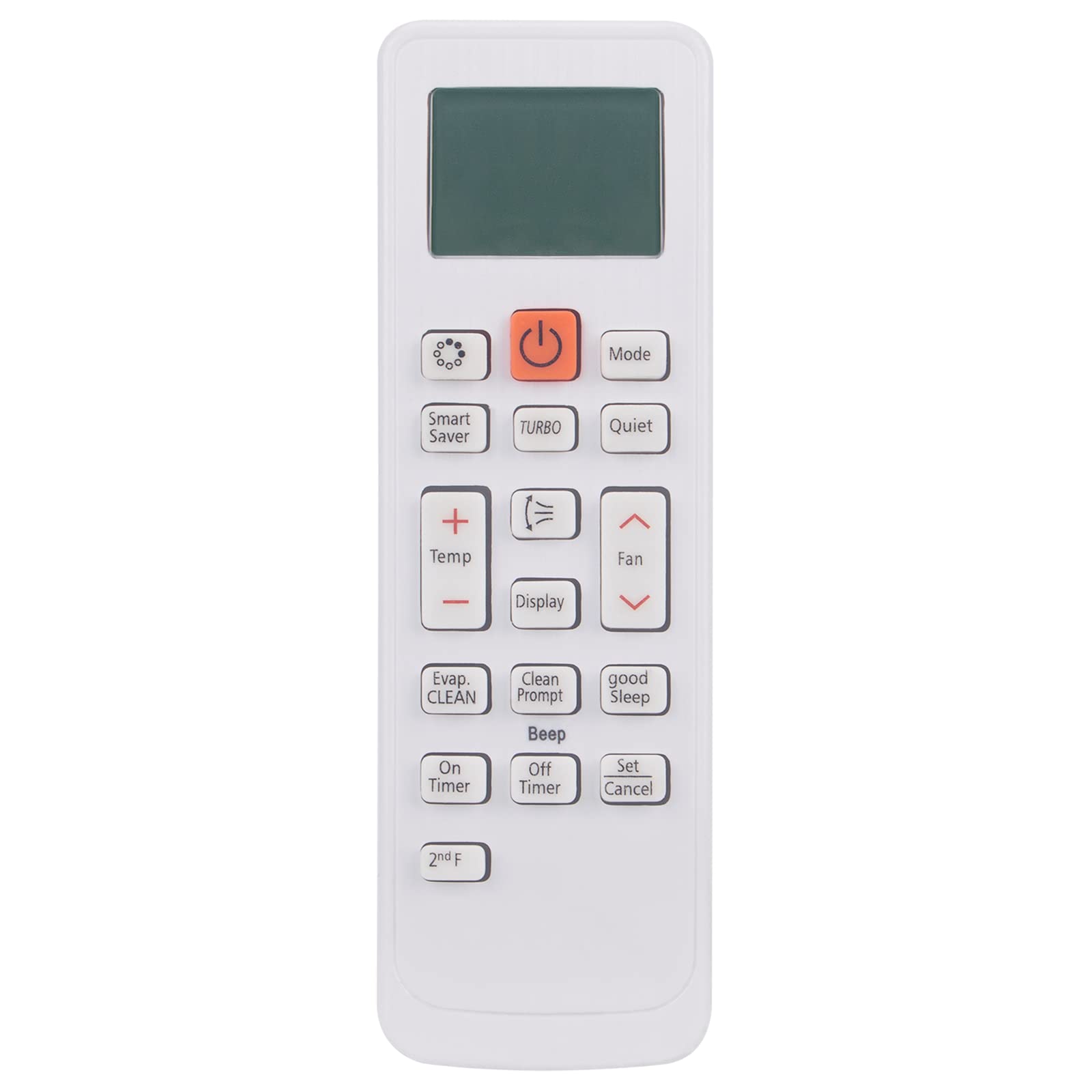
Figure 1: Front view of the PERFASCIN DB93-14195G remote control.
2. Setup
2.1 Battery Installation
The remote control requires two (2) 1.5V AAA alkaline batteries (not included). Follow these steps to install the batteries:
- Locate the battery compartment on the back of the remote control.
- Press down on the latch and slide the battery cover downwards to open it.
- Insert two AAA batteries, ensuring the positive (+) and negative (-) terminals match the diagrams inside the compartment.
- Slide the battery cover back into place until it clicks securely.

Figure 2: Back view of the remote control with the battery compartment.

Figure 3: Battery compartment with AAA batteries correctly inserted.
Note: Ensure batteries are inserted correctly. Incorrect polarity can prevent the remote from functioning. Replace both batteries simultaneously when they are depleted.
3. Operating Instructions
This remote control operates via infrared (IR) signals. Point the remote directly at the air conditioner's receiver for optimal performance. No programming or pairing is required; the remote is ready for use once batteries are installed.
3.1 Button Functions
The remote control features 20 buttons for various functions. Below is a general overview of common button functions:
- Power Button (Orange): Turns the air conditioner ON or OFF.
- Mode: Cycles through operating modes (e.g., Cool, Heat, Fan, Dry, Auto).
- Quiet: Activates or deactivates quiet operation mode.
- Turbo: Engages maximum cooling/heating power for rapid temperature change.
- Smart Saver: Activates energy-saving functions.
- Temp (+/-): Adjusts the desired temperature setting.
- Display: Controls the display on the air conditioner unit.
- Fan (Speed): Adjusts the fan speed (e.g., Low, Medium, High, Auto).
- Evap CLEAN: Initiates the evaporator cleaning function.
- Clean Prompt: Displays or clears cleaning reminders.
- Good Sleep: Activates a specialized sleep mode for comfort and energy saving.
- Beep: Toggles the remote's button press sound.
- On Timer: Sets a timer for the air conditioner to turn ON.
- Off Timer: Sets a timer for the air conditioner to turn OFF.
- Set: Confirms timer settings or other selections.
- Cancel: Cancels timer settings or other active functions.
- 2nd F: Activates secondary functions for certain buttons (refer to your air conditioner's main manual for specific details).
4. Maintenance
Proper care will extend the life of your remote control.
- Cleaning: Wipe the remote control with a soft, dry cloth. Do not use liquid cleaners, sprays, or abrasive materials.
- Battery Replacement: Replace batteries when the remote's range decreases or it stops responding. Always replace both batteries at the same time.
- Storage: If the remote will not be used for an extended period, remove the batteries to prevent leakage and damage. Store in a cool, dry place.
- Environment: Avoid exposing the remote to direct sunlight, extreme temperatures, high humidity, or water.
5. Troubleshooting
If you experience issues with your remote control, try the following solutions:
- Remote not responding:
- Check if the batteries are inserted correctly with the correct polarity.
- Replace old batteries with new 1.5V AAA alkaline batteries.
- Ensure there are no obstructions between the remote control and the air conditioner's receiver.
- Confirm you are within the maximum operating range (approximately 5 meters).
- Intermittent operation:
- This may indicate low battery power. Replace batteries.
- Ensure the remote's infrared emitter is clean and unobstructed.
6. Specifications
| Brand | PERFASCIN |
| Model Number | DB93-14195G (ANG-MBE596-DB93-14195G-US) |
| Compatible Devices | Samsung Air Conditioners |
| Connectivity Technology | Infrared (IR) |
| Power Supply | 2 x 1.5V AAA Alkaline Batteries (not included) |
| Maximum Range | 5 meters |
| Button Quantity | 20 |
| Item Weight | 0.06 kg |
| Color | White/Silver |
7. Support
For any questions or further assistance regarding your PERFASCIN remote control, please contact our customer service. We are available to provide professional suggestions and support.
Note: Specific warranty information is not provided in the product details. Please refer to your purchase documentation or contact the seller for warranty inquiries.