
1. Introduction
The Kair MultiFan KMF100T is a versatile in-line extractor fan designed for effective ventilation in various domestic and commercial settings. This unit is suitable for use in bathrooms, kitchens, offices, and other areas requiring air extraction. It features a 100mm duct compatibility, a 2-speed operation, and an adjustable timer function, providing powerful airflow while maintaining a low noise level.

Figure 1.1: The Kair MultiFan KMF100T In-Line Extractor Fan.

Figure 1.2: The Kair MultiFan is designed to improve ventilation and reduce humidity in various environments such as bathrooms, kitchens, and commercial spaces.
2. Safety Information
Please read all safety instructions carefully before installing or operating the Kair MultiFan KMF100T. Failure to follow these instructions may result in electric shock, fire, or personal injury.
- Always disconnect the power supply before performing any installation, maintenance, or cleaning.
- Installation must be carried out by a qualified electrician in accordance with local wiring regulations.
- Ensure the fan is properly grounded to prevent electric shock.
- Do not operate the fan if the power cord or any part of the unit is damaged.
- Keep hands and foreign objects away from the fan blades during operation.
- This appliance is not intended for use by persons (including children) with reduced physical, sensory or mental capabilities, or lack of experience and knowledge, unless they have been given supervision or instruction concerning use of the appliance by a person responsible for their safety.
- Do not use this fan in areas where flammable or explosive gases are present.
3. Package Contents
Verify that all components are present and undamaged upon opening the package:
- Kair MultiFan KMF100T In-Line Extractor Fan Unit
- Mounting brackets and screws (may vary by package)
- Instruction Manual (this document)
4. Specifications

Figure 4.1: Dimensional drawing of the Kair MultiFan KMF100T, showing measurements in millimeters and weight in kilograms.
| Feature | Specification |
|---|---|
| Model | KMF100T |
| Brand | Kair |
| Duct Diameter | 100 mm (Spigot ØD: 96mm) |
| Dimensions (L x W x H) | 24.6 x 16.7 x 19 cm (L: 246mm, B: 167mm, H: 190mm) |
| Weight | 1.35 kg |
| Power Consumption | 21 Watts (Min) - 33 Watts (Max) |
| Voltage | 230 Volts |
| Material | Plastic |
| Number of Speeds | 2 |
| Noise Level | From 27 Decibels |
| Airflow (Max) | 187 m³/h (52 l/s) |
| Special Features | Adjustable Speed Control, Timer Function |
| IP Rating | IPX4 |

Figure 4.2: Detailed technical data for Kair MultiFan series, including the 100mm model (KMF100T).
5. Installation
The Kair MultiFan KMF100T is designed for in-line installation within ducting systems. It can be mounted in various positions, including ceiling voids, wall cavities, or loft spaces. Ensure the chosen location allows for proper airflow and access for maintenance.
5.1 Mounting the Fan
- Select Location: Choose a suitable, stable location for mounting the fan. Consider accessibility for wiring and future maintenance.
- Secure Mounting: Use the provided mounting brackets and screws to securely attach the fan unit to a solid surface. Ensure the fan is firmly fixed to minimize vibration and noise.
- Ducting Connection: Connect 100mm diameter ducting to both inlet and outlet spigots of the fan. Use appropriate clamps or tape to ensure airtight connections. The maximum recommended duct length is 5 meters without bends for optimal performance.

Figure 5.1: Examples of Kair MultiFan installation in a bathroom and office environment. Ducting and accessories are sold separately.
5.2 Electrical Wiring
WARNING: Electrical wiring must be performed by a qualified electrician. Ensure the main power supply is disconnected before commencing any wiring work.
- The KMF100T requires a 230V AC power supply.
- Connect the live, neutral, and earth wires to the corresponding terminals within the fan's wiring compartment.
- For the timer function, a switched live connection is typically required from a light switch or separate control.
- Refer to the wiring diagram provided inside the fan's terminal cover for specific connections.
- Ensure all connections are secure and properly insulated.
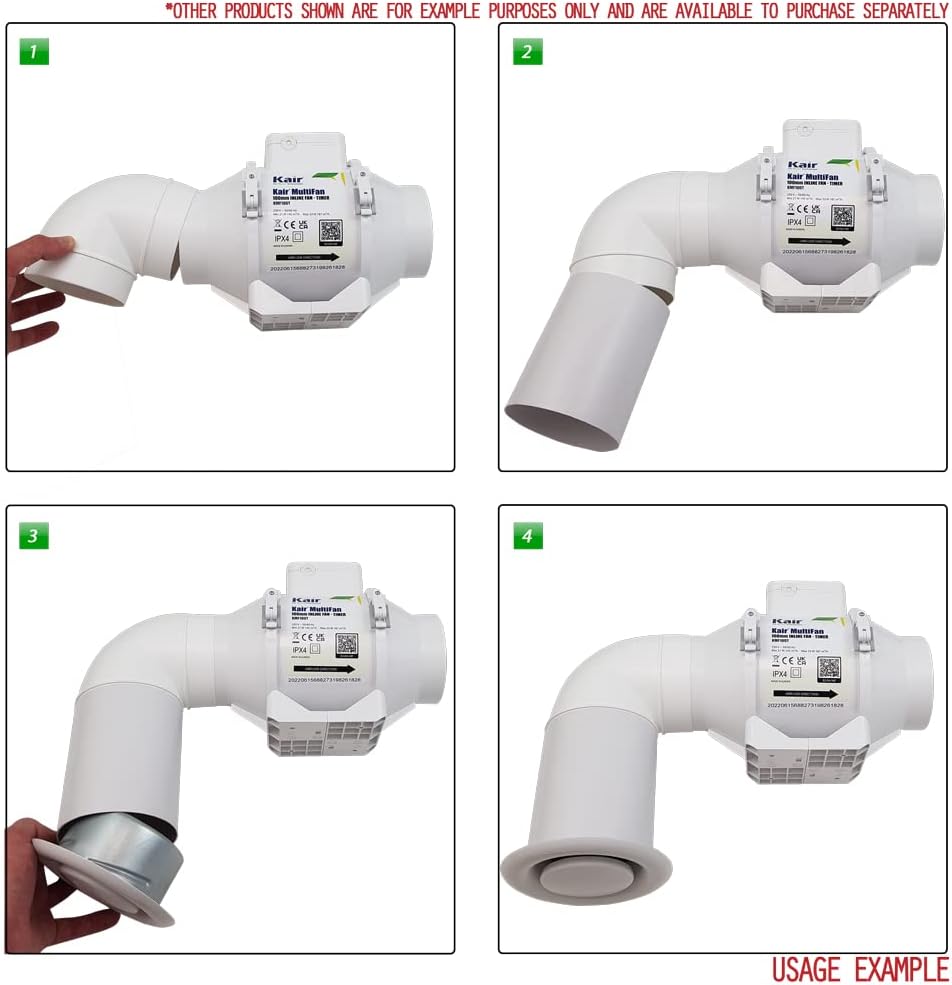
Figure 5.2: Example of the Kair MultiFan connected to ducting and a ceiling grille.

Figure 5.3: Example of the Kair MultiFan connected to ducting and an external wall grille.

Figure 5.4: Another example of the Kair MultiFan connected to ducting and an external wall grille.
6. Operation
The Kair MultiFan KMF100T features two operating speeds and an adjustable timer function.
- Speed Selection: The fan can operate at two different speeds (Min and Max) to suit varying ventilation requirements. The speed setting is typically configured during installation via internal wiring or a switch.
- Timer Function: The integrated timer allows the fan to continue running for a set period after the main power switch (e.g., light switch) is turned off. The timer duration is adjustable. To set the timer, access the internal timer adjustment screw (usually located near the wiring terminals) and rotate it to increase or decrease the run-on time. A small screwdriver is typically required for this adjustment. Test the setting to achieve the desired run-on duration.
7. Maintenance
Regular maintenance ensures optimal performance and longevity of your Kair MultiFan KMF100T.
- Power Disconnection: Always disconnect the fan from the main power supply before performing any cleaning or maintenance.
- Exterior Cleaning: Wipe the exterior surfaces of the fan with a soft, damp cloth. Do not use abrasive cleaners, solvents, or harsh chemicals, as these can damage the plastic housing.
- Internal Inspection: Periodically inspect the fan blades and internal components for dust, lint, or debris accumulation. If accessible and safe to do so, carefully remove any obstructions.
- Ducting Check: Ensure that the connected ducting remains clear and free of blockages. Blockages can reduce airflow and increase noise.
8. Troubleshooting
If you encounter issues with your Kair MultiFan KMF100T, refer to the following troubleshooting guide:
| Problem | Possible Cause | Solution |
|---|---|---|
| Fan does not turn on. | No power supply. Incorrect wiring. Faulty switch. | Check the circuit breaker and ensure power is supplied to the fan. Verify wiring connections (consult a qualified electrician). Test the control switch. |
| Fan is excessively noisy. | Loose mounting. Obstruction in fan blades or ducting. Damaged fan motor/bearings. | Ensure the fan is securely mounted. Disconnect power and check for debris in the fan or ducting. If noise persists, contact support. |
| Poor or no airflow. | Ducting blockage. Incorrect ducting installation. Fan running at low speed. | Check ducting for obstructions. Ensure ducting is properly sealed and not kinked. Verify the fan speed setting. |
| Timer function not working correctly. | Incorrect timer setting. Wiring issue for switched live. | Adjust the timer setting screw. Ensure the switched live wire is correctly connected (consult a qualified electrician). |
If the problem persists after attempting these solutions, please contact Kair customer support.
9. Warranty and Support
The Kair MultiFan KMF100T comes with a 2-year warranty from the date of purchase, covering manufacturing defects and material faults under normal use.
For warranty claims, technical assistance, or any product-related inquiries, please contact Kair customer service. Keep your proof of purchase for warranty validation.
Contact Information: Please refer to the Kair official website or your purchase documentation for the most up-to-date customer support contact details.