
GMKtec KB4
GMKtec Nucbox 4 Mini PC Instruction Manual
Model: KB4
1. Introduction
This manual provides comprehensive instructions for setting up, operating, maintaining, and troubleshooting your GMKtec Nucbox 4 Mini PC. This compact desktop computer is powered by an AMD Ryzen 7 3750H processor, 16GB DDR4 RAM, and a 512GB PCIe SSD, offering robust performance for business, office, video editing, and light gaming. It supports 4K UHD triple screen display for enhanced productivity.

Figure 1: Front and rear view of the GMKtec Nucbox 4 Mini PC, highlighting its compact design and various ports.
2. Package Contents
Verify that all items listed below are present in your package:
- 1x GMKtec Nucbox 4 Mini PC
- 1x Power Adapter (65W)
- 1x User Manual (this document)
- Screws and cables for 2.5-inch HDD/SSD installation
The package includes the Mini PC, power adapter, and necessary hardware for storage expansion.
Video: Unboxing the Nucbox 4 Mini PC, showing the contents and initial appearance of the device.
3. Product Overview
3.1. Front Panel
- Power Button: To turn the device on/off.
- 3.5mm Audio Jack: For headphones or external speakers.
- USB Type-C (USB+DP): Supports data transfer and DisplayPort output for 4K@60Hz.
- USB 3.1 Ports (x2): For connecting peripherals.
3.2. Rear Panel
- DC Jack: Power input.
- HDMI 2.0 Ports (x2): Supports 4K@60Hz display output.
- USB 3.1 Ports (x2): Additional ports for peripherals.
- RJ45 1000M (Gigabit LAN): For wired network connection.
3.3. Side Panel
- Micro SD Card Slot: For additional storage expansion.
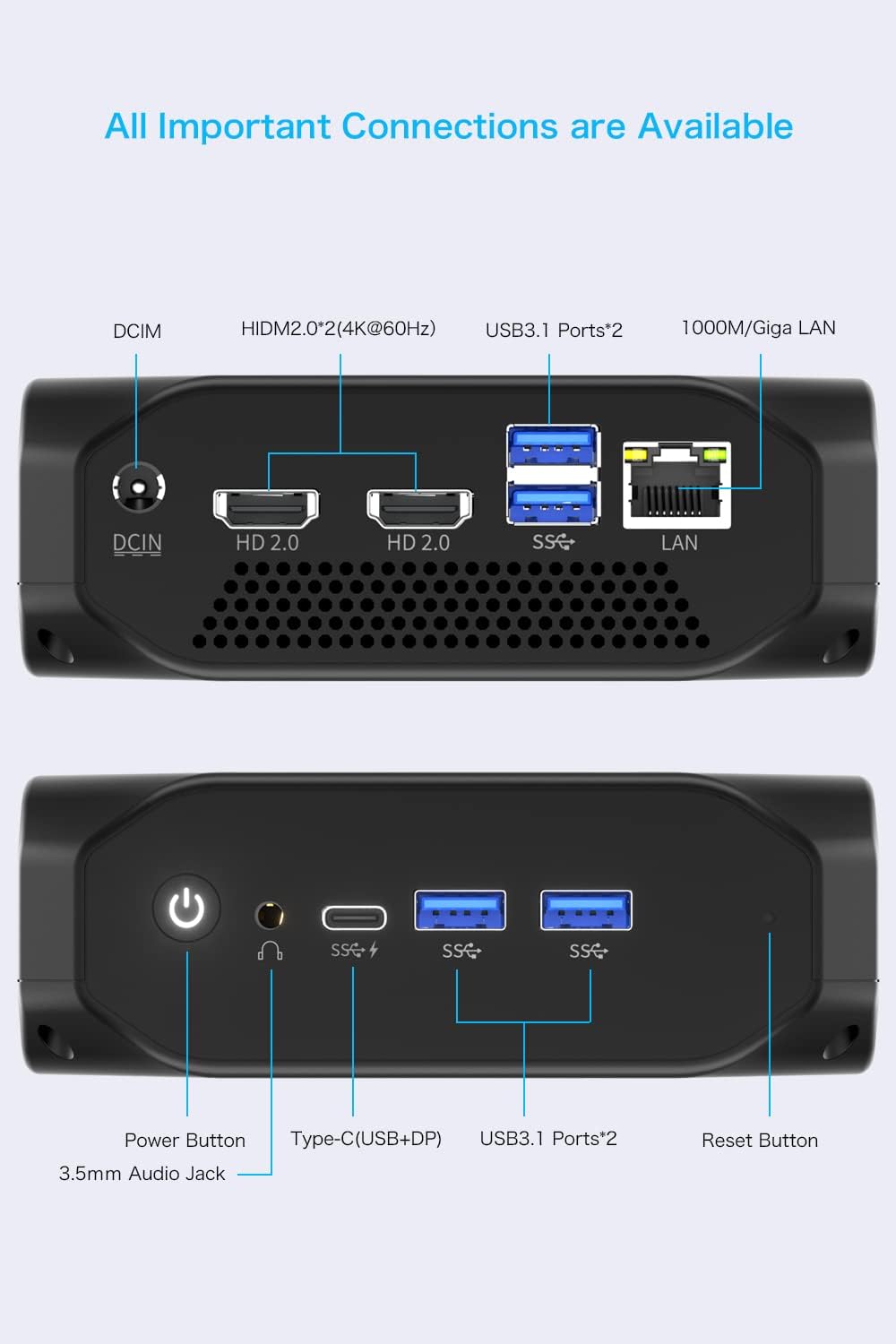
Figure 2: Detailed diagram of all available ports on the GMKtec Nucbox 4 Mini PC.
4. Setup Guide
- Connect to Power: Plug the power adapter into the DC Jack on the rear panel and then into a power outlet.
- Connect to Display: Connect your monitor(s) to the HDMI 2.0 ports or the USB Type-C port using appropriate cables. The Mini PC supports up to three independent 4K@60Hz displays.
- Connect Peripherals: Connect your keyboard, mouse, and other USB devices to the available USB 3.1 ports.
- Network Connection: For a wired connection, plug an Ethernet cable into the RJ45 port. For wireless, the device supports dual-band 2.4G+5G Wi-Fi (802.11ac).
- Power On: Press the power button on the front panel to start the Mini PC.
- Initial Setup: Follow the on-screen instructions to complete the Windows 11 Pro setup.

Figure 3: Example setup showing the Mini PC connected to three monitors for a multi-display workstation.
5. Operating Instructions
The GMKtec Nucbox 4 comes pre-installed with Windows 11 Pro, providing a familiar and user-friendly operating environment. It also supports Linux and Ubuntu operating systems.
5.1. Everyday Use
This Mini PC is designed for daily general use, including web browsing, email, document editing, and multimedia consumption. Its AMD Ryzen 7 3750H processor ensures smooth performance for these tasks.
5.2. Light Gaming & Video Editing
Equipped with Radeon RX Vega 10 Graphics, the Nucbox 4 is capable of handling light gaming and 1080p video editing. For optimal gaming performance, consider utilizing third-party applications to adjust power limits if the cooling system allows.
Video: Demonstrates the gaming capabilities of the Nucbox 4 Mini PC, showcasing its performance in various titles.
6. Storage and Memory Expansion
The Mini PC comes with 16GB DDR4 RAM and a 512GB M.2 PCIe SSD. Both memory and storage are upgradeable.
6.1. RAM Expansion
The RAM capacity can be expanded up to 32GB using a single card slot or up to 64GB with dual card slots. The device features two SO-DIMM slots for DDR4 RAM.
6.2. SSD/HDD Expansion
The internal storage can be expanded up to 1TB via the M.2 2280 PCIe slot. Additionally, you can add a 2.5-inch HDD/SSD (up to 2TB) using the provided cables and mounting tabs inside the case lid.

Figure 4: Exploded view showing internal components and options for storage and memory expansion.

Figure 5: Visual representation of adding a 2.5-inch HDD and using Micro SD for external storage.
7. BIOS Settings and Performance Optimization
The BIOS (Basic Input/Output System) allows for advanced configuration of your Mini PC. While the device is set to 25W power consumption out of the box, advanced users can adjust settings for enhanced performance.
7.1. Accessing BIOS
To access the BIOS setup utility, press the designated key (usually DEL or F2) during startup.
7.2. RAM Overclocking
Within the BIOS, navigate to the Advanced section, then AMD CBS, and finally UMC Common Options. Here, you can adjust DRAM Timing Configuration to potentially overclock the RAM from 2400MHz to higher frequencies, which can significantly improve GPU performance.
7.3. Power Limit Adjustment (TDP)
The default power configuration is 25W. While the BIOS offers options to increase this, the built-in cooling system is optimized for this default. For higher power limits (e.g., 30W for gaming), a third-party application like APU Tuning Utility can be used within Windows. Be aware that increasing the power limit may lead to higher operating temperatures.
Video: Demonstrates navigating BIOS settings and discusses power consumption and performance optimization for the Mini PC.
8. Maintenance
To ensure the longevity and optimal performance of your GMKtec Nucbox 4, follow these maintenance guidelines:
- Keep Clean: Regularly clean the exterior of the Mini PC with a soft, dry cloth. Avoid using liquid cleaners directly on the device.
- Ventilation: Ensure the ventilation holes are clear of obstructions to allow for proper airflow and heat dissipation.
- Software Updates: Keep your operating system and drivers updated to the latest versions for security and performance improvements.
- Temperature Monitoring: While the device has excellent heat dissipation with its smart fan, avoid placing it in enclosed spaces that could restrict airflow. Average CPU temperatures are around 39°C at idle and 70°C during gaming, with a maximum observed temperature of 94°C.
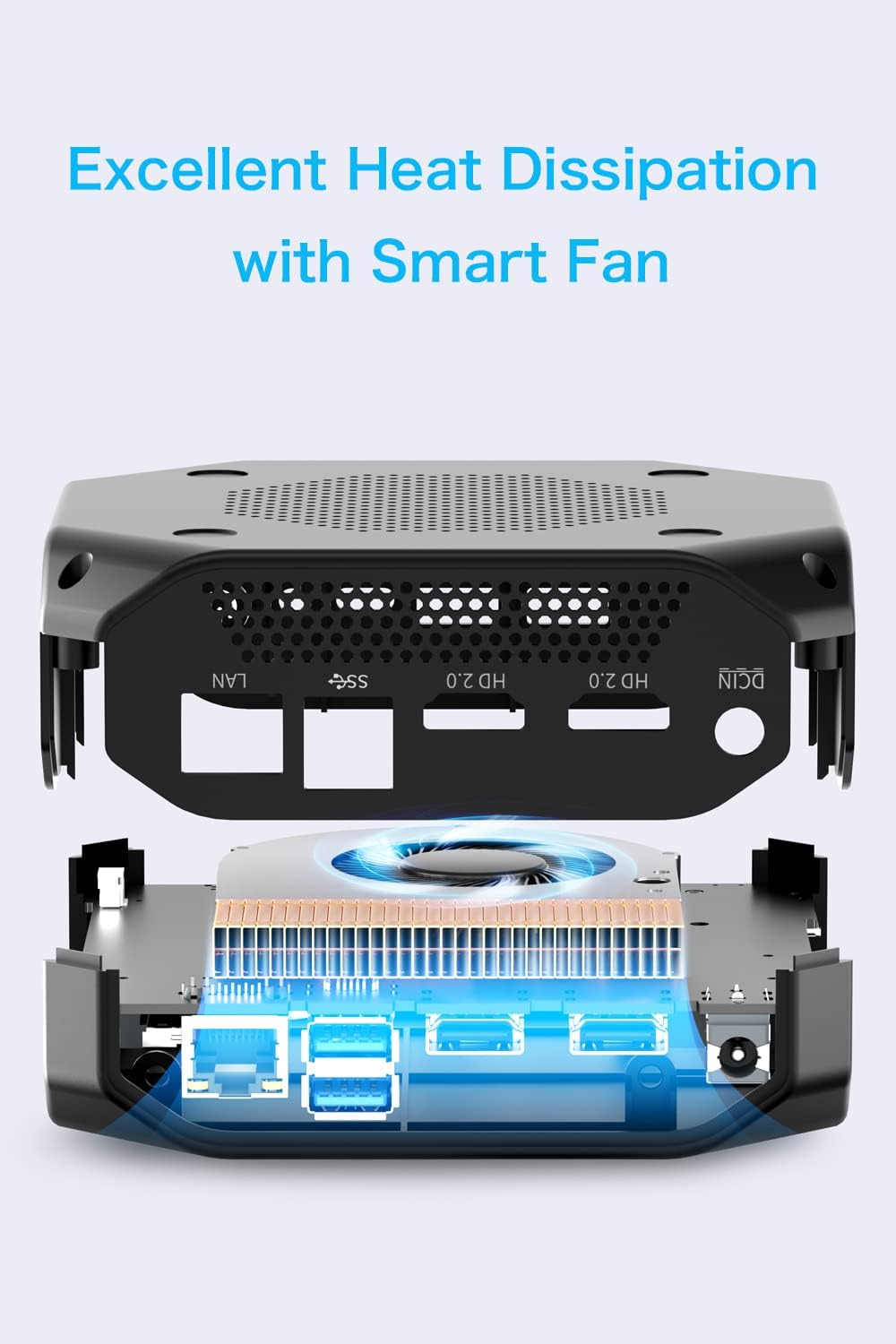
Figure 6: Diagram illustrating the heat dissipation system of the Mini PC.
9. Troubleshooting
If you encounter issues with your Mini PC, refer to the following common troubleshooting steps:
- No Display:
- Ensure all display cables (HDMI, USB-C) are securely connected to both the Mini PC and the monitor.
- Verify the monitor input source is correctly selected.
- Try a different display cable or monitor if available.
- Power Issues:
- Check if the power adapter is properly connected to the Mini PC and the power outlet.
- Ensure the power outlet is functional.
- Slow Performance:
- Close unnecessary applications running in the background.
- Check for and install any pending Windows updates.
- Ensure adequate ventilation to prevent thermal throttling.
- Peripheral Not Recognized:
- Try connecting the peripheral to a different USB port.
- Restart the Mini PC.
- Update the peripheral's drivers if necessary.
10. Specifications
| Feature | Specification |
|---|---|
| Processor | AMD Ryzen 7 3750H (4 Cores, 8 Threads, 2.3GHz base / 4.0GHz boost) |
| Graphics | Radeon RX Vega 10 Graphics (up to 1400 MHz) |
| RAM | 16GB DDR4 (2400MHz, Dual channel SO-DIMM slots x2, Max 64GB) |
| Storage | 512GB M.2 PCIe 3.0 SSD (Max 1TB) + 2.5-inch SATA HDD Slot (Max 2TB) |
| Operating System | Windows 11 Pro (Supports Linux, Ubuntu) |
| Connectivity | Intel AC 7265 2.4G/5G Wi-Fi (802.11ac), Bluetooth 4.2, Gigabit LAN (RJ45) |
| Ports | 4x USB 3.1, 2x HDMI 2.0 (4K@60Hz), 1x Type-C (USB+DP 4K@60Hz), 1x 3.5mm Headphone Jack, 1x DC Port |
| Dimensions | 124.5 x 112 x 41 mm |
| Weight | 339 grams |
| Power Adapter | AC 100-240V, 50/60Hz, 19V/3.42A (65W) |
11. Warranty and Support
GMKtec provides lifetime technical support and 7-day, 24-hour service for this product. All products have obtained FCC, CE, and ROSH certification.
For further assistance, please refer to the contact information provided with your purchase or visit the official GMKtec website.
Ask a question about this manual
Ask about setup, troubleshooting, compatibility, parts, safety, or missing instructions. Manuals+ will review the question and use this page’s manual context to help answer it.