Product Overview
The INNOCN 27 Inch 4K UHD (3840 x 2160p) monitor provides a superior visual experience with its advanced IPS panel and LED Backlit Technology. It features a 178° wide viewing angle, a frameless design, and supports HDR400 for vibrant colors and contrast. With 1.07 billion colors and a 60Hz refresh rate, it's designed for various uses including home office, design, photo/video editing, and gaming.

Figure 1: Front view of the INNOCN 27 Inch 4K Monitor.
Video 1: Official INNOCN 27C1U 4K USB C Monitor overview.
Setup Instructions
Package Contents
Ensure all items are present in the package:
- 1 x HDMI 2.1 Ports
- 1 x DP 1.4 Port
- 1 x Type C 65W
- 1 x Audio Out
- Monitor Panel
- Standard Pivot Stand
Assembly
The monitor is designed for easy, tool-free assembly. Simply attach the monitor arm to the base and secure it. Then, snap the monitor panel onto the arm. The stand allows for various ergonomic adjustments.

Figure 2: Monitor stand showing swivel, tilt, pivot, and height adjustments.
Connecting Your Devices
The monitor offers versatile connectivity options:
- USB-C (65W Power Delivery): Connect compatible laptops, Macs, phones, and tablets with a single USB-C cable for video, data, and power. This reduces cable clutter and keeps your workspace tidy.
- DisplayPort (DP): For high-resolution video input.
- HDMI: Two HDMI ports are available for connecting various devices like gaming consoles, PCs, and media players.
- 3.5mm Audio Jack: For external audio output.

Figure 3: Monitor connected to multiple devices illustrating powerful connections.
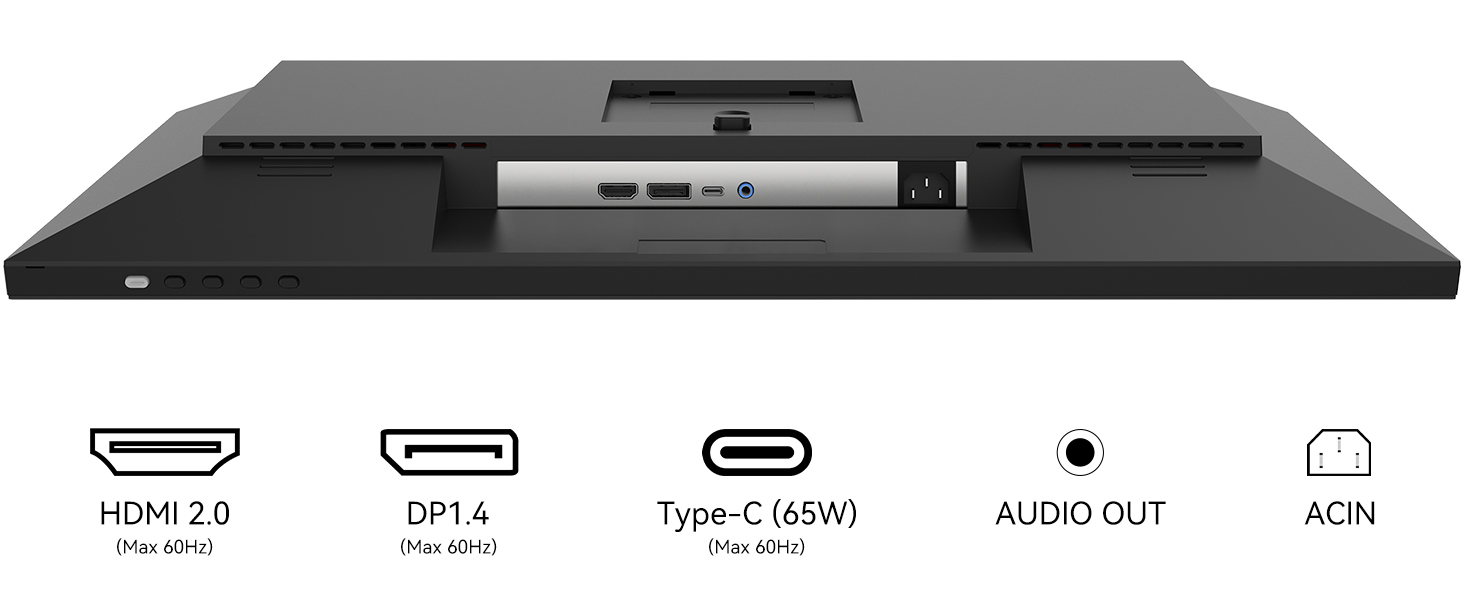
Figure 4: Detailed view of the monitor's input and output ports.
Operating Instructions
Display Features
The monitor boasts a bold IPS panel with 100% sRGB, 98% DCI-P3 color gamut, and a Delta E (ΔE) less than 2 for exceptional color accuracy. It supports 1.07 billion colors (8 bits + FRC) and has a 1000:1 contrast ratio, providing vivid and true-to-life visuals.

Figure 5: Visual representation of the IPS panel's color performance.
High Dynamic Range (HDR) 400 technology enhances contrast and color performance, meeting Display HDR 400 standards for smooth images and video viewing.

Figure 6: HDR 400 in action, showing enhanced visual depth.
Picture-in-Picture (PIP) and Picture-by-Picture (PBP)
The monitor supports PIP and PBP functions, allowing you to view or run two projects from two simultaneous sources. This feature is ideal for multitasking and professional workflows.

Figure 7: Illustration of PIP and PBP functionalities for enhanced productivity.
Built-in speakers provide audio output, making it a comprehensive solution for various multimedia needs.
Maintenance
To ensure the longevity and optimal performance of your INNOCN monitor, follow these maintenance guidelines:
- Cleaning the Screen: Gently wipe the screen with a soft, lint-free cloth. For stubborn smudges, slightly dampen the cloth with water or a screen-cleaning solution. Avoid using harsh chemicals or abrasive materials.
- Cleaning the Casing: Use a soft, dry cloth to clean the monitor's casing. Do not use liquid cleaners directly on the monitor.
- Ventilation: Ensure the ventilation openings on the monitor are not blocked. Proper airflow prevents overheating.
- Storage: When not in use for extended periods, store the monitor in a cool, dry place away from direct sunlight and extreme temperatures.
Troubleshooting
If you encounter issues with your monitor, refer to the following common troubleshooting steps:
- No Signal/Black Screen:
- Ensure all cables (power, USB-C, DP, HDMI) are securely connected to both the monitor and the source device.
- Verify the correct input source is selected on the monitor's OSD (On-Screen Display) menu.
- Test with a different cable or source device to rule out cable or device issues.
- Monitor Not Waking Up from Sleep:
- This can sometimes occur with certain operating systems or device configurations. Try disconnecting and reconnecting the display cable, or power cycling the monitor.
- Check your device's power management settings to ensure it's configured to wake up external displays.
- Poor Image Quality/Incorrect Colors:
- Adjust brightness, contrast, and color settings via the monitor's OSD menu.
- Ensure your device's display resolution is set to 3840 x 2160 (4K) for optimal clarity.
- Verify that your graphics drivers are up to date.
- If using a Mac, ensure font smoothing is enabled in macOS settings if text appears blurry.
- No Audio:
- Check the monitor's volume settings in the OSD menu.
- Ensure the audio output on your source device is directed to the monitor.
- If using the 3.5mm audio jack, ensure external speakers or headphones are properly connected and functional.
Specifications
| Feature | Detail |
|---|---|
| Product Dimensions | 2.6 x 24 x 14 inches |
| Item Weight | 17.42 pounds |
| Manufacturer | Guangxi Century Innovation Display Electronics Co.,Ltd |
| ASIN | B0B6PCXZ79 |
| Item model number | 27C1U |
| Date First Available | July 15, 2022 |
| Standing screen display size | 27 Inches |
| Aspect Ratio | 16:9 |
| Voltage | 220 Volts (AC) |
| Resolution | 3840 x 2160 Pixels (4K UHD 2160p) |
| Image brightness | 400 Candela (nits) |
| Total USB Ports | 1 (USB-C with 65W PD) |
| Screen Surface Description | Flat |


