Introduction
This manual provides detailed instructions for the setup, operation, and maintenance of your ALLIMITY XMRM-19 Voice Remote Control. This remote is designed as a replacement and is compatible with various Xiaomi MI P1 4K OLED LCD TV models, including L32M6-6AEU, L43M6-6AEU, L50M6-6AEU, L55M6-6AEU, L-43M7-7AEU, and L32M7. Please read this manual carefully to ensure proper use and to maximize your remote control's functionality.
Setup
1. Battery Installation
The ALLIMITY XMRM-19 remote control requires two (2) AAA batteries (not included). Follow these steps to install them:
- Locate the battery compartment cover on the back of the remote control.
- Slide the cover downwards or press the latch (if present) to open the compartment.
- Insert two AAA batteries, ensuring the positive (+) and negative (-) terminals align correctly with the markings inside the compartment.
- Replace the battery compartment cover by sliding it back into place until it clicks securely.

Always use new batteries and replace both batteries at the same time. Do not mix old and new batteries or different types of batteries.
2. Pairing Instructions
The XMRM-19 is a voice remote and requires pairing with your Xiaomi MI TV before use. Follow these steps to pair your remote:
- Ensure your Xiaomi MI TV is powered on.
- Point the remote control towards your TV.
- Simultaneously press and hold the Home button (often represented by a house icon or 'm' for Mi) and the Back button (represented by an arrow pointing left) for approximately 5-10 seconds.
- Release the buttons when you hear a beep or see a pairing confirmation message on your TV screen.
- The remote should now be paired and ready for use.

If pairing fails, ensure the batteries are correctly installed and try the process again. Make sure there are no obstructions between the remote and the TV during pairing.
Operating Instructions
Once paired, your ALLIMITY XMRM-19 remote control provides full functionality for your compatible Xiaomi MI TV. Below is an overview of key buttons and their functions:
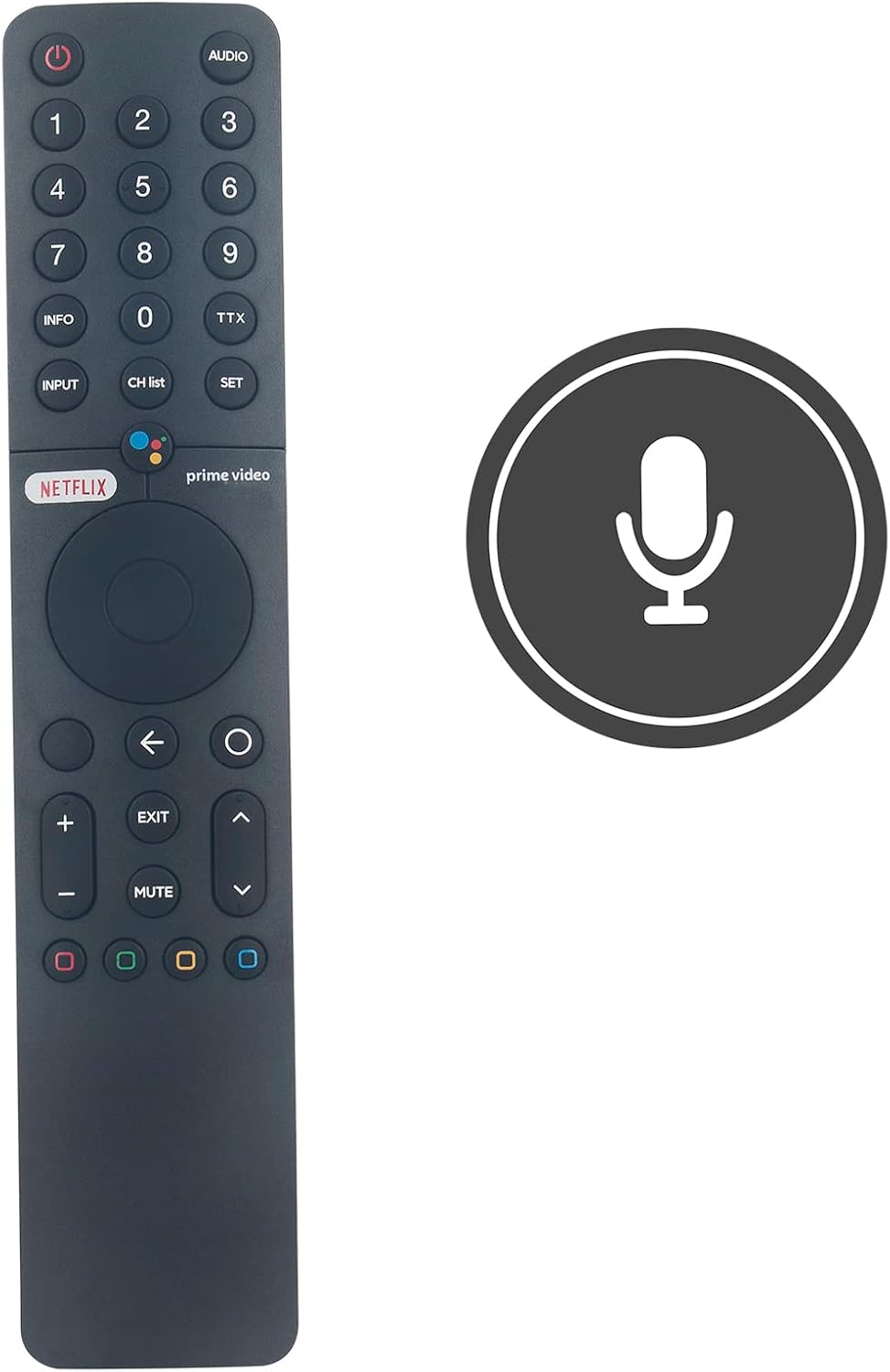
- Power Button (⏻): Turns the TV on or off.
- Voice Assistant Button (●●●●): Activates the voice control feature for commands and searches.
- Number Buttons (0-9): Direct channel selection or input for numerical data.
- INPUT: Cycles through available input sources (HDMI, AV, etc.).
- CH LIST: Displays the channel list.
- SETTINGS: Accesses the TV's settings menu.
- Netflix Button: Direct access to the Netflix application.
- Prime Video Button: Direct access to the Amazon Prime Video application.
- Navigation Pad (Circular): Used to navigate menus and select items.
- Back Button (←): Returns to the previous screen or menu.
- Home Button (m): Returns to the TV's home screen.
- Volume Up/Down (+/-): Adjusts the TV volume.
- Mute Button: Mutes or unmutes the TV audio.
- Channel Up/Down (⌃/⌄): Changes channels.
- Color Buttons (Red, Green, Yellow, Blue): Functionality varies depending on the application or TV menu.
Voice Control Function
To use the voice control feature, press the Voice Assistant button (multi-colored dots) and speak clearly into the microphone located on the remote. You can use voice commands to search for content, open apps, control playback, and more.

Maintenance
Battery Replacement
If the remote control becomes unresponsive or its range decreases, the batteries may need to be replaced. Refer to the "Battery Installation" section for instructions on how to replace the AAA batteries. Dispose of used batteries responsibly according to local regulations.
Cleaning
To clean the remote control, gently wipe its surface with a soft, dry cloth. For stubborn dirt, slightly dampen the cloth with water or a mild, non-abrasive cleaner. Avoid using harsh chemicals, solvents, or abrasive materials, as these can damage the remote's finish or internal components. Ensure no liquid enters the remote control.
Troubleshooting
If you encounter issues with your ALLIMITY XMRM-19 remote control, try the following troubleshooting steps:
- Remote Not Responding:
- Check if the batteries are correctly inserted and have sufficient charge. Replace them if necessary.
- Ensure there are no obstructions between the remote control and the TV's infrared receiver.
- Re-pair the remote control with your TV by following the "Pairing Instructions" in the Setup section.
- Voice Control Not Working:
- Ensure the remote is properly paired with your TV. Voice functionality relies on a Bluetooth connection.
- Speak clearly and directly into the microphone.
- Check your TV's settings to ensure voice control is enabled.
- Buttons Not Functioning Correctly:
- Clean the remote control to remove any dirt or debris that might be interfering with button presses.
- If only specific buttons are not working, it might indicate a hardware issue.
If these steps do not resolve the issue, please refer to the "Warranty and Support" section for further assistance.
Specifications
| Model Number | XMRM-19 (BJKJ-XMRM-19-Voice-JKJB) |
| Compatible Devices | Xiaomi MI P1 4K OLED LCD TVs (L32M6-6AEU, L43M6-6AEU, L50M6-6AEU, L55M6-6AEU, L-43M7-7AEU, L32M7) |
| Power Source | 2 x AAA Batteries (not included) |
| Product Dimensions | 4.72 x 1.57 x 0.24 inches (12 x 4 x 0.6 cm) |
| Item Weight | 2 ounces (approx. 56.7 grams) |
| Special Feature | Voice Control, No Programming Required (after initial pairing) |
Warranty and Support
For any questions, concerns, or issues not covered in this manual, please contact ALLIMITY customer support. Details regarding warranty coverage and support channels are typically provided with your purchase documentation or can be found on the manufacturer's official website. Please retain your proof of purchase for warranty claims.


