
Introduction
Thank you for choosing the CaDA C61052W Farm Tractor building set. This manual provides essential information for the assembly, operation, maintenance, and troubleshooting of your remote-controlled farm tractor model. Please read these instructions carefully before beginning assembly or operation to ensure proper use and to maximize your enjoyment of the product.
Safety Information
- Age Recommendation: This product is recommended for users aged 8 years and older. It contains small parts that may pose a choking hazard for younger children.
- Adult Supervision: Adult supervision is recommended during assembly and operation, especially for younger users.
- Battery Safety:
- Do not mix old and new batteries.
- Do not mix alkaline, standard (carbon-zinc), or rechargeable (nickel-cadmium) batteries.
- Insert batteries with correct polarity (+ and -).
- Remove exhausted batteries promptly.
- Do not short-circuit battery terminals.
- Remove batteries if the product will not be used for an extended period.
- Operating Environment: Operate the model in a safe, open area, away from obstacles, people, and pets. Avoid operating near water or in wet conditions.
- Choking Hazard: Keep all small parts and packaging materials away from infants and young children.
Package Contents
The CaDA C61052W Farm Tractor set includes the following components:
- Building blocks for the CaDA C61052W Farm Tractor model
- Building blocks for the detachable plough attachment
- 2 x M Size Pro Motors
- 1 x Servo Pro Motor
- 1 x L Size Pro Motor
- 1 x Lipo Battery Box (requires rechargeable LiPo battery, not included)
- 1 x 2.4GHz Radio Control (requires 2 x AA batteries, not included)
- Instruction manual (this document)
- Assembly guide (separate booklet)

Image: Overview of the CaDA C61052W Farm Tractor's main components, including various motors, the Lipo battery box, and the 2.4GHz remote control unit.

Image: The retail packaging for the CaDA C61052W Farm Tractor, showing the assembled model and remote control.
Setup
1. Assembly
The CaDA C61052W Farm Tractor is a self-assembly model. Please refer to the separate, detailed assembly guide provided in the box for step-by-step instructions on how to construct the tractor and its plough attachment. Follow the instructions carefully to ensure all parts are correctly connected and the mechanical functions operate as intended.
2. Battery Installation
Batteries are required for both the tractor's Lipo Battery Box and the 2.4GHz Radio Control unit. Batteries are not included in the package.
- For the Tractor (Lipo Battery Box): Install a compatible rechargeable LiPo battery (not included) into the Lipo Battery Box according to the instructions in the assembly guide. Ensure correct polarity.
- For the Remote Control: Open the battery compartment on the back of the 2.4GHz Radio Control unit. Insert 2 x AA alkaline batteries (not included), ensuring correct polarity (+ and -). Close the battery compartment securely.
Operating Instructions
1. Remote Control Functions
The 2.4GHz Radio Control unit allows for comprehensive control of the CaDA C61052W Farm Tractor. Familiarize yourself with the controls as illustrated below:
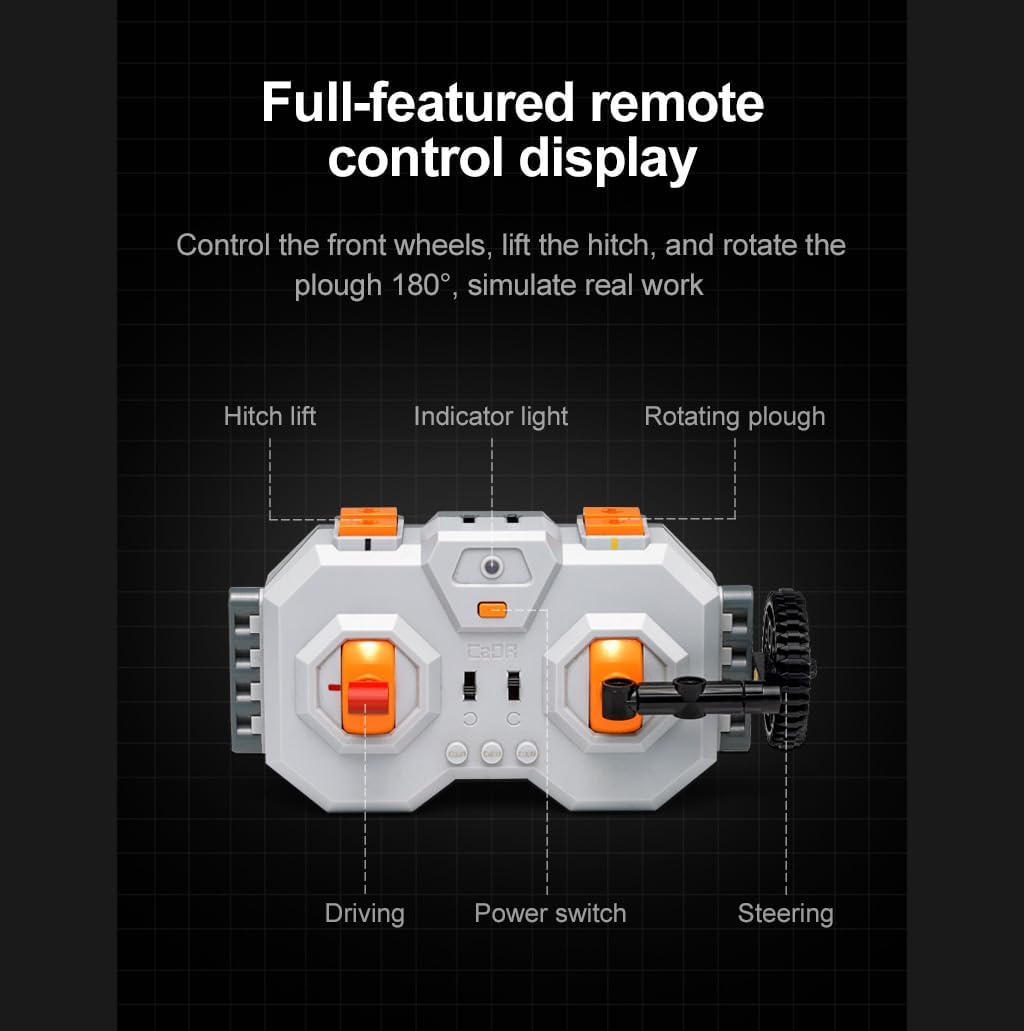
Image: The remote control unit, highlighting controls for driving, steering, hitch lift, indicator light, rotating plough, and power switch.
- Power Switch: Turns the remote control unit on/off.
- Driving: Controls forward and backward movement of the tractor.
- Steering: Controls the left and right steering of the front wheels.
- Hitch Lift: Raises and lowers the rear hitch mechanism, which connects to the plough.
- Indicator Light: Provides status feedback for the remote control.
- Rotating Plough: Activates the 180-degree rotation function of the plough.
2. Plough 180° Rotation
The attached plough features a realistic 180-degree rotation function, simulating real farm work. This function is controlled via the remote control.
- Use the designated control on the remote to initiate the plough's rotation.
- The plough can rotate to its opposite position and back to its original position.
- During rotation, the model's wheels may automatically adjust position to facilitate the movement.

Image: The CaDA C61052W Farm Tractor demonstrating the 180-degree rotation capability of the plough attachment and the automatic wheel adjustment.
3. Detaching the Plough
The plough attachment can be detached from the tractor, allowing the tractor to be operated independently. This modular design enhances playability.
- To detach, carefully uncouple the plough from the tractor's rear hitch mechanism. Refer to the assembly guide for specific detachment steps.
- Once detached, the tractor can be controlled via the remote without the plough.

Image: The CaDA C61052W Farm Tractor shown with its plough attachment separated, demonstrating its modular design.
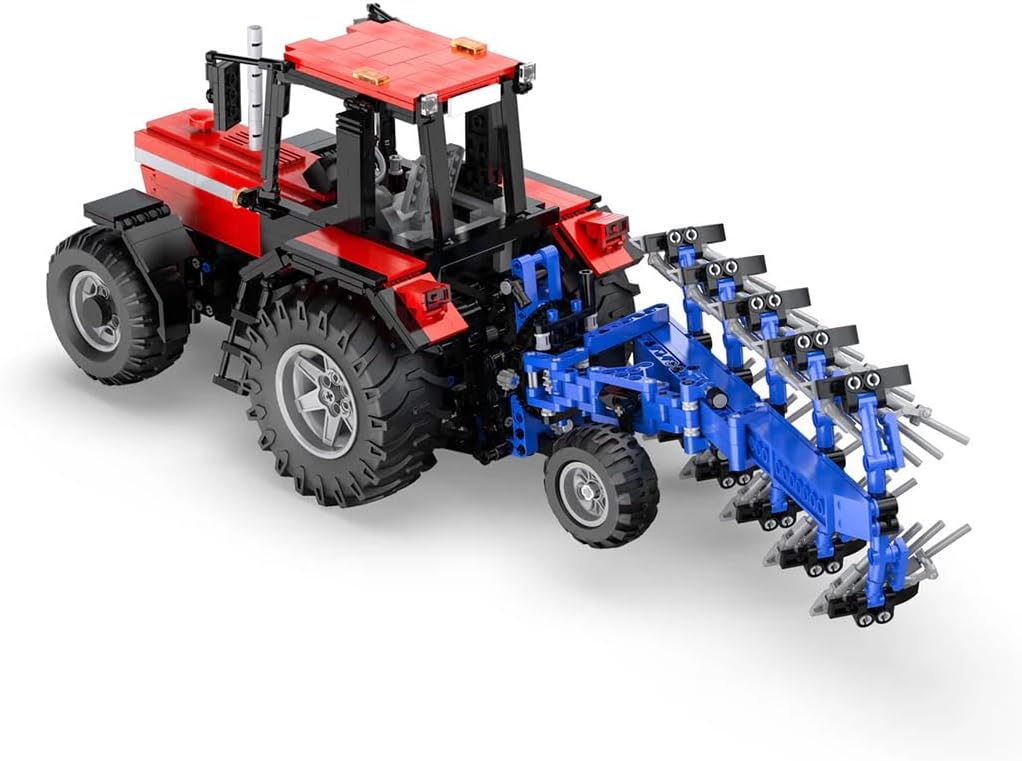
Image: A front-side view of the fully assembled CaDA C61052W Farm Tractor with the plough attachment.
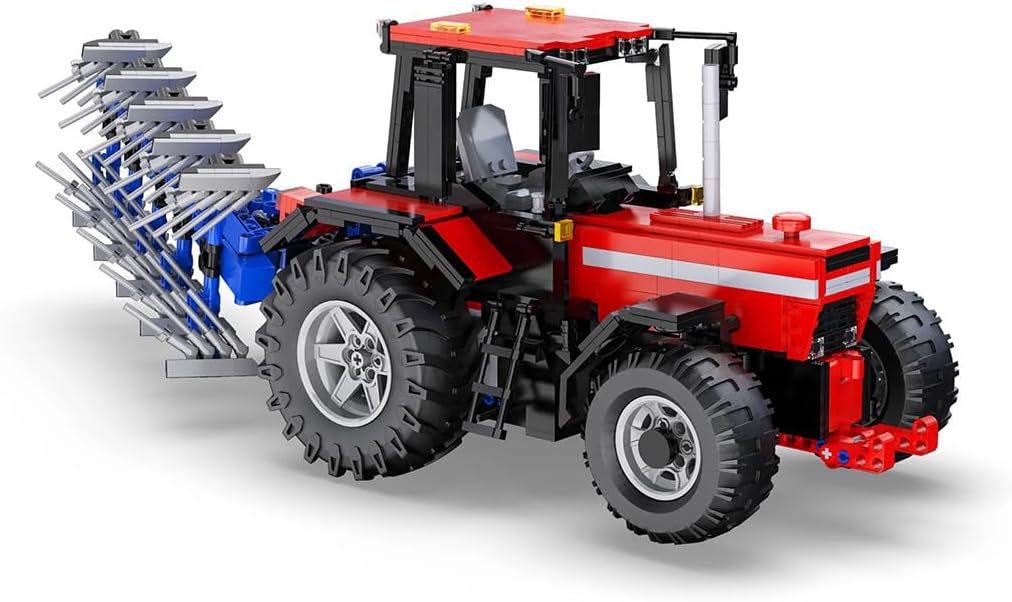
Image: A rear-side view of the fully assembled CaDA C61052W Farm Tractor with the plough attachment.
Maintenance
- Cleaning: Use a soft, dry cloth to clean the model. Avoid using water or chemical cleaners, as they may damage the electronic components or plastic parts.
- Storage: Store the model in a cool, dry place, away from direct sunlight and extreme temperatures.
- Battery Care: Remove batteries from both the tractor and the remote control if the model will not be used for an extended period to prevent leakage and damage.
- Charging LiPo Battery: If using a rechargeable LiPo battery (not included), ensure it is charged according to the battery manufacturer's instructions. Note that accessing the Lipo Battery Box for charging may require partial disassembly of the model.
- Part Integrity: Periodically check all connections and parts to ensure they are secure. Re-tighten or re-assemble any loose components as needed.
Troubleshooting
If you encounter issues with your CaDA C61052W Farm Tractor, please refer to the following common problems and solutions:
| Problem | Possible Cause | Solution |
|---|---|---|
| Tractor does not move or respond to remote control. |
|
|
| Plough does not rotate or lift. |
|
|
| Model is unstable or parts fall off easily. |
|
|
| Difficulty charging the Lipo battery. |
|
|
Specifications
| Brand | CaDA |
| Model Number | C61052W |
| Product Dimensions (L x W x H) | 46 x 15 x 38 cm |
| Product Weight | 3.28 kg |
| Material | Plastic |
| Age Recommendation | 8+ years |
| Power Source | Battery Powered (LiPo for tractor, 2 AA for remote control) |
| Special Feature | Remote Control - Movable |
| Number of Players | 1-3 players |
| Color | Red |
Warranty and Support
Information regarding specific warranty terms for the CaDA C61052W Farm Tractor is not available in this document. Please refer to the product packaging or contact your retailer for warranty details.
Information on the availability of spare parts is currently unavailable.
For further assistance or technical support, please contact the retailer or manufacturer directly using the contact information provided with your purchase.
