
1. Introduction and Overview
This manual provides comprehensive instructions for the Edearkar 15W GU10 LED Light Bulbs. These bulbs are designed to deliver bright, energy-efficient illumination for various indoor applications. Each bulb features a GU10 base, 15W power consumption, 1500 lumens brightness, and a 6000K Daylight White color temperature. They are non-dimmable and offer a 38-degree beam angle, making them suitable for track lighting, recessed fixtures, and general spotlighting.

Figure 1: Edearkar 15W GU10 LED Light Bulbs (Pack of 6)
2. Safety Information
Please read and adhere to the following safety precautions before installation and use:
- Always turn off the power supply to the fixture before attempting installation, removal, or maintenance of the bulb.
- Do not touch the bulb when it is operating or immediately after it has been turned off, as it may be hot. Allow sufficient time for cooling.
- Ensure that the color temperature and base type (GU10) of this bulb match the requirements of your lamp or fixture before installation.
- If you have any uncertainties regarding the installation or safe use of this product, consult a qualified electrician.
- These bulbs are non-dimmable. Do not use them with dimmer switches, as this can cause damage to the bulb and may pose a fire hazard.
- This product is designed for indoor use only. Do not expose to water directly.
3. Package Contents
The package includes:
- Edearkar 15W GU10 LED Light Bulbs (Pack of 6)
4. Specifications

Figure 2: Product Dimensions and Lighting Parameters
| Feature | Specification |
|---|---|
| Brand | Edearkar |
| Model Name | SDBG-06-1432 |
| Base Type | GU10 |
| Bulb Power (Wattage) | 15W |
| Incandescent Equivalent | 150W |
| Input Voltage | AC 100-265V |
| Lumen Output (Brightness) | 1500 Lumens |
| Color Temperature | 6000K Daylight White |
| Beam Angle | 38 Degrees |
| Color Rendering Index (CRI) | >80 |
| Dimmable | No |
| Lifespan | >30,000 Hours |
| Dimensions (Diameter x Length) | 1.96" (50mm) x 3.22" (82mm) |
| Material | Plastic coated aluminum + PC lens |
| Indoor/Outdoor Usage | Indoor |
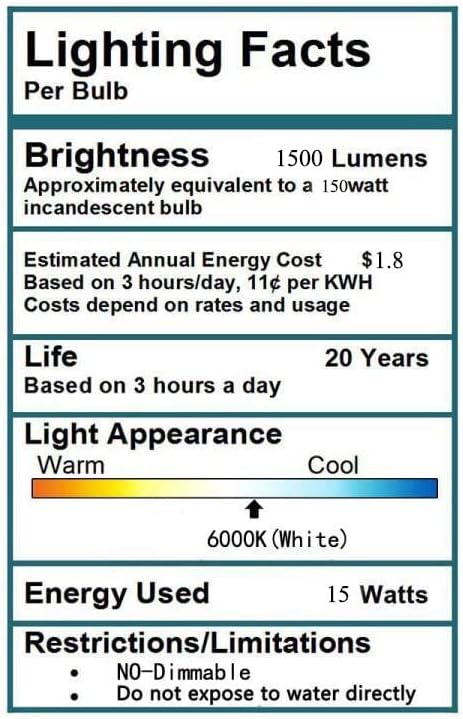
Figure 3: Lighting Facts
5. Setup and Installation
Follow these steps to install your Edearkar GU10 LED Light Bulb:
- Power Off: Before beginning installation, ensure that the power supply to the light fixture is completely turned off at the circuit breaker or wall switch.
- Remove Old Bulb: If replacing an existing bulb, carefully remove the old bulb from the GU10 fixture. Allow it to cool if it was recently in use.
- Insert New Bulb: Align the two pins of the Edearkar GU10 LED bulb with the two holes in the GU10 socket. Gently push the bulb into the socket and twist it clockwise until it locks securely into place.
- Restore Power: Once the bulb is securely installed, restore power to the light fixture.

Figure 4: GU10 Base and Bulb Construction
6. Operating Instructions
Once installed, the Edearkar GU10 LED Light Bulb operates like any standard light bulb. Simply use the wall switch or the fixture's integrated switch to turn the light on or off. These bulbs are non-dimmable and should not be connected to dimmer switches.

Figure 5: Example of Light Output

Figure 6: Flicker-Free Operation

Figure 7: Wide Application Examples

Figure 8: Color Rendering Index (CRI) 80+
7. Maintenance
These LED bulbs require minimal maintenance:
- Cleaning: To clean the bulb, ensure the power is off and the bulb is cool. Use a soft, dry cloth to gently wipe the surface. Do not use liquid cleaners or abrasive materials.
- Replacement: The bulbs contain no user-serviceable parts. If a bulb becomes faulty, replace the entire unit.
8. Troubleshooting
If you encounter issues with your Edearkar GU10 LED Light Bulbs, refer to the following common problems and solutions:
- Bulb Not Lighting:
- Ensure the power supply to the fixture is on.
- Check that the bulb is correctly seated and twisted securely into the GU10 socket.
- Verify that the light fixture itself is functioning correctly by testing with another known working bulb.
- Bulb Flickering:
- Confirm that the bulb is not connected to a dimmer switch. These bulbs are non-dimmable.
- Ensure a stable power supply to the fixture. Fluctuations in voltage can cause flickering.
- Light Output is Low:
- Verify the bulb's specifications match your expectations (1500 lumens).
- Ensure the fixture's cover or shade is clean and not obstructing light.
If these steps do not resolve the issue, please contact customer support.
9. Warranty Information
Edearkar 15W GU10 LED Light Bulbs are covered by a 2-year warranty from the date of purchase. This warranty covers defects in materials and workmanship under normal use. Please retain your proof of purchase for any warranty claims. The warranty does not cover damage resulting from improper installation, misuse, abuse, or use with incompatible dimmer switches.
10. Support
For further assistance, technical support, or warranty inquiries, please contact Edearkar customer service through the retailer where the product was purchased or visit the official Edearkar website for contact information.