
1. Introduction
The NUX Stageman II AC-80 is an 80-watt acoustic amplifier designed for acoustic-electric guitars, offering portability with its rechargeable battery. This amplifier features two independent channels, various effects, Acoustic Impulse Response (AIR) technology, a 60-second phrase looper, and Bluetooth audio streaming. This manual provides essential information for setting up, operating, maintaining, and troubleshooting your AC-80 amplifier.
2. Important Safety Instructions
- Read all instructions before operating the product.
- Do not use this apparatus near water.
- Clean only with a dry cloth.
- Do not block any ventilation openings. Install in accordance with the manufacturer's instructions.
- Do not install near any heat sources such as radiators, heat registers, stoves, or other apparatus (including amplifiers) that produce heat.
- Protect the power cord from being walked on or pinched, particularly at plugs, convenience receptacles, and the point where they exit from the apparatus.
- Only use attachments/accessories specified by the manufacturer.
- Unplug this apparatus during lightning storms or when unused for long periods of time.
- Refer all servicing to qualified service personnel. Servicing is required when the apparatus has been damaged in any way, such as power-supply cord or plug is damaged, liquid has been spilled or objects have fallen into the apparatus, the apparatus has been exposed to rain or moisture, does not operate normally, or has been dropped.
3. Package Contents
Please check the packaging for a complete list of included items. Typically, the package contains:
- NUX Stageman II AC-80 Acoustic Guitar Amplifier
- Power Adapter (DC 28V)
- User Manual (this document)
4. Product Overview
4.1 Front View

Figure 1: Front view of the NUX Stageman II AC-80 Acoustic Amplifier. This image shows the amplifier's overall design, featuring a dark wood finish on the sides and a black speaker grille with the NUX Acoustic logo.
4.2 Top Panel Controls
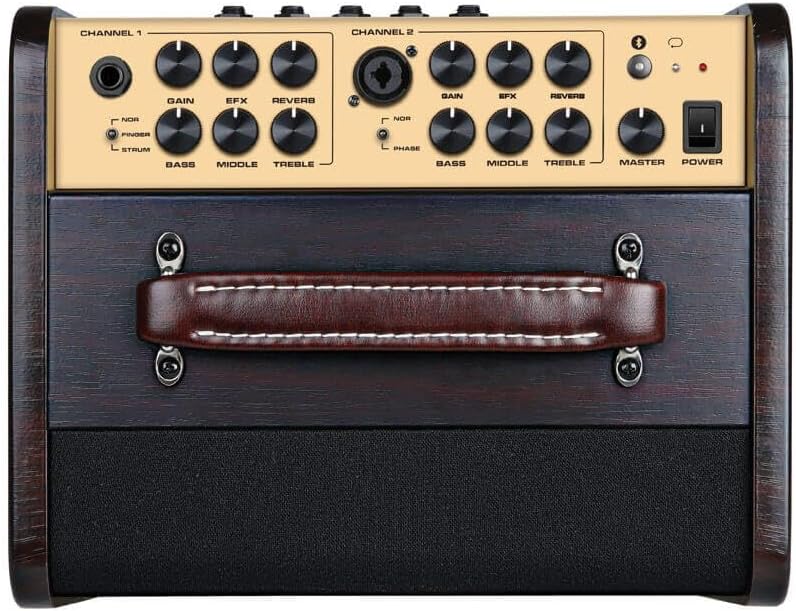
Figure 2: Top control panel of the NUX Stageman II AC-80. This view highlights the two independent channels, each with dedicated Gain, EFX, Reverb, Bass, Middle, and Treble controls. Channel 1 features a 1/4" input, while Channel 2 offers a combo XLR/1/4" input. A Master volume knob and Power switch are also visible.
4.3 Rear Panel Connections

Figure 3: Rear panel of the NUX Stageman II AC-80. This image displays the various input and output ports, including DC 28V power input, USB port for firmware updates, AUX IN, SEND/RETURN effects loop, LINE OUT, two FOOT SWITCH inputs (for Drum and Channel control), and a DI OUT (XLR). Charging and Low Battery indicators are also present.
5. Setup
5.1 Power Connection and Charging
- Connect the provided DC 28V power adapter to the 'DC 28V' input on the rear panel of the amplifier.
- Plug the power adapter into a suitable AC outlet.
- The 'CHARGING' indicator on the rear panel will illuminate during charging. The 'LOW BATTERY' indicator will show when the internal battery needs recharging. A full charge provides approximately 4.5 hours of outdoor performing time.
5.2 Instrument and Microphone Connections
- Channel 1 (Instrument): Connect your acoustic-electric guitar or other instrument to the 1/4" input on Channel 1 of the top panel.
- Channel 2 (Instrument/Microphone): Connect a second instrument via the 1/4" input or a microphone via the XLR input on the combo jack of Channel 2.
5.3 External Device Connections
- AUX IN: Use a 3.5mm stereo cable to connect an external audio player (e.g., smartphone, MP3 player) to the 'AUX IN' jack on the rear panel for backing tracks.
- USB: The USB port on the rear panel is used for firmware updates. Refer to the NUX website for detailed instructions on updating firmware.
- SEND/RETURN: Connect external effects pedals using the 'SEND' and 'RETURN' jacks to integrate them into the amplifier's signal chain.
- LINE OUT: Use the 1/4" 'LINE OUT' to send the amplifier's signal to another amplifier or mixing console.
- DI OUT: Use the XLR 'DI OUT' to send a balanced signal directly to a mixing console or audio interface for recording or live sound.
6. Operating Instructions
6.1 Basic Operation
- Ensure all connections are secure.
- Turn the 'MASTER' volume knob to its minimum setting.
- Press the 'POWER' switch to turn on the amplifier.
- Adjust the 'GAIN' knob for each channel to achieve the desired input level.
- Slowly increase the 'MASTER' volume to your preferred listening level.
6.2 Channel Controls
Each channel features independent controls:
- GAIN: Adjusts the input sensitivity for the connected instrument or microphone.
- EFX: Controls the level of the selected digital effect (e.g., Chorus, Delay).
- REVERB: Controls the level of the reverb effect.
- BASS, MIDDLE, TREBLE: 3-band equalizer for tone shaping.
- PHASE (Channel 2 only): Inverts the phase of the input signal, useful for reducing feedback with microphones.
6.3 Acoustic Impulse Response (AIR)
The Stageman II AC-80 incorporates Acoustic Impulse Response technology to enhance the natural sound of your acoustic instrument. This feature can be toggled or adjusted via the NUX Stageman II mobile application.
6.4 Drum & Loop Function
The amplifier includes a 60-second phrase looper and built-in drum patterns. These functions can be controlled directly from the amplifier's top panel or via an optional footswitch connected to the 'FOOT SWITCH (Drum)' input on the rear panel.
6.5 Bluetooth Audio Streaming
- Activate Bluetooth on your mobile device.
- Press and hold the Bluetooth button on the amplifier's top panel until the indicator light flashes.
- On your device, select 'NUX Stageman II' from the list of available Bluetooth devices.
- Once paired, you can stream audio wirelessly through the amplifier.
6.6 NUX Stageman II Mobile Application
Download the free NUX Stageman II application for your smartphone (iOS/Android) to access advanced controls, customize effects, manage Impulse Responses, and perform firmware updates. Connect the app to the amplifier via Bluetooth.
7. Maintenance
- Cleaning: Use a soft, dry cloth to clean the amplifier's exterior. Avoid abrasive cleaners or solvents.
- Storage: Store the amplifier in a dry, cool place away from direct sunlight and extreme temperatures.
- Battery Care: For optimal battery life, avoid fully discharging the battery frequently. If storing for extended periods, charge the battery to approximately 50% every few months.
- Ventilation: Ensure the amplifier's ventilation openings are not obstructed to prevent overheating.
8. Troubleshooting
| Problem | Possible Cause | Solution |
|---|---|---|
| No sound from amplifier | Power off; Volume knobs low; Incorrect input connection; Cable fault. | Check power switch; Increase Master and Channel Gain; Ensure instrument is plugged into correct input; Test with different cables. |
| Bluetooth not connecting | Bluetooth not enabled on device; Amplifier not in pairing mode; Interference. | Ensure Bluetooth is on and visible on your device; Press and hold amplifier's Bluetooth button to enter pairing mode; Move closer to amplifier; Restart both devices. |
| Firmware update issues | Incorrect USB cable; Software driver issues; Interrupted update. | Ensure you are using a compatible USB cable (e.g., USB-A to USB-B); Follow NUX official instructions carefully; Do not disconnect during update. Contact NUX support if issues persist. |
| Feedback or unwanted noise | High gain settings; Proximity to instrument; Phase issues (microphone). | Reduce gain; Move amplifier further from instrument; Use the Phase switch on Channel 2 for microphones. |
9. Specifications
- Output Wattage: 80 Watts
- Speakers: 6.5" premium speaker, 1" tweeter
- Channels: 2 independent channels
- Effects: EFX (Chorus, Delay, etc.), Reverb
- Special Features: Acoustic Impulse Response (AIR), 60-second Phrase Looper, Drum Machine, Bluetooth Audio Stream, Mobile App Control
- Power Source: DC 28V power adapter, Internal Rechargeable Battery
- Battery Life: Approximately 4.5 hours (outdoor performing)
- Inputs: Channel 1 (1/4" Instrument), Channel 2 (Combo XLR/1/4" Instrument/Mic), AUX IN (3.5mm), USB
- Outputs: SEND, RETURN, LINE OUT (1/4"), DI OUT (XLR)
- Dimensions (L x W x H): 12.2 x 12.91 x 11.02 inches (30.99 x 32.79 x 27.99 cm)
- Item Weight: 27.6 pounds (12.54 kg)
- Compatible Devices: Acoustic Guitar, Microphone, Drum (for looper/drum machine)
10. Warranty and Support
NUX products are designed and manufactured to high-quality standards. For warranty information, technical support, or service inquiries, please refer to the official NUX website or contact your local NUX distributor. Please retain your proof of purchase for warranty claims.


