Download PDFFree PDF. The Save button below keeps a bookmark and private notes in your account.
Lumesner 40L Carry On Travel Backpack Instruction Manual
Model: 001#
Introduction
This manual provides detailed instructions for the proper use, setup, and maintenance of your Lumesner 40L Carry On Travel Backpack. Please read this manual thoroughly before using the product to ensure optimal performance and longevity.
Product Features Overview
Capacity and Expandability
The Lumesner 40L Carry On Travel Backpack features an expandable design, allowing you to increase its packing capacity up to 40 liters. This design ensures compliance with standard carry-on size requirements for both overhead compartments and under-seat storage on most flights.
Image: The backpack is shown in its normal size (20 inches height, 14 inches width, 7 inches depth) and expanded size (20 inches height, 14 inches width, 7+2 inches depth), illustrating the additional capacity.
Integrated Packing Cubes
This travel backpack includes a set of four packing cubes designed to enhance organization:
Large Cube: Suitable for bulkier items such as sweaters, jackets, and pants.
Medium Cube: Ideal for shirts and shorts.
Water-Resistant Cube: Features a transparent side for easy identification of toiletries and liquids.
Shoe Bag: A dedicated bag for storing footwear separately.
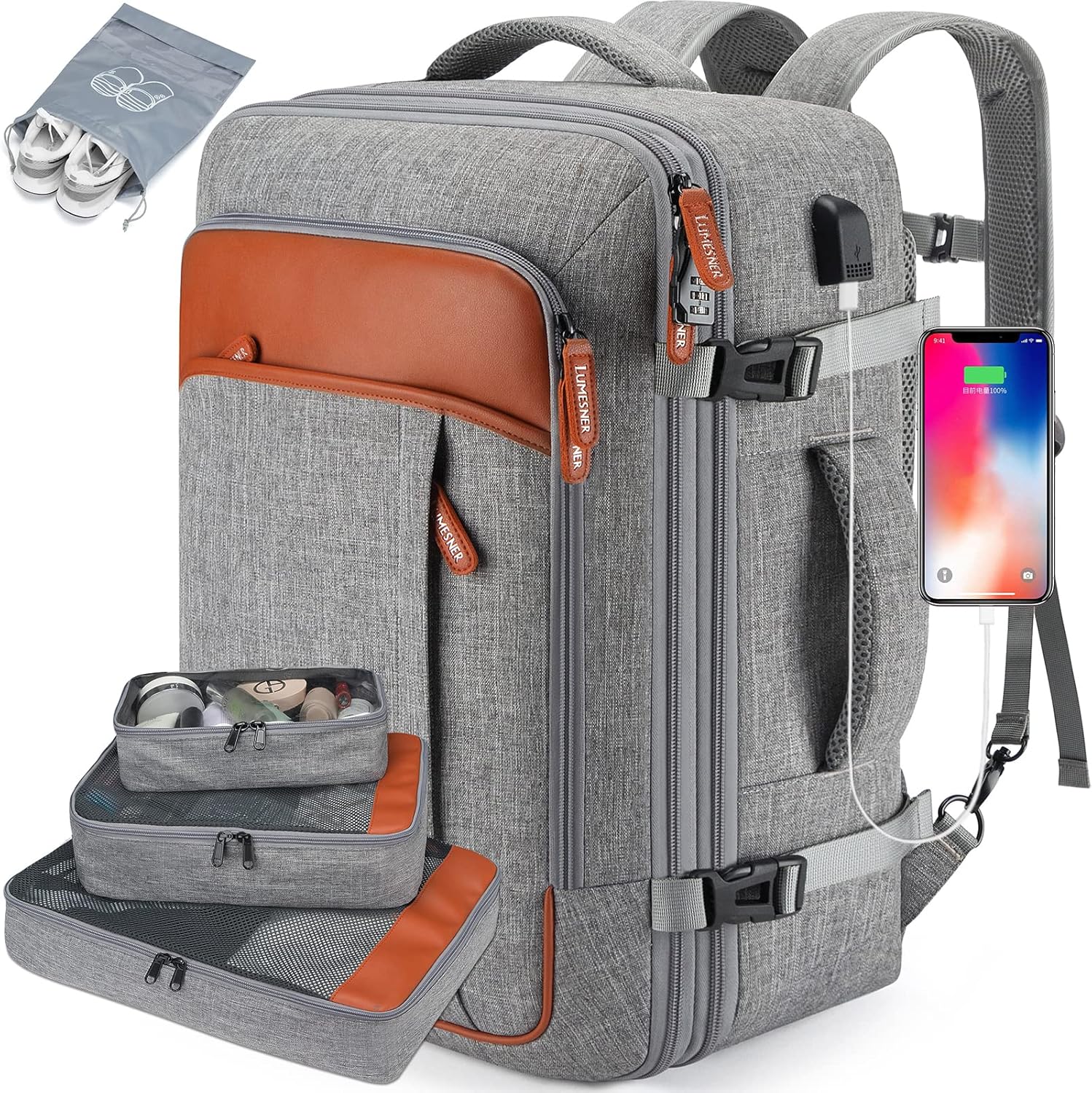
Image: A visual representation of the included packing cubes (large, medium, water-resistant) and the shoe bag, along with an illustration of how they fit into the backpack's main compartment.
Travel-Optimized Design
Comfort: Features multi-panel ventilated padding and adjustable, breathable shoulder straps to distribute weight and reduce strain. An adjustable chest strap provides additional stability.
Luggage Strap: A strap on the back allows the backpack to be securely attached to the handle of a rolling suitcase.
Anti-Theft Pocket: A discreet pocket located on the back panel is designed for securing valuables.
USB Charging Port: An integrated external USB port with an internal charging cable facilitates convenient charging of electronic devices. A power bank (not included) is required for this function.
Image: The main product view of the Lumesner backpack, highlighting its overall design, the external USB port, and the included packing cubes.
Durability and Material
The backpack is constructed from durable, water-resistant polyester and anti-scratch material. It features sturdy metal double zippers and upgraded reinforced stitching for enhanced longevity and protection against light moisture.
Image: A detailed view showcasing various features such as the comfortable top handle, durable zippers with Lumesner branding, water-resistant material, and a luggage belt.
Setup
Unpacking: Carefully remove the backpack and all accessories, including the packing cubes and shoe bag, from their packaging.
Initial Inspection: Inspect the backpack for any signs of damage or manufacturing defects. Contact customer support if any issues are found.
USB Port Preparation: Locate the internal USB cable within the backpack. Connect your personal power bank (not included) to this cable to enable the external charging port.
Operating Instructions
Packing: Utilize the included packing cubes to organize your clothing and accessories. Place heavier items closer to your back for better weight distribution.
Expanding Capacity: If additional space is needed, locate the expansion zipper around the perimeter of the main compartment and unzip it to increase the backpack's volume.
Wearing the Backpack: Adjust the shoulder straps to a comfortable length. Fasten and adjust the chest strap for added stability, especially when carrying heavier loads.
Converting to Duffel Bag: To convert the backpack into a carry-on duffel, locate the two buttons under the shoulder straps. Unlock these buttons and tuck the shoulder straps into the dedicated back compartment. This creates a cleaner profile for carrying by hand or checking.
Image: A visual guide demonstrating how to tuck away the shoulder straps into a hidden compartment, transforming the backpack into a more streamlined carry-on bag.
Using the USB Charging Port: Once your power bank is connected internally, plug your device's charging cable into the external USB port to charge your device.
Attaching to Luggage: Slide the integrated luggage strap over the telescopic handle of your rolling suitcase for secure transport.
Maintenance
Cleaning: For minor dirt or stains, spot clean the backpack with a damp cloth and mild soap. Do not machine wash, bleach, or tumble dry, as this may damage the material and structural integrity.
Drying: Allow the backpack to air dry completely in a well-ventilated area, away from direct sunlight or heat sources.
Storage: When not in use, store the backpack in a cool, dry place to prevent mildew and material degradation.
Troubleshooting
Zipper Malfunction:
If a zipper becomes stiff or difficult to move, apply a small amount of zipper lubricant or wax. Avoid overstuffing the backpack, which can put excessive strain on zippers and lead to breakage.
USB Charging Port Not Working:
Ensure your power bank is fully charged and correctly connected to the internal USB cable. Verify that your device's charging cable is functioning properly. The USB port is a pass-through and does not store power itself.
Backpack Feels Uncomfortable:
Adjust the shoulder straps and chest strap to evenly distribute weight. Ensure the backpack is not overloaded beyond its intended capacity. Utilize the ventilated padding for optimal comfort.
For information regarding warranty coverage or to obtain customer support, please refer to the product packaging or contact Lumesner directly through their official website or the retailer where the product was purchased. Please retain your proof of purchase for warranty claims.
Ask a question about this manual
Ask about setup, troubleshooting, compatibility, parts, safety, or missing instructions. Manuals+ will review the question and use this page’s manual context to help answer it.