1. Introduction
This manual provides detailed instructions for the assembly, operation, and maintenance of your HOMCOM Industrial Buffet Cabinet, Model 839-413BN. Please read this manual thoroughly before assembly and use to ensure safe and correct operation. Keep this manual for future reference.

Figure 1: Front view of the HOMCOM Industrial Buffet Cabinet.
2. Safety Information
For your safety and to prevent damage to the product, please adhere to the following guidelines:
- Always ensure all parts are securely fastened during assembly.
- An anti-tipping design is included for stability. It is crucial to attach the storage unit to the wall using the provided anti-tipping strap to prevent accidental tipping, especially in households with children or pets.
- Do not exceed the maximum weight capacity of 110 lbs (total), 22 lbs (top/bottom shelf), and 11 lbs (middle shelf).
- Place the cabinet on a flat, stable surface.
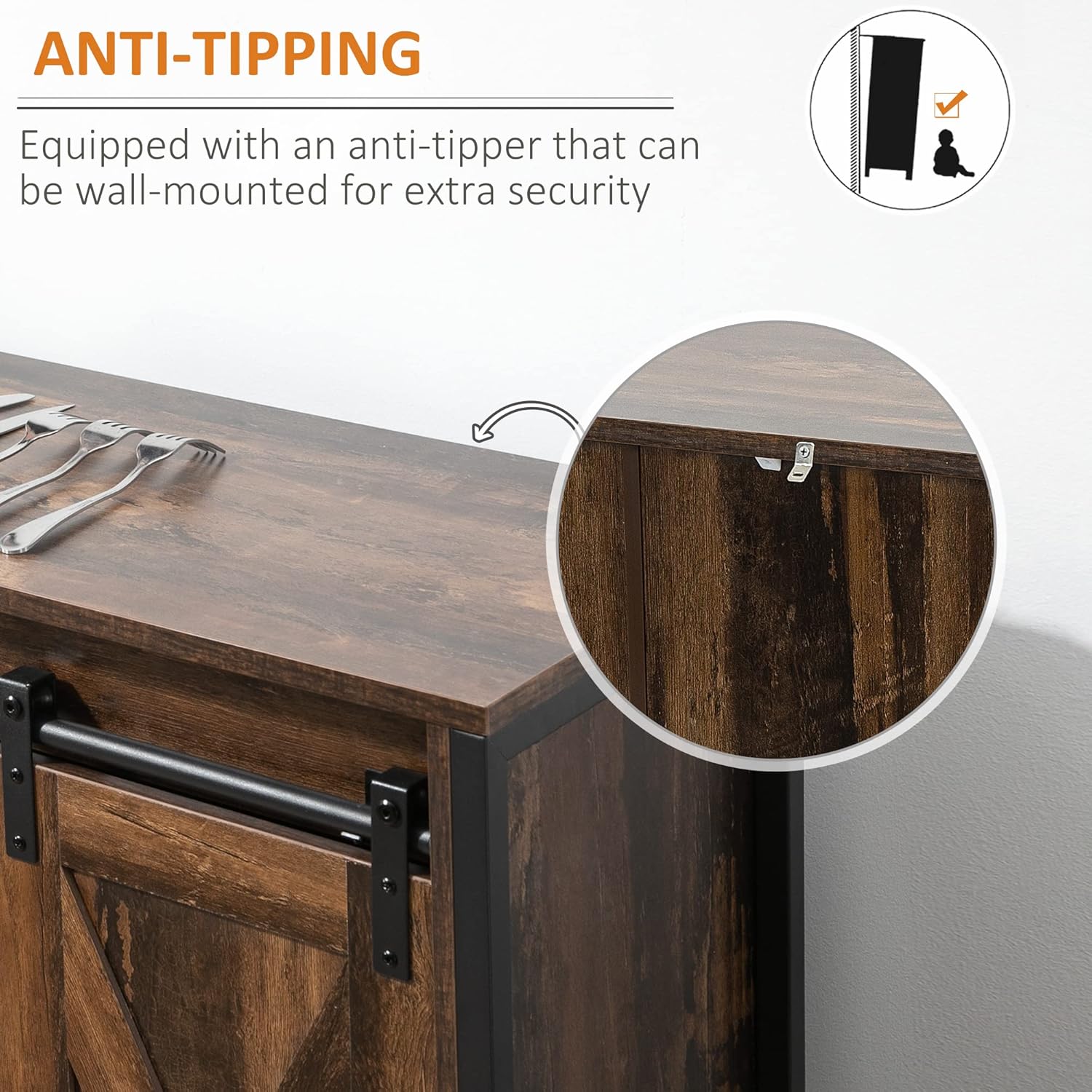
Figure 2: Detail of the anti-tipping strap attachment point on the cabinet.
3. Package Contents
Before beginning assembly, verify that all components listed in the packaging are present and undamaged. If any parts are missing or damaged, please contact customer support.
- Cabinet panels (top, bottom, sides, back)
- Sliding barn doors (2)
- Adjustable shelves
- Metal frame components
- Sliding door hardware (track, rollers, handles)
- Assembly hardware (screws, dowels, cam locks, etc.)
- Anti-tipping strap and wall anchors
- Instruction manual
4. Assembly Instructions
Assembly is required for this product. Follow the step-by-step instructions provided in the package to assemble the cabinet. It is recommended to have two people for assembly. Ensure all parts are securely fastened and the anti-tipping strap is attached to the wall for stability.
Key Assembly Points:
- Begin by identifying all components and hardware.
- Assemble the main frame structure first, ensuring all connections are tight.
- Install the sliding door track securely before attaching the doors.
- Carefully attach the barn doors to the track, ensuring smooth movement.
- Insert the adjustable shelves into your desired positions.
- Finally, secure the anti-tipping strap to the back of the cabinet and to a wall stud using appropriate hardware.

Figure 3: Detail of the sliding barn door mechanism.

Figure 4: Detail of the cabinet's sturdy metal leg and base.
5. Operating Instructions
The HOMCOM Industrial Buffet Cabinet is designed for versatile storage and display.
- Sliding Barn Doors: The cabinet features two sliding barn doors that move along a top track. Gently slide the doors left or right to reveal or conceal the interior compartments. This allows for flexible access to different sections of the cabinet.
- Adjustable Shelves: The interior shelves are adjustable, allowing you to customize the storage space to fit items of various heights. To adjust a shelf, remove any items, lift the shelf, and reposition the shelf pegs into the desired holes. Ensure the shelf is level and securely seated before placing items on it.
- Storage Utilization: Use the top surface for serving dishes or decorative items. The open shelves are suitable for display, while the areas behind the sliding doors can store items you wish to keep out of sight, such as cooking utensils or other belongings.

Figure 5: Demonstrating the smooth operation of the sliding barn doors.

Figure 6: Adjustable shelf feature, allowing customization of storage space.
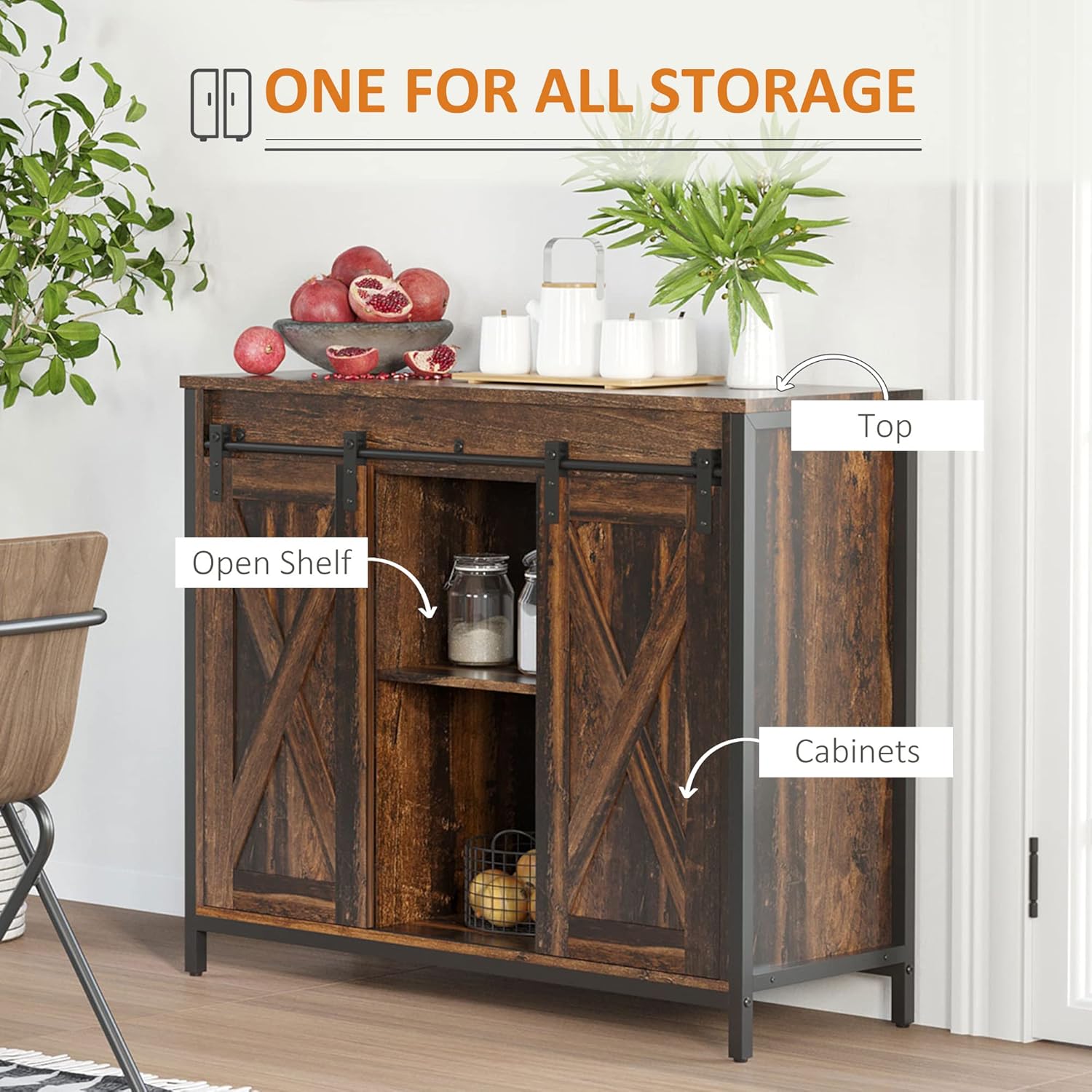
Figure 7: Example of the cabinet's versatile storage capabilities.
Video 1: Overview of the HOMCOM Industrial Buffet Cabinet, showcasing its features and design.
6. Maintenance
To maintain the appearance and longevity of your cabinet:
- Clean the smooth MDF surfaces with a soft, damp cloth. Avoid abrasive cleaners or harsh chemicals.
- Wipe spills immediately to prevent staining or damage to the wood finish.
- Periodically check all screws and fasteners to ensure they remain tight. Retighten if necessary.
- Keep the sliding door track free of debris to ensure smooth operation.
7. Troubleshooting
If you encounter any issues with your cabinet, refer to the following common solutions:
- Doors not sliding smoothly: Check the track for any obstructions or debris. Ensure the rollers are properly seated on the track.
- Cabinet wobbles: Verify that the cabinet is placed on a level surface. Check all assembly fasteners for tightness. Ensure the anti-tipping strap is securely installed.
- Missing parts: Refer to the package contents list. If parts are genuinely missing, contact customer support for assistance.
8. Specifications
| Feature | Detail |
|---|---|
| Brand | HOMCOM |
| Model Name | Side Cabinet (Model 839-413BN) |
| Product Dimensions | 35.5" W x 13.5" D x 30" H |
| Item Weight | 51.3 pounds |
| Weight Capacity (Total) | 110 lbs |
| Weight Capacity (Top/Bottom Shelf) | 22 lbs |
| Weight Capacity (Middle Shelf) | 11 lbs |
| Material | Engineered Wood (MDF), Alloy Steel (Frame) |
| Color | Rustic Brown |
| Special Feature | Adjustable Shelves, Sliding Barn Doors, Anti-tipping Design |
| Assembly Required | Yes |

Figure 8: Detailed dimensions of the cabinet.
9. Warranty and Support
For warranty information or customer support, please refer to the documentation included with your purchase or contact HOMCOM directly through their official website or customer service channels. Please have your model number (839-413BN) and purchase details ready when contacting support.


