
AmazLit B0B6FMRQ8C
AmazLit Desk Lamp User Manual
Model: B0B6FMRQ8C
Introduction
This manual provides instructions for the safe operation, installation, and maintenance of your AmazLit Desk Lamp. Please read this manual thoroughly before using the product and retain it for future reference.
Package Contents
- 1x Desk Lamp with Clamp (Material: Aluminum Alloy, Matte Black Finish)
- 1x UL Adapter (Length: 71 in / 180 cm)
- 1x User Manual
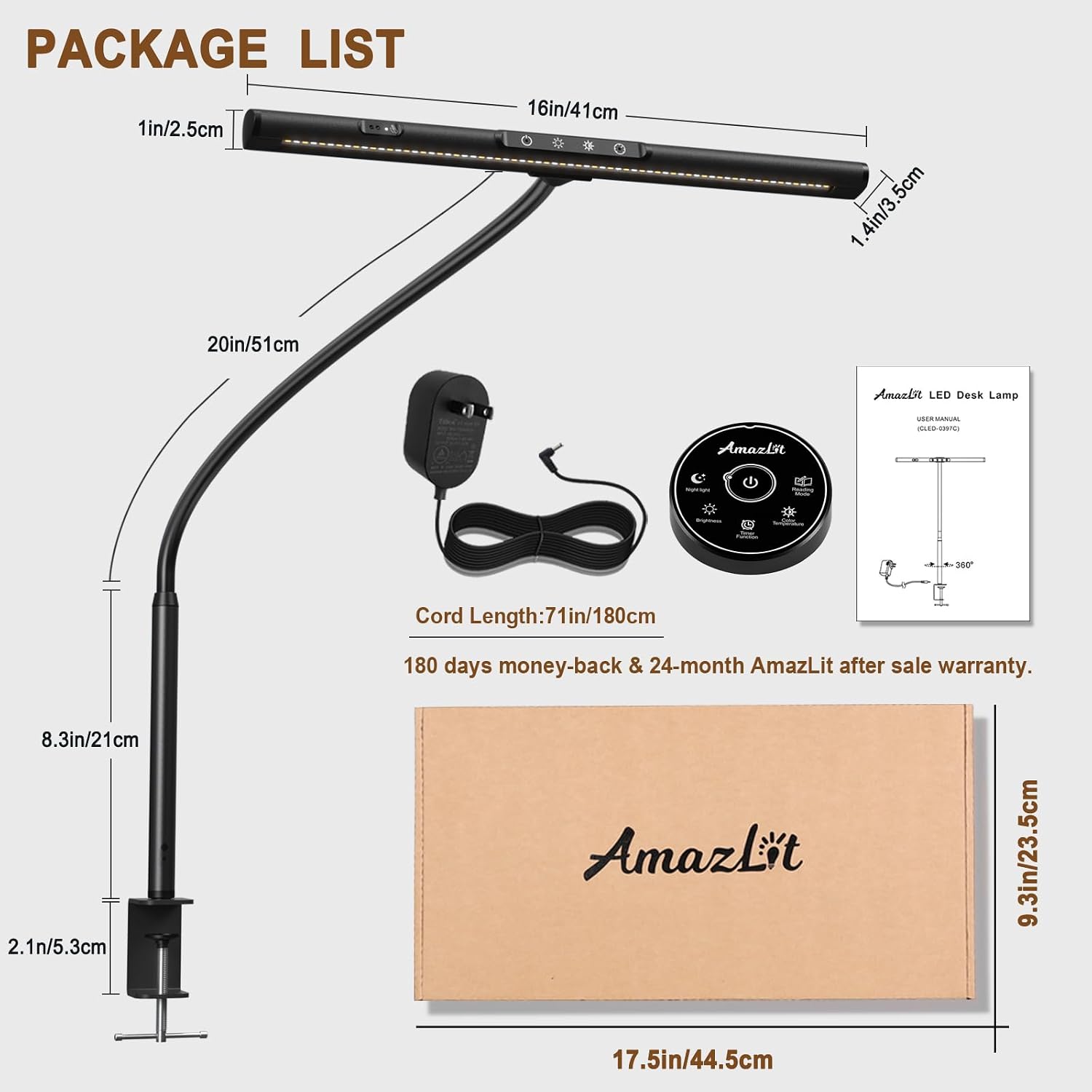
Image: Package contents of the AmazLit Desk Lamp, including the lamp, clamp, power adapter, remote control, and user manual.
Safety Instructions
- Ensure the power adapter voltage matches your local power supply.
- Do not disassemble or modify the lamp. This may cause damage or electric shock.
- Keep the lamp away from water or other liquids.
- Avoid direct eye exposure to the LED light source for extended periods.
- Unplug the lamp from the power outlet before cleaning or when not in use for a long time.
- This product is for indoor use only.
Setup and Installation
- Attach the Clamp: Securely attach the metal clamp to the edge of your desk or table. The clamp supports tabletops up to 5.3 cm (2.1 inches) thick. Tighten the screw until the clamp is firm.

Image: The clamp attachment process, demonstrating how to secure it to a desk.
- Insert the Lamp: Insert the base of the lamp's gooseneck into the opening on the clamp. Ensure it is seated firmly.
- Adjust Gooseneck: The flexible gooseneck allows for 360° adjustment. Position the lamp head to your desired lighting angle and height.

Image: Demonstrating the 360° flexible gooseneck for versatile positioning.
- Connect Power: Plug the UL adapter into the lamp's power input, then plug the adapter into a standard wall outlet.
Operating Instructions
The AmazLit Desk Lamp offers multiple control methods: touch controls on the lamp head, gesture sensing, and a remote control.
1. Touch Controls on Lamp Head

Image: Overview of the touch control panel on the lamp head.
- Power ON/OFF: Touch the power icon (⏻) to turn the lamp on or off.
- Brightness Adjustment: Short click the brightness icon (☀) to cycle through 5 levels of brightness. Press and hold for stepless brightness adjustment.
- Color Temperature Adjustment: Short click the color temperature icon (★) to cycle through 5 color temperatures (e.g., warm light to cool light). Press and hold for stepless color temperature adjustment.
- Timer Function: Touch the timer icon (⏱) to activate the timer (e.g., 60-minute auto-off).
- Memory Function: The lamp remembers your last brightness and color temperature settings.
2. Gesture Sensing
The lamp features a gesture sensor for convenient touchless operation.
- Turn ON/OFF: Wave your hand approximately 5-10 cm (2-4 inches) in front of the gesture sensor to turn the lamp ON or OFF.
- The gesture sensing indicator light will illuminate when the feature is active.
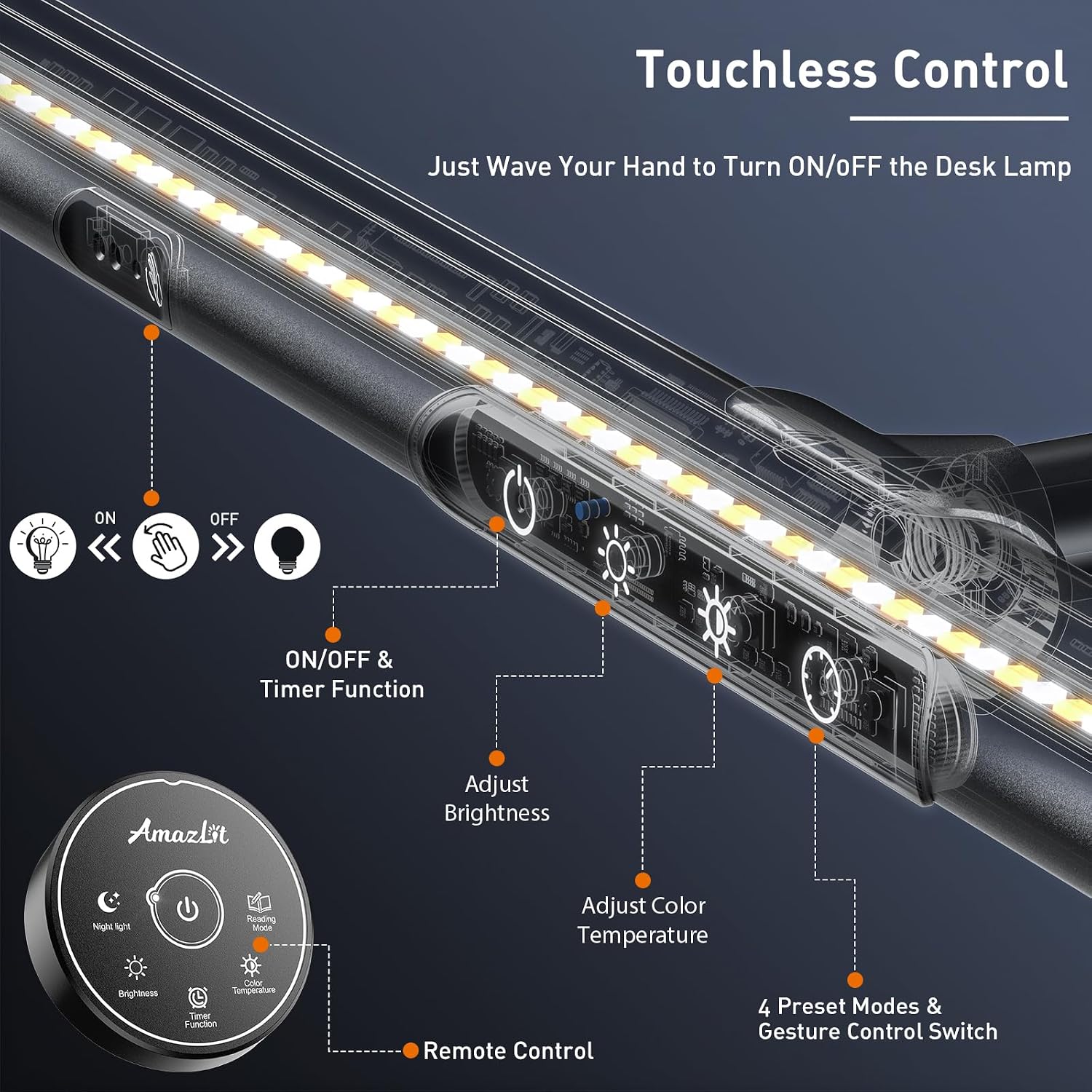
Image: Gesture sensing for touchless ON/OFF control.
3. Remote Control
Use the included remote control for convenient adjustments from a distance.

Image: The remote control for the desk lamp.
- Power Button: Turns the lamp ON/OFF.
- Brightness Buttons: Increase or decrease brightness.
- Color Temperature Buttons: Adjust color temperature.
- Night Light Mode: Activates a low-brightness, warm light setting.
- Timer Button: Activates the auto-off timer.
- Reading Light Mode: Activates a preset optimal reading light setting.
Key Features
- Eye-caring Light Source: Utilizes LED technology designed to reduce blue light and glare, providing soft illumination to minimize eye fatigue.

Image: Eye-caring light source for various applications.
- Asymmetric Optical Design: The 45° side-emitting light source is positioned to illuminate only the work area, eliminating screen reflections common with traditional desk lamps.

Image: Asymmetric optical design preventing screen glare.
- Adjustable Color Temperature & Brightness: Offers a range of color temperatures from warm (relaxing) to cool (focus-enhancing) and multiple brightness levels, all with memory function.
Image: Adjustable light modes for color temperature and brightness.
- Space-Saving Design: The strong metal clamp and flexible gooseneck allow for efficient use of desk space.
Maintenance
- Cleaning: Disconnect the power before cleaning. Use a soft, dry cloth to wipe the lamp. Do not use abrasive cleaners or solvents.
- Storage: When not in use for extended periods, store the lamp in a dry, cool place.
- Bulb Replacement: The LED light source is integrated and not user-replaceable.
Troubleshooting
| Problem | Possible Cause | Solution |
|---|---|---|
| Lamp does not turn on. |
|
|
| Gesture sensing not working. |
|
|
| Remote control not responding. |
|
|
Specifications
| Feature | Detail |
|---|---|
| Model | B0B6FMRQ8C |
| Brand | AmazLit |
| Power Source | Corded Electric |
| Wattage | 12 watts (max) |
| Light Source Type | LED |
| Material | Metal (Aluminum Alloy) |
| Finish Type | Matte Black |
| Product Dimensions | 2.2"D x 16.1"W x 31.5"H (5.6cm D x 40.9cm W x 80cm H) |
| Item Weight | 1.07 Kilograms (2.35 pounds) |
| Cable Length | 71 inches (180 cm) |
| Clamp Support | Up to 5.3 cm / 2.1 inches tabletop thickness |
| Control Method | Touch, Gesture, Remote Control |
| Special Features | Adjustable Color Temperature, Adjustable Brightness, Gesture Sensing, Asymmetric Optical Design, Memory Function |
Warranty and Support
The AmazLit Desk Lamp comes with a 180-day money-back guarantee and a 24-month AmazLit worry-free after-sale service.
For technical support, warranty claims, or any questions regarding your product, please contact AmazLit customer service through the platform where you purchased the product or refer to the contact information provided in your original packaging.
Ask a question about this manual
Ask about setup, troubleshooting, compatibility, parts, safety, or missing instructions. Manuals+ will review the question and use this page’s manual context to help answer it.