
Introduction
This manual provides essential information for setting up, operating, maintaining, and troubleshooting your HP 15s Laptop, model 15s-fq5111TU. Please read this guide thoroughly to ensure optimal performance and longevity of your device.
What's in the Box
Verify that all items are present in the packaging.
- HP 15s Laptop
- 65 W Smart AC Power Adapter

Image: The HP 15s Laptop and its 65W Smart AC Power Adapter as found in the product packaging.
Setup
- Unpack the Laptop: Carefully remove the laptop and all accessories from the packaging.
- Connect Power: Plug the AC power adapter into the laptop's charging port and then into a power outlet.
- Initial Power On: Open the laptop lid and press the power button. The laptop will guide you through the initial Windows 11 setup process.
- Complete Windows Setup: Follow the on-screen instructions to configure your operating system, including language, region, network connection, and user account creation.
- Install Updates: After setup, connect to the internet and allow Windows to download and install any pending updates to ensure system stability and security.
Operating Your Laptop
Key Features Overview

Image: A visual summary of the HP 15s Laptop's key features.
- Alexa Built-in: Use voice commands for various tasks.
- Backlit Keyboard & Numeric Keypad: For comfortable typing in various lighting conditions and efficient data entry.
- Dual Speakers: Enhanced audio experience.
- HP True Vision 720p HD Camera: For video calls and conferencing.
- Bluetooth 5 & Realtek RTL8822CE 802.11ac Wi-Fi: For wireless connectivity.
- Integrated Dual Array Digital Microphone: Clear audio input.
- Temporal Noise Reduction: Improves audio clarity during calls.
Display and Visuals

Image: Details of the HP 15s Laptop's display features.
The laptop features a 15.6-inch Full HD (1920 x 1080) anti-glare display with a micro-edge bezel, providing a wide viewing experience. The Intel Iris Xe Graphics ensures clear visuals for everyday tasks and multimedia consumption.
Performance Components
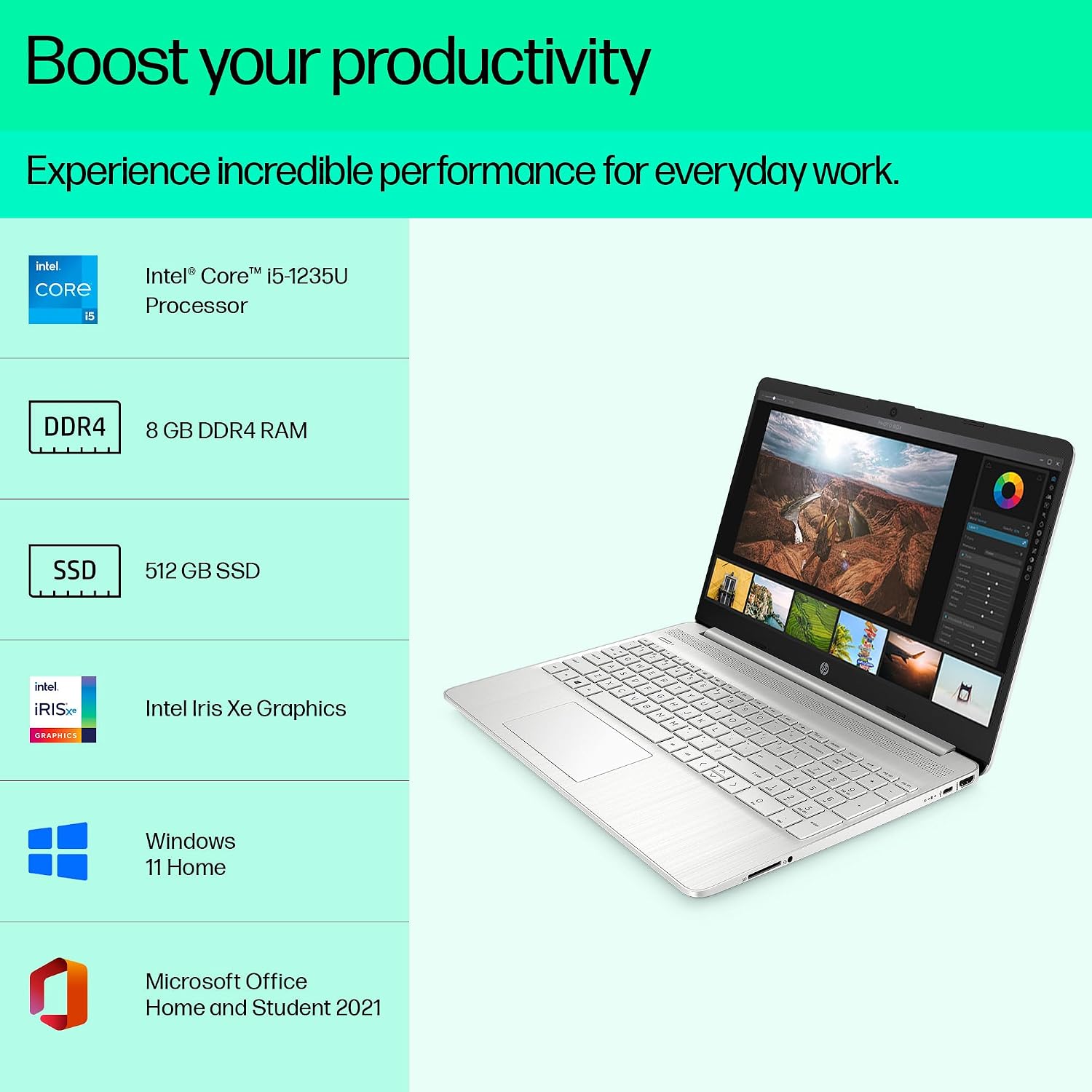
Image: An overview of the HP 15s Laptop's core performance components.
- Processor: Intel Core i5-1235U (up to 4.4 GHz, 10 cores, 12 threads).
- Memory: 8 GB DDR4-3200 MHz RAM, expandable up to 16 GB.
- Storage: 512 GB PCIe NVMe M.2 SSD for fast boot times and application loading.
- Graphics: Integrated Intel Iris Xe Graphics.
- Operating System: Pre-installed Windows 11 Home 64 Plus Single Language.
- Software: Includes Microsoft Office Home & Student 2021 and a 30-day trial of McAfee LiveSafe.
Connectivity

Image: A detailed view of the connectivity ports available on the HP 15s Laptop.
The HP 15s Laptop offers a range of ports for connecting peripherals and external displays:
- 1x SuperSpeed USB Type-C 5Gbps signaling rate
- 2x SuperSpeed USB Type-A 5Gbps signaling rate
- 1x Headphone/microphone combo jack
- 1x AC smart pin (charging port)
- 1x HDMI 1.4b port
- Media Card Reader
Wireless connectivity includes Realtek RTL8821CE-M 802.11a/b/g/n/ac (1x1) Wi-Fi and Bluetooth 4.2 combo, with MU-MIMO support and Miracast compatibility.
Battery and Portability

Image: Information on the HP 15s Laptop's battery life, weight, and fast charging capability.
The laptop is designed for portability, weighing approximately 1.69 kg. It features a long-lasting battery, offering up to 7 hours and 30 minutes of usage. Fast charging technology allows the battery to reach 50% capacity within 45 minutes.
Maintenance
Regular maintenance helps ensure the longevity and optimal performance of your HP 15s Laptop.
- Cleaning: Use a soft, lint-free cloth to clean the screen and exterior. For stubborn marks, dampen the cloth slightly with water or a screen cleaner. Avoid harsh chemicals.
- Software Updates: Regularly check for and install operating system and driver updates to maintain security and performance.
- Battery Care: To prolong battery life, avoid extreme temperatures and do not leave the laptop plugged in constantly at 100% charge for extended periods.
- Ventilation: Ensure the laptop's vents are not obstructed to prevent overheating. Use the laptop on a hard, flat surface.
- Data Backup: Periodically back up important data to an external drive or cloud storage to prevent data loss.
Troubleshooting
This section addresses common issues you might encounter with your HP 15s Laptop.
- Laptop does not power on:
- Ensure the power adapter is securely connected to both the laptop and a working power outlet. Check if the power outlet is functional. Try holding the power button for 15 seconds to perform a hard reset.
- Screen is blank or black:
- Connect an external monitor to check if the display output is working. Adjust screen brightness using function keys. Restart the laptop.
- Wi-Fi connection issues:
- Ensure Wi-Fi is enabled in Windows settings. Restart your router and modem. Update Wi-Fi drivers from the HP support website.
- Slow performance:
- Close unnecessary applications. Check for and install system updates. Run a disk cleanup and defragmentation (for HDD, not necessary for SSD). Scan for malware.
- Battery not charging:
- Verify the power adapter is correctly connected. Check the adapter for damage. Try a different power outlet. Update battery drivers.
Specifications
| Feature | Detail |
|---|---|
| Model Number | 15s-fq5111TU |
| Processor | Intel Core i5-1235U (up to 4.4 GHz, 10 cores, 12 threads) |
| Memory | 8 GB DDR4-3200 MHz RAM (2 x 4 GB), expandable to 16 GB |
| Storage | 512 GB PCIe NVMe M.2 SSD |
| Display | 15.6-inch diagonal, FHD (1920 x 1080), micro-edge, anti-glare, UWVA, 250 nits, 45% NTSC |
| Graphics | Intel Iris Xe Graphics (Integrated) |
| Operating System | Windows 11 Home 64 Plus Single Language |
| Ports | 1x SuperSpeed USB Type-C, 2x SuperSpeed USB Type-A, 1x HDMI 1.4b, 1x Headphone/microphone combo, 1x AC smart pin |
| Wireless Connectivity | Realtek RTL8821CE-M 802.11a/b/g/n/ac (1x1) Wi-Fi, Bluetooth 4.2 |
| Camera | HP True Vision 720p HD camera with integrated dual array digital microphones |
| Audio | Dual speakers |
| Battery | 1 Lithium Ion battery (included), 41 Watt Hours, 3 cells |
| Dimensions (W x D x H) | 35.8 x 24.2 x 1.8 cm |
| Weight | 1.69 kg |
| Included Components | Laptop, Power Adapter |
Warranty and Support
Your HP 15s Laptop comes with a standard warranty and access to HP support services.

Image: HP's warranty and support contact information.
- Warranty: The unit comes with a one-year base domestic warranty from the unit shipped date. This can be corrected by contacting HP.
- WhatsApp Support: 24x7 support available at +91 22 6101 4560.
- Phone Support: 12 hours a day, 7 days a week. Toll-free number: 18002587170.
- Online Support: Access Virtual Agent Support, HP Support Assistant, and Chat Support through the official HP website.
- HP Digital Support: For additional resources and support, visit HP Digital Support.
- HP Care Pack: For extended warranty options, consider purchasing an HP Care Pack.


