
Introduction
Thank you for purchasing the CHICIRIS LED Digital Alarm Clock. This manual provides detailed instructions for the proper setup, operation, and maintenance of your device. Please read this manual thoroughly before use and retain it for future reference.
Product Overview
Key Features:
- Snooze Function: Allows for temporary silencing of the alarm for additional sleep.
- 6-Level Brightness Adjustment: Customize display brightness for optimal viewing in various environments.
- Dual USB Charging Ports: Conveniently charge two devices simultaneously (5V/2A output).
- Full-Screen LED Mirror Display: Elegant design with clear, large digital time display.
- Dual Power Options: Operates via 4 AAA batteries (not included) or external 5V/USB cable.
- Loud Buzzer Alarm: 65-100 dB alarm suitable for heavy sleepers and individuals with hearing difficulties.
Package Contents:
- 1 x CHICIRIS LED Digital Alarm Clock
- 1 x USB Cable
- 1 x User Manual
Safety Information
- Do not expose the device to extreme temperatures, direct sunlight, or high humidity.
- Avoid dropping or subjecting the device to strong impacts.
- Use only the provided USB cable or a certified 5V/2A USB power adapter.
- When using batteries, ensure correct polarity (+/-) and do not mix old and new batteries or different types of batteries.
- Remove batteries if the device will not be used for an extended period.
- Keep out of reach of children.
Setup
1. Powering the Device
The alarm clock can be powered by either a USB cable or AAA batteries.
- USB Power: Connect the provided USB cable to the USB Input port on the back of the clock and plug the other end into a 5V/2A USB power adapter (not included) or a powered USB port.
- Battery Power: For backup power or portable use, insert 4 AAA batteries (not included) into the battery compartment.

Image: CHICIRIS LED Digital Alarm Clock connected via USB cable. The clock displays "12:01 AM" in green LED digits. The white USB cable is visible below the clock.

Image: A coiled white USB cable, used for powering the CHICIRIS LED Digital Alarm Clock.
2. Battery Installation
- Locate the 4*AAA Battery Compartment on the bottom of the clock.
- Open the battery compartment cover.
- Insert 4 new AAA batteries, ensuring correct polarity (+ and -).
- Close the battery compartment cover securely.

Image: Bottom view of the CHICIRIS LED Digital Alarm Clock, showing the battery compartment labeled "4*AAA Battery Compartment" and various control buttons and USB ports.
Operating Instructions
Familiarize yourself with the control buttons located on the top and back of the device.
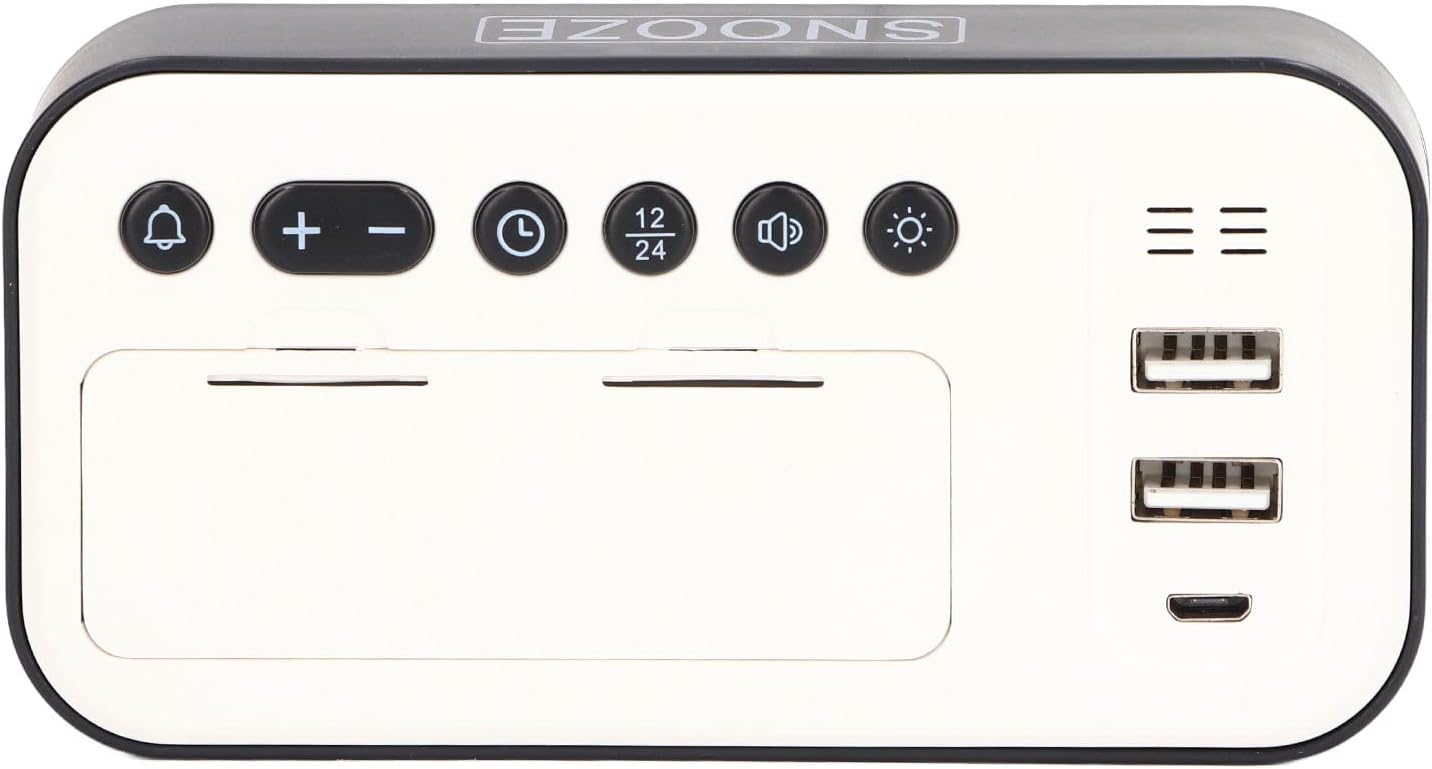
Image: Top view of the CHICIRIS LED Digital Alarm Clock, displaying the control buttons (Alarm, Plus, Minus, Time, 12/24 Hour, Volume, Brightness) and USB charging ports.
Image: A detailed diagram labeling the functions of each button and port on the CHICIRIS LED Digital Alarm Clock, including Alarm Setting, Time Setting, Volume Adjust, Snooze Touch Sensitive Area, 4*AAA Battery Compartment, USB Output 1, USB Output 2, USB Input, 24/12 Hour, and Brightness Adjust.
1. Time Setting
- Press and hold the Time Setting button (clock icon) until the hour digits start flashing.
- Use the + and - buttons to adjust the hour.
- Press the Time Setting button again to switch to minute adjustment.
- Use the + and - buttons to adjust the minutes.
- Press the Time Setting button once more to confirm and exit time setting mode.
2. Alarm Setting
- Press and hold the Alarm Setting button (bell icon) until the alarm hour digits start flashing.
- Use the + and - buttons to adjust the alarm hour.
- Press the Alarm Setting button again to switch to alarm minute adjustment.
- Use the + and - buttons to adjust the alarm minutes.
- Press the Alarm Setting button once more to confirm and exit alarm setting mode. The alarm icon will appear on the display, indicating the alarm is active.
- To deactivate the alarm, press the Alarm Setting button briefly. The alarm icon will disappear.
3. Snooze Function
When the alarm sounds, touch the Snooze Touch Sensitive Area (top of the clock, labeled "SNOOZE") to activate the snooze function. The alarm will pause for 5 minutes and then sound again. To turn off the alarm completely, press and hold the Alarm Setting button.
4. Brightness Adjustment
The clock features 6 levels of brightness. Briefly press the Brightness Adjust button (sun icon) to cycle through the brightness levels until you find your preferred setting.
5. 12/24 Hour Format
Briefly press the 12/24 Hour button to switch between 12-hour (with AM/PM indicator) and 24-hour time formats.
6. USB Charging Ports
The clock is equipped with two USB Output ports (USB Output 1 and USB Output 2) on the side, providing 5V/2A output. You can use these ports to charge your mobile devices while the clock is powered via its main USB input.
Maintenance
- Clean the clock's surface with a soft, dry cloth. Do not use abrasive cleaners or solvents.
- Ensure the USB ports are free from dust and debris.
- If the clock is not functioning correctly, try resetting it by removing both USB power and batteries for a few minutes, then reconnecting.
Troubleshooting
| Problem | Possible Cause | Solution |
|---|---|---|
| Clock display is off. | No power or low battery. | Ensure USB cable is securely connected to a working power source. If using batteries, replace with fresh AAA batteries. |
| Alarm does not sound. | Alarm not set or deactivated. | Verify the alarm is set and the alarm icon is visible on the display. Check alarm volume. |
| USB charging ports not working. | Clock not powered via USB input. | The USB charging ports only function when the clock is powered by the main USB input. Ensure the clock is connected to a 5V/2A USB power source. |
| Display is too dim/bright. | Brightness level needs adjustment. | Press the Brightness Adjust button to cycle through the 6 brightness levels. |
Specifications
- Model: CHICIRISygh6rtb8ax-12
- Material: ABS
- Product Size: Approximately 13 x 6.5 x 3.5 cm (5.1 x 2.6 x 1.4 inches)
- Screen Size: 5 inches
- Input Voltage: 5V, 2A
- USB Output: 5V, 2A (for charging external devices)
- Alarm Duration: 5 minutes
- Snooze Time: 5 minutes
- Alarm Tones: 65-100 dB
- Battery Power: 4 x AAA batteries (not included)
- Weight: Approximately 167g (5.9 oz)
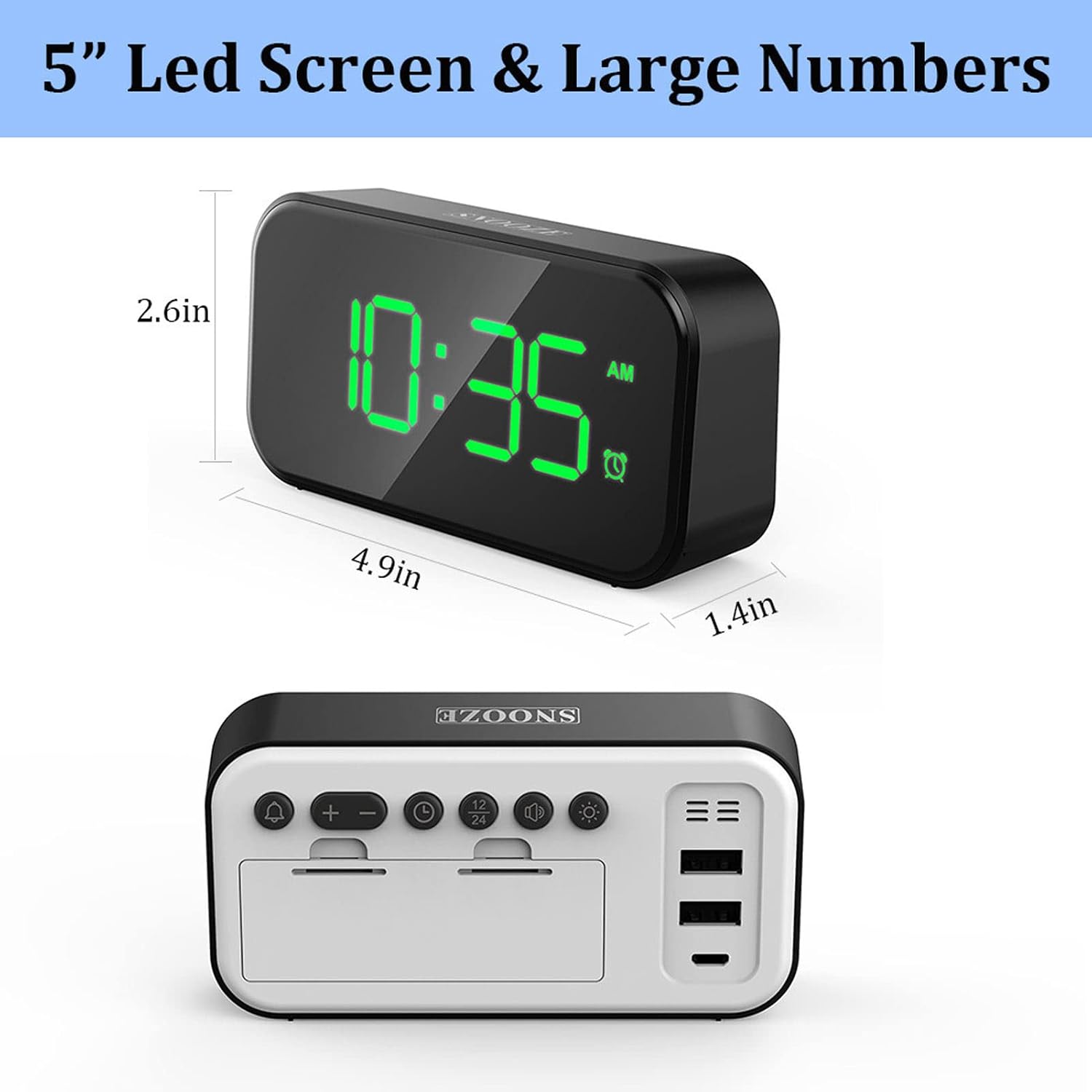
Image: The CHICIRIS LED Digital Alarm Clock with its dimensions indicated: 4.9 inches (length), 2.6 inches (height), and 1.4 inches (depth).

Image: Detailed dimensions of the CHICIRIS LED Digital Alarm Clock, showing 13cm/5.1in (length), 6.5cm/2.6in (height), and 3.5cm/1.4in (depth).
Warranty and Support
For warranty information or technical support, please refer to the retailer where you purchased the product or contact CHICIRIS customer service through their official channels. Please have your model number (CHICIRISygh6rtb8ax-12) and purchase details ready when contacting support.