
A-BENET COG-VLIT1319-01
Instruction Manual
A-BENET Display Replacement for Ducati Monster Instrument Cluster
Model: COG-VLIT1319-01
Product Overview
This manual provides essential information for the installation, operation, and maintenance of the A-BENET LCD display replacement for various Ducati Monster instrument clusters. This product is designed to restore the functionality and clarity of your motorcycle's dashboard display.
Compatibility:
- Ducati Monster 696 (2008-2013)
- Ducati Monster 696 ABS (2009-2014)
- Ducati Monster 696 Plus (2007-2014)
- Ducati Monster 795 (2011-2014)
- Ducati Monster 796 (2010-2013)
- Ducati Monster 796 ABS (2010-2014)
- Ducati Monster 1100 (2009-2010)
- Ducati Monster 1100 S (2009-2010)
- Ducati Monster 1100 Evo ABS (2011-2013)
This display is suitable for instrument clusters with both orange/red backlight and light blue/white backlight.

Figure 1: The A-BENET LCD display replacement unit. This is the component you will be installing into your motorcycle's instrument cluster.
Package Contents
Upon opening the package, please verify that all components are present and undamaged.
- 1 x A-BENET LCD Display Replacement Unit
Note: The instrument cluster itself is shown in application scenarios for instructional purposes only and is not included with the purchase of this LCD display.
Installation Guide
Replacing the LCD display requires careful handling of delicate electronic components. It is highly recommended that installation be performed by a qualified technician or an individual with experience in motorcycle electronics repair.
General Steps (Consult a service manual or professional for detailed instructions specific to your motorcycle model):
- Preparation: Ensure the motorcycle's ignition is off and the battery is disconnected to prevent electrical damage.
- Remove Instrument Cluster: Carefully detach the instrument cluster from the motorcycle's dashboard. This typically involves removing mounting screws and disconnecting electrical connectors.
- Disassemble Cluster: Open the instrument cluster housing to access the internal circuit board and the existing LCD display. Be mindful of any clips, screws, or ribbon cables.
- Remove Old Display: Gently disconnect the ribbon cable from the old LCD display and remove the display unit. Avoid touching the display surface or the ribbon cable contacts with bare hands.
- Install New Display: Connect the ribbon cable of the new A-BENET LCD display to the circuit board, ensuring it is seated correctly and securely. Position the new display within the cluster housing.
- Reassemble Cluster: Carefully reassemble the instrument cluster housing, ensuring all seals and screws are properly secured.
- Reinstall Cluster: Reconnect the instrument cluster's electrical connectors and mount it back onto the motorcycle's dashboard.
- Test Functionality: Reconnect the battery and turn on the ignition to verify the new display is functioning correctly. Check for clear readouts and proper illumination.

Figure 2: The A-BENET display shown in an application scenario for a Ducati Monster 696 instrument cluster (2007-2014 model years). This illustrates how the display integrates into the existing dashboard unit.

Figure 3: The A-BENET display shown in an application scenario for a Ducati Monster 1100 Evo instrument cluster (2011-2013 model years). Note the clear white backlight and digital readouts.
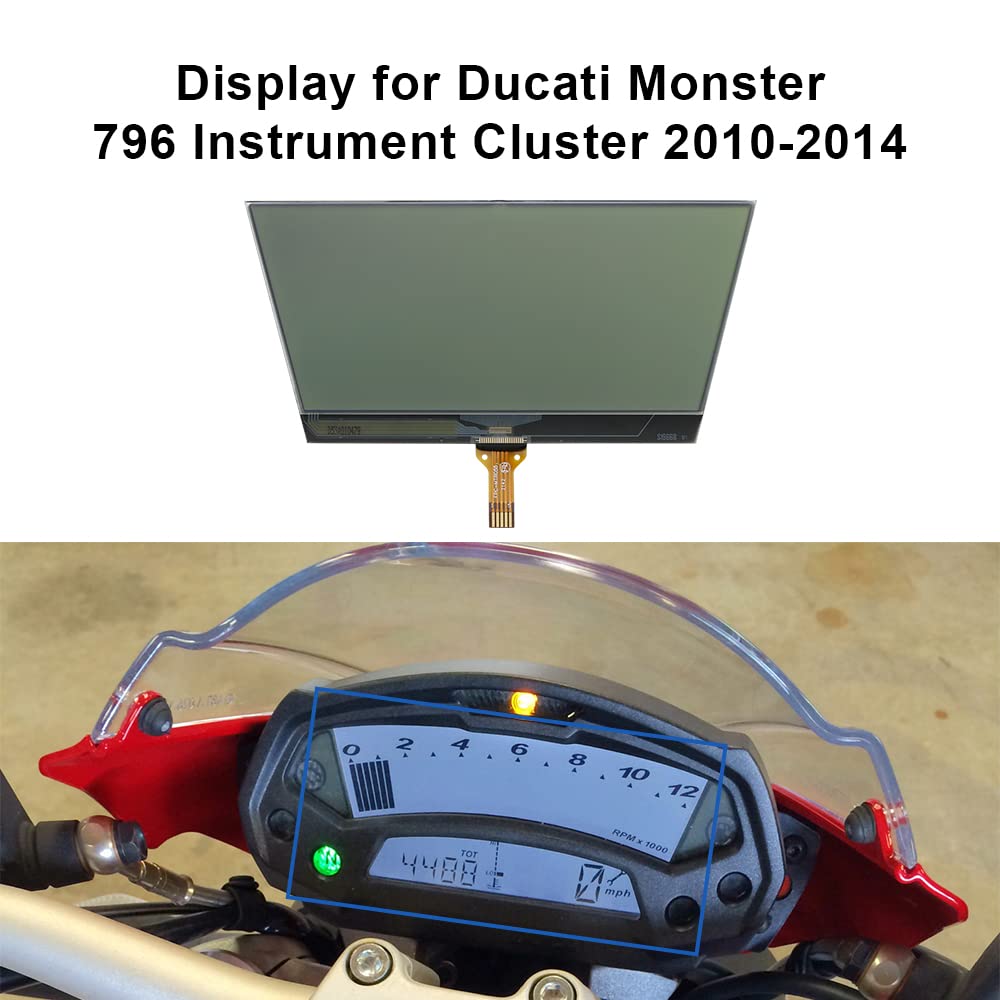
Figure 4: The A-BENET display shown in an application scenario for a Ducati Monster 796 instrument cluster (2010-2014 model years). This image highlights the display's fit and appearance within the cluster.
Operation
Once correctly installed, the A-BENET LCD display will function as the primary visual interface for your Ducati Monster's instrument cluster. It will display all relevant vehicle information, including but not limited to speed, RPM, mileage, warning indicators, and other data provided by the motorcycle's onboard systems.
The display is designed to integrate seamlessly with your existing instrument cluster's electronics, restoring clear and accurate readouts regardless of the original backlight color (orange/red or light blue/white).
Maintenance
The A-BENET LCD display is a sealed unit and requires minimal maintenance once installed. To ensure longevity and clear visibility:
- Cleaning: If the outer surface of the instrument cluster (above the display) becomes dirty, gently wipe it with a soft, lint-free cloth. For stubborn marks, use a mild, non-abrasive cleaner specifically designed for electronic screens, applied to the cloth, not directly to the display.
- Avoid Harsh Chemicals: Do not use strong solvents, abrasive cleaners, or alcohol-based solutions directly on the display or surrounding plastics, as these can cause damage.
- Environmental Protection: While the instrument cluster is designed to be weather-resistant, prolonged exposure to extreme temperatures, direct sunlight, or excessive moisture can affect electronic components over time.
Troubleshooting
If you experience issues with the new display after installation, consider the following:
- No Display or Partial Display:
- Ensure all electrical connectors to the instrument cluster are securely attached.
- Verify that the ribbon cable connecting the new LCD display to the circuit board is fully seated and not damaged. A loose or improperly connected ribbon cable is a common cause of display issues.
- Check the motorcycle's battery voltage. Low voltage can sometimes cause erratic electronic behavior.
- Incorrect Readings:
- This is less likely to be a display issue and more likely related to sensors or the main instrument cluster circuit board. Consult a professional if the display itself is clear but readings are inaccurate.
- Display Appears Defective:
- If the display exhibits lines, dead pixels, or other visual anomalies immediately after proper installation, the unit may be defective. In such cases, contact the seller for assistance.
If troubleshooting steps do not resolve the issue, it is recommended to seek assistance from a qualified motorcycle mechanic or electronics repair specialist.
Specifications
| Brand | A-BENET |
| Model Number (Screen OEM) | COG-VLIT1319-01 |
| Job Number | 550786 |
| Screen Size | 125 x 59 mm |
| Reference OEM Numbers | 40610714A, 40610715A, 40610716A, 40610802A, 40610803A |
| Material | Acrylonitrile Butadiene Styrene (ABS) |
| Item Weight | 0.31 Pounds (approx. 141 grams) |
| Package Dimensions | 8.66 x 6.3 x 0.79 inches |
| UPC | 750439967862 |

Figure 5: The A-BENET LCD display shown with a ruler, illustrating its precise dimensions for compatibility verification.
Warranty Information
Specific warranty details for the A-BENET LCD display replacement unit are not provided in the product information. Please refer to the seller's return policy or contact the seller directly for information regarding warranty coverage and terms.
Customer Support
For technical assistance, installation queries, or product support, please contact the seller through the platform where the purchase was made. Direct contact information for A-BENET customer support is not provided in the product details.
Ask a question about this manual
Ask about setup, troubleshooting, compatibility, parts, safety, or missing instructions. Manuals+ will review the question and use this page’s manual context to help answer it.