
1. Introduction
Thank you for choosing the ODK L-Shaped Desk. This manual provides detailed instructions for the assembly, operation, maintenance, and troubleshooting of your new desk. Designed for versatility and ergonomics, this desk features a reversible L-shape configuration, an elevated monitor stand, and integrated storage solutions, making it ideal for home offices, gaming setups, or study areas. Please read this manual carefully before assembly and use to ensure proper setup and long-lasting enjoyment of your product.
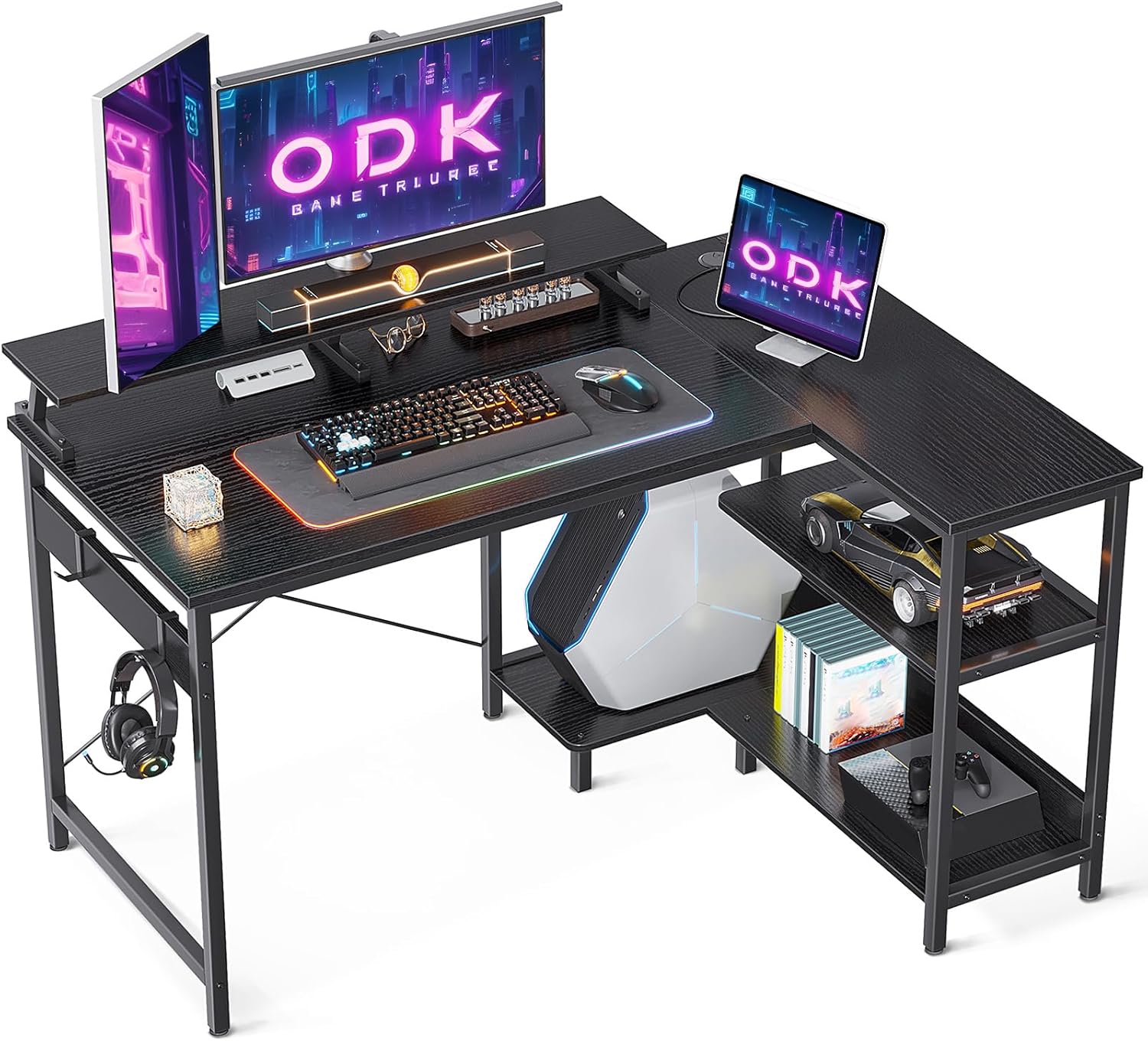
Image 1.1: The ODK L-Shaped Desk in a gaming setup, showcasing its ergonomic monitor stand and ample surface area.
2. Safety Information
- Always assemble the desk on a soft, clean surface to prevent scratches.
- Ensure all screws and fasteners are securely tightened before use. Periodically check and re-tighten as necessary.
- Do not overload the desk or shelves beyond their recommended weight capacity.
- Keep small parts and packaging materials away from children and pets to prevent choking hazards.
- Avoid placing hot items directly on the desk surface without protection.
- Do not stand or sit on the desk.
3. Package Contents
Before beginning assembly, please verify that all components listed below are present and undamaged. If any parts are missing or damaged, please contact customer support.
- Main Desktop Panel
- Side Desktop Panel with Cable Hole
- Monitor Stand Shelf
- L-Shaped Frame Components (Legs, Support Bars)
- Storage Shelves (for CPU stand and side storage)
- Headphone Hooks (2)
- Assembly Hardware (Screws, Bolts, Allen Wrench)
- Instruction Manual
4. Assembly Instructions (Setup)
The ODK L-Shaped Desk is designed for easy assembly. It can be configured with the side storage compartments on either the left or right side to suit your space. Follow the step-by-step instructions provided in the included assembly guide. It is recommended to have two people for certain steps to ensure stability and ease of assembly.
4.1 Reversible Configuration
The L-shaped section of the desk, including the side shelves and CPU stand, can be assembled on either the left or right side of the main desk. Refer to the specific diagrams in your physical instruction manual for detailed steps on both configurations.

Image 4.1: The ODK L-Shaped Desk demonstrating its reversible design, allowing the L-section to be placed on either side.
4.2 General Assembly Steps
- Unpack all components and lay them out on a protected surface.
- Identify all parts according to the parts list in your assembly guide.
- Assemble the main desk frame first, securing all connections loosely before final tightening.
- Attach the main desktop panel to the assembled frame.
- Assemble the L-shaped extension frame, deciding on the left or right orientation.
- Attach the side desktop panel and the storage shelves to the L-shaped extension.
- Connect the L-shaped extension to the main desk frame.
- Install the monitor stand shelf onto the main desktop.
- Attach the headphone hooks to the desired locations on the frame.
- Once all parts are in place, gradually tighten all screws and bolts until secure. Do not overtighten.
5. Usage (Operating)
The ODK L-Shaped Desk is designed to maximize your workspace and provide ergonomic benefits. Here's how to best utilize its features:
5.1 Ergonomic Monitor Stand
The elevated monitor stand (4.5 inches increased height) helps position your computer monitors at an optimal eye level, reducing neck strain and promoting a comfortable working posture. It is wide enough (7.8 inches) to accommodate two monitors.

Image 5.1: The desk featuring two monitors comfortably placed on the elevated monitor stand, enhancing ergonomic viewing.
5.2 Integrated Storage Solutions
- CPU Stand: A dedicated lower shelf provides ample space for your computer tower, keeping it off the floor and protected.
- Side Shelves: Two additional shelves on the L-shaped section offer convenient storage for books, documents, gaming consoles, or decorative items.
- Headphone Hooks: Two integrated hooks allow you to hang headphones or other accessories, keeping your desktop clutter-free.
- Cable Hole: The side desktop panel includes a cable hole for organized cable management, helping to maintain a tidy workspace.

Image 5.2: A visual comparison highlighting the utility of the integrated CPU stand and side storage shelves.
5.3 Versatile Workspace
The large desktop surface (main plate: 48''L x 19.7''W, side plate: 31.5''L x 10.2''W) provides ample room for multiple monitors, keyboards, mice, and other peripherals, supporting both work and gaming activities.

Image 5.3: An overhead view illustrating the spacious and organized layout of the ODK L-Shaped Desk.
6. Maintenance and Care
To ensure the longevity and appearance of your ODK L-Shaped Desk, follow these care guidelines:
- Cleaning: Wipe the desk surface with a soft, damp cloth. For stubborn marks, use a mild, non-abrasive cleaner. Dry immediately with a clean cloth.
- Protection: Although the tabletop is scratch-resistant and waterproof, it is advisable to use coasters for drinks and protective pads under hot items or sharp objects.
- Avoid Harsh Chemicals: Do not use harsh chemicals, abrasive cleaners, or solvents, as these can damage the finish.
- Sunlight Exposure: Avoid prolonged direct sunlight exposure, which can cause fading or discoloration over time.
- Stability Check: Periodically check all screws and connections to ensure they remain tight. Re-tighten if necessary to maintain stability.
7. Troubleshooting
If you encounter any issues with your ODK L-Shaped Desk, refer to the following common problems and solutions:
- Desk is Wobbly:
- Ensure all screws and bolts are fully tightened.
- Check that the desk is on a level surface. Adjust the leveling feet if present.
- Verify that all frame components are correctly assembled according to the instructions.
- Parts Do Not Align:
- Loosen all screws slightly, align the parts, and then re-tighten them evenly.
- Double-check the orientation of the parts against the assembly diagrams.
- Missing or Damaged Parts:
- Carefully check all packaging materials. Small parts can sometimes be overlooked.
- Contact ODK customer support with your purchase details and a description of the missing/damaged part.
8. Specifications
Detailed specifications for the ODK L-Shaped Desk, Model ZJXFZ-01:

Image 8.1: Detailed dimensions of the ODK L-Shaped Desk (all measurements in centimeters).
| Feature | Detail |
|---|---|
| Brand | ODK |
| Model Number | ZJXFZ-01 |
| Color | Black |
| Product Dimensions (L x W x H) | 120 x 88 x 80 cm |
| Main Desktop Panel (L x W) | 48'' x 19.7'' (approx. 122 x 50 cm) |
| Side Desktop Panel (L x W) | 31.5'' x 10.2'' (approx. 80 x 26 cm) |
| Monitor Stand Height Increase | 4.5 inches (approx. 11.4 cm) |
| Monitor Stand Width | 7.8 inches (approx. 19.8 cm) |
| Item Weight | 17.4 Kilograms |
| Material | Solid Chipboard (Wood), High-Strength Iron Frame |
| Special Features | Compact, Convertible, Scratch Resistant, Waterproof, Ergonomic Monitor Stand, Reversible L-Shape, CPU Stand, Headphone Hooks |
| Desk Design | Computer Desk |
| Style | Modern |
9. Warranty and Support
ODK is committed to providing high-quality products and excellent customer service. While specific warranty details are not provided in this manual, we stand behind the quality of our products.
If you have any questions regarding your ODK L-Shaped Desk, require assistance with assembly, or encounter any issues, please do not hesitate to contact ODK customer support. We aim to respond to all inquiries within 24 hours to ensure your satisfaction.
Please retain your proof of purchase for any support inquiries.


