
Introduction
This manual provides comprehensive instructions for the installation, operation, maintenance, and troubleshooting of your Amazon Basics Keyless Entry Door Lock Deadbolt. Designed for convenience and security, this electronic keypad deadbolt offers keyless access with customizable security codes and an automatic locking feature. Please read this manual thoroughly before installation and use to ensure proper functionality and safety.
Package Contents
Verify that all components are present before beginning installation:
- Electronic Keypad Deadbolt Assembly (Exterior and Interior Units)
- Latch Mechanism
- Strike Plate
- Screw Pack
- Keys (for traditional key option)
- Installation Template

The image above displays the complete set of parts you should find in your product package, including the electronic keypad unit, the interior deadbolt assembly, the latch, strike plate, screws, and traditional keys.
Setup
Before Installation
- Ensure your door thickness is between 1-3/8 to 1-3/4 inches (35mm to 44mm).
- Verify the backset (distance from door edge to center of bore hole) is either 2-3/8 inches (60mm) or 2-3/4 inches (70mm).
- Prepare the necessary tools: Phillips head screwdriver, tape measure, pencil.
- The lock requires 4 AA batteries (not included). Install fresh batteries before final assembly.
Installation Steps
Follow these general steps for installation. For detailed, step-by-step instructions, refer to the included printed manual or the official Warranty (PDF) document which often contains installation guides.
- Prepare the Door: Use the provided installation template to mark and drill holes if your door is not pre-drilled. Ensure the correct backset is selected.
- Install the Latch: Insert the latch into the door edge, ensuring the correct orientation for your door swing. Secure it with screws.
- Install the Exterior Assembly: Place the exterior keypad assembly onto the door, aligning the spindle through the latch.
- Install the Interior Mounting Plate: Secure the interior mounting plate to the exterior assembly using screws, ensuring it is flush against the door.
- Install the Interior Assembly: Connect the cable from the exterior assembly to the interior assembly. Attach the interior assembly to the mounting plate.
- Install Batteries: Remove the battery cover on the interior assembly and insert 4 new AA batteries, observing polarity. Replace the cover.
- Perform Door Handing Process: This step calibrates the lock to your door's orientation. Follow the specific instructions in your printed manual for this crucial step.

The template provides clear markings for drilling holes, ensuring proper alignment for the deadbolt mechanism and keypad. It supports both 60mm and 70mm backsets.
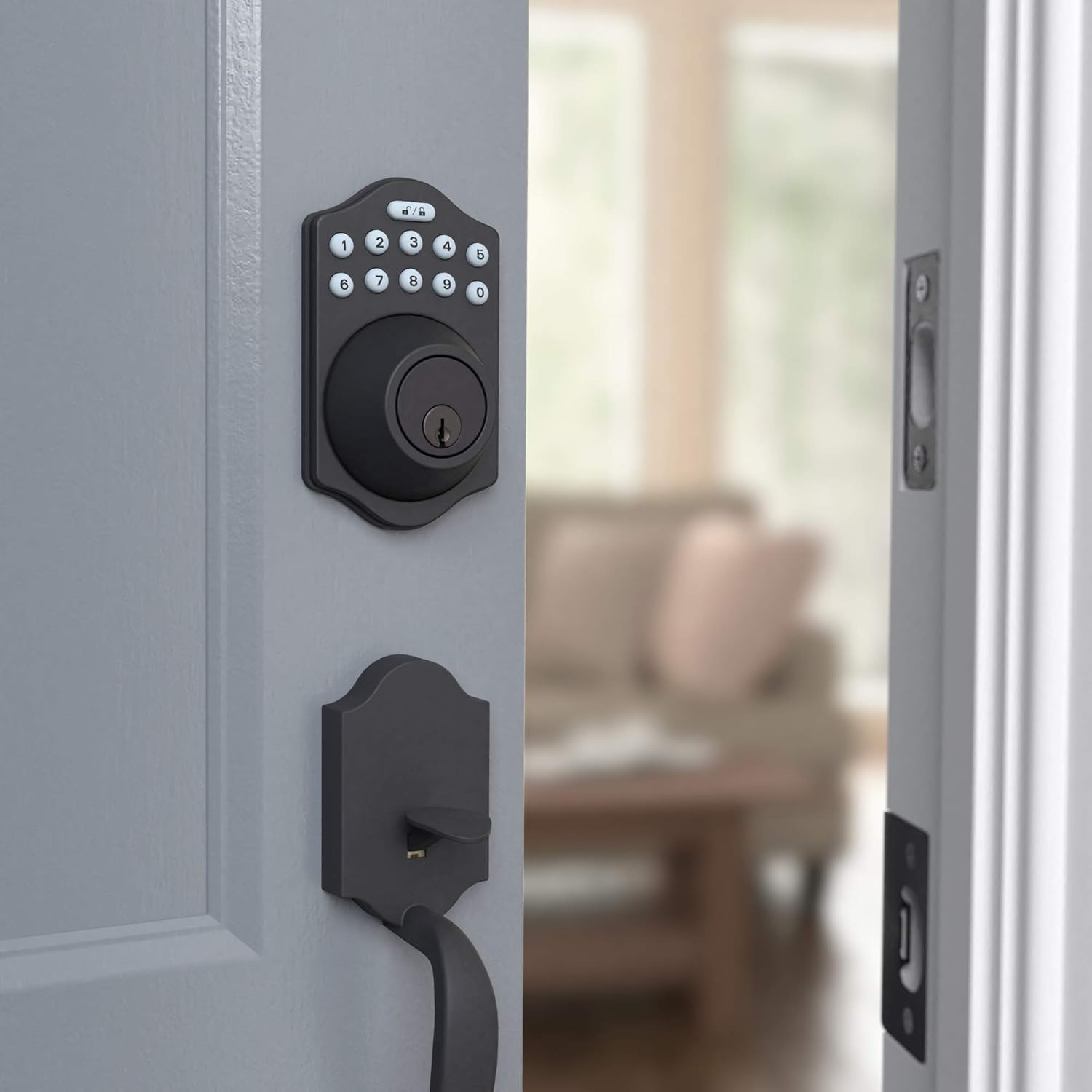
This image shows the electronic keypad deadbolt installed on the exterior side of a door, ready for operation. The matte black finish blends seamlessly with the door.

The side view illustrates how the deadbolt integrates with the door frame, providing a secure locking mechanism. The internal components are neatly concealed.
Operating Instructions
Programming User Codes
Your deadbolt comes with a default programming code. You will use this code to set up to 6 unique user codes for family members or temporary single-use codes for guests. Refer to your printed manual for the exact sequence of button presses to add, delete, or modify user codes.
Locking and Unlocking
The lock can be operated using the keypad or a traditional key.
- To Lock: Press the Lock button (top right button with lock icon) on the keypad. The deadbolt will extend.
- To Unlock: Enter your valid user code, then press the Unlock button (top left button with unlock icon). The deadbolt will retract.
- Automatic Locking: The deadbolt features an automatic locking function, which can be set to engage 10 to 99 seconds after entry. This provides added peace of mind, ensuring your door is always secured.
- Manual Operation: From the interior, the deadbolt can be manually locked or unlocked using the thumb turn. From the exterior, a traditional key can be used as a backup.

The keypad features illuminated numbers for easy visibility in low light conditions, along with dedicated lock and unlock buttons at the top. The traditional keyhole is located below the keypad.
Maintenance
Battery Replacement
The electronic deadbolt is powered by 4 AA batteries. When the batteries are low, the lock may emit a warning sound or the keypad lights may flash. To replace the batteries:
- Remove the battery cover located on the interior side of the deadbolt assembly. This cover typically slides upwards or detaches with a gentle pull.
- Carefully remove the old batteries.
- Insert 4 new AA batteries, ensuring correct polarity (+/-).
- Replace the battery cover, making sure it clicks securely into place.
Regularly check battery levels to ensure uninterrupted operation. High usage may require more frequent battery changes.
Cleaning
Clean the keypad and lock body with a soft, damp cloth. Avoid using abrasive cleaners or solvents, as these can damage the finish and electronic components.
Troubleshooting
If you encounter issues with your Amazon Basics Keyless Entry Door Lock Deadbolt, refer to the following common problems and solutions:
| Problem | Possible Cause / Solution |
|---|---|
| Lock does not respond to keypad input. |
|
| Deadbolt does not extend or retract fully. |
|
| Cannot program new user codes. |
|
| Automatic locking feature not working. |
|
If these solutions do not resolve the issue, please contact Amazon Basics customer support for further assistance.
Specifications
| Feature | Detail |
|---|---|
| Brand | Amazon Basics |
| Model Name | PL14910_6B |
| Part Number | PL14910 |
| UPC | 840095890281 |
| Lock Type | Key Lock, Keypad |
| Special Feature | Keyless |
| Color | Matte Black |
| Style | Traditional Electronic Keypad Deadbolt (Pack of 6) |
| Number of Pieces | 6 |
| Finish Type | Satin |
| Item Weight | 2.71 Pounds |
| Control Method | Touch |
| Recommended Uses | Residential door locking, commercial door locking |
| Door Thickness Compatibility | 1-3/8 to 1-3/4 inches |
| Batteries Required | Yes (4 AA batteries) |
| Country of Origin | Taiwan |
Warranty and Support
For warranty information regarding your Amazon Basics Keyless Entry Door Lock Deadbolt, please refer to the official warranty document provided with your product or available online:
For additional support, troubleshooting assistance, or to inquire about replacement parts, please visit the Amazon Basics Store or contact Amazon customer service directly.


