
COLSUR K660
COLSUR Multifunctional Digital Alarm Clock Radio User Manual
Model: K660
1. Product Overview
The COLSUR K660 is a versatile 6-in-1 device designed to enhance your daily routine. It integrates a Bluetooth speaker, digital alarm clock, 15W wireless charger, FM radio, adjustable night lamp, and a portable phone holder. Its elegant wood design makes it a stylish addition to any room.

Figure 1: COLSUR K660 Multifunctional Digital Alarm Clock Radio.
2. Package Contents
Please check the package for the following items:
- 1x COLSUR K660 Wireless Charger Speaker & Radio Lamp
- 1x User Manual
- 1x QC3.0 Adapter
- 1x Type-C Power Cord

Figure 2: Included accessories and main unit.
3. Product Components
Familiarize yourself with the different parts of your COLSUR K660 device:
- A. LED Display: Shows time, alarm status, and mode indicators.
- B. Control Buttons: For setting time, alarm, adjusting volume, changing modes, and tuning radio.
- C. Wireless Charging Pad: For Qi-enabled devices.
- D. Night Lamp: Adjustable brightness light.
- E. Phone Holder Slot: Integrated slot for propping up your smartphone.
- F. Speaker Grille: High-quality stereo sound output.
- G. USB Charging Port: For wired charging of other devices.
- H. Power Input (Type-C): Connect the provided power cord here.
- I. Non-Slip Mat: Located at the bottom for stability.
Figure 3: Key components of the COLSUR K660.

Figure 4: Detail of the non-slip mat.
4. Setup
- Power Connection: Connect the provided Type-C power cord to the power input port on the back of the device and plug the QC3.0 adapter into a wall outlet. The device will power on automatically.
- Initial Charge: If the device does not turn on immediately, allow it to charge for a few minutes as it may have a low battery from shipping. The integrated 2500 mAh battery provides portability.
- Time Setting: Refer to the "Operating Instructions" section for detailed steps on setting the current time.
5. Operating Instructions
5.1. Setting Time and Alarm
The COLSUR K660 features an LED display with adjustable brightness and a dual alarm system.
- Time Setting: Press the 'Time Set' button (usually indicated by a clock icon). Use the '+' and '-' buttons to adjust hours and minutes. Press 'Time Set' again to confirm.
- Alarm Setting: Press the 'Alarm Set' button (usually indicated by an alarm icon). Use the '+' and '-' buttons to set the desired alarm time. Press 'Alarm Set' again to confirm. You can set two independent alarms.
- Snooze Function: When the alarm sounds, press the 'Snooze' button to temporarily silence it for an additional 5 minutes of sleep.
- Display Brightness: The LED display has 3 brightness levels (low, medium, high). Use the 'Dimmer' or 'Brightness' button to cycle through the settings.

Figure 5: Snooze function for the alarm clock.
5.2. FM Radio Operation
Enjoy your favorite FM radio stations with clear sound.
- Switch to FM Mode: Press the 'Mode' button until 'FM' appears on the display.
- Auto Scan: Press and hold the 'Play/Pause' button to automatically scan and save available FM stations.
- Manual Tuning: Use the 'Previous/Next' buttons to manually tune to a specific frequency.
- Volume Adjustment: Use the 'Volume Up' and 'Volume Down' buttons to adjust the radio volume.
Note: This product was released in 2022. Some customers have reported limited FM radio channel reception. Other functions are not affected.
5.3. Bluetooth Speaker Pairing
Connect your smartphone or other Bluetooth-enabled devices to play audio wirelessly.
- Switch to Bluetooth Mode: Press the 'Mode' button until 'BT' appears on the display. The device will enter pairing mode, indicated by a flashing 'BT' icon.
- Enable Bluetooth on Your Device: Go to your smartphone's Bluetooth settings and search for available devices.
- Pairing: Select 'COLSUR K660' (or similar name like 'S29 Bluetooth Speaker') from the list. Once connected, the 'BT' icon will stop flashing.
- Playback Control: Use the device's control buttons (Play/Pause, Previous/Next) or your connected device to control music playback.

Figure 6: Bluetooth 5.0 connection interface.
5.4. Wireless Charging
The COLSUR K660 supports 15W fast wireless charging for Qi-enabled smartphones and AirPods.
- Power Requirement: Ensure the device is connected to the power adapter for wireless charging functionality.
- Placement: Place your Qi-enabled device directly on the wireless charging pad (marked with a cross or charging symbol) on top of the COLSUR K660.
- Charging Indicator: The charging indicator light on the COLSUR K660 will illuminate to confirm charging has begun.
- Case Compatibility: Wireless charging works with phone cases up to 5mm thick. Remove any metal cases, magnets, grips, or credit cards from your phone before charging.

Figure 7: Wireless charging functionality and case compatibility.

Figure 8: Compatible devices for wireless charging.
5.5. Night Lamp Control
The integrated night lamp offers adjustable illumination for various needs.
- Turning On/Off: Touch the designated touch control area (often on the handle or near the lamp) to turn the lamp on or off.
- Adjusting Brightness: Continue touching the control area to cycle through the 4 brightness levels (e.g., 30%, 70%, 100%, off).
- Usage: The lamp can be used as a reading light, ambient light, or a soft light for sleeping or nursing.
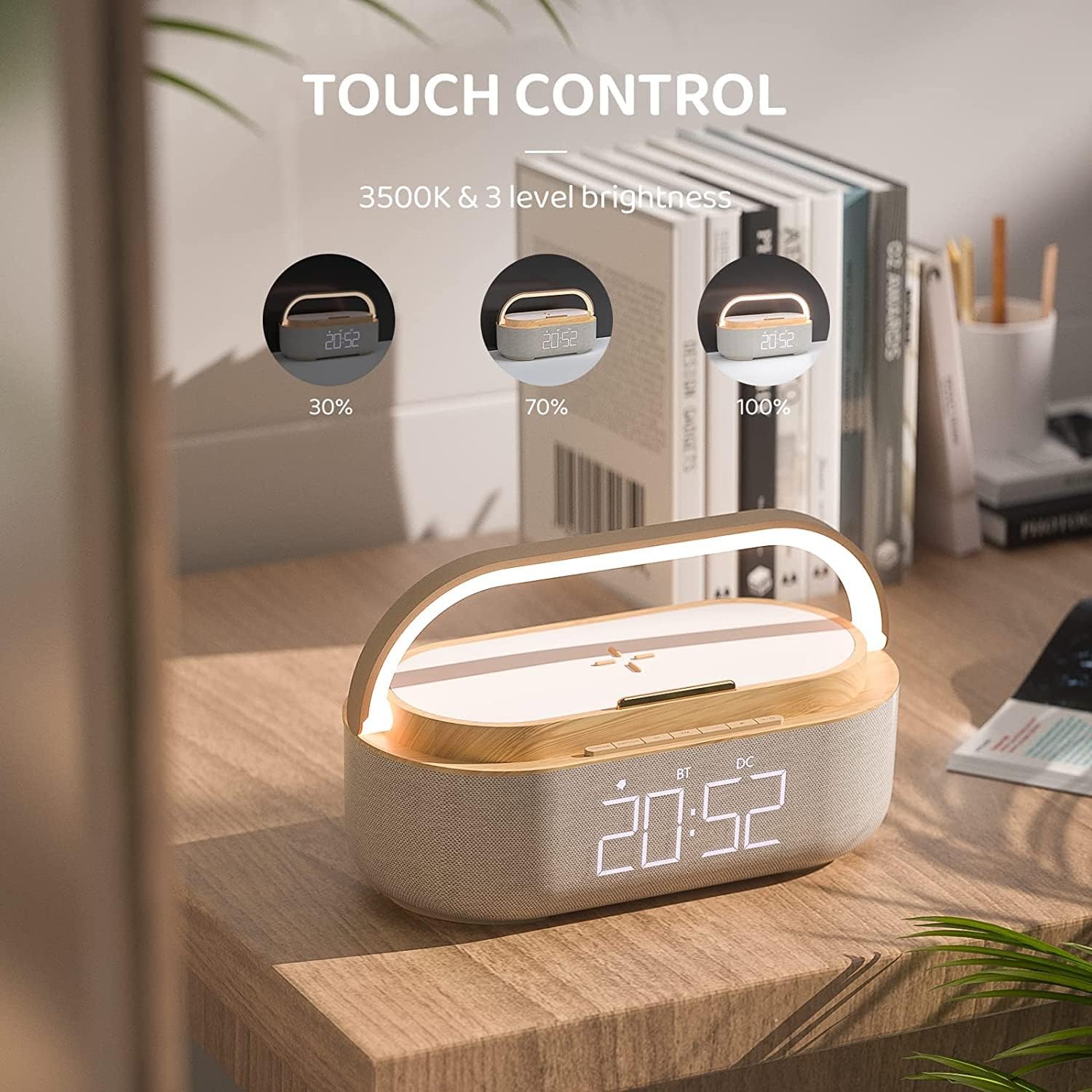
Figure 9: Touch control for night lamp brightness.

Figure 10: Night light in a bedroom setting.
5.6. Phone Holder
The integrated phone holder allows for hands-free viewing of your device.
- Simply place your smartphone into the designated slot on top of the COLSUR K660.
- This feature is ideal for watching videos, making video calls, or following recipes while your phone charges wirelessly.

Figure 11: Smartphone in the phone holder.

Figure 12: Phone holder in use during an activity.
6. Maintenance
- Cleaning: Use a soft, dry cloth to clean the surface of the device. Do not use abrasive cleaners or solvents.
- Storage: When not in use for extended periods, store the device in a cool, dry place away from direct sunlight and extreme temperatures.
- Avoid Water: This device is not waterproof. Keep it away from water and high humidity.
7. Troubleshooting
| Problem | Possible Cause | Solution |
|---|---|---|
| Device does not power on. | Not connected to power; battery depleted. | Ensure the power adapter is securely connected and plugged into a working outlet. Allow a few minutes for initial charge if battery is completely drained. |
| Wireless charging not working. | Device not connected to power; phone not Qi-enabled; improper phone placement; phone case too thick or contains metal. | Connect the device to power. Ensure your phone supports Qi wireless charging. Reposition the phone on the charging pad. Remove thick cases, metal objects, or credit cards. |
| Bluetooth pairing failed. | Device not in BT mode; Bluetooth not enabled on phone; too far from device. | Ensure the COLSUR K660 is in Bluetooth mode. Enable Bluetooth on your phone and search for 'COLSUR K660' or 'S29 Bluetooth Speaker'. Keep devices within 10 meters. |
| Poor FM radio reception. | Weak signal; environmental interference. | Reposition the device to find a better signal. Note that some users have reported limited channel reception for this model. |
| Alarm not sounding. | Alarm not set; alarm volume too low. | Verify that the alarm time is correctly set and activated. Increase the alarm volume. |
8. Specifications
- Brand: COLSUR
- Model Number: K660 (s29 Bluetooth Speaker)
- Color: Wood
- Dimensions (L x W x H): 22.86 x 3.81 x 3.81 cm (9 x 1.5 x 1.5 inches)
- Weight: 1 gram (Note: This weight seems incorrect from source data, likely a typo. Actual weight would be higher.)
- Material: Wood
- Power Source: Corded Electric (with internal battery)
- Battery: 1 Lithium-ion (included), 2500 mAh (up to 16 hours audio, 100 hours lamp, 180 hours alarm)
- Wireless Charging Output: 15W
- Bluetooth Version: 5.3 (updated chip)
- Display Type: Digital LED (3 brightness levels)
- Special Features: FM Radio, Alarm, Wireless Charging, Bluetooth Speaker, Night Lamp, Phone Holder
- Country of Origin: China
9. Warranty and Support
COLSUR products are designed for durability and performance. This product typically comes with a 3-year comprehensive warranty, ensuring peace of mind.
- Warranty: Please refer to your purchase documentation or the official COLSUR website for specific warranty terms and conditions applicable to your region.
- Customer Service: For any questions, technical support, or warranty claims, please contact COLSUR customer service. Contact information can usually be found on the product packaging or the official COLSUR website.
Related documentsK660


Ask a question about this manual
Ask about setup, troubleshooting, compatibility, parts, safety, or missing instructions. Manuals+ will review the question and use this page’s manual context to help answer it.