
ZEALOT S57
ZEALOT S57 Bluetooth Speaker
User Manual
1. Introduction
Thank you for choosing the ZEALOT S57 Bluetooth Speaker. This manual provides essential information for the safe and effective use of your new speaker. Please read it thoroughly before operation and retain it for future reference.
2. Safety Information
- Do not expose the speaker to extreme temperatures or direct sunlight for prolonged periods.
- While the speaker is IP67 waterproof, avoid submerging it in water for extended durations or exposing it to saltwater. Ensure the charging port cover is securely closed before exposure to water.
- Do not disassemble, repair, or modify the speaker. This may void the warranty and pose safety risks.
- Keep the speaker away from medical devices, as its magnetic components may interfere with their operation.
- Use only the provided charging cable and a certified power adapter (not included) to charge the speaker.
3. Package Contents
Please check the box for the following items:
- ZEALOT S57 Bluetooth Speaker
- USB-C Charging Cable
- 3.5mm Audio Cable
- S57 Quick Start Manual
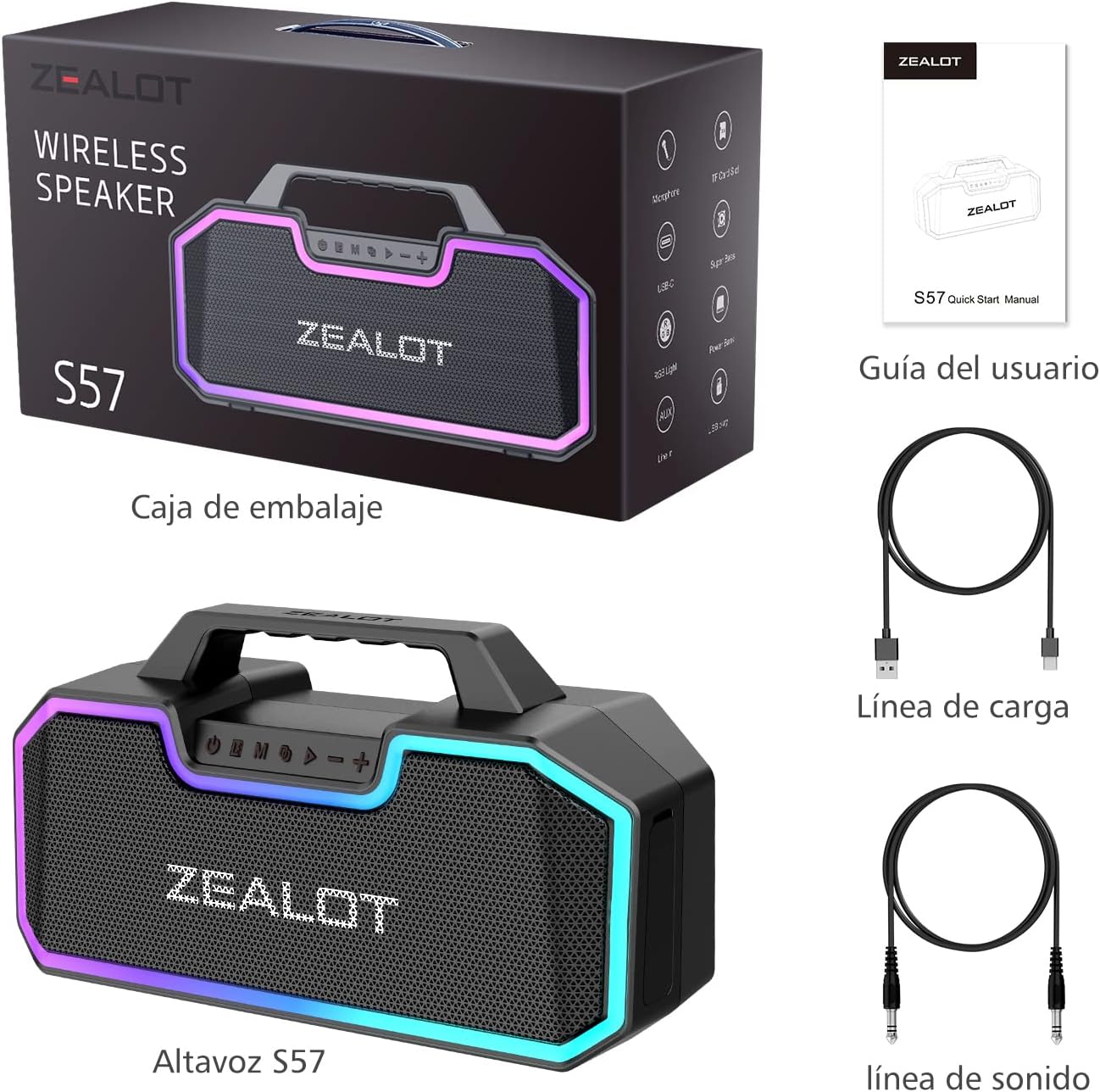
Image: The ZEALOT S57 speaker, its packaging box, USB-C charging cable, 3.5mm audio cable, and quick start manual.
4. Product Overview
4.1 Components
The ZEALOT S57 features a robust design with integrated RGB lighting and a convenient carry handle. Internally, it is equipped with dual woofers and dual tweeters to deliver powerful 60W stereo bass.

Image: The ZEALOT S57 Bluetooth Speaker showcasing its front grille, control panel, and vibrant RGB lighting.

Image: An exploded view illustrating the internal components of the ZEALOT S57, highlighting its two subwoofers and two tweeters for 60W audio output.
4.2 Controls and Ports
The control panel is located on the top of the speaker, providing easy access to all functions. The rear panel houses various input/output ports.
- Power Button: Press and hold to turn on/off.
- Mode Button (M): Short press to switch between Bluetooth, AUX, TF Card, and USB modes.
- Play/Pause Button: Press to play or pause audio.
- Volume Down (-): Short press to decrease volume.
- Volume Up (+): Short press to increase volume.
- RGB Light Button: Press to cycle through light modes or turn off the RGB lights.
Ports:
- MIC Input: For connecting an external microphone.
- AUX Input: For connecting devices via a 3.5mm audio cable.
- DC5V (USB-C) Input: For charging the speaker.
- OUT5V (USB-A) Output: Functions as a power bank to charge external devices.
- USB Input: For playing audio from a USB flash drive.
- TF Card Slot: For playing audio from a TF (MicroSD) card.

Image: A detailed view of the speaker's connectivity ports, including MIC, AUX, DC5V (USB-C), OUT5V (USB-A), USB, and TF card slot.
5. Setup
5.1 Charging the Speaker
Before first use, fully charge the speaker. Connect the provided USB-C charging cable to the DC5V port on the speaker and the other end to a USB power adapter (not included). The charging indicator will show the charging status.

Image: The ZEALOT S57 speaker acting as a power bank, charging a smartphone via its USB-A output port.
5.2 Power On/Off
Press and hold the Power button for approximately 3 seconds to turn the speaker on or off.
5.3 Bluetooth Pairing
- Turn on the speaker. It will automatically enter Bluetooth pairing mode, indicated by a flashing blue light.
- On your device (smartphone, tablet, etc.), enable Bluetooth and search for available devices.
- Select "ZEALOT S57" from the list of devices.
- Once paired, the speaker will emit a confirmation tone, and the blue light will become solid.

Image: The ZEALOT S57 speaker positioned next to a smartphone, illustrating its Bluetooth 5.0 connectivity.
6. Operating Instructions
6.1 Audio Playback
- Bluetooth Mode: After successful pairing, play audio from your connected device.
- AUX Mode: Connect your device to the AUX port using the 3.5mm audio cable. The speaker will automatically switch to AUX mode.
- TF Card/USB Mode: Insert a TF card or USB flash drive into the respective slot. The speaker will automatically detect and play audio files.
6.2 Volume Control
Use the '+' and '-' buttons on the speaker to adjust the volume. You can also control the volume from your connected device.
6.3 RGB Lighting Control
Press the dedicated RGB Light button to cycle through different lighting modes. Double-click the button to turn the lights off.
6.4 Dual Pairing (TWS Function)
You can connect two ZEALOT S57 speakers together for a true wireless stereo experience, doubling the output to 120W.
- Ensure both S57 speakers are powered on and not connected to any Bluetooth device.
- On one speaker (this will be the primary speaker), double-press the Power button. You will hear a tone indicating it's searching for another speaker.
- The two speakers will automatically connect to each other. Once connected, you will hear a confirmation tone.
- Now, connect your device to the primary speaker via Bluetooth as described in section 5.3. Audio will play through both speakers in stereo.

Image: Two ZEALOT S57 speakers wirelessly connected, demonstrating the dual pairing feature for enhanced sound.
7. Maintenance
7.1 Cleaning
Wipe the speaker with a soft, damp cloth. Do not use harsh chemicals or abrasive cleaners. Ensure the charging port cover is closed before cleaning with water.
7.2 Water Resistance (IP67)
The ZEALOT S57 is rated IP67, meaning it is protected from dust ingress and can withstand immersion in water up to 1 meter for 30 minutes. This makes it suitable for outdoor use and splashes. Always ensure the port cover is sealed tightly before exposing the speaker to water.

Image: The ZEALOT S57 speaker with water splashing over it, highlighting its IP67 waterproof capability.
8. Troubleshooting
| Problem | Possible Cause | Solution |
|---|---|---|
| Speaker does not turn on. | Low battery. | Charge the speaker fully. |
| No sound. | Volume too low; incorrect mode; device not connected. | Increase volume; switch to correct mode (Bluetooth, AUX, TF, USB); ensure device is paired/connected. |
| Cannot pair via Bluetooth. | Speaker not in pairing mode; device Bluetooth off; too far from speaker. | Ensure speaker is in pairing mode (flashing blue light); turn on device Bluetooth; move device closer to speaker (within 10 meters). |
| Sound distortion. | Volume too high; low battery; interference. | Reduce volume; charge speaker; move speaker away from other electronic devices. |
| TWS pairing failed. | Speakers already connected to another device; too far apart. | Disconnect speakers from any other Bluetooth devices; ensure speakers are within close proximity for TWS pairing. |
9. Specifications
| Feature | Specification |
|---|---|
| Brand | ZEALOT |
| Model Name | S57 |
| Item Model Number | ZEALOT-S57 |
| Maximum Speaker Output Power | 60 Watts |
| Battery Capacity | 14400 mAh |
| Connectivity Technology | Bluetooth 5.0, Auxiliary, USB, Mic |
| Is Waterproof | True (IP67) |
| Product Dimensions | 33P x 11l x 18H centimeters |
| Item Weight | 2268 Grams |
| Controller Type | Button Control |
| Material | Hard Plastic |
| Recommended Uses For Product | For Smartphone or Tablet |
| Compatible Devices | PC, Android, iOS, iPad |
| Maximum Range | 100 Feet (approx. 30 meters) |
| Included Components | 3.5mm Audio Cable, USB-C Charging Cable, S57 Bluetooth Speaker, S57 Quick Start Manual |
10. Warranty and Support
The ZEALOT S57 Bluetooth Speaker comes with a limited manufacturer's warranty. Please refer to the warranty information provided at the time of purchase for specific terms and conditions. For any questions, technical support, or warranty claims, please contact ZEALOT customer service through the retailer where you purchased the product or visit the official ZEALOT website.
Related Documents - S57
 |
Zealot S-67 Bluetooth Speaker Quick Start Manual A quick start guide for the Zealot S-67 Bluetooth speaker, covering power on/off, mode switching, Bluetooth pairing and calls, TWS connection, music playback, data transmission, equalizer functions, USB and TF card playback, AUX mode, charging, specifications, and important notices. |
 |
ZEALOT M2 Wireless Speaker User Manual - Safety & Specifications Read the ZEALOT M2 wireless speaker user manual for important safety instructions, operating guidelines, and technical specifications. Ensure proper use and prevent damage. |
 |
ZEALOT S51 Portable Bluetooth Speaker User Manual Comprehensive user manual for the ZEALOT S51 portable Bluetooth speaker, detailing specifications, operations, TWS connection, charging, precautions, and FCC compliance. Includes multilingual instructions. |
 |
ZEALOT-MP1 Wireless Speaker User Manual and Safety Information This document provides instructions and safety information for the ZEALOT-MP1 Wireless Speaker. It includes details on product usage, battery care, cleaning, and compliance with regulatory standards. |
 |
Zealot ZE-01 Wireless Speaker Quick Start Guide A quick start guide for the Zealot ZE-01 wireless speaker, detailing setup, features like Party Add and microphone functionality, technical specifications, charging information, and safety warnings. The guide is presented primarily in English with extensive multilingual support. |
 |
FCC Confidentiality Request Letter for ZEALOT Products This letter requests permanent confidentiality for documentation related to FCC certification of various ZEALOT models, including S49, S1, S31, S32, S32Max, S32Pro, S34, S37L, S38, S39, S46, S49Pro, S51, S51Pro, S53, S55, S56, S57, S61, S61M, S64, S66, S67, S75, S76, S77, S78, S79, S85, S87, S95, S97, S98, Z7, P1, P2. |
Ask a question about this manual
Ask about setup, troubleshooting, compatibility, parts, safety, or missing instructions. Manuals+ will review the question and use this page’s manual context to help answer it.