
1. Introduction
The FLYDOG Wireless Call Bell System is designed to streamline communication in various professional environments such as restaurants, cafes, care facilities, hospitals, and factories. This comprehensive system includes a main receiver display, multiple call buttons, wrist pagers, and a signal repeater to ensure reliable and efficient service. It features a high-brightness LED display, touch screen operation, and a wide range of customization options for display modes, volume, and call numbering. The system is pre-configured for immediate use upon delivery, requiring no complex installation.

Figure 1: Overview of the FLYDOG Wireless Call Bell System components.
2. Setup
The FLYDOG Wireless Call Bell System is designed for quick and easy deployment, requiring no special construction or complex wiring.
2.1 Initial Setup
- Unpack Components: Carefully remove all items from the packaging, including the main receiver display, call buttons, wrist pagers, and signal amplifier (if included).
- Power On Receiver: Connect the main receiver display to a power source using the provided AC adapter. The display will power on automatically.
- Call Button Placement: Place the call buttons in desired locations. Each button comes with adhesive tape for secure mounting.
- Wrist Pager Use: Wear the wrist pagers as needed by staff.
- Signal Amplifier (Optional): If a signal amplifier is included or purchased separately, position it strategically to extend the signal range, especially in large or multi-story environments.
Note: The call button numbers are pre-set at the factory and are ready for immediate use. No re-setting is required for initial operation.

Figure 2: Operational process of the system.
3. Operating Instructions
3.1 Making a Call
- To make a call, simply press the call button located at the customer's or patient's station.
- Upon pressing, the call button's indicator light will illuminate briefly.
3.2 Receiving Calls on the Main Display (Model 200D)
- When a call button is pressed, the corresponding number will appear on the main receiver display.
- The display supports four different modes for showing numbers:
- 1-Group 3-Digit Display: e.g., 001-ZZZ (Numbers: 0-9, English letters: A-Z)
- 2-Group 3-Digit Display: e.g., 001-ZZZ
- 3-Group 2-Digit Display: e.g., 01-ZZ
- 4-Group 2-Digit Display: e.g., 01-ZZ
- The display can show multiple calls simultaneously.
- The display also supports standby time display.

Figure 3: Receiver display modes.
3.3 Receiver Display Functions (Touch Screen Operation)
The receiver display features a touch screen for easy configuration and operation:
- FUN (Function): Initiates or exits the settings menu.
- BIT (Selection): Selects the number of digits to edit or scrolls through options.
- ADJ (Adjustment): Adjusts numerical values.
- ENT (Confirm): Saves settings. In call display mode, pressing ENT cancels the displayed call.
3.4 Audio Settings
- Volume Adjustment: The receiver has 10 volume levels (0-9), where 0 is mute.
- Broadcast Mode: Choose between Japanese voice prompts or 7 different ringtones.
3.5 Signal Range Extension
The system offers a reception range of approximately 400m outdoors. Indoors, the range is typically 50-100m, depending on environmental factors such as walls and obstacles. A FLYDOG signal repeater can be added to significantly extend the range, covering up to 5 floors or approximately 2500 square meters in open areas.

Figure 4: Signal range and repeater functionality.
4. Maintenance
4.1 Call Button Battery Replacement
The call buttons are powered by a CR2025 coin cell battery. When the indicator light on the call button becomes dim or the button stops transmitting signals, it's time to replace the battery.
- Locate Battery Compartment: The battery compartment is on the underside of the call button.
- Open Compartment: Use a small screwdriver to open the battery compartment cover.
- Remove Old Battery: Carefully remove the old CR2025 battery.
- Insert New Battery: Insert a new CR2025 battery, ensuring correct polarity (+ side up).
- Close Compartment: Securely close the battery compartment cover.
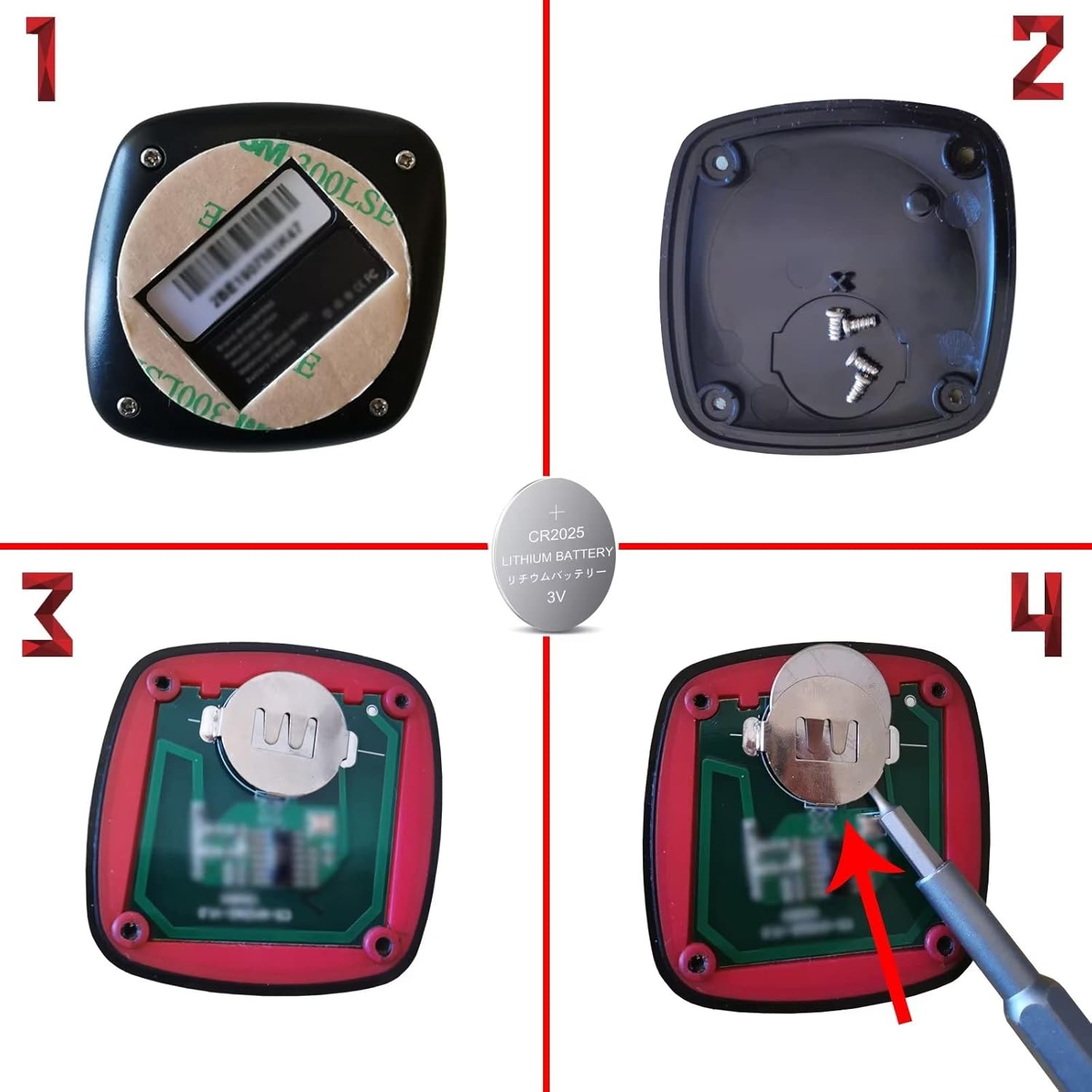
Figure 5: Call button battery replacement steps.
4.2 Cleaning
- Wipe the main receiver display and call buttons with a soft, dry cloth.
- For stubborn dirt, a slightly damp cloth can be used, followed by immediate drying.
- Do not use abrasive cleaners or solvents, as they may damage the product's surface.
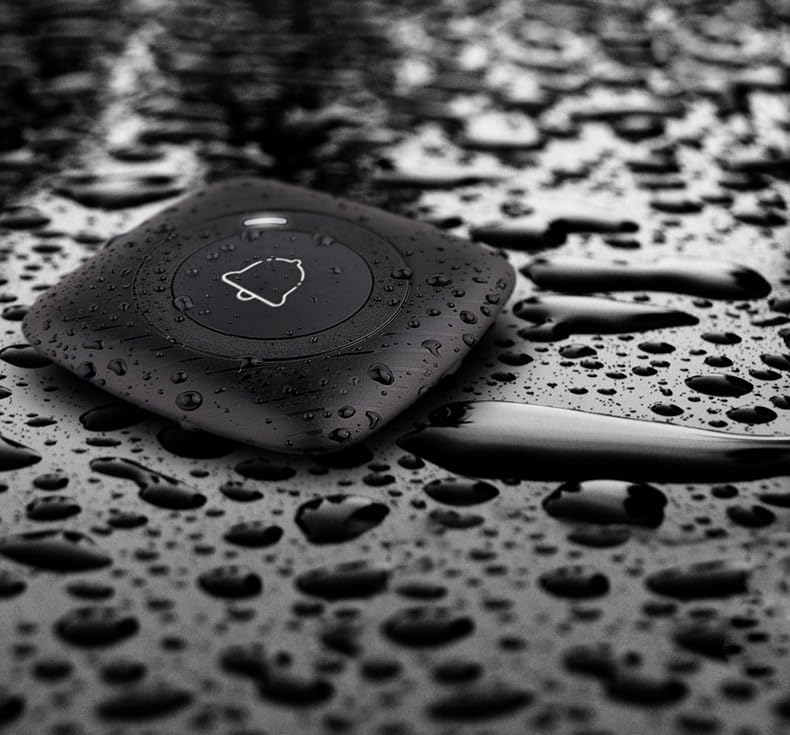
Figure 6: The call button is designed with IPX67 waterproof rating.
5. Troubleshooting
| Problem | Possible Cause | Solution |
|---|---|---|
| Call button not responding / Indicator light dim. | Low or dead battery in the call button. | Replace the CR2025 battery in the call button (refer to Section 4.1). |
| Receiver not displaying calls. | Receiver not powered on or disconnected. Out of range. | Ensure the receiver is properly connected to power. Check if the call button is within the effective range of the receiver or repeater. Reduce obstacles between devices. |
| Signal range is shorter than expected. | Obstacles (walls, metal structures) interfering with signal. No signal amplifier. | Relocate the receiver or call buttons to minimize obstructions. Consider adding a FLYDOG signal amplifier to extend the range. |
| Display shows incorrect numbers or behavior. | Interference or temporary glitch. | Restart the main receiver by unplugging and re-plugging the power adapter. If issues persist, contact customer support. |
| No sound from receiver. | Volume set to 0 (mute). | Adjust the volume level on the receiver display (refer to Section 3.4). |
6. Specifications
| Feature | Detail |
|---|---|
| Brand | BYHUBYENG |
| Model Number (Receiver) | 200D |
| Model Number (Call Button) | CS-M1(BB3) |
| Max Range | 400 meters (outdoor), 50-100 meters (indoor, varies by environment) |
| Sensor Technology | Touch Sensor |
| UPC | 755419629617 |
| Product Dimensions (Receiver) | 22 x 11 x 33 cm |
| Item Weight | 1.55 Kilograms |
| Included Components | Main Unit, Sub-units (Call Buttons), Wrist Pagers, Signal Amplifier |
| Battery Description (Call Button) | Alkaline (CR2025) |
| Mounting Type | Tabletop Mount, Wall Mount |
| Call Button Waterproof Rating | IPX67 |
7. Warranty and Support
The FLYDOG Wireless Call Bell System comes with a 1-year warranty against natural defects. This warranty covers manufacturing defects and malfunctions that occur under normal use conditions.
In the unlikely event of a natural defect, please contact customer support with your Amazon order number. Our support team will assist you with troubleshooting or arrange for a replacement if necessary.
For further assistance or inquiries, please refer to the contact information provided with your purchase or visit the official BYHUBYENG store on Amazon: BYHUBYENG Amazon Store.