
Zstar HZB-20BN
Zstar Countertop Nugget Ice Maker User Manual
Model: HZB-20BN
Introduction
Thank you for purchasing the Zstar Countertop Nugget Ice Maker. This manual provides important information regarding the safe operation, installation, maintenance, and troubleshooting of your new ice maker. Please read this manual thoroughly before use and retain it for future reference.
The Zstar HZB-20BN is designed to produce soft, chewable nugget ice, perfect for a variety of beverages. Its compact design makes it suitable for most kitchen countertops.
Safety Instructions
Always follow basic safety precautions when using electrical appliances to reduce the risk of fire, electric shock, and injury to persons.
- Ensure the power supply matches the voltage specified on the appliance.
- Do not immerse the appliance, cord, or plug in water or other liquids.
- Unplug from the outlet when not in use and before cleaning.
- Do not operate any appliance with a damaged cord or plug.
- Keep hands and utensils out of the ice basket during operation.
- This appliance is for household use only.
- Ensure proper ventilation around the unit.
Product Overview
Familiarize yourself with the components of your Zstar Nugget Ice Maker.
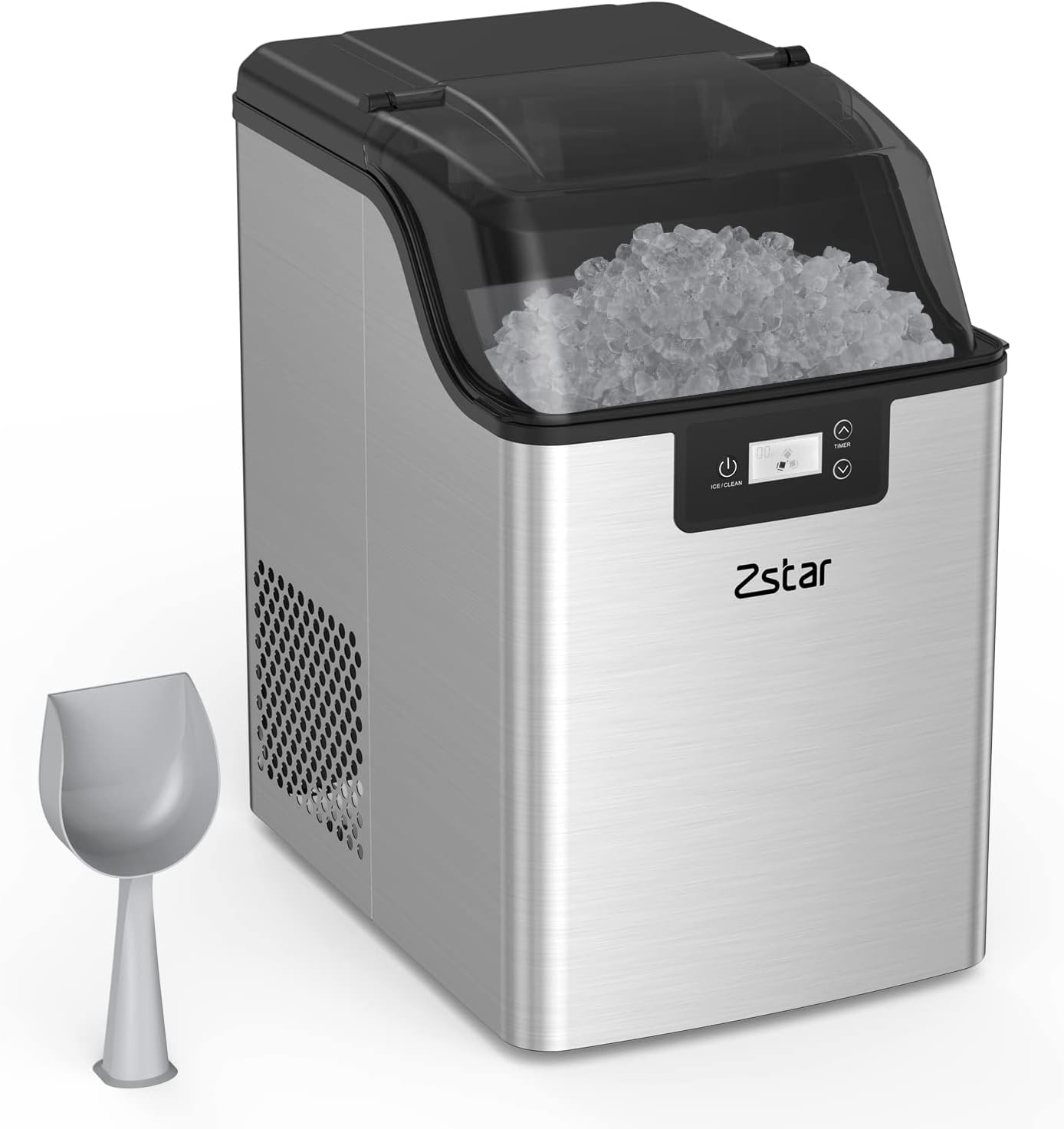
Figure 1: Zstar Countertop Nugget Ice Maker with included ice scoop and basket. The unit features a stainless steel exterior and a clear lid to view ice production.

Figure 2: Portable size of the ice maker, showing dimensions of 9.5 inches (depth), 13.2 inches (width), and 15.4 inches (height). It has a 3.3 lbs ice basket capacity and 2.8L water reservoir.
Setup
- Unpacking: Carefully remove the ice maker from its packaging. Retain packaging materials for future transport if needed.
- Placement: Place the ice maker on a flat, stable surface away from direct sunlight and heat sources. Ensure there is at least 6 inches of clearance around the unit for proper ventilation.
- Initial Cleaning: Before first use, clean the interior of the ice maker. Refer to the "Maintenance and Cleaning" section for detailed instructions.
- Water Filling: Open the lid and fill the water reservoir with potable water up to the MAX fill line. Do not overfill.
- Power Connection: Plug the power cord into a grounded electrical outlet.
Operating Instructions
First Use
For the first cycle, it is recommended to discard the first batch of ice to ensure cleanliness.
Making Ice
- Ensure the water reservoir is filled.
- Press the POWER button to start the ice making process. The indicator light will illuminate.
- The ice maker will begin producing nugget ice within 10-15 minutes.
- The "ICE FULL" indicator will light up when the ice basket is full. The machine will automatically pause.
- The "ADD WATER" indicator will light up when the water reservoir is low. Refill water to resume ice production.

Figure 3: Control panel displaying the power button, timer controls, and indicators for "Water Shortage" and "Ice Full".
Using the Timer Function
The 24-hour timer allows you to schedule ice making.
- Press the TIMER button.
- Use the UP and DOWN arrows to set the desired delay time (in hours) before the ice maker starts or stops.
- Confirm the setting by pressing the TIMER button again or waiting a few seconds.
Maintenance and Cleaning
Regular cleaning ensures optimal performance and extends the lifespan of your ice maker.
Self-Cleaning Function
The Zstar HZB-20BN features an automatic self-cleaning function.
- Ensure the water reservoir is filled with clean water.
- Press and hold the ICE/CLEAN button for 3 seconds to activate the self-cleaning cycle.
- The cycle will run for approximately 20 minutes.
- Once complete, drain the water from the unit using the drain plug located at the bottom.

Figure 4: Illustration of the self-cleaning process, showing water circulation and the location of the drain hole at the bottom of the unit for easy water discharge.
Manual Cleaning
- Unplug the ice maker before cleaning.
- Remove the ice basket.
- Clean the interior with a soft cloth and a mild detergent solution. Rinse thoroughly.
- Wipe the exterior with a damp cloth. Do not use abrasive cleaners.
- Ensure all parts are dry before reassembling and operating.
Troubleshooting
Refer to this section for common issues and their solutions.
| Problem | Possible Cause | Solution |
|---|---|---|
| Ice maker not producing ice. | No water in reservoir; Power not connected; Ambient temperature too high. | Fill water reservoir; Check power plug; Move unit to a cooler location. |
| "ADD WATER" indicator is on. | Water reservoir is empty or low. | Refill the water reservoir with potable water. |
| "ICE FULL" indicator is on. | Ice basket is full. | Remove ice from the basket. |
| Ice cubes are too small or clumpy. | Water temperature too high; Air vent blocked. | Use colder water; Ensure proper ventilation around the unit. |
If the problem persists after trying these solutions, please contact Zstar customer support.
Specifications
| Brand | Zstar |
| Model Name | HZB-20BN (IB01) |
| Product Dimensions (D x W x H) | 9.5" x 13.2" x 15.4" |
| Daily Ice Output | Up to 44 lbs |
| Ice Basket Capacity | 3.3 lbs |
| Voltage | 115 Volts |
| Refrigerant | R600a |
| Material | Stainless Steel |
| Certifications | ETL, FDA, SGS |
| Included Components | Ice Basket, Standing Ice Scoop, Manual |
Warranty and Support
Zstar products are manufactured to high quality standards. For warranty information and customer support, please refer to the warranty card included with your product or visit the official Zstar website.
For technical assistance or service inquiries, please contact Zstar customer support at support@zstar.com or visit their support page at Zstar Store on Amazon.
Related documentsHZB-20BN


Ask a question about this manual
Ask about setup, troubleshooting, compatibility, parts, safety, or missing instructions. Manuals+ will review the question and use this page’s manual context to help answer it.