Product Overview
This manual provides detailed instructions for the assembly, operation, and maintenance of your COSTWAY Dual Motor Electric Stand Up Desk. Designed for a healthy sit-to-stand work style, this desk features a robust dual motor system, a spacious one-piece desktop, and a smart memory controller for convenient height adjustments.

Image: The COSTWAY Dual Motor Electric Stand Up Desk in a typical office setup, featuring a monitor, laptop, and headphones hanging from the side hook.
Safety Instructions
- Ensure all components are present and undamaged before assembly.
- Keep children and pets away from the desk during operation to prevent injury.
- Do not overload the desk beyond its maximum weight capacity of 176 lbs.
- Ensure there are no obstacles in the desk's path during height adjustment to prevent activation of the anti-collision feature or damage.
- Only use the provided power adapter and components.
- Do not disassemble or modify the motor or control system.
- Unplug the desk from the power outlet before cleaning or maintenance.
Setup and Assembly
The COSTWAY Electric Standing Desk is designed for straightforward assembly with pre-drilled holes and detailed instructions included in the package. It arrives in two separate boxes to ensure safe transportation of the desktop and frame.
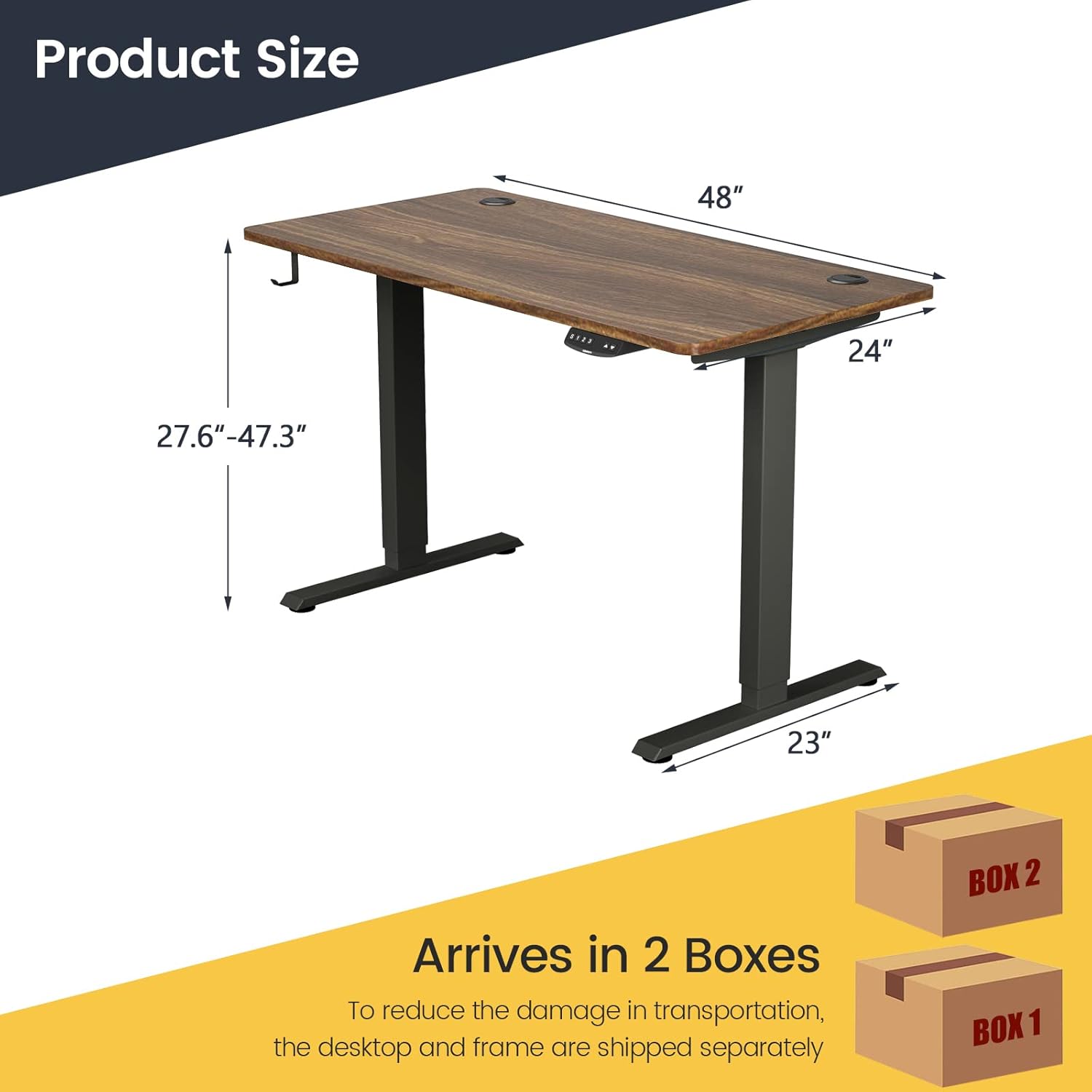
Image: Diagram illustrating the dimensions of the 48''x24'' desk and indicating that it arrives in two separate boxes (Box 1 for frame, Box 2 for desktop).
Before You Begin:
- Unpack all components and verify against the parts list in the included instruction manual.
- Ensure you have adequate space for assembly.
- Gather necessary tools (typically a screwdriver and Allen wrench, often included).
Assembly Steps:
- Attach the Lifting Columns: Secure the lifting columns to the desktop using the provided screws and pre-drilled holes.
- Install the Feet: Attach the T-shaped steel feet to the bottom of the lifting columns. Ensure they are firmly tightened for stability.
- Connect the Control Box and Motors: Follow the wiring diagram in the instruction manual to connect the control box to both motors and the control panel.
- Mount the Control Panel: Secure the smart control panel to the underside of the desktop in the designated area.
- Install Accessories: Attach the cable management tray and headphone hook as desired.
- Power On and Test: Plug the desk into a power outlet and perform an initial test of the up/down movement.
For detailed, step-by-step visual instructions, please refer to the assembly manual included in your package.
Operating Instructions
The COSTWAY Electric Stand Up Desk features a smart controller for easy and precise height adjustments.

Image: Close-up of the smart height adjustment controller, highlighting its features: Up/Down Movement, 3 Memory Presets, LED Display, Movement Limit & Self-Stop Positions, and Displayed Unit Change (cm/in).
Controller Functions:
- Up/Down Buttons (▲ / ▼): Press and hold to move the desk up or down. Release to stop at the desired height.
- Memory Presets (1, 2, 3):
- Adjust the desk to your desired height.
- Press the "M" or "S" button (depending on controller model) followed by the desired number (1, 2, or 3) to save the current height.
- To recall a saved height, simply press the corresponding number button (1, 2, or 3). The desk will automatically move to that position.
- LED Display: Shows the current height of the desk in inches or centimeters.
- Unit Change (cm/in): Press the "cm/in" button to switch between centimeter and inch display.
- Anti-Collision Technology: The desk is equipped with an anti-collision sensor. If an obstacle is detected during movement, the desk will automatically stop and slightly reverse to prevent damage.
Initial Setup / Reset:
If the desk does not operate correctly or displays an error code, a reset may be required. Refer to the specific instructions in your included manual for the reset procedure, which typically involves holding down certain buttons until the desk moves to its lowest position and resets.
Maintenance
Regular maintenance ensures the longevity and optimal performance of your electric standing desk.
- Cleaning: Wipe the desktop and frame with a damp cloth. Avoid abrasive cleaners or harsh chemicals that could damage the finish.
- Cable Management: Periodically check and organize cables using the integrated cable management tray and holes to prevent tangling and damage.
- Component Check: Ensure all screws and connections remain tight. Re-tighten if necessary.
- Motor Care: The dual motor system is designed for maintenance-free operation. Do not attempt to lubricate or open the motor housing.
Troubleshooting
If you encounter issues with your COSTWAY Electric Stand Up Desk, please refer to the following common troubleshooting steps:
| Problem | Possible Cause | Solution |
|---|---|---|
| Desk does not move. |
|
|
| Desk stops during movement. |
|
|
| Uneven movement or strange noise. |
|
|
If the problem persists after attempting these solutions, please contact COSTWAY customer support for further assistance.
Specifications
| Feature | Detail |
|---|---|
| Model Number | HW67380US+JV10098-CYWH |
| Overall Dimensions (M Size) | 48" x 30" x 27.6"-47.3" (L x W x H) |
| Desktop Thickness | 1" |
| Height Adjustment Range | 27.6" - 47.3" |
| Lift Speed | 1"/s |
| Noise Level | <50dB |
| Weight Capacity | 176 lbs |
| Material | Steel, Engineered Wood, PVC |
| Color (Desktop + Frame) | Walnut + Black |
| Motor Type | Dual Motor |
| Power Adapter Model | (UL) E310283SW-3712 |
| Power Adapter Input | AC100-240V, 50/60Hz, 2.0A |
| Power Adapter Output | DC29.0V, 2.0A, 58.0W |
| Included Components | 1 X Electric Standing Desk, 1 X Instruction Manual |
Note: Specifications are subject to change without prior notice.
Warranty and Support
Specific warranty information for the COSTWAY Dual Motor Electric Stand Up Desk is not provided in the product details. Please refer to the warranty card included with your product or visit the official COSTWAY website for detailed warranty terms and conditions.
For technical support, parts replacement, or any inquiries regarding your product, please contact COSTWAY customer service through their official channels. Contact information can typically be found on the product packaging, the included instruction manual, or the COSTWAY official website.
Official Website: www.costway.com


