
ZIQING B0B6395FWW
ZIQING Blood Pressure Monitor User Manual
Model: B0B6395FWW
1. Introduction
This manual provides comprehensive instructions for the safe and effective operation of your ZIQING Blood Pressure Monitor. This device is designed for accurate measurement of blood pressure and pulse rate on the upper arm, suitable for home use. Each unit is calibrated to ensure measurement accuracy within 3mmHg when used correctly.

Image: The ZIQING Blood Pressure Monitor, showing the main unit, the arm cuff, and the USB-C charging cable.
2. Safety Information
Please read all safety warnings and instructions carefully before using this product. Keep this manual for future reference.
- Keep the device and its components away from children.
- Do not use this device for purposes other than measuring blood pressure and pulse rate.
- Consult a healthcare professional for interpretation of blood pressure readings. Self-diagnosis and treatment based on measurements can be dangerous.
- Do not use the device if the cuff is damaged or if the air tube is kinked.
- Avoid strong electromagnetic fields (e.g., microwave ovens, mobile phones) near the device during operation.
- Statements regarding dietary supplements have not been evaluated by the FDA and are not intended to diagnose, treat, cure, or prevent any disease or health condition.
3. Package Contents
Verify that all items are present in the package:
- 1 x ZIQING Blood Pressure Monitor Unit
- 1 x Upper Arm Cuff (suitable for 8.7''-17.3'' arm circumference)
- 1 x User Manual
- 1 x Type-C USB Cable (for power, batteries are not included)
4. Product Features
- Clinically Accurate: Calibrated for high accuracy with an error margin within 3mmHg when used correctly.
- One-Button Operation: Fully automatic measurement with a single press of the "Start/Stop" button.
- 2 Users Mode: Stores up to 99 memories for each of two user profiles, allowing for convenient tracking of blood pressure trends.
- Large LCD Screen: Provides clear and easy-to-read display of blood pressure and heart rate measurements.
- Voice Broadcast: Offers audible readings for users with impaired vision. This function can be turned off as per the user's preference.
- Adjustable Large Cuff: Designed to fit standard and large adult arms with a circumference ranging from 22 cm (8.7 inches) to 44 cm (17.32 inches).
- Portable Power Options: Can be powered via the included Type-C USB cable (connecting to a laptop, power bank, or USB interface) or by 4 x AAA batteries (not included). Note: The device is not rechargeable.

Image: Visual representation of key features including clinical accuracy, one-button operation, large LCD, adjustable cuff, 2 user memories, voice broadcast, fast reading, irregular heartbeat detection, and auto power off.

Image: A man demonstrating the use of the blood pressure monitor with its large adjustable cuff on his upper arm.

Image: The blood pressure monitor displaying readings for two different user profiles, highlighting the 2-user memory function.
5. Setup
5.1 Powering the Device
The ZIQING Blood Pressure Monitor can be powered in two ways:
- USB-C Cable: Connect the provided Type-C USB cable to the monitor and to any compatible USB power source (e.g., laptop, power bank, USB wall adapter).
- AAA Batteries: Open the battery compartment on the back of the device and insert four (4) AAA batteries. Ensure correct polarity (+/-). Batteries are not included.
Note: This device is not rechargeable. If using batteries, they will need to be replaced when depleted. Settings like date and time may reset if the device is unplugged and batteries are not present.
5.2 Connecting the Arm Cuff
Locate the air tube on the arm cuff. Insert the connector of the air tube firmly into the air jack on the side of the main monitor unit. Ensure a secure connection to prevent air leakage during measurement.
6. Operating Instructions
6.1 Proper Cuff Placement
- Wrap the arm cuff around your left upper arm. The cuff tube should be located inside the arm and in line with your middle finger.
- Position the bottom edge of the cuff approximately 2-3 cm (0.8-1.2 inches) above the inner side of your elbow joint.
- Ensure the cuff is snug but not overly tight. You should be able to insert two fingers comfortably between the cuff and your arm.

Image: A four-panel illustration demonstrating the correct steps for placing the cuff and positioning the arm for blood pressure measurement.
6.2 Taking a Measurement
- Sit upright with your back supported. Place your forearms flat on a table with palms up, ensuring your arm is at heart level.
- Remain still and avoid talking during the measurement process.
- Press the Start/Stop button (the green power button). The cuff will automatically inflate, and the monitor will begin measuring your blood pressure and pulse rate.
- The voice broadcast will guide you through the process and announce the results.
- Once the measurement is complete, the cuff will deflate, and your readings (Systolic, Diastolic, and Pulse) will be displayed on the large LCD screen.

Image: A hand pressing the green "Start/Stop" button on the blood pressure monitor, illustrating its simple one-button operation.
6.3 Understanding Your Readings (WHO Classification)
The monitor features a WHO (World Health Organization) classification indicator on the left side of the screen, using a traffic light system to help you understand your blood pressure level at a glance:
- Green: Optimal/Normal blood pressure.
- Yellow: High-Normal or Slight High blood pressure.
- Red: Too High or Serious blood pressure.
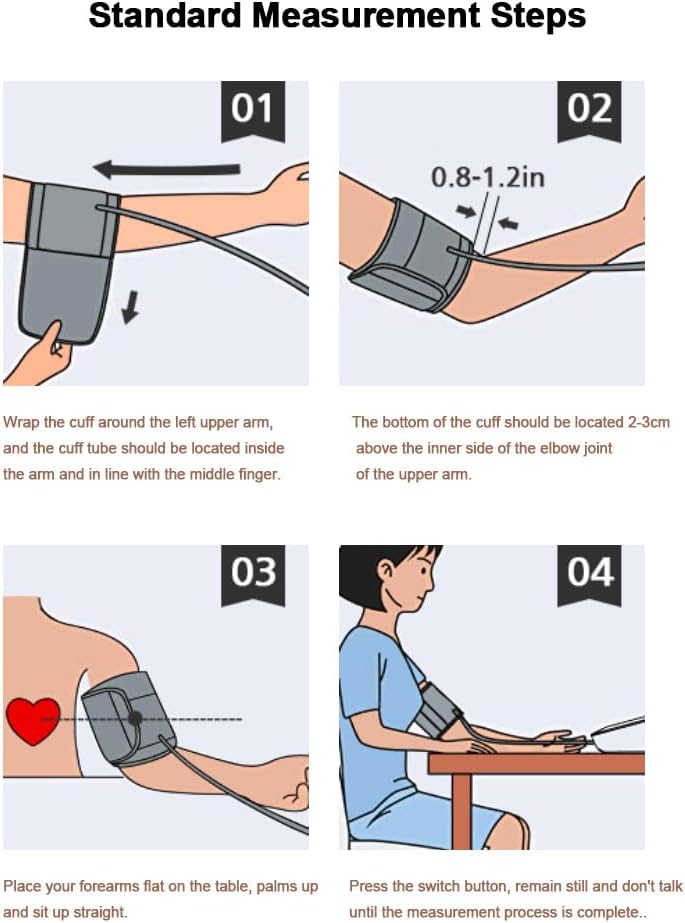
Image: A diagram illustrating the WHO blood pressure classification with corresponding color zones (green, yellow, red) and numerical ranges.
6.4 Switching Users and Viewing Memory
- Switch Users: Press the S button to toggle between User 1 and User 2. Each user profile can store up to 99 measurement records.
- View History: Press the M button to access the memory records for the currently selected user. Repeated presses will cycle through past measurements.
6.5 Adjusting Settings (Voice & Units)
Refer to the detailed user manual (included in the package) for specific instructions on how to:
- Turn off or adjust the volume of the voice broadcast.
- Change the unit of measurement between millimeters of mercury (mmHg) and kilopascals (kPa).
7. Maintenance
- Clean the monitor unit and cuff with a soft, dry cloth. Do not use abrasive cleaners or immerse the device in water.
- Store the device in a cool, dry place, away from direct sunlight and extreme temperatures.
- If not using the device for an extended period, remove the batteries to prevent leakage.
- Do not attempt to disassemble or repair the device yourself. Contact customer support for assistance.
8. Troubleshooting
| Problem | Possible Cause | Solution |
|---|---|---|
| Device does not power on. | No power source or depleted batteries. | Connect USB-C cable to a power source or insert new AAA batteries. |
| Inaccurate readings. | Improper cuff placement, movement during measurement, or incorrect posture. | Ensure cuff is correctly placed, remain still, and maintain proper posture. Refer to Section 6.1. |
| Voice broadcast is too loud/soft or off. | Voice settings need adjustment. | Refer to the full user manual for instructions on adjusting voice settings. |
| Settings (date/time/memory) reset. | No batteries installed when unplugged from USB power. | Install 4 AAA batteries for continuous memory and settings retention when not connected via USB. |
| Cuff does not inflate or inflates slowly. | Air tube not securely connected or cuff leakage. | Check that the air tube is firmly inserted into the monitor unit. Inspect cuff for any damage. |
9. Specifications
| Brand | ZIQING |
| Model | B0B6395FWW |
| Product Dimensions | 5.59 x 4.44 x 2.75 inches |
| Item Weight | 8.85 ounces (251 Grams) |
| Included Components | BP Machine, Arm Cuff, USB Cable, User Manual |
| Power Source | Corded Electric, Battery Powered (4 x AAA batteries, not included) |
| Use for | Arm |
| Display Type | LCD |
| Cuff Size | Medium/Large Cuff (8.7 - 17.3 inches / 22 - 44 cm) |
| Age Range (Description) | Adult |
| Material Feature | BP machine: ABS; BP cuff: Environmentally friendly materials |
10. Warranty and Support
ZIQING offers a worry-free 12-month warranty for this blood pressure monitor. Our professional team is available 24/7 to assist with any questions or issues you may encounter. Please contact us directly for support.
For further assistance, please visit the official ZIQING store: ZIQING Store on Amazon
Related documentsB0B6395FWW


Ask a question about this manual
Ask about setup, troubleshooting, compatibility, parts, safety, or missing instructions. Manuals+ will review the question and use this page’s manual context to help answer it.